
Django---简单from表单提交
表单提交可能会报错,注意一行代码就可以解决:
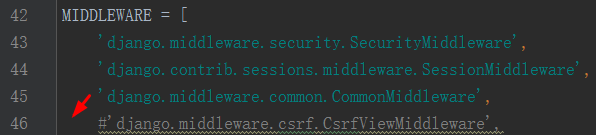
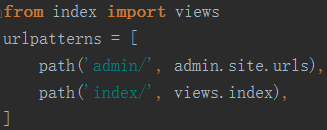
简单配置路由:
简单表单提交:
<form action="/index/" method="post">

    <p><input type="text" name="username" placeholder="请输入用户名"></p>

    <p><input type="text" name="password" placeholder="请输入密码"></p>

    <p><input type="submit" value="提交"></p>

</form>
可见上面的提交还是提交到当前方法:可以通过判断提交方式来判断是提交表单还是请求页面:
def index(request):

    #return HttpResponse("hello word")

    if request.method == 'POST':

        u = request.POST['username']

        p = request.POST['password']

        print(u,p)

    return render(request,'index.html')
这种接受如果,接受不到就会报错,所以都是这样接受的:
def index(request):

    #return HttpResponse("hello word")

    if request.method == 'POST':

        u = request.POST.get('username',None)

        p = request.POST.get('password',None)

        print(u,p)

        if u =='' and p == '':

            from django.shortcuts import redirect

            return redirect("http://www.baidu.com")

    return render(request,'index.html')
示例demo:
from django.shortcuts import render

from django.shortcuts import HttpResponse

#coding=utf-8

def index(request):

    #return HttpResponse("hello word")

    error_msg = ''

    if request.method == 'POST':

        u = request.POST.get('username',None)

        p = request.POST.get('password',None)

        print(u,p)

        if u =='' and p == '':

            from django.shortcuts import redirect

            return redirect("/index/")

        else:

            error_msg = "failse to login"

    return render(request,'index.html',{'error_msg':error_msg})
模板:
<form action="/index/" method="post">

    <p><input type="text" name="username" placeholder="请输入用户名"></p>

    <p><input type="text" name="password" placeholder="请输入密码"></p>

    <p><input type="submit" value="提交">{{ error_msg }}</p>

</form>
Django---简单from表单提交的更多相关文章
- Maven web项目(简单的表单提交) 搭建(eclipse)
我们将会搭建一个,基于Maven管理的,具有简单的表单提交功能的web项目,使用DAO--service--WEB三层结构,服务器使用Tomcat 1 项目基本结构的搭建 左上角File---> ...
- jQuery最简单的表单提交方式
第一步:绑定事件 常用的与ajax相关的事件参考如下: 1.$(selector).click(function) 2.$(selector).change(function) 3.$(selecto ...
- Django之form表单提交并验证
1.提交的时候会报错 2. 需要在setting里面注释掉一句话,关闭跨站请求检查. 3. 注释掉以后,理论上就不报错了.可我还是卡壳了. 4. 通过在网上找方法,修复错误. 原因:表单action字 ...
- Django 使用form表单提交数据报错: Forbidden (403)
Issue: 使用from表单submit之后报错入下: Action: 把django工程文件的setting.py中的'django.middleware.csrf.CsrfViewMiddlew ...
- Konckout开发实例:简单的表单提交页面
<!doctype html> <html > <head> <meta http-equiv="Content-Type" conten ...
- PHP——简单的表单提交
<body> <form name="" method="post" action="CHULI.php"> < ...
- springmvc 表单提交
Spring MVC自带的表单标签比较简单,很多时候需要借助EL和JSTL来完成. 下面是一个比较简单的表单提交页面功能: 1.User model package com.my.controller ...
- [Spring MVC] - 表单提交
Spring MVC自带的表单标签比较简单,很多时候需要借助EL和JSTL来完成. 下面是一个比较简单的表单提交页面功能: 1.User model package com.my.controller ...
- (转)ASP.NET MVC 第五个预览版和表单提交场景
转自:http://ourlife.blog.51cto.com/708821/296171 上个星期四,ASP.NET MVC开发团队发布了ASP.NET MVC框架的“第五个预览版”.你可以在这里 ...
- 代码段:js表单提交检测
市面上当然有很多成型的框架,比如jquery的validation插件各种吧.现在工作地,由于前端童鞋也没用这些个插件.根据业务的要求,自己就在代码里写了个简单的表单提交的检测代码(php的也写了一个 ...
随机推荐
- ubuntu 4.10~5.10 :古老的ubuntu上安装oracle10g的情况
64位的: 不用想了,安装不上,因为ubuntu库里没有提供编译环境:安装不上gcc-multilib库.也没有libc6-dev-i386库! 自己这点水平,真搞不定! 32位的: 很顺利.很顺利! ...
- ubuntu 的chmod 和 chown
1.chown改文件或目录的所有者和群组权限 格式 chown [OPTION]... [OWNER][:[GROUP]] FILE... 参数: -R 递归操作当前目录下的所有目录和文件: -h 更 ...
- 怎么解决BarTender因为未检测到IIS安装失败的问题
个别小伙伴在安装BarTender条码标签设计软件的时候,遇到“未检测到IIS,无法安装BarTender Web Print Server配套程序”导致安装失败的问题,本文小编给大家分享解决BarT ...
- Nginx 向客户端输出真实的后端IP地址
因为涉及到内外网的改造,所以狠多东西现在需要依赖于openresty来做总控实现.然后就碰见了一个比较难办的问题,即在upstream时候,如何获取实际处理请求的server地址.假设有如下upstr ...
- jsp新建项目
1.在原有项目的基础上新建一个文件夹 在文件夹内新建一个jsp文件 取名 JSP容器处理JSP文件需要以下三个阶段:翻译——编译——执行 JSP的页面元素包括 静态内容-HTML静态文本 指令-以“& ...
- linux 安装lnmp
wget -c http://soft.vpser.net/lnmp/lnmp1.4.tar.gz && tar zxf lnmp1.4.tar.gz && cd ln ...
- List中的Contains方法内部其实是用对象的equals方法做比较,所以如果比较两个类就重写类的equals方法即可;而Set是调用equals和hashCode
public class Person { private String name; private int age; public String getName() { return name; } ...
- MySQL实现树状所有子节点查询的方法
本文实例讲述了MySQL实现树状所有子节点查询的方法.分享给大家供大家参考,具体如下: 在Oracle 中我们知道有一个 Hierarchical Queries 通过CONNECT BY 我们可以方 ...
- Waf-Bypass-Learning
WAF Bypass 综合篇: WAF攻防研究之四个层次Bypass WAF Bypass WAF Cookbook - MayIKissYou My Waf Bypass Series Articl ...
- Oracle的闪回技术--闪回已删除的表
注意闪回技术只能保护非系统表决空间中的表,而且表空间必须本地管理, 外键将不可以被恢复, 索引和约束的名字将会被命名为以BIN开头,由系统生成的名字 查看是否开启闪回: SQL> show pa ...