
C# 压缩文件 ICSharpCode.SharpZipLib.dll
效果:
代码只能压缩文件夹里面的文件,不能压缩文件夹。
压缩前:
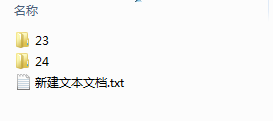
压缩后:

代码:
需要引用ICSharpCode.SharpZipLib.dll
public ActionResult Index()

{

    //路径

    string path = "E:/test/xls_Z";

    //调用

    CreateZip(path ,path + ".zip");

}

/// <summary>

/// 压缩文件

/// </summary>

/// <param name="sourceFilePath">文件路径</param>

/// <param name="destinationZipFilePath">压缩后的地址</param>

public static void CreateZip(string sourceFilePath, string destinationZipFilePath)

{

    if (sourceFilePath[sourceFilePath.Length - ] != System.IO.Path.DirectorySeparatorChar)

        sourceFilePath += System.IO.Path.DirectorySeparatorChar;

    ZipOutputStream zipStream = new ZipOutputStream(System.IO.File.Create(destinationZipFilePath));

    zipStream.SetLevel();  // 压缩级别 0-9

    CreateZipFiles(sourceFilePath, zipStream);

    zipStream.Finish();

    zipStream.Close();

}

/// <summary>

/// 递归压缩文件

/// </summary>

/// <param name="sourceFilePath">待压缩的文件或文件夹路径</param>

/// <param name="zipStream">打包结果的zip文件路径(类似 D:\WorkSpace\a.zip),全路径包括文件名和.zip扩展名

/// <param name="staticFile"></param>

private static void CreateZipFiles(string sourceFilePath, ZipOutputStream zipStream)

{

    Crc32 crc = new Crc32();

    string[] filesArray = Directory.GetFileSystemEntries(sourceFilePath);

    foreach (string file in filesArray)

    {

     //如果当前是文件夹,递归

        if (Directory.Exists(file))

        {

            CreateZipFiles(file, zipStream);

        }

     //如果是文件,开始压缩

        else

        {

            FileStream fileStream = System.IO.File.OpenRead(file);

            byte[] buffer = new byte[fileStream.Length];

            fileStream.Read(buffer, , buffer.Length);

            string tempFile = file.Substring(sourceFilePath.LastIndexOf("\\") + );

            ZipEntry entry = new ZipEntry(tempFile);

            entry.DateTime = DateTime.Now;

            entry.Size = fileStream.Length;

            fileStream.Close();

            crc.Reset();

            crc.Update(buffer);

            entry.Crc = crc.Value;

            zipStream.PutNextEntry(entry);

            zipStream.Write(buffer, , buffer.Length);

        }

    }

}
C# 压缩文件 ICSharpCode.SharpZipLib.dll的更多相关文章
- C#文件或文件夹压缩和解压方法(通过ICSharpCode.SharpZipLib.dll)
我在网上收集一下文件的压缩和解压的方法,是通过ICSharpCode.SharpZipLib.dll 来实现的 一.介绍的目录 第一步:下载压缩和解压的 ICSharpCode.SharpZipLib ...
- C# ICSharpCode.SharpZipLib.dll文件压缩和解压功能类整理,上传文件或下载文件很常用
工作中我们很多时候需要进行对文件进行压缩,比较通用的压缩的dll就是ICSharpCode.SharpZipLib.dll,废话不多了,网上也有很多的资料,我将其最常用的两个函数整理了一下,提供了一个 ...
- C#使用ICSharpCode.SharpZipLib.dll压缩多个文件
首先通过NuGet管理安装ICSharpCode.SharpZipLib.dll 以下是压缩的通用方法: using System; using System.IO; using System.Web ...
- C# 下利用ICSharpCode.SharpZipLib.dll实现文件/目录压缩、解压缩
ICSharpCode.SharpZipLib.dll下载地址 1.压缩某个指定文件夹下日志,将日志压缩到CompressionDirectory文件夹中,并清除原来未压缩日志. #region 压缩 ...
- ICSharpCode.SharpZipLib.dll 压缩多文件
网站:http://icsharpcode.github.io/SharpZipLib/ 引用:ICSharpCode.SharpZipLib.dll private string CompassZi ...
- C# ZipHelper C#公共类 -- ICSharpCode.SharpZipLib.dll实现压缩和解压
关于本文档的说明 本文档基于ICSharpCode.SharpZipLib.dll的封装,常用的解压和压缩方法都已经涵盖在内,都是经过项目实战积累下来的 1.基本介绍 由于项目中需要用到各种压缩将文件 ...
- zip (ICSharpCode.SharpZipLib.dll文件需要下载)
ZipClass zc=new ZipClass (); zc.ZipDir(@"E:\1\新建文件夹", @"E:\1\新建文件夹.zip", 1);//压缩 ...
- ICSharpCode.SharpZipLib.dll,MyZip.dll,Ionic.Zip.dll 使用
MyZip.dll : 有BUG,会把子目录的文件解压到根目录.. ICSharpCode.SharpZipLib.dll: 把ICSharpCode.SharpZipLib.dll复制一份,重命名为 ...
- ICSharpCode.SharpZipLib.dll 移植WP
由于众所周知的原因. ICSharpCode.SharpZipLib.dll在Unity移植WP的时候出现诸多API不兼容,解决方案是在在Github上面找ICSharpCode.SharpZipLi ...
随机推荐
- categorys
//spark-shell --driver-class-path /home/hadoop/test/mysqljdbc.jarimport java.sql.DriverManager// --q ...
- HTML5 touche vents drag to move & AF actionsheet by longTap
$('img').on("touchstart",function(E){ //E.preventDefault();E.stopPropagation(); var el=thi ...
- Java编程思想学习笔记——枚举类型
前言 关键字enum可以将一组具名的值有限集合创建一种为新的类型,而这些具名的值可以作为常规的程序组件使用. 正文 基本enum特性 调用enum的values()方法可以遍历enum实例,value ...
- 将Unity导出的Eclipse工程转换为AndroidStudio工程
步骤:1)将unity项目导出到文件夹: 转换到安卓平台,这里只勾选google android project.然后导出到自己新建的文件夹. 2)打开导出的文件夹,看到如下内容.这是unity5.x ...
- JS貪食蛇網頁代碼
<meta http-equiv="Content-Type" content="text/html; charset=utf-8"> <bo ...
- Apache+php5
.下载回来的是解压文件,解压好放到要安装的位置.(我这里以D:\Acpache24为例) .打开Apache24\conf下httpd.conf 文件,用记事本打开即可. ()第37行ServerRo ...
- linux如何通过脚本来修改用户的密码?脚本自动化修改用户密码?
需求描述: linux环境中在创建用户的时候,涉及到修改用户的密码,一般是通过passwd命令进行修改,需要多次的确认,这里考虑通过一条命令直接对密码进行修改 不需要进行交互的方式.在此记录. 操作过 ...
- 使用d3.v3插件绘制出svg图
众所周知,这个插件使用的svg技术,而IE8(包括IE8)之前的浏览器是不支持svg的 接下来看代码吧 从后台获取到带id和父id的目录数据[json格式] var module = requestU ...
- C#(少用的)
挖一挖C#中那些我们不常用的东西之系列(1)——ToDictionary,ToLookup 挖一挖C#中那些我们不常用的东西之系列(2)——IsXXX 系列方法 挖一挖C#中那些我们不常用的东西之系列 ...
- 接口测试之JMeter初探
1.JMeter安装配置 )登录 http://jmeter.apache.org/download_jmeter.cgi ,下载与自己的平台相对应文件: )安装JDK(.6以上),配置环境变量JAV ...