
springMVC访问 WEB-INF 下的 jsp 和 html
配置freemarker,记得加上jar包
<?xml version="1.0" encoding="UTF-8"?>

<beans xmlns="http://www.springframework.org/schema/beans"

	   xmlns:xsi="http://www.w3.org/2001/XMLSchema-instance"

	   xmlns:tx="http://www.springframework.org/schema/tx"

	   xmlns:aop="http://www.springframework.org/schema/aop"

	   xmlns:p="http://www.springframework.org/schema/p"

	   xmlns:mvc="http://www.springframework.org/schema/mvc"

	   xmlns:context="http://www.springframework.org/schema/context"

	   xsi:schemaLocation="http://www.springframework.org/schema/beans

	   http://www.springframework.org/schema/beans/spring-beans.xsd

	   http://www.springframework.org/schema/tx

	   http://www.springframework.org/schema/tx/spring-tx.xsd

	   http://www.springframework.org/schema/aop

	   http://www.springframework.org/schema/aop/spring-aop.xsd

	   http://www.springframework.org/schema/mvc

	   http://www.springframework.org/schema/mvc/spring-mvc.xsd

       http://www.springframework.org/schema/context

	   http://www.springframework.org/schema/context/spring-context.xsd">

	<mvc:annotation-driven/>

	<context:component-scan base-package="com.sawshaw" use-default-filters="false">

		<context:include-filter type="annotation" expression="org.springframework.stereotype.Controller"/>

	</context:component-scan>

	 <!-- 视图解析器1:html视图解析器 必须先配置freemarkerConfig,注意html是没有prefix前缀属性的 -->

	 <bean id="freemarkerConfig"

		class="org.springframework.web.servlet.view.freemarker.FreeMarkerConfigurer">

		<property name="freemarkerSettings">

			<bean

				class="org.springframework.beans.factory.config.PropertiesFactoryBean">

				<property name="properties">

					<props>

						<prop key="default_encoding">utf-8</prop>

						<prop key="output_encoding">utf-8</prop>

					</props>

				</property>

			</bean>

		</property>

		<property name="templateLoaderPath">

			<value>/WEB-INF/views/</value>

		</property>

	</bean>

	<bean id="htmlviewResolver"

		class="org.springframework.web.servlet.view.freemarker.FreeMarkerViewResolver"

		p:suffix=".html" p:order="0">

		<property name="contentType" value="text/html;charset=UTF-8" />

	</bean>

	<!-- 视图解析器2:jsp视图解析器 -->

	<bean id="jspviewResolver"

		class="org.springframework.web.servlet.view.InternalResourceViewResolver"

		p:prefix="/WEB-INF/views/" p:suffix=".jsp" p:order="1">

		<property name="contentType" value="text/html;charset=UTF-8" />

	</bean>

    <!-- <mvc:resources location="/" mapping="*.html"/> -->

	<mvc:resources location="/pages/" mapping="/pages/*"/>

	<mvc:resources location="/img/" mapping="/img/**"/>

	<mvc:resources location="/css/" mapping="/css/**"/>

	<mvc:resources location="/js/" mapping="/js/**"/>

</beans>
Controller
package com.sawshaw.controller;

import java.io.IOException;

import javax.servlet.ServletException;

import javax.servlet.http.HttpServletRequest;

import javax.servlet.http.HttpServletResponse;

import org.springframework.stereotype.Controller;

import org.springframework.web.bind.annotation.RequestMapping;

import org.springframework.web.bind.annotation.ResponseBody;

import org.springframework.web.servlet.ModelAndView;

import com.alibaba.fastjson.JSONObject;

/**

 * @author mercy

 *页面跳转功能

 */

@Controller

@RequestMapping("/me")

public class PageFowardController {

	@RequestMapping("/greeting")

	@ResponseBody

	public String greeting(){

		JSONObject js=new JSONObject();

		js.put("id", "myId");

		js.put("content", "mycontent");

		return js.toJSONString();

	}

	//转向web-inf的hello.jsp

	@RequestMapping("/getHelloUrl")

	public ModelAndView handleRequest( HttpServletRequest request,HttpServletResponse response){

		ModelAndView mav = new ModelAndView("forward:/WEB-INF/views/hello.jsp");

		return mav;

	}

	//不配置freemarker返回web-infd的hello.jsp,配置了返回 web-inf的hello.html

	@RequestMapping("/getHelloUrl0")

	public String handleRequest0( HttpServletRequest request,HttpServletResponse response){

		return "hello";

	}

	//转发请求

	@RequestMapping("/getHelloUrl1")

	public void handleRequest1( HttpServletRequest request,HttpServletResponse response) throws ServletException, IOException{

		request.getRequestDispatcher("getHelloUrl7").forward(request, response);

	}

	/**

	 * @param request

	 * 这个方法是重定向webapp下的hello.html

	 * @param response

	 * @return

	 */

	@RequestMapping("/getHelloUrl2")

	public ModelAndView handleRequest2( HttpServletRequest request,HttpServletResponse response){

		ModelAndView mv = new ModelAndView("redirect:/hello.html");

	    return mv;

	}

	/**

	 * @param request

	 * 这个方法是重定向webapp下的hello.html

	 * @param response

	 * @return

	 */

	@RequestMapping("/getHelloUrl3")

	public String handleRequest3( HttpServletRequest request,HttpServletResponse response){

		return "redirect:/hello.html";

	}

	/**

	 * @param request

	 * 这个方法是重定向webapp下的hello.html

	 * @param response

	 * @return

	 */

	@RequestMapping("/getHelloUrl4")

	public void handleRequest4( HttpServletRequest request,HttpServletResponse response) throws IOException{

		response.sendRedirect(request.getContextPath()+"/hello.html");

	}

	//返回webroot的hello.jsp

	@RequestMapping("/getHelloUrl5")

	public void handleRequest5( HttpServletRequest request,HttpServletResponse response) throws ServletException, IOException{

		//失败

		//request.getRequestDispatcher("hello.jsp").forward(request, response);

		//成功

		response.sendRedirect(request.getContextPath()+"/hello.jsp");

	}

	//配置freemarker后返回web-inf的hello.html,有同名的html和jsp优先返回html

	@RequestMapping("/getHelloUrl6")

	public ModelAndView handleRequest6( HttpServletRequest request,HttpServletResponse response){

		ModelAndView mav = new ModelAndView("hello");

		return mav;

	}

	//返回web-inf的nihao.jsp

	@RequestMapping("/getHelloUrl7")

	public ModelAndView handleRequest7( HttpServletRequest request,HttpServletResponse response){

		ModelAndView mav = new ModelAndView("nihao");

		return mav;

	}

	@RequestMapping("/postData")

	@ResponseBody

	public String postData(HttpServletRequest request,HttpServletResponse response){

		String userName=request.getParameter("userName");

		System.out.println("userName:"+userName);

		return userName;

	}

}
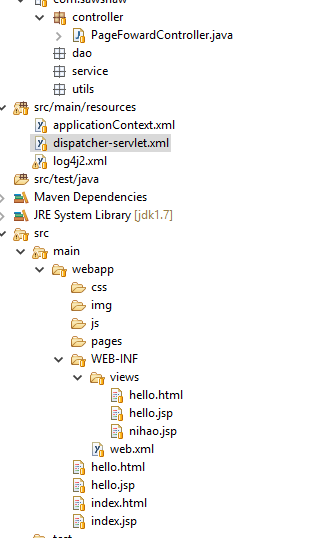
项目结构:
springMVC访问 WEB-INF 下的 jsp 和 html的更多相关文章
- 【servlet】客户端是否可以访问到WEB-INF下的jsp文件
一般情况下(不考虑出现安全问题被入侵,那样啥都能访问到),WEB-INF下的jsp文件单凭浏览器端请求时访问不到的. 想访问的话需要通过服务端servlet的转发. 下面通过转发和重定向的尝试来观察访 ...
- springmvc 拦截器,不拦截jsp文件
spring mvc的拦截器只拦截controller不拦截jsp文件,如果不拦截jsp文件也会给系统带安全性问题. 解决方案有两种: 1.将所有的jsp文件放入到WEB-INF文件夹下,这样用户是直 ...
- 记录-springMVC访问web-inf下文件问题+在jsp页面导入jquery插件路径不对问题
环境:spring + springMvc + mybatis + maven 关于在springMVC环境访问web-inf目录下文件,其一有在springMVC xml文件下加 <!-- 对 ...
- springMVC框架访问web-inf下的jsp文件
博客原文章:http://td.xue163.com/1042/1/10425265.html 用户提出问题:springMVC框架访问web-inf下的jsp文件,具体如下: 使用springMVC ...
- 关于springMVC框架访问web-inf下的jsp文件
问题:springMVC框架访问web-inf下的jsp文件,具体如下: 使用springMVC,一般都会使用springMVC的视图解析器,大概会这样配置 <property name=&qu ...
- 访问WEB-INF下的jsp页面
访问web-inf下的jsp文件, 1)使用springMVC,一般都会使用springMVC的视图解析器,大概会这样配置 <!--jsp视图解析器--> <bean class ...
- 关于Spring MVC 中地址栏访问 /WEB-INF下的.jsp
WEB-INF是对资源的保护,直接在地址栏访问WEB-INF目录下的页面,会显示404,关于为什么要把页面放在WEB-INF下,可以自行百度 在这里我是用SpringMVC 对WEB-INF目录下的页 ...
- java:maven中webapp下的jsp不能访问web-inf下面的bean
java:maven中webapp下的jsp不能访问web-inf下面的bean 当然 WEB-INF下面的文件是不能访问的,只能吧jsp文件放入到WEB-INF下面,然后通过配置WEB-INF下we ...
- java web中servlet、jsp、html 互相访问的路径问题
java web中servlet.jsp.html 互相访问的路径问题 在java web种经常出现 404找不到网页的错误,究其原因,一般是访问的路径不对. java web中的路径使用按我的分法可 ...
- XAMPP环境访问非Web DocumentRoot下绝对路径
假设你的XAMPP网站文档根目录在C:/xampp/apache/htdocs/下面,那么访问这个目录下的文件是很直接的. 但是有时候需要把用户上传文件指定到特殊目录,比如E盘,那么就需要用户能够访问 ...
随机推荐
- What's new in JDK 8
(1)http://docs.oracle.com/javase/8/docs/technotes/guides/language/enhancements.html#javase8 (2)https ...
- python内存泄漏,python垃圾手动回收,1
部署的舆情系统,内存变大,找原因. 一个小例子. def func(): local_list = list(range(10000000)) func() time.sleep(200) 能够观察到 ...
- Linux静态库生成
Linux上的静态库,其实是目标文件的归档文件. 在Linux上创建静态库的步骤如下: 写源文件,通过 gcc -c xxx.c 生成目标文件. 用 ar 归档目标文件,生成静态库. 配合静态库,写一 ...
- SQL Compare数据库比较工具 完全破解+使用教程
来源http://www.cnblogs.com/duci/articles/4482665.html 一.使用教程 SQL Compare是编程人员常用的比较两个数据库之间差异的工具.可以用来比较数 ...
- c# 匿名反序列化
1.先new一个匿名对象,然后再反序列化好处是能点点点,坏处是得先new匿名对象 2.借用Newtonsoft.Json.Linq.JObject.Parse,好处是不需要new匿名对象,坏处是不能点 ...
- actor binary tree lab4
forward 与 ! (tell) 的差异,举个例子: Main(当前actor): topNode ! Insert(requester, id=1, ele = 2) topNode: root ...
- tomcat运行模式APR安装
centos6.2下,Tomcat运行模式apr安装过程,如下: 一.安装apr [root@vmT227-m5 /]# cd /usr/local/ [root@vmT227-m5 local]# ...
- vux ajax请求 及 跨域
1)使用 AjaxPlugin 插件(在组件里使用) 引入插件 import { AjaxPlugin } from 'vux' 初始化 export default { components: { ...
- 【代码审计】iCMS_v7.0.7 keywords.admincp.php页面存在SQL注入漏洞分析
0x00 环境准备 iCMS官网:https://www.icmsdev.com 网站源码版本:iCMS-v7.0.7 程序源码下载:https://www.icmsdev.com/downloa ...
- SpringBoot(一)-- 知识点介绍
一.简介 Spring Boot是为了简化Spring应用的创建.运行.调试.部署等而出现的,使用它可以做到专注于Spring应用的开发,而无需过多关注XML的配置.简单来说,它提供了一堆依赖打包,并 ...