
Hadoop实战:用Hadoop处理Excel通话记录
项目需求
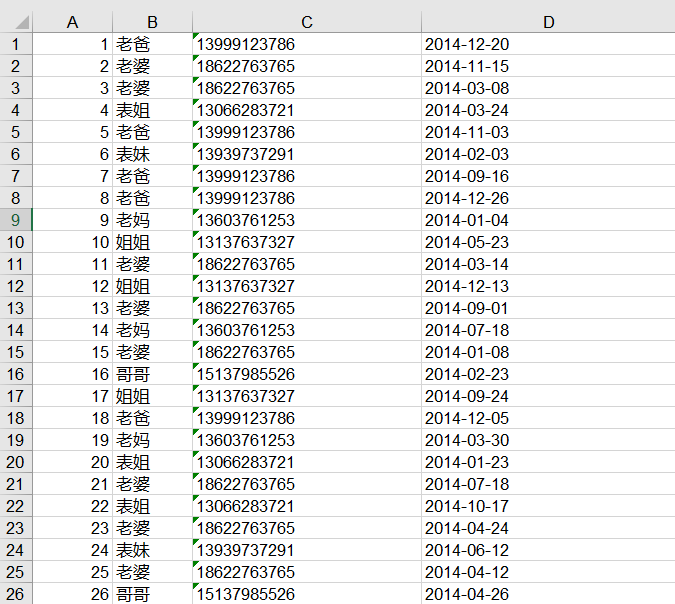
有博主与家庭成员之间的通话记录一份,存储在Excel文件中,如下面的数据集所示。我们需要基于这份数据,统计每个月每个家庭成员给自己打电话的次数,并按月份输出到不同文件夹。
数据集
下面是部分数据,数据格式:编号 联系人 电话 时间。
项目实现
首先,输入文件是Excel格式,我们可以借助poi jar包来解析Excel文件,如果本地没有可以下载:poi-3.9.jar 和 poi-excelant-3.9.jar 并引入到项目中。借助这两个jar包,我们先来实现一个Excel的解析类 —— ExcelParser.java。
package com.hadoop.phoneStatistics;

import java.io.IOException;

import java.io.InputStream;

import java.util.Iterator;

import org.apache.commons.logging.Log;

import org.apache.commons.logging.LogFactory;

import org.apache.poi.hssf.usermodel.HSSFSheet;

import org.apache.poi.hssf.usermodel.HSSFWorkbook;

import org.apache.poi.ss.usermodel.Cell;

import org.apache.poi.ss.usermodel.Row;

/**

 * @author Zimo

 * 用于解析Excel中的通话记录

 */

public class ExcelParser {

    private static final Log LOG = LogFactory.getLog(ExcelParser.class);

    private StringBuilder currentString = null;

    private long bytesRead = ;

    public String parseExcelData(InputStream is) {

        try {

            HSSFWorkbook workbook = new HSSFWorkbook();

            // Taking first sheet from the workbook

            HSSFSheet sheet = workbook.getSheetAt();

            // Iterate through each rows from first sheet

            Iterator<Row> rowIterator = sheet.iterator();

            currentString = new StringBuilder();

            while (rowIterator.hasNext()) {

                Row row = rowIterator.next();

                // For each row, iterate through each columns

                Iterator<Cell> cellIterator = row.cellIterator();

                while (cellIterator.hasNext()) {

                    Cell cell = cellIterator.next();

                    switch (cell.getCellType()) {

                    case Cell.CELL_TYPE_BOOLEAN:

                        bytesRead++;

                        currentString.append(cell.getBooleanCellValue() + "\t");

                        break;

                    case Cell.CELL_TYPE_NUMERIC:

                        bytesRead++;

                        currentString.append(cell.getNumericCellValue() + "\t");

                        break;

                    case Cell.CELL_TYPE_STRING:

                        bytesRead++;

                        currentString.append(cell.getStringCellValue() + "\t");

                        break;

                    }

                }

                currentString.append("\n");

            }

            is.close();

        } catch (IOException ioe) {

            // TODO: handle exception

            LOG.error("IO Exception : File not found " + ioe);

        }

        return currentString.toString();

    }

    public long getBytesRead()

    {

        return bytesRead;

    }

}
ExcelPhoneStatistics.java
package com.hadoop.phoneStatistics;

import java.io.IOException;

import org.apache.hadoop.conf.Configuration;

import org.apache.hadoop.conf.Configured;

import org.apache.hadoop.fs.FileSystem;

import org.apache.hadoop.fs.Path;

import org.apache.hadoop.io.LongWritable;

import org.apache.hadoop.io.Text;

import org.apache.hadoop.mapreduce.Job;

import org.apache.hadoop.mapreduce.Mapper;

import org.apache.hadoop.mapreduce.Reducer;

import org.apache.hadoop.mapreduce.lib.input.FileInputFormat;

import org.apache.hadoop.mapreduce.lib.output.FileOutputFormat;

import org.apache.hadoop.util.Tool;

import org.apache.hadoop.util.ToolRunner;

import org.slf4j.Logger;

import org.slf4j.LoggerFactory;

/**

 * @author Zimo

 * 处理通话记录

 */

public class ExcelPhoneStatistics extends Configured implements Tool {

    private static Logger logger = LoggerFactory.getLogger(ExcelPhoneStatistics.class);

    public static class ExcelMapper extends

            Mapper<LongWritable, Text, Text, Text>

    {

        private static Logger LOG = LoggerFactory.getLogger(ExcelMapper.class);

        private Text pkey = new Text();

        private Text pvalue = new Text();

        /**

         * Excel Spreadsheet is supplied in string form to the mapper. We are

         * simply emitting them for viewing on HDFS.

         */

        public void map(LongWritable key, Text value, Context context)

                throws InterruptedException, IOException

        {

            //1.0, 老爸, 13999123786, 2014-12-20

            String line = value.toString();

            String[] records = line.split("\\s+");

            String[] months = records[].split("-");//获取月份

            pkey.set(records[] + "\t" + months[]);//昵称+月份

            pvalue.set(records[]);//手机号

            context.write(pkey, pvalue);

            LOG.info("Map processing finished");

        }

    }

    public static class PhoneReducer extends Reducer<Text, Text, Text, Text>

    {

        private Text pvalue = new Text();

        protected void reduce(Text Key, Iterable<Text> Values, Context context)

                throws IOException, InterruptedException

        {

            int sum = ;

            Text outKey = Values.iterator().next();

            for (Text value : Values)

            {

                sum++;

            }

            pvalue.set(outKey+"\t"+sum);

            context.write(Key, pvalue);

        }

    }

    public static class PhoneOutputFormat extends

            MailMultipleOutputFormat<Text, Text>

    {

        @Override

        protected String generateFileNameForKeyValue(Text key,

                Text value, Configuration conf)

        {

            //name+month

            String[] records = key.toString().split("\t");

            return records[] + ".txt";

        }

    }

    @Override

    public int run(String[] args) throws Exception

    {

        Configuration conf = new Configuration();// 配置文件对象

        Path mypath = new Path(args[]);

        FileSystem hdfs = mypath.getFileSystem(conf);// 创建输出路径

        if (hdfs.isDirectory(mypath))

        {

            hdfs.delete(mypath, true);

        }

        logger.info("Driver started");

        Job job = new Job();

        job.setJarByClass(ExcelPhoneStatistics.class);

        job.setJobName("Excel Record Reader");

        job.setMapperClass(ExcelMapper.class);

        job.setMapOutputKeyClass(Text.class);

        job.setMapOutputValueClass(Text.class);

        job.setInputFormatClass(ExcelInputFormat.class);//自定义输入格式

        job.setReducerClass(PhoneReducer.class);

        job.setOutputKeyClass(Text.class);

        job.setOutputValueClass(Text.class);

        job.setOutputFormatClass(PhoneOutputFormat.class);//自定义输出格式

        FileInputFormat.addInputPath(job, new Path(args[]));

        FileOutputFormat.setOutputPath(job, new Path(args[]));

        job.waitForCompletion(true);

        return ;

    }

    public static void main(String[] args) throws Exception

    {

        String[] args0 = {

//            args[0], args[1]

            "hdfs://master:8020/phone/phone.xls",

            "hdfs://master:8020/phone/out/"

        };

        int ec = ToolRunner.run(new Configuration(), new ExcelPhoneStatistics(), args0);

        System.exit(ec);

    }

}
ExcelInputFormat.java
package com.hadoop.phoneStatistics;

import java.io.IOException;

import java.io.InputStream;

import org.apache.hadoop.conf.Configuration;

import org.apache.hadoop.fs.FSDataInputStream;

import org.apache.hadoop.fs.FileSystem;

import org.apache.hadoop.fs.Path;

import org.apache.hadoop.io.LongWritable;

import org.apache.hadoop.io.Text;

import org.apache.hadoop.mapreduce.InputSplit;

import org.apache.hadoop.mapreduce.RecordReader;

import org.apache.hadoop.mapreduce.TaskAttemptContext;

import org.apache.hadoop.mapreduce.lib.input.FileInputFormat;

import org.apache.hadoop.mapreduce.lib.input.FileSplit;

/**

 * @author Zimo
 * 自定义输入格式

 * * <p>

 * An {@link org.apache.hadoop.mapreduce.InputFormat} for excel spread sheet files.

 * Multiple sheets are supported

 * <p/>

 * Keys are the position in the file, and values are the row containing all columns for the

 * particular row.

 */

public class ExcelInputFormat extends FileInputFormat<LongWritable, Text> {

    @Override

    public RecordReader<LongWritable, Text> createRecordReader(InputSplit split, TaskAttemptContext context)

            throws IOException, InterruptedException {

        // TODO Auto-generated method stub

        return new ExcelRecordReader();

    }

    public class ExcelRecordReader extends RecordReader<LongWritable, Text> {

        private LongWritable key;

        private Text value;

        private InputStream is;

        private String[] strArrayofLines;

        @Override

        public void initialize(InputSplit genericSplit, TaskAttemptContext context) throws IOException, InterruptedException {

            // TODO Auto-generated method stub

            FileSplit split = (FileSplit) genericSplit;

            Configuration job = context.getConfiguration();

            final Path file = split.getPath();

            FileSystem fs = file.getFileSystem(job);

            FSDataInputStream fileIn = fs.open(file);

            is = fileIn;

            String line =     new ExcelParser().parseExcelData(is);//调用解析excel方法

            this.strArrayofLines = line.split("\n");

        }

        @Override

        public boolean nextKeyValue() throws IOException, InterruptedException {

            // TODO Auto-generated method stub

            if (key == null) {

                key = new LongWritable();

                value = new Text(strArrayofLines[]);

            } else {

                if (key.get() < this.strArrayofLines.length - ) {

                    long pos = (int)key.get();

                    key.set(pos + );

                    value.set(this.strArrayofLines[(int)(pos + )]);

                    pos++;

                } else {

                    return false;

                }

            }

            if (key == null || value == null) {

                return false;

            } else {

                return true;

            }

        }

        @Override

        public LongWritable getCurrentKey() throws IOException, InterruptedException {

            // TODO Auto-generated method stub

            return key;

        }

        @Override

        public Text getCurrentValue() throws IOException, InterruptedException {

            // TODO Auto-generated method stub

            return value;

        }

        @Override

        public float getProgress() throws IOException, InterruptedException {

            // TODO Auto-generated method stub

            return ;

        }

        @Override

        public void close() throws IOException {

            // TODO Auto-generated method stub

            if (is != null) {

                is.close();

            }

        }

    }

}
MailMultipleOutputFormat.java
package com.hadoop.phoneStatistics;

import java.io.DataOutputStream;

import java.io.IOException;

import java.util.HashMap;

import java.util.Iterator;

import org.apache.hadoop.conf.Configuration;

import org.apache.hadoop.fs.FSDataInputStream;

import org.apache.hadoop.fs.FSDataOutputStream;

import org.apache.hadoop.fs.Path;

import org.apache.hadoop.io.Writable;

import org.apache.hadoop.io.WritableComparable;

import org.apache.hadoop.io.compress.CompressionCodec;

import org.apache.hadoop.io.compress.GzipCodec;

import org.apache.hadoop.mapreduce.OutputCommitter;

import org.apache.hadoop.mapreduce.RecordWriter;

import org.apache.hadoop.mapreduce.TaskAttemptContext;

import org.apache.hadoop.mapreduce.lib.output.FileOutputCommitter;

import org.apache.hadoop.mapreduce.lib.output.FileOutputFormat;

import org.apache.hadoop.util.ReflectionUtils;

import com.jcraft.jsch.Compression;

/**

 * @author Zimo

 * @param <MultiRecordWriter>

 * 自定义输出格式

 */

public abstract class MailMultipleOutputFormat<K extends WritableComparable<?>, V extends Writable>

            extends FileOutputFormat<K, V>{

    private MultiRecordWriter writer = null;

    public RecordWriter<K, V> getRecordWriter(TaskAttemptContext job) throws IOException {

        if (writer == null) {

            writer = new MultiRecordWriter(job, getTaskOutputPath(job));

        }

        return writer;

    }

    private Path getTaskOutputPath(TaskAttemptContext conf) throws IOException {

        Path workPath = null;

        OutputCommitter committer = super.getOutputCommitter(conf);

        if (committer instanceof FileOutputCommitter) {

            workPath = ((FileOutputCommitter) committer).getWorkPath();

        } else {

            Path outputPath = super.getOutputPath(conf);

            if (outputPath == null) {

                throw new IOException("Undefined job output-path");

            }

            workPath = outputPath;

        }

        return workPath;

    }

    //通过key, value, conf来确定输出文件名(含扩展名)

    protected abstract String generateFileNameForKeyValue(K key, V value, Configuration conf);

    public class MultiRecordWriter extends RecordWriter<K, V> {

        //RecordWriter的缓存

        private HashMap<String, RecordWriter<K, V>> recordWriters = null;

        private TaskAttemptContext job = null;

        //输出目录

        private Path workPath = null;

        public MultiRecordWriter(TaskAttemptContext job, Path workpath) {

            // TODO Auto-generated constructor stub

            super();

            this.job = job;

            this.workPath = workpath;

            recordWriters = new HashMap<String, RecordWriter<K, V>>();

        }

        @Override

        public void write(K key, V value) throws IOException, InterruptedException {

            // TODO Auto-generated method stub

            //得到输出文件名

            String baseName = generateFileNameForKeyValue(key, value, job.getConfiguration());

            RecordWriter<K, V> rw = this.recordWriters.get(baseName);

            if (rw == null) {

                rw = getBaseRecordWriter(job, baseName);

                this.recordWriters.put(baseName, rw);

            }

            rw.write(key, value);

        }

        @Override

        public void close(TaskAttemptContext context) throws IOException, InterruptedException {

            // TODO Auto-generated method stub

            Iterator<RecordWriter<K, V>> values = this.recordWriters.values().iterator();

            while (values.hasNext()) {

                values.next().close(context);

            }

            this.recordWriters.clear();

        }

        private RecordWriter<K, V> getBaseRecordWriter(TaskAttemptContext job, String baseName)

                throws IOException {

            Configuration conf = job.getConfiguration();

            boolean isCompressed = getCompressOutput(job);

            String keyValueSeparator = "\t";//key value 分隔符

            RecordWriter<K, V> recordWriter = null;

            if (isCompressed) {

                Class<? extends CompressionCodec> codecClass = getOutputCompressorClass(job, GzipCodec.class);

                CompressionCodec codec = ReflectionUtils.newInstance(codecClass, conf);

                Path file = new Path(workPath, baseName + codec.getDefaultExtension());

                FSDataOutputStream fileOut = file.getFileSystem(conf).create(file, false);

                recordWriter = new MailRecordWriter<K, V>(

                        new DataOutputStream(codec.createOutputStream(fileOut)), keyValueSeparator);

            } else {

                Path file = new Path(workPath, baseName);

                FSDataOutputStream fileOut = file.getFileSystem(conf).create(file, false);

                recordWriter = new MailRecordWriter<K, V>(fileOut, keyValueSeparator);

            }

            return recordWriter;

        }

    }

}
MailRecordWriter.java
package com.hadoop.phoneStatistics;

import java.io.DataOutputStream;

import java.io.IOException;

import java.io.UnsupportedEncodingException;

import org.apache.hadoop.io.NullWritable;

import org.apache.hadoop.io.Text;

import org.apache.hadoop.mapreduce.RecordWriter;

import org.apache.hadoop.mapreduce.TaskAttemptContext;

/**

 * @author Zimo

 *

 */

public class MailRecordWriter< K, V > extends RecordWriter< K, V >

{

    private static final String utf8 = "UTF-8";

    private static final byte[] newline;

    static

    {

        try

        {

            newline = "\n".getBytes(utf8);

        } catch (UnsupportedEncodingException uee)

        {

            throw new IllegalArgumentException("can't find " + utf8 + " encoding");

        }

    }

    protected DataOutputStream out;

    private final byte[] keyValueSeparator;

    public MailRecordWriter(DataOutputStream out, String keyValueSeparator)

    {

        this.out = out;

        try

        {

            this.keyValueSeparator = keyValueSeparator.getBytes(utf8);

        } catch (UnsupportedEncodingException uee)

        {

            throw new IllegalArgumentException("can't find " + utf8 + " encoding");

        }

    }

    public MailRecordWriter(DataOutputStream out)

    {

        this(out, "/t");

    }

    private void writeObject(Object o) throws IOException

    {

        if (o instanceof Text)

        {

            Text to = (Text) o;

            out.write(to.getBytes(), , to.getLength());

        } else

        {

            out.write(o.toString().getBytes(utf8));

        }

    }

    public synchronized void write(K key, V value) throws IOException

    {

        boolean nullKey = key == null || key instanceof NullWritable;

        boolean nullValue = value == null || value instanceof NullWritable;

        if (nullKey && nullValue)

        {

            return;

        }

        if (!nullKey)

        {

            writeObject(key);

        }

        if (!(nullKey || nullValue))

        {

            out.write(keyValueSeparator);

        }

        if (!nullValue)

        {

            writeObject(value);

        }

        out.write(newline);

    }

    public synchronized void close(TaskAttemptContext context) throws IOException

    {

        out.close();

    }

}
项目结果
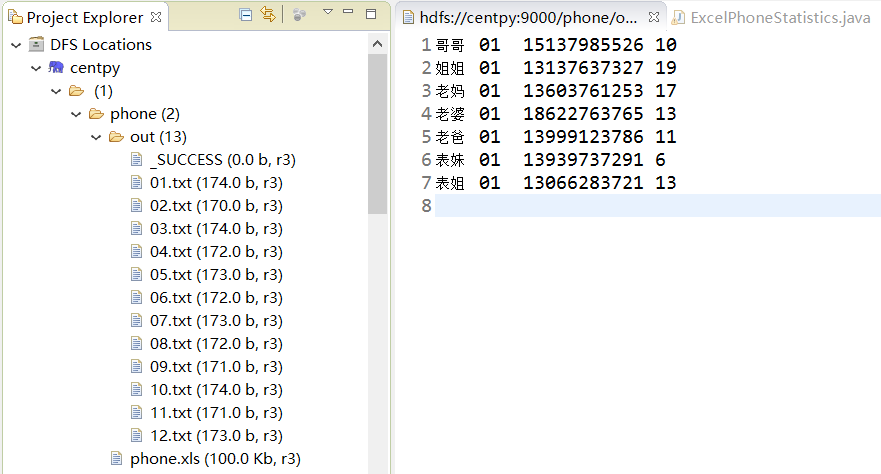
处理结果如上图所示,输出数据格式为:姓名+月份+电话号码+通话次数。我们成功将所有通话记录按月输出为一个文件夹,并统计出了和每一个人的通话次数。
以上就是博主为大家介绍的这一板块的主要内容,这都是博主自己的学习过程,希望能给大家带来一定的指导作用,有用的还望大家点个支持,如果对你没用也望包涵,有错误烦请指出。如有期待可关注博主以第一时间获取更新哦,谢谢!
版权声明:本文为博主原创文章,未经博主允许不得转载。
Hadoop实战:用Hadoop处理Excel通话记录的更多相关文章
- hadoop基础----hadoop实战(七)-----hadoop管理工具---使用Cloudera Manager安装Hadoop---Cloudera Manager和CDH5.8离线安装
hadoop基础----hadoop实战(六)-----hadoop管理工具---Cloudera Manager---CDH介绍 简介 我们在上篇文章中已经了解了CDH,为了后续的学习,我们本章就来 ...
- hadoop处理Excel通话记录
前面我们所写mr程序的输入都是文本文件,但真正工作中我们难免会碰到需要处理其它格式的情况,下面以处理excel数据为例 1.项目需求 有刘超与家庭成员之间的通话记录一份,存储在Excel文件中,如下面 ...
- Hadoop实战:Hadoop分布式集群部署(一)
一.系统参数优化配置 1.1 系统内核参数优化配置 修改文件/etc/sysctl.conf,使用sysctl -p命令即时生效. 1 2 3 4 5 6 7 8 9 10 11 12 13 14 ...
- hadoop基础----hadoop实战(九)-----hadoop管理工具---CDH的错误排查(持续更新)
在CDH安装完成后或者CDH使用过程中经常会有错误或者警报,需要我们去解决,积累如下: 解决红色警报 时钟偏差 这是因为我们的NTP服务不起作用导致的,几台机子之间有几秒钟的时间偏差. 这种情况下一是 ...
- Hadoop实战之一~Hadoop概述
对技术,我还是抱有敬畏之心的. Hadoop概述 Hadoop是一个开源分布式云计算平台,基于Map/Reduce模型的,处理海量数据的离线分析工具.基于Java开发,建立在HDFS上,最早由Goog ...
- Hadoop实战之四~hadoop作业调度详解(2)
这篇文章将接着上一篇wordcount的例子,抽象出最简单的过程,一探MapReduce的运算过程中,其系统调度到底是如何运作的. 情况一:数据和运算分开的情况 wordcount这个例子的是hado ...
- Hadoop实战实例
Hadoop实战实例 Hadoop实战实例 Hadoop 是Google MapReduce的一个Java实现.MapReduce是一种简化的分布式编程模式,让程序自动分布 ...
- Hadoop实战课程
Hadoop生态系统配置Hadoop运行环境Hadoop系统架构HDFS分布式文件系统MapReduce分布式计算(MapReduce项目实战)使用脚本语言Pig(Pig项目实战)数据仓库工具Hive ...
- Hadoop on Mac with IntelliJ IDEA - 10 陆喜恒. Hadoop实战(第2版)6.4.1(Shuffle和排序)Map端 内容整理
下午对着源码看陆喜恒. Hadoop实战(第2版)6.4.1 (Shuffle和排序)Map端,发现与Hadoop 1.2.1的源码有些出入.下面作个简单的记录,方便起见,引用自书本的语句都用斜体表 ...
随机推荐
- js---倒计时的自动跳转.html
============================================================================== 倒计时的自动跳转.html <!DO ...
- js检测对象属性
In:(检测自身及原型属性) var o={x:1}; "x" in o; //true,自有属性存在 "y" in o; //false "toSt ...
- sharepoint SDDL 字符串包含无效的SID或无法转换的SID
安装过程中出现以下错误 采用独立模式安装Sharepoint Server 2013/Foundation 2013,在进行配置向导的时候会碰到这样的错误 System.ArgumentExcepti ...
- android activity生命周期的一张经典图片
图片来自http://blog.csdn.net/android_tutor/article/details/5772285 onpause只有弹出的窗体是Activity的时候才会触发,并非是通过焦 ...
- elasticsearch 复合查询
常用查询 固定分数查询 127.0.0.1/_search(全文搜索) { "query":{ "match"{ "title":" ...
- datatables的使用
在开发web项目中,界面就是一个以丰富友好的样式来展现数据的窗口,同样的数据不用的展现形式给人不同的体验,数据列表是数据是一种常见展现形式,对于数据列表的一个最基本的要求就是能够实现分页以及检索功能. ...
- hdu1081
#include<iostream> using namespace std; int GetMaxNum(int a[],int n) //求最大字段和 { int i,sum=0,ma ...
- 【mysql-索引+存储过程+函数+触发器-更新。。。】
BaseOn ===>MySQL5.6 一:索引 1:创建索引: create index nameIndex on seckill(name) ; 2:查看索引: show index fro ...
- EasyOffice-.NetCore一行代码导入导出Excel,生成Word
简介 Excel和Word操作在开发过程中经常需要使用,这类工作不涉及到核心业务,但又往往不可缺少.以往的开发方式在业务代码中直接引入NPOI.Aspose或者其他第三方库,工作繁琐,耗时多,扩展性差 ...
- 安全测试 + 渗透测试 Xmind 要点梳理
从事测试工作多年,一直对安全测试充满神秘感.买了本书,闲来无事时翻看了解.发现书的开头提供的Xmind脑图挺有参考价值,所以做了次“搬运工”,提供给想接触了解安全测试/渗透测试的小伙伴. 安全测试要点 ...