
fiddler抓包出现错误 creation of the root certificate was not successful
fiddler安装完要配置才可以抓取HTTP
 1.首先 找到Tools——>Options,在弹出的菜单中 选择https项  勾选捕捉https,这样配置完OK之后 一般会弹窗提示安装证书,点击安装,然后重启Fiddler即可。

 2.也可以直接使用右边的Actions-->reset all cer...
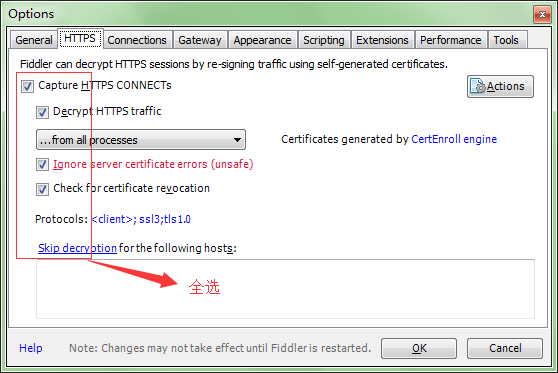
但有时候没有弹窗安装证书或根本就没有提示,这种情况一般在Win7中较多出现,Win7的系统https方面 在.net Framework4.0上有bug
网上搜罗一番之后解决方案是
1.cmd 命令行 找到fiddler的安装目录 如:
cd C:\Users\JayshSoft\AppData\Local\Programs\Fiddler
然后执行以下命令
makecert.exe -r -ss my -n "CN=DO_NOT_TRUST_FiddlerRoot, O=DO_NOT_TRUST, OU=Created by http://www.fiddler2.com" -sky signature -eku 1.3.6.1.5.5.7.3.1 -h 1 -cy authority -a sha1 -m 120 -b 09/11/2019
注意:这个命令最后的日期 09/11/2019 一定要大于现在的日期 否则创建证书是过期的
fiddler抓包出现错误 creation of the root certificate was not successful的更多相关文章
- 解决Fiddler出现无线弹框 "creation of the root certificate was not successful”的问题
打开Fiddler 访问:http://localhost:8888/ 安装证书,如果提示没有证书(8888是你在Tool->Fiddler Option->Connections设置的F ...
- 【fiddler安装】解决“Creation of the root certificate was not successful.”的问题
问题:在安装过fiddler后,会出现“Creation of the root certificate was not successful.”的问题,这个是说证书安装不成功. 原因:在使用Fidd ...
- Fiddler 抓包https配置 提示:creation of the root certificate was not successful 证书安装不成功
window7 提示:creation of the root certificate was not successful 证书安装不成功 1.cmd 命令行 找到fiddler的安装目录 如 ...
- fiddler报错:creation of the root certificate was not successful 证书安装不成功
fiddler提示:creation of the root certificate was not successful 证书安装不成功 首先 找到Tools——>Options 在弹出的菜单 ...
- Fiddler 抓包https配置 提示creation of the root certificate was not successful 证书安装不成功
在使用Fiddler抓包时,我们有时需要抓https协议的包,这种需要配置一下 开启监控https才可以 首先 找到Tools——>Options 在弹出的菜单中 选择https项 勾选捕捉h ...
- Fiddler(三)Fiddler 报错creation of the root certificate was not successful
打开CMD,找到Fiddler所在目录,我这里是把汉化版的解压在了桌面,所以通过CMD进入桌面下的Fiddler文件夹. 执行命令 makecert.exe -r -ss my -n -h -cy a ...
- Fiddler问题 - creation of the root certificate was not successful
打开cmd执行命令. d: cd D:\soft\Fiddler2 makecert.exe -r -ss my -n "CN=DO_NOT_TRUST_FiddlerRoot, O=DO_ ...
- win7 fiddler报“Creation of the root certificate was not successful”的问题
cd "C:\Program Files (x86)\Fiddler2" makecert.exe -r -ss my -n "CN=DO_NOT_TRUST_Fiddl ...
- 快速学会使用Fiddler抓包 截包伪造提交包
1.Fiddler介绍 Fiddler是一个http协议调试代理工具,它能够记录并检查所有你的电脑,移动设备和互联网之间的http通讯,设置断点,查看所有的"进出"Fiddler的 ...
随机推荐
- JavaScript中数值和对象
一.创建对象并将其初始化 a.使用new创建对象和方法 <<!DOCTYPE html> <html> <head> <mete http-equiv ...
- ssh整合思想
整合过程:
- 提示crontab command not found的解决方法
操作步骤 1. 确认crontab是否安装: 执行 crontab 命令如果报 command not found,就表明没有安装 2. 安装 crontab 执行 yum insta ...
- Educational Codeforces Round 56 (Rated for Div. 2) E(1093E) Intersection of Permutations (树套树,pb_ds)
题意和分析在之前的链接中有:https://www.cnblogs.com/pkgunboat/p/10160741.html 之前补题用三维偏序的cdq的分治A了这道题,但是感觉就算比赛再次遇到类似 ...
- Hibernate 执行sql语句返回yntax error: syntax error, expect LPAREN, actual NOT not
hibernate自动创建表时提示 : ERROR: sql injection violation, syntax error: syntax error, expect LPAREN, actu ...
- C++——virtual
一.放在父类的函数名前面:多态 1.作用:实现多态:子类可以自定义父类中的virtual函数 #include <iostream> using namespace std; class ...
- 算法Sedgewick第四版-第1章基础-1.4 Analysis of Algorithms-002如何改进算法
1. package algorithms.analysis14; import algorithms.util.In; import algorithms.util.StdOut; /******* ...
- centos安装中文字体
1.查看字体列表 2.将需要上传的字体上传至linux服务器/usr/share/fonts/chinese目录下 3.修改chinese目录的权限 chmod -R /usr/share/fonts ...
- Thread.currentThread().getContextClassLoader() 和 Class.getClassLoader()区别
查了一些资料也不是太明白两个的区别,但是前者是最安全的用法 打个简单的比方,你一个WEB程序,发布到Tomcat里面运行.首先是执行Tomcat org.apache.catalina.startup ...
- AJAX的dataType问题
dataType是预期服务器返回的数据类型.如果不指定,jQuery 将自动根据 HTTP 包 MIME 信息来智能判断,比如 XML MIME 类型就被识别为 XML.在 1.4 中,JSON 就会 ...