
Hadoop集群配置免密SSH登录方法
Hadoop集群包含1个主节点和3个从节点,需要实现各节点之间的免密码登录,下面介绍具体的实现方法。
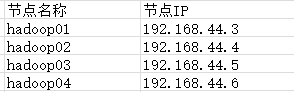
一、Hadoop集群环境
二、免密登录原理
每台主机authorized_keys文件里面包含的主机(ssh密钥),该主机都能无密码登录,所以只要每台主机的authorized_keys文件里面都放入其他主机(需要无密码登录的主机)的ssh密钥就行了。
三、实现方法
1. 配置每个节点的hosts文件
#vim /etc/hosts
1 192.168.44.3 hadoop01

 192.168.44.4 hadoop02

 192.168.44.5 hadoop03

 192.168.44.6 hadoop04
2. 每个节点生成ssh密钥
[root@hadoop01 ~]# ssh-keygen -t rsa

Generating public/private rsa key pair.

Enter file in which to save the key (/root/.ssh/id_rsa):

Created directory '/root/.ssh'.

Enter passphrase (empty for no passphrase):

Enter same passphrase again:

Your identification has been saved in /root/.ssh/id_rsa.

Your public key has been saved in /root/.ssh/id_rsa.pub.

.....................

[root@hadoop01 .ssh]# ls

id_rsa  id_rsa.pub
执行命令后会在~目录下生成.ssh文件夹,里面包含id_rsa和id_rsa.pub两个文件。
注:使用ssh-keygen -t rsa -P '' -f ~/.ssh/id_rsa命令可避免上述交互式操作。
3. 在主节点上将公钥拷到一个特定文件authorized_keys中。
[root@hadoop01 ~]# cd .ssh

[root@hadoop01 .ssh]# ls

id_rsa  id_rsa.pub

[root@hadoop01 .ssh]# cp id_rsa.pub authorized_keys

[root@hadoop01 .ssh]# ls

authorized_keys  id_rsa  id_rsa.pub
4. 将authorized_keys文件拷到下一个节点,并将该节点的ssh密钥id_rsa.pub加入该文件中。
#在hadoop01上使用scp命令实现远程文件拷贝
[root@hadoop01 .ssh]# scp authorized_keys  root@hadoop02:/root/.ssh/

The authenticity of host 'hadoop02 (192.168.44.11)' can't be established.

ECDSA key fingerprint is SHA256:MyB1zs0E3J/fm8pC0AN8ycsgEIBNHtUqd9xS0WAyv3s.

ECDSA key fingerprint is MD5:::3a:ba:3e::a7:d7::f6:::::f9:.

Are you sure you want to continue connecting (yes/no)? yes

Warning: Permanently added 'hadoop02,192.168.44.11' (ECDSA) to the list of known hosts.

root@hadoop02's password:

authorized_keys                                                                %     .2KB/s   :

#登录hadoop02主机
[root@hadoop02 ~]# cd .ssh/
[root@hadoop02 .ssh]# ls
authorized_keys id_rsa id_rsa.pub
[root@hadoop02 .ssh]# cat id_rsa.pub >> authorized_keys #使用cat追加方式
5. 重复第4步的操作,依次将hadoop03、hadoop04节点的ssh密钥加入到authorized_keys文件中,并将hadoop04节点生成的authorized_keys文件拷贝到其他三个节点(hadoop01、hadoop02、hadoop03)即可。
#登录hadoop03主机,将ssh密钥加入authorized_keys文件中

[root@hadoop03 .ssh]# cat id_rsa.pub >> authorized_keys

[root@hadoop03 .ssh]# scp authorized_keys root@hadoop04:/root/.ssh/

#登录hadoop04主机,将ssh密钥加入authorized_keys文件中

[root@hadoop04 .ssh]# cat id_rsa.pub >> authorized_keys

#将最后生成的authorized_keys文件分别拷贝到hadoop01、hadoop02和hadoop03

[root@hadoop04 .ssh]# scp authorized_keys root@hadoop01:/root/.ssh/

[root@hadoop04 .ssh]# scp authorized_keys root@hadoop02:/root/.ssh/

[root@hadoop04 .ssh]# scp authorized_keys root@hadoop03:/root/.ssh/
6. 验证免密登录
使用ssh 用户名@节点名或ssh ip地址命令验证免密码登录。
[root@hadoop01 .ssh]# ssh root@hadoop02

Last login: Tue Feb  ::  from 192.168.44.1

[root@hadoop02 .ssh]# ssh root@hadoop01

Last login: Tue Feb  ::  from hadoop04

[root@hadoop03 .ssh]# ssh root@hadoop04

Last login: Tue Feb  ::  from 192.168.44.1

[root@hadoop04 .ssh]# ssh root@hadoop01

Last login: Tue Feb  ::  from hadoop02
Hadoop集群配置免密SSH登录方法的更多相关文章
- [Kubernetes]集群配置免密登录Permission denied (publickey,password) 解决办法
在用ansible部署Kubernetes集群是需要配置免密登录,但是遇到Permission denied (publickey,password)的问题 首先推断可能是sshd_config的配置 ...
- hadoop集群配置SSH免登陆
今天给大家总结一下hadoop集群之间免登陆的步骤 node1 ssh node4 1.在node1中生成密钥 [root@node1 ~]# ssh-keygen -t dsa -P '' -f ~ ...
- hadoop集群配置和在windows系统上运用java操作hdfs
安装 配置 概念 hadoop常用shell命令 使用java操作hadoop 本文介绍hadoop集群配置和在windows系统上运用java操作hdfs 安装 http://mirror.bit. ...
- Hadoop集群配置(最全面总结)
Hadoop集群配置(最全面总结) 通常,集群里的一台机器被指定为 NameNode,另一台不同的机器被指定为JobTracker.这些机器是masters.余下的机器即作为DataNode也作为Ta ...
- Hadoop集群配置(最全面总结 )(转)
Hadoop集群配置(最全面总结) huangguisu 通常,集群里的一台机器被指定为 NameNode,另一台不同的机器被指定为JobTracker.这些机器是masters.余下的机器即作为Da ...
- 大数据测试之hadoop集群配置和测试
大数据测试之hadoop集群配置和测试 一.准备(所有节点都需要做):系统:Ubuntu12.04java版本:JDK1.7SSH(ubuntu自带)三台在同一ip段的机器,设置为静态IP机器分配 ...
- Hadoop 集群配置记录小结
Hadoop集群配置往往按照网上教程就可以"配置成功",但是你自己在操作的时候会有很多奇奇怪怪的问题出现, 我在这里整理了一下常见的问题与处理方法: 1.配置/etc/hosts ...
- hadoop集群配置方法---mapreduce应用:xml解析+wordcount详解---yarn配置项解析
注:以下链接均为近期hadoop集群搭建及mapreduce应用开发查找到的资料.使用hadoop2.6.0,其中hadoop集群配置过程下面的文章都有部分参考. hadoop集群配置方法: ---- ...
- Hadoop集群搭建过程中ssh免密码登录(二)
一.为什么设置ssh免密码登录 在集群中,Hadoop控制脚本依赖SSH来执行针对整个集群的操作.例如,某个脚本能够终止并重启集群中的所有守护进程.所以,需要安装SSH,但是,SSH远程登陆的时候,需 ...
随机推荐
- 通俗解释glLoadIdentity(),glPushMatrix(),glPopMatrix()的作用
通俗解释glLoadIdentity(),glPushMatrix(),glPopMatrix()的作用 (2012-04-02 09:17:28) 转载▼ 对于glLoadIdentity(), ...
- thinkphp中图片上传的几种好的办法
http://www.thinkphp.cn/code/701.html http://www.thinkphp.cn/code/151.html
- 虚拟机centos系统,停机装第二块网卡,需要更改的配置
虚拟机centos系统,停机装第二块网卡,需要更改的配置. 问题描述: 虚拟机centos系统,停机装第二块网卡,发现 /etc/sysconfig/network-scripts/ifcfg-et ...
- [转]CSS遮罩——如何在CSS中使用遮罩
特别声明:此篇文章由D姐根据Christian Schaefer的英文文章原名<CSS Masks – How To Use Masking In CSS Now>进行翻译,整个译文带有我 ...
- Python:删除字符串中的字符
一.删除字符串两端的一种或多种字符 #strip().lstrip().rstrip()方法:(默认删除空格符) A.list.strip(字符):删除字符串两端的一种或多种字符: #例:删除字符串s ...
- 杂项-Log:log4net
ylbtech-杂项-Log:log4net log4net库是Apache log4j框架在Microsoft .NET平台的实现,是一个帮助程序员将日志信息输出到各种目标(控制台.文件.数据库等) ...
- 第三课 go语言基础语法
http://www.runoob.com/go/go-basic-syntax.html 1 行分隔符 在 Go 程序中,一行代表一个语句结束.每个语句不需要像 C 家族中的其它语言一样以分号 ; ...
- 关于javaScript事件委托的那些事
今天是第一次写稿,还是有那么一丢丢小鸡冻...回归正题啦... 关于javaScript事件委托不得不说的那些事,为什么要使用事件委托? 我们可以这么说,假设老板要分配一项任务,首先要秘书叫A君来到办 ...
- HBase 二级索引与Coprocessor协处理器
Coprocessor简介 (1)实现目的 HBase无法轻易建立“二级索引”: 执行求和.计数.排序等操作比较困难,必须通过MapReduce/Spark实现,对于简单的统计或聚合计算时,可能会因为 ...
- shell脚本备份系统的方法
linux自动备份shell(使用全备份,增量备份策略) 在cron里设置,每周日晚12点执行(每周日全备份,其余时间增量备份)#vi backup.sh #!/bin/bash # definewe ...