
Spring Boot 集成Swagger2生成RESTful API文档
Swagger2可以在写代码的同时生成对应的RESTful API文档,方便开发人员参考,另外Swagger2也提供了强大的页面测试功能来调试每个RESTful API。
使用Spring Boot可以方便的集成Swagger2
1.新建Spring Boot项目
2.添加swagger依赖
<dependency>

    <groupId>io.springfox</groupId>

    <artifactId>springfox-swagger2</artifactId>

    <version>2.2.2</version>

</dependency>

<dependency>

    <groupId>io.springfox</groupId>

    <artifactId>springfox-swagger-ui</artifactId>

    <version>2.2.2</version>

</dependency>
---
3.创建swagger配置类
/**

 * Created by LG on 2017/8/3.

 *

 * Spring Boot中使用Swagger2构建RESTful APIs说明文档

 * 访问http://localhost:8071/swagger-ui.html 查看效果

 */

@Configuration

@EnableSwagger2

public class Swagger2 {

    @Bean

    public Docket createRestApi() {

        return new Docket(DocumentationType.SWAGGER_2)

                .apiInfo(apiInfo())

                .select()

                .apis(RequestHandlerSelectors.basePackage("com.luangeng.controller"))

                .paths(PathSelectors.any())

                .build();

    }

    private ApiInfo apiInfo() {

        return new ApiInfoBuilder()

                .title("Spring Boot中使用Swagger2构建RESTful APIs说明文档--title")

                .description("Spring Boot中使用Swagger2构建RESTful APIs说明文档--description")

                .contact("Spring Boot中使用Swagger2构建RESTful APIs说明文档--contact")

                .version("1.0.1")

                .build();

    }

}
---
4.添加一个UserController.java类
@RestController

@RequestMapping(value="/users")

public class UserController {

    private static Map<Long, User> users = Collections.synchronizedMap(new HashMap<Long, User>());

    @ApiOperation(value="获取用户列表", notes="获取用户列表")

    @RequestMapping(value="/", method= RequestMethod.GET)

    public List<User> getUserList() {

        List<User> r = new ArrayList<User>(users.values());

        return r;

    }

    @ApiOperation(value="创建用户", notes="根据User对象创建用户")

    @ApiImplicitParam(name = "user", value = "实体user", required = true, dataType = "User")

    @RequestMapping(value="/", method=RequestMethod.POST)

    public String postUser(@ModelAttribute User user) {

        users.put(user.getId(), user);

        return "success";

    }

    @RequestMapping(value="/{id}", method=RequestMethod.GET)

    public User getUser(@PathVariable Long id) {

        return users.get(id);

    }

    @RequestMapping(value="/{id}", method=RequestMethod.PUT)

    public String putUser(@PathVariable Long id, @ModelAttribute User user) {

        User u = users.get(id);

        u.setName(user.getName());

        u.setAge(user.getAge());

        users.put(id, u);

        return "success";

    }

    @RequestMapping(value="/{id}", method=RequestMethod.DELETE)

    public String deleteUser(@PathVariable Long id) {

        users.remove(id);

        return "success";

    }

}
---
再增加一个InfoController.java类
@RestController

public class InfoController {

    @Autowired

    MyConfig myconfig;

    @RequestMapping("/info")

    public String msg() {

        return "client1 service"+myconfig.toString();

    }

}
---
6.访问http://localhost:8071/swagger-ui.html 查看效果
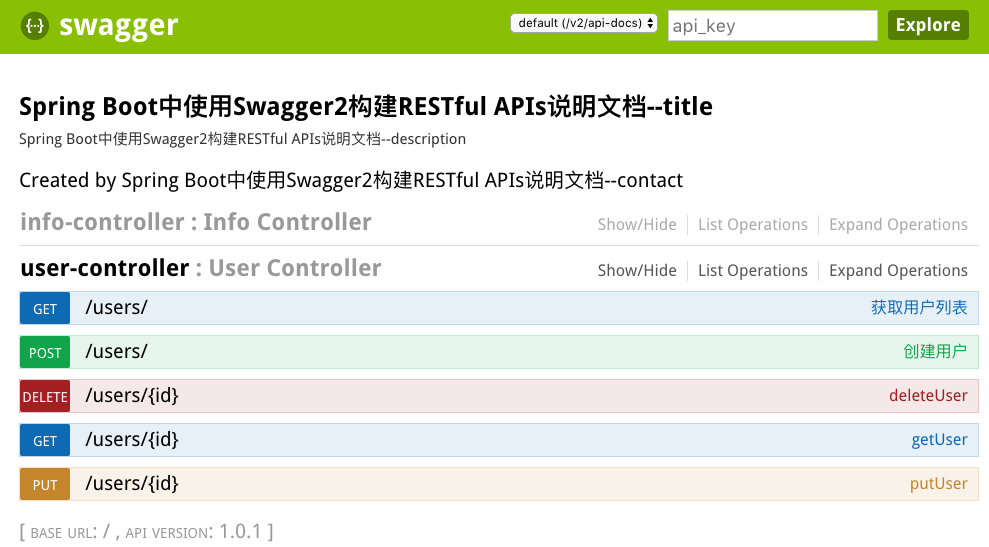
+
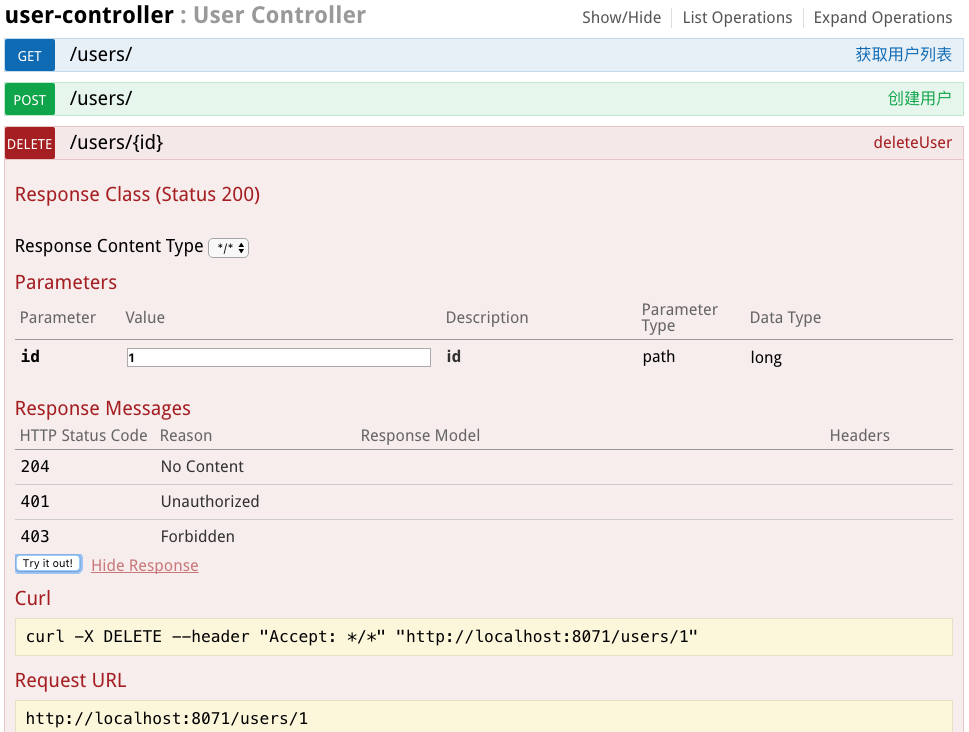
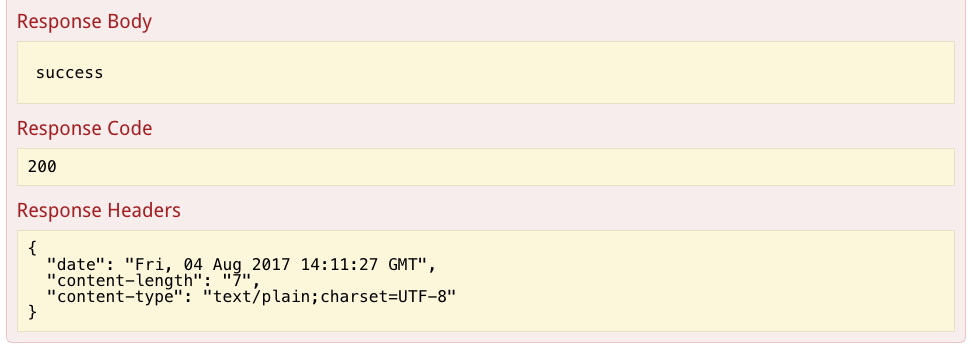
end
Spring Boot 集成Swagger2生成RESTful API文档的更多相关文章
- Spring Boot 集成 Swagger 生成 RESTful API 文档
原文链接: Spring Boot 集成 Swagger 生成 RESTful API 文档 简介 Swagger 官网是这么描述它的:The Best APIs are Built with Swa ...
- springboot集成swagger2构建RESTful API文档
在开发过程中,有时候我们需要不停的测试接口,自测,或者交由测试测试接口,我们需要构建一个文档,都是单独写,太麻烦了,现在使用springboot集成swagger2来构建RESTful API文档,可 ...
- Spring Boot中使用Swagger2生成RESTful API文档(转)
效果如下图所示: 添加Swagger2依赖 在pom.xml中加入Swagger2的依赖 <!-- https://mvnrepository.com/artifact/io.springfox ...
- Spring Boot学习笔记 - 整合Swagger2自动生成RESTful API文档
1.添加Swagger2依赖 在pom.xml中加入Swagger2的依赖 <!--swagger2--> <dependency> <groupId>io.spr ...
- Spring Boot 入门系列(二十二)使用Swagger2构建 RESTful API文档
前面介绍了如何Spring Boot 快速打造Restful API 接口,也介绍了如何优雅的实现 Api 版本控制,不清楚的可以看我之前的文章:https://www.cnblogs.com/zha ...
- Spring Boot中使用Swagger2构建RESTful API文档
在开发rest api的时候,为了减少与其他团队平时开发期间的频繁沟通成本,传统做法我们会创建一份RESTful API文档来记录所有接口细节,然而这样的做法有以下几个问题: 1.由于接口众多,并且细 ...
- Golang使用swaggo自动生成Restful API文档
#关于Swaggo 相信很多程序猿和我一样不喜欢写API文档.写代码多舒服,写文档不仅要花费大量的时间,有时候还不能做到面面具全.但API文档是必不可少的,相信其重要性就不用我说了,一份含糊的文档甚至 ...
- 如何生成RestFul Api文档
Web API文档工具列表Swagger ——Swagger框架可以通过代码生成漂亮的在线API,甚至可以提供运行示例.支持Scala.Java.Javascript.Ruby.PHP甚至 Actio ...
- Api2Doc生成 Restful API 文档
1,引入maven <dependency> <groupId>com.github.terran4j</groupId> <artifactId>te ...
随机推荐
- tornado解析 第一篇
一.tornado介绍 Tornado 是 FriendFeed 使用的可扩展的非阻塞式 web 服务器及其相关工具的开源版本.这个 Web 框架看起来有些像web.py 或者 Google 的 we ...
- INSPIRED启示录 读书笔记 - 第3章 产品管理与项目管理
互联网让两者变得不同 在传统的零售软件领域,产品经理常常兼任项目经理的工作,随着互联网的发展,两者的职责区别也越来越明显 产品管理的职责是探索(定义)有价值的.可用的.可行的产品 项目管理的职责是关注 ...
- Kubernetes addon-manager
Addon-manager 附加组件管理器(Addon-manager)是运行在 Kubernetes 集群 Master 节点.用来管理附加组件(Addons)的服务.它管理着 $ADDON_PAT ...
- Eclipse Task的使用
参考链接:http://blog.csdn.net/limb99/article/details/8881891; http://hi.baidu.com/jinxv1987/item/64496f6 ...
- 常用java开发工具快捷键
在这里列举一些开发中常用的快捷键 常用的idea的快捷键: 1.删除当前行:Ctrl+X 2.格式化代码:Ctrl+Alt+L 3.查看本页里面的内容:Ctrl+F 4.查看类的继承方式:Ctrl+H ...
- 【P2422】良好的感觉(单调栈优化DP//奇怪的暴力)
话说正解是单调栈优化DP,然而貌似根据某种玄学的推算,这个题暴力出解貌似也是可以的.首先,我们枚举所有的点作为最小点,然后横向展开,遇到更小的就停止...然后再操作一下,看上去时间O(N^2),然而由 ...
- http 常见的错误码
翻译自:https://www.w3.org/Protocols/rfc2616/rfc2616-sec10.html 常见错误码 一.信息 1XX (Information 1xx) ——这一类的状 ...
- hdu 5663 Hillan and the girl 莫比乌斯反演
Hillan and the girl Time Limit: 12000/6000 MS (Java/Others) Memory Limit: 524288/524288 K (Java/O ...
- js的介绍
需要了解的 如果没有宽带产业的发展,即便是发送JSON这种轻量级数据所带来的延时成本也是不可想象的. 如果没有ECMA-262这份标准文档,各大浏览器在客户端的表现完全不一致,我们就没有办法对Web应 ...
- 将datagridview数据保为xml或txt文件
using System.IOpublic void SaveFile() { //实例化一个保存文件对话框 SaveFileDialog s ...