
Identity – Introduction & Scaffold
主要参考:
Introduction to Identity on ASP.NET Core
Start by command
dotnet new webapp --auth Individual -uld -o WebApp1
new webapp 是做一个 razor page
--auth Individual 表示要包含 Identity Framework (简称 Identity)
-uld 是 use local database (本地数据库, 默认是用 SQLite)
-o WebApp1 是 output 项目名字
运行上面 command 后, 所有代码就写好了. 它是搭配 EF Core 的. 所以接下来通过 EF Migration 创建数据库.
dotnet ef database update
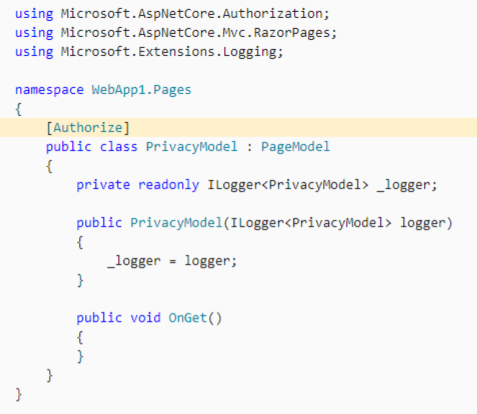
在 privacy 页面放上 [Authorize] 标签就可以跑了.
Scaffold Identity
参考: Scaffold Identity in ASP.NET Core projects
之所以几行 command 就可以跑起来, 那是因为 ASP.NET Core 对 Identity 做了一个封装, 这个封装还包括了 View (这个技术叫 Razor Class Library 简称 RCL)
我们来从一个 Web App 没有 authen 的做起.
先装好 global 工具
dotnet tool install -g dotnet-aspnet-codegenerator
// 做一个新项目, 没有 authentication 的

dotnet new webapp -o ScaffoldIdentity

// 进入项目 folder

cd ScaffoldIdentity

// 装 package

dotnet add package Microsoft.VisualStudio.Web.CodeGeneration.Design

dotnet add package Microsoft.EntityFrameworkCore.Design

dotnet add package Microsoft.AspNetCore.Identity.EntityFrameworkCore

dotnet add package Microsoft.AspNetCore.Identity.UI

dotnet add package Microsoft.EntityFrameworkCore.SqlServer

dotnet add package Microsoft.EntityFrameworkCore.Tools

// generate Identity code template

dotnet aspnet-codegenerator Identity --useDefaultUI

// 做数据库

dotnet ef migrations add CreateIdentitySchema

dotnet ef database update
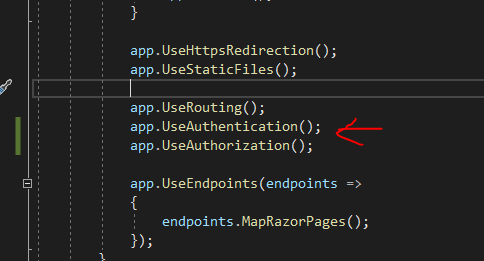
跑完上面的 command 后, 在 startup 添加 UseAuthentication
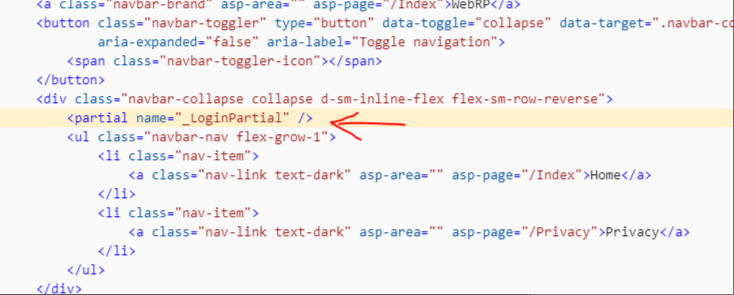
然后 layout view 添加 _LoginPartial, 就可以了.
当然这个只是演示让, 让我们知道它是怎样 work 的, 真实开发还是差很多的. 之后慢慢讲.
这里有几个 point 可以记入一下.
在 IdentityHostingStartup.cs 里面封装了 service 的调用, 所以我们在 startup 看不到,
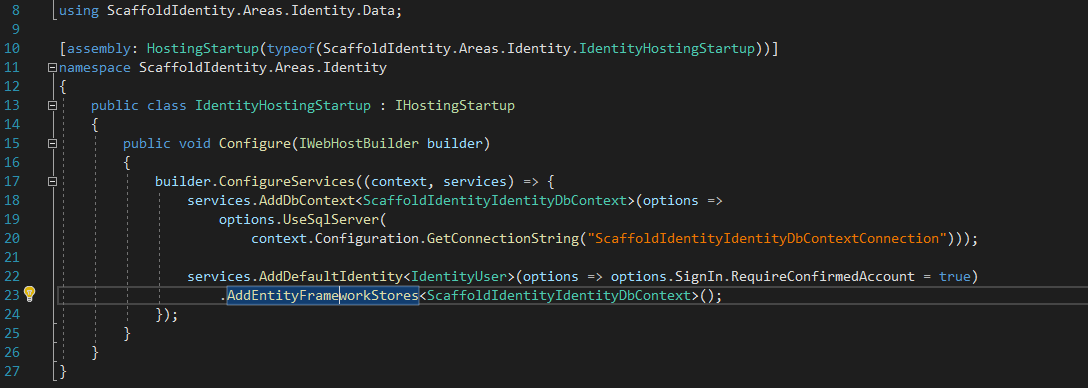
然后所有的 view 都是看不见 source code 的.
除非在我们声明时加入 --files (把指定要的 file 调出来) 或者拿掉 --useDefaultUI 那么所有的 source code 才会显示出来 (这正是我们需要的, 不然怎么魔改呢?)

Identity Overview
既然 Scaffold 帮我们搞了这么多代码, 那我们一个一个来看看 Identity 的代码是如何工作的。要魔改自然要先摸清楚它底细.
首先是 Entity
public class ScaffoldIdentityIdentityDbContext : IdentityDbContext<IdentityUser>

{

    public ScaffoldIdentityIdentityDbContext(DbContextOptions<ScaffoldIdentityIdentityDbContext> options)

        : base(options)

    {

    }

    protected override void OnModelCreating(ModelBuilder builder)

    {

        base.OnModelCreating(builder);

    }

}
把平常的 DbContext 继承了 IdentityDbContext
Identity 封装了许多的 Entity, 比如 IdentityUser, IdentityRole, IdentityLogin 等等, 有了这些, 数据库就搞定了.
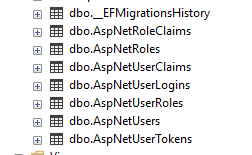
AspNetUsers = user table
AspNetUserClaims = user 的 claims
AspNetUserLogins = user 的 external logins
AspNetRoles = role table
AspNetRoleClaims = role 的 claims
AspNetUserRoles = user 和 role 的关系
AspNetUserTokens = 暂时不清楚
Role 和 Claims 都是用来做 autho 的, 之后会讲到
接下来就是 Startup 的 service provide
services.AddDefaultIdentity<IdentityUser>(options => options.SignIn.RequireConfirmedAccount = true)

    .AddEntityFrameworkStores<ScaffoldIdentityIdentityDbContext>();
源码在这里
2 年前我超讨厌看 .NET 源码, 东一个西一个, 幸好现在全部放一起了.
这些源码最好都稍微看一下,因为大部分情况我们是需要修改的.
AddDefaultIdentity
IdentityServiceCollectionUIExtensions.cs
services.AddAuthentication 是 ASP.NET Core authen 的 service 哦
AddIdentityCookies
IdentityCookiesBuilderExtensions.cs
里面负责了 cookie schemes 的代码
IdentityServiceCollectionExtensions.cs
负责UserManger 之类的
AddDefaultUI
IdentityBuilderUIExtensions.cs
负责 Ui 的咚咚, SignInManager 也在这里
AddDefaultTokenProviders
Email, Phone reset password 这些 token 的做法
还有一个 AddIdentity
IdentityServiceCollectionExtensions.cs
这个是以前还没有 AddDefaultIdentity 的时候的调用, 如果现在没有要 DefaultUI 也是会用回 AddIdentity + AddDefaultTokenProviders

注: AddDefaultUI 会有 Error Page 哦, 可能破坏 router, 除非你真的要, 不然建议不适用它.
整个过程就是, 你要什么就拿什么来用, 或拿来改就是了, 最重要的是全部过一遍, 知道它都搞了些什么.
Identity – Introduction & Scaffold的更多相关文章
- 000.Introduction to ASP.NET Core--【Asp.net core 介绍】
Introduction to ASP.NET Core Asp.net core 介绍 270 of 282 people found this helpful By Daniel Roth, Ri ...
- Discrete.Differential.Geometry-An.Applied.Introduction(sig2013) 笔记
The author has a course on web: http://brickisland.net/DDGSpring2016/ It has more reading assignment ...
- A.Kaw矩阵代数初步学习笔记 1. Introduction
“矩阵代数初步”(Introduction to MATRIX ALGEBRA)课程由Prof. A.K.Kaw(University of South Florida)设计并讲授. PDF格式学习笔 ...
- Security » Authentication » Identity介绍
Introduction to Identity¶ By Pranav Rastogi, Rick Anderson, Tom Dykstra, Jon Galloway and Erik Reita ...
- [转]DCM Tutorial – An Introduction to Orientation Kinematics
原地址http://www.starlino.com/dcm_tutorial.html Introduction This article is a continuation of my IMU G ...
- TIJ——Chapter One:Introduction to Objects
///:~容我对这个系列美其名曰"读书笔记",其实shi在练习英文哈:-) Introduction to Objects Object-oriented programming( ...
- Core Java Volume I — 4.1. Introduction to Object-Oriented Programming
4.1. Introduction to Object-Oriented ProgrammingObject-oriented programming, or OOP for short, is th ...
- Introduction to ASP.NET Web Programming Using the Razor Syntax (C#)
1, http://www.asp.net/web-pages/overview/getting-started/introducing-razor-syntax-c 2, Introduction ...
- Introduction to the POM
原文:https://maven.apache.org/guides/introduction/introduction-to-the-pom.html Introduction to the POM ...
- asp.net core系列 46 Identity介绍
一. Identity 介绍 ASP.NET Core Identity是一个会员系统,可为ASP.NET Core应用程序添加登录功能.可以使用SQL Server数据库配置身份以存储用户名,密码和 ...
随机推荐
- card 卡片 html
{% extends 'base.html' %} {% block content %} <div class="container"> <h1>客户信息 ...
- [oeasy]python0090_极客起源_wozniac_苹果公司_Jobs_Wozniac
极客起源 回忆上次内容 上次回顾了 DEC公司的兴起 从IBM的大型机 到DEC的小型机Mini Computer 再到DEC的终端 VT-100 计算机基础元器件发生了进化 从ENIAC的 电子管 ...
- AT_agc022_a 题解
洛谷链接&Atcoder 链接 本篇题解为此题较简单做法及较少码量,并且码风优良,请放心阅读. 题目简述 给定字符串 \(S\) , 仅包含互不相同的小写字母, 你需要找到仅包含互不相同的小写 ...
- BTC 地址
比特币地址(Bitcoin Address)是用于接收和发送比特币的唯一标识符,类似于传统金融系统中的银行账号.一个比特币地址由一串字母和数字组成,通常以1.3或bc1开头,具体长度为26至35个字符 ...
- mysql面试汇总
最近一直在关注mysql方面的面试题目,并且从最近的面试情况来看,mysql在java后端的面试中,肯定是必问的题目,所以这里有必要对这块的内容进行总结,大家可以根据下面的导图进行重点复习, 引擎 1 ...
- Jmeter函数助手34-digest
digest函数用于返回特定哈希算法的加密值. 算法摘要:填入算法,如MD2.MD5.SHA-1.SHA-224.SHA-256.SHA-384.SHA-512 String to be hashed ...
- 测试工程师-bug的组成要素
bug的组成要素:所属产品.所属模块.版本.指派开发.bug标题.严重程度.优先级.bug类型.重现步骤.附件等: 1. 所属产品.所属模块.版本.指派开发 根据相应的项目正确填写 2.bug标题 简 ...
- 对比python学julia(第四章:人工智能)--(第一节)OpenCV编程初步(3)
1.4. 人脸检测 (续上) 3.检测视频中的人脸 在VSCode环境中,新建一个空白源文件,以detect_video.jl作为文件名保存到项目文件夹中,然后编写程序检测视频流中的人脸(正脸).由 ...
- 1、SpringMVC简介
1.1.MVC 概述 MVC:是一种软件架构的思想,将软件按照模型.视图.控制器来划分: M( Model ):模型层,指工程中的 JavaBean ,作用是处理数据: V( View ):视图层,指 ...
- 【Vue】01 基础语法
Hello Vue的演示案例: <!DOCTYPE html> <html lang="en" xmlns:v-bind="http://www.w3. ...