
【驱动】串口驱动分析(二)-tty core
前言
tty这个名称源于电传打字节的简称,在linux表示各种终端,终端通常都跟硬件相对应。比如对应于输入设备键盘鼠标,输出设备显示器的控制终端和串口终端。也有对应于不存在设备的pty驱动。在如此众多的终端模型之中,linux是怎么将它们统一建模的呢?这就是我们今天要讨论的问题。
tty驱动概貌
tty架构如下所示:
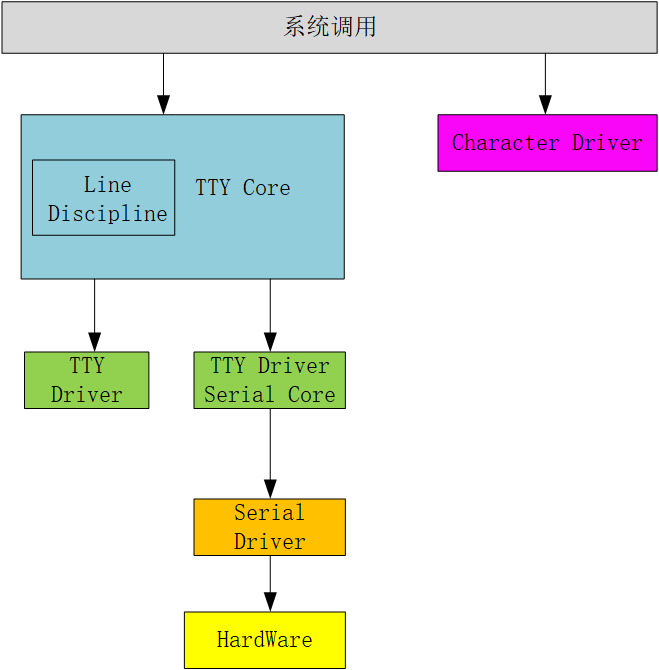
如上图所示,用户空间主要是通过系统调用与tty core交互。tty core根据用空间操作的类型再选择跟line discipline和tty driver交互。
例如,设置硬件的ioctl指令就直接交给tty_driver处理。read和write操作就会交给 line discipline处理。
Line discipline是线路规程的意思。正如它的名字一样,它表示的是这条终端”线程”的输入与输出规范设置。主要用来进行输入/输出数据的预处理。
处理之后,就会将数据交给tty driver ,它将字符转换成终端可以理解的字串。将其传给终端设备。
值得注意的是,这个架构没有为tty driver 提供read操作。也就是说tty core 和line discipline都没有办法从tty driver里直接读终端信息。这是因为tty driver对应的hardware并不一定是输入数据和输出 数据的共同负载者。
例如控制终端,输出设备是显示器,输入设备是键盘。基于这样的原理。在line discipline中有一个输入缓存区,并提供了一个名叫receive_buf()的接口函数。对应的终端设备只要调用line discipine的receiver_buf函数,将数据写入到输入缓存区就可以了。如果一个设备同时是输入设备又是输出设备。那在设备的中断处理中调用receive_buf()将数据写入即可.
tty驱动接口分析
tty_init()
/*

 * Ok, now we can initialize the rest of the tty devices and can count

 * on memory allocations, interrupts etc..

 */

int __init tty_init(void)

{

	tty_sysctl_init();

	cdev_init(&tty_cdev, &tty_fops);

	if (cdev_add(&tty_cdev, MKDEV(TTYAUX_MAJOR, 0), 1) ||

	    register_chrdev_region(MKDEV(TTYAUX_MAJOR, 0), 1, "/dev/tty") < 0)

		panic("Couldn't register /dev/tty driver\n");

	device_create(tty_class, NULL, MKDEV(TTYAUX_MAJOR, 0), NULL, "tty");

	cdev_init(&console_cdev, &console_fops);

	if (cdev_add(&console_cdev, MKDEV(TTYAUX_MAJOR, 1), 1) ||

	    register_chrdev_region(MKDEV(TTYAUX_MAJOR, 1), 1, "/dev/console") < 0)

		panic("Couldn't register /dev/console driver\n");

	consdev = device_create_with_groups(tty_class, NULL,

					    MKDEV(TTYAUX_MAJOR, 1), NULL,

					    cons_dev_groups, "console");

	if (IS_ERR(consdev))

		consdev = NULL;

#ifdef CONFIG_VT

	vty_init(&console_fops);

#endif

	return 0;

}
tty_init主要做了以下工作:
- 初始化 tty 子系统的 sysctl 相关设置,包括注册 sysctl 参数、创建 sysctl 目录等。
- 初始化 tty 设备的字符设备对象,并将其与 tty 设备操作函数
tty_fops绑定。同时,创建一个名为 "tty" 的 tty 设备节点,并将其设备号设置为MKDEV(TTYAUX_MAJOR, 0)。 - 初始化控制台设备的字符设备对象,并将其添加到字符设备系统中。同时,创建一个名为 "console" 的控制台设备节点,并将其设备号设置为
MKDEV(TTYAUX_MAJOR, 1)。该控制台设备节点还将在 sysfs 中创建一个名为 "console" 的目录,并在该目录下创建多个属性文件,用于控制控制台的一些属性。 - 如果内核支持虚拟终端,则初始化虚拟终端。
这里我们看到了熟悉的
cdev_init(),device_create()之类的函数,这正是字符设备的创建流程。因此,我们说串口驱动也是一个字符设备驱动。而在
serial8250_init()中,会调用platform_driver_register()去注册serial8250_isa_driver,在设备树节点和serial8250_isa_drivername匹配的时候,就会进入probe流程。因此,也可以说串口驱动是总线设备驱动模型。
tty_alloc_driver
/* Use TTY_DRIVER_* flags below */

#define tty_alloc_driver(lines, flags) \

		__tty_alloc_driver(lines, THIS_MODULE, flags)
__tty_alloc_driver()用于分配一个 tty 驱动程序的数据结构 struct tty_driver,并对其一些常用字段进行初始化。
/**

 * __tty_alloc_driver -- allocate tty driver

 * @lines: count of lines this driver can handle at most

 * @owner: module which is repsonsible for this driver

 * @flags: some of TTY_DRIVER_* flags, will be set in driver->flags

 *

 * This should not be called directly, some of the provided macros should be

 * used instead. Use IS_ERR and friends on @retval.

 */

struct tty_driver *__tty_alloc_driver(unsigned int lines, struct module *owner,

		unsigned long flags)

{

	struct tty_driver *driver;

	unsigned int cdevs = 1;

	int err;

	if (!lines || (flags & TTY_DRIVER_UNNUMBERED_NODE && lines > 1))

		return ERR_PTR(-EINVAL);

    /*分配一个 struct tty_driver 结构体,并对其中的一些字段进行初始化,包括 num、owner、flags 等*/

	driver = kzalloc(sizeof(struct tty_driver), GFP_KERNEL);

	if (!driver)

		return ERR_PTR(-ENOMEM);

	kref_init(&driver->kref);

	driver->magic = TTY_DRIVER_MAGIC;

	driver->num = lines;

	driver->owner = owner;

	driver->flags = flags;

	/*如果 TTY_DRIVER_DEVPTS_MEM 标志位没有被设置,那么函数会分配 driver->ttys 和 driver->termios,否则不需要分配*/

	if (!(flags & TTY_DRIVER_DEVPTS_MEM)) {

		driver->ttys = kcalloc(lines, sizeof(*driver->ttys),

				GFP_KERNEL);

		driver->termios = kcalloc(lines, sizeof(*driver->termios),

				GFP_KERNEL);

		if (!driver->ttys || !driver->termios) {

			err = -ENOMEM;

			goto err_free_all;

		}

	}

    /*如果 TTY_DRIVER_DYNAMIC_ALLOC 标志位没有被设置,那么函数会分配 driver->ports,否则不需要分配*/

	if (!(flags & TTY_DRIVER_DYNAMIC_ALLOC)) {

		driver->ports = kcalloc(lines, sizeof(*driver->ports),

				GFP_KERNEL);

		if (!driver->ports) {

			err = -ENOMEM;

			goto err_free_all;

		}

		cdevs = lines;

	}

	/*函数会根据 lines 的值分配相应数量的 driver->cdevs*/

	driver->cdevs = kcalloc(cdevs, sizeof(*driver->cdevs), GFP_KERNEL);

	if (!driver->cdevs) {

		err = -ENOMEM;

		goto err_free_all;

	}

	return driver;

err_free_all:

	kfree(driver->ports);

	kfree(driver->ttys);

	kfree(driver->termios);

	kfree(driver->cdevs);

	kfree(driver);

	return ERR_PTR(err);

}
tty_register_driver
tty_register_driver用于注册 tty 驱动程序的,被 tty 驱动程序调用以将自己注册到内核中。
/*

 * Called by a tty driver to register itself.

 */

int tty_register_driver(struct tty_driver *driver)

{

	int error;

	int i;

	dev_t dev;

	struct device *d;

	/*确认是否要内核动态分配主设备号*/

	if (!driver->major) {

        /*函数调用 alloc_chrdev_region 函数来动态分配主设备号,并将分配的主设备号和次设备号保存在 driver->major 和 driver->minor_start 字段中*/

		error = alloc_chrdev_region(&dev, driver->minor_start,

						driver->num, driver->name);

		if (!error) {

			driver->major = MAJOR(dev);

			driver->minor_start = MINOR(dev);

		}

	} else {

        /*已经预先分配了主设备号,函数调用 register_chrdev_region 函数来注册设备号*/

		dev = MKDEV(driver->major, driver->minor_start);

		error = register_chrdev_region(dev, driver->num, driver->name);

	}

	if (error < 0)

		goto err;

	/*判断是否设置了 TTY_DRIVER_DYNAMIC_ALLOC 标志位*/

	if (driver->flags & TTY_DRIVER_DYNAMIC_ALLOC) {

        /*需要动态分配 tty 设备号,函数调用 tty_cdev_add 函数来添加 tty 设备号,并将每个 tty 设备的字符设备注册到内核中*/

		error = tty_cdev_add(driver, dev, 0, driver->num);

		if (error)

			goto err_unreg_char;

	}

	mutex_lock(&tty_mutex);

    /*将 driver 添加到链表 tty_drivers 中*/

	list_add(&driver->tty_drivers, &tty_drivers);

	mutex_unlock(&tty_mutex);

	/*判断 TTY_DRIVER_DYNAMIC_DEV 标志位是否设置*/

	if (!(driver->flags & TTY_DRIVER_DYNAMIC_DEV)) {

		for (i = 0; i < driver->num; i++) {

            /*需要注册固定的 tty 设备号,函数在循环中调用 tty_register_device 函数来注册每个 tty 设备号,并将每个 tty 设备注册到内核中*/

			d = tty_register_device(driver, i, NULL);

			if (IS_ERR(d)) {

				error = PTR_ERR(d);

				goto err_unreg_devs;

			}

		}

	}

    /*注册 /proc/tty/drivers 目录中的信息*/

	proc_tty_register_driver(driver);

    /*将 driver 结构体中的 flags 字段设置为 TTY_DRIVER_INSTALLED,表示该驱动程序已经被成功注册到内核中*/

	driver->flags |= TTY_DRIVER_INSTALLED;

	return 0;

err_unreg_devs:

	for (i--; i >= 0; i--)

		tty_unregister_device(driver, i);

	mutex_lock(&tty_mutex);

	list_del(&driver->tty_drivers);

	mutex_unlock(&tty_mutex);

err_unreg_char:

	unregister_chrdev_region(dev, driver->num);

err:

	return error;

}
tty_register_driver()函数操作比较简单。就是为tty_driver创建字符设备。然后将字符设备的操作集指定为tty_fops。并且将tty_driver 挂载到tty_drivers链表中。这个链表中是以设备号为关键字找到对应的driver。
特别的。如果没有定义TTY_DRIVER_DYNAMIC_DEV。还会在sysfs中创建一个类设备。这样主要是为了udev管理设备。
tty_unregister_device
tty_unregister_device用于注销一个 tty 设备。该函数的作用是销毁设备节点和字符设备,以便于释放与该 tty 设备相关的资源,例如内存和设备文件等.
/**

 * 	tty_unregister_device - unregister a tty device

 * 	@driver: the tty driver that describes the tty device

 * 	@index: the index in the tty driver for this tty device

 *

 * 	If a tty device is registered with a call to tty_register_device() then

 *	this function must be called when the tty device is gone.

 *

 *	Locking: ??

 */

void tty_unregister_device(struct tty_driver *driver, unsigned index)

{

	device_destroy(tty_class,

		MKDEV(driver->major, driver->minor_start) + index);

	if (!(driver->flags & TTY_DRIVER_DYNAMIC_ALLOC)) {

		cdev_del(driver->cdevs[index]);

		driver->cdevs[index] = NULL;

	}

}
tty_unregister_device所做工作如下:
- 调用
device_destroy函数来销毁 tty 设备对应的设备节点。接受两个参数:第一个参数tty_class表示 tty 类,第二个参数是 tty 设备的设备号,其中MKDEV(driver->major, driver->minor_start) + index表示 tty 设备的设备号,driver->major表示 tty 设备的主设备号,driver->minor_start表示 tty 设备的次设备号的起始值,index表示 tty 设备的索引 - 如果该 tty 驱动程序不是动态分配的,则调用
cdev_del函数来注销该 tty 设备对应的字符设备。
get_tty_driver
get_tty_driver作用是在用户空间的应用程序使用 tty 设备时,获取对应的 tty 驱动程序的信息。
/**

 *	get_tty_driver		-	find device of a tty

 *	@dev_t: device identifier

 *	@index: returns the index of the tty

 *

 *	This routine returns a tty driver structure, given a device number

 *	and also passes back the index number.

 *

 *	Locking: caller must hold tty_mutex

 */

static struct tty_driver *get_tty_driver(dev_t device, int *index)

{

	struct tty_driver *p;

    /**/

	list_for_each_entry(p, &tty_drivers, tty_drivers) {

		dev_t base = MKDEV(p->major, p->minor_start);

		if (device < base || device >= base + p->num)

			continue;

		*index = device - base;

		return tty_driver_kref_get(p);

	}

	return NULL;

}
首先使用 list_for_each_entry 循环遍历全局链表 tty_drivers,该链表中保存了所有已经注册的 tty 驱动程序。对于每个 tty 驱动程序,函数将其设备号的起始值和结束值计算出来,如果给定设备号不在这个范围内,则继续遍历下一个 tty 驱动程序。
如果给定设备号在某个 tty 驱动程序的范围内,则计算出该设备号对应的 tty 设备的索引值,并调用 tty_driver_kref_get 函数来获取该 tty 驱动程序的引用计数。函数返回该 tty 驱动程序的结构体指针,并将找到的 tty 设备的索引值保存到 index 参数中。
需要注意的是,函数在访问全局链表 tty_drivers 时,需要持有互斥锁 tty_mutex。因为多个应用程序可能同时访问同一个 tty 驱动程序,如果没有互斥锁保护,可能会导致并发问题。
tty_open
从注册的过程可以看到,所有的操作都会对应到tty_fops中。Open操作对应的操作接口是tty_open(),用于打开一个 tty 设备。函数的作用是在用户空间的应用程序使用 tty 设备时,打开对应的 tty 设备,并初始化相应的数据结构。
/**
* tty_open - open a tty device
* @inode: inode of device file
* @filp: file pointer to tty
*
* tty_open and tty_release keep up the tty count that contains the
* number of opens done on a tty. We cannot use the inode-count, as
* different inodes might point to the same tty.
*
* Open-counting is needed for pty masters, as well as for keeping
* track of serial lines: DTR is dropped when the last close happens.
* (This is not done solely through tty->count, now. - Ted 1/27/92)
*
* The termios state of a pty is reset on first open so that
* settings don't persist across reuse.
*
* Locking: tty_mutex protects tty, tty_lookup_driver and tty_init_dev.
* tty->count should protect the rest.
* ->siglock protects ->signal/->sighand
*
* Note: the tty_unlock/lock cases without a ref are only safe due to
* tty_mutex
*/
static int tty_open(struct inode *inode, struct file *filp)
{
struct tty_struct *tty;
int noctty, retval;
struct tty_driver *driver = NULL;
int index;
dev_t device = inode->i_rdev;
unsigned saved_flags = filp->f_flags;
nonseekable_open(inode, filp);
retry_open:
/*分配一个 tty 结构体*/
retval = tty_alloc_file(filp);
if (retval)
return -ENOMEM;
/*检查文件的标志位,如果包含 O_NOCTTY 标志,则禁止将该 tty 设备设置为控制终端*/
noctty = filp->f_flags & O_NOCTTY;
index = -1;
retval = 0;
/*尝试打开当前的 tty 设备*/
tty = tty_open_current_tty(device, filp);
if (!tty) {
mutex_lock(&tty_mutex);
/*根据设备号来查找对应的 tty 驱动程序,并初始化该 tty 设备,将找到的 tty 驱动程序保存到 driver 变量中*/
driver = tty_lookup_driver(device, filp, &noctty, &index);
if (IS_ERR(driver)) {
retval = PTR_ERR(driver);
goto err_unlock;
}
/* check whether we're reopening an existing tty */
/*查找对应的 tty 设备,并将找到的 tty 设备结构体指针保存到 tty 变量中*/
tty = tty_driver_lookup_tty(driver, inode, index);
if (IS_ERR(tty)) {
retval = PTR_ERR(tty);
goto err_unlock;
}
if (tty) {
/*如果找到了该 tty 设备,则需要重新打开该 tty 设备*/
mutex_unlock(&tty_mutex);
retval = tty_lock_interruptible(tty);
tty_kref_put(tty); /* drop kref from tty_driver_lookup_tty() */
if (retval) {
if (retval == -EINTR)
retval = -ERESTARTSYS;
goto err_unref;
}
retval = tty_reopen(tty);
if (retval < 0) {
tty_unlock(tty);
tty = ERR_PTR(retval);
}
} else { /* Returns with the tty_lock held for now */
/*需要初始化该 tty 设备*/
tty = tty_init_dev(driver, index);
/*为该 tty 设备分配一个 tty 结构体,并对其进行初始化*/
mutex_unlock(&tty_mutex);
}
tty_driver_kref_put(driver);
}
if (IS_ERR(tty)) {
retval = PTR_ERR(tty);
if (retval != -EAGAIN || signal_pending(current))
goto err_file;
tty_free_file(filp);
schedule();
goto retry_open;
}
/*将该 tty 设备与文件结构体相关联*/
tty_add_file(tty, filp);
check_tty_count(tty, __func__);
/*如果该 tty 设备是一个伪终端主设备,则需要将 noctty 标志设置为 1*/
if (tty->driver->type == TTY_DRIVER_TYPE_PTY &&
tty->driver->subtype == PTY_TYPE_MASTER)
noctty = 1;
tty_debug_hangup(tty, "(tty count=%d)\n", tty->count);
/*调用 tty 设备的 open 函数*/
if (tty->ops->open)
retval = tty->ops->open(tty, filp);
else
retval = -ENODEV;
filp->f_flags = saved_flags;
if (retval) {
tty_debug_hangup(tty, "error %d, releasing...\n", retval);
tty_unlock(tty); /* need to call tty_release without BTM */
tty_release(inode, filp);
if (retval != -ERESTARTSYS)
return retval;
if (signal_pending(current))
return retval;
schedule();
/*
* Need to reset f_op in case a hangup happened.
*/
if (tty_hung_up_p(filp))
filp->f_op = &tty_fops;
goto retry_open;
}
clear_bit(TTY_HUPPED, &tty->flags);
read_lock(&tasklist_lock);
spin_lock_irq(¤t->sighand->siglock);
if (!noctty &&
current->signal->leader &&
!current->signal->tty &&
tty->session == NULL) {
/*
* Don't let a process that only has write access to the tty
* obtain the privileges associated with having a tty as
* controlling terminal (being able to reopen it with full
* access through /dev/tty, being able to perform pushback).
* Many distributions set the group of all ttys to "tty" and
* grant write-only access to all terminals for setgid tty
* binaries, which should not imply full privileges on all ttys.
*
* This could theoretically break old code that performs open()
* on a write-only file descriptor. In that case, it might be
* necessary to also permit this if
* inode_permission(inode, MAY_READ) == 0.
*/
if (filp->f_mode & FMODE_READ)
__proc_set_tty(tty);
}
spin_unlock_irq(¤t->sighand->siglock);
read_unlock(&tasklist_lock);
tty_unlock(tty);
return 0;
err_unlock:
mutex_unlock(&tty_mutex);
err_unref:
/* after locks to avoid deadlock */
if (!IS_ERR_OR_NULL(driver))
tty_driver_kref_put(driver);
err_file:
tty_free_file(filp);
return retval;
}
函数所作工作如下:
在打开 tty 设备时,该函数会检查文件的标志位,如果包含
O_NOCTTY标志,则禁止将该 tty 设备设置为控制终端。这是因为如果一个进程打开一个 tty 设备并将其设置为控制终端,其他进程就无法再将该 tty 设备设置为控制终端,这可能会导致一些问题。如果打开当前的 tty 设备失败,则需要根据设备号来查找对应的 tty 驱动程序,并初始化该 tty 设备。在查找 tty 驱动程序时,需要调用
tty_lookup_driver函数来查找对应的 tty 驱动程序,并将找到的 tty 驱动程序保存到driver变量中。如果找不到对应的 tty 驱动程序,则返回错误码。如果找到了对应的 tty 驱动程序,则调用
tty_driver_lookup_tty函数来查找对应的 tty 设备,并将找到的 tty 设备结构体指针保存到tty变量中。如果找到了该 tty 设备,则需要重新打开该 tty 设备。否则,需要初始化该 tty 设备。在初始化 tty 设备时,需要调用tty_init_dev函数来为该 tty 设备分配一个 tty 结构体,并对其进行初始化。在打开 tty 设备之后,函数会调用
tty_add_file函数将该 tty 设备与文件结构体相关联。此外,如果该 tty 设备是一个伪终端主设备,则需要将noctty标志设置为 1。最后,函数会调用 tty 设备的
open函数,如果存在的话,来进行一些特定的操作。如果open函数返回错误码,则需要释放该 tty 设备并返回错误码。如果open函数返回-ERESTARTSYS,则需要重新打开该 tty 设备。如果有中断发生,也需要重新打开该 tty 设备。
tty_write
tty_write()作用是将用户数据写入 tty 设备,并通过线路规则(line discipline)进行处理。
线路规则是 tty 设备的一种机制,用于处理和转换从用户进程到内核和设备的数据流。在写入 tty 设备之前,需要获取该 tty 设备的线路规则,并调用其 write 方法进行处理。
/**

 *	tty_write		-	write method for tty device file

 *	@file: tty file pointer

 *	@buf: user data to write

 *	@count: bytes to write

 *	@ppos: unused

 *

 *	Write data to a tty device via the line discipline.

 *

 *	Locking:

 *		Locks the line discipline as required

 *		Writes to the tty driver are serialized by the atomic_write_lock

 *	and are then processed in chunks to the device. The line discipline

 *	write method will not be invoked in parallel for each device.

 */

static ssize_t tty_write(struct file *file, const char __user *buf,

						size_t count, loff_t *ppos)

{

	struct tty_struct *tty = file_tty(file);

 	struct tty_ldisc *ld;

	ssize_t ret;

	if (tty_paranoia_check(tty, file_inode(file), "tty_write"))

		return -EIO;

	if (!tty || !tty->ops->write ||

		(test_bit(TTY_IO_ERROR, &tty->flags)))

			return -EIO;

	/* Short term debug to catch buggy drivers */

	if (tty->ops->write_room == NULL)

		printk(KERN_ERR "tty driver %s lacks a write_room method.\n",

			tty->driver->name);

	ld = tty_ldisc_ref_wait(tty);

	if (!ld->ops->write)

		ret = -EIO;

	else

		ret = do_tty_write(ld->ops->write, tty, file, buf, count);

	tty_ldisc_deref(ld);

	return ret;

}
tty_write()所作工作如下:
- 首先从文件指针中获取
tty_struct数据结构的指针,表示要写入的 tty 设备。 - 检查传入的
tty_struct指针是否有效,以及是否有其他进程正在访问该 tty 设备。如果出现问题,返回输入/输出错误码-EIO。 - 检查
tty_struct指针是否有效、tty 设备是否支持写操作,以及是否已经出现了输入/输出错误。如果出现问题,返回输入/输出错误码-EIO。 - 检查 tty 设备是否实现了
write_room方法,如果没有,则输出错误信息。 - 获取 tty 设备的线路规则(line discipline),并等待获取成功。
- 检查线路规则的
write方法是否存在,如果不存在,返回输入/输出错误码-EIO。否则,调用do_tty_write函数,将数据写入 tty 设备。 - 释放线路规则引用计数器。
- 返回写入操作的结果,如果写入成功,则返回写入的字节数;否则,返回相应的错误码。
tty_read
/**

 *	tty_read	-	read method for tty device files

 *	@file: pointer to tty file

 *	@buf: user buffer

 *	@count: size of user buffer

 *	@ppos: unused

 *

 *	Perform the read system call function on this terminal device. Checks

 *	for hung up devices before calling the line discipline method.

 *

 *	Locking:

 *		Locks the line discipline internally while needed. Multiple

 *	read calls may be outstanding in parallel.

 */

static ssize_t tty_read(struct file *file, char __user *buf, size_t count,

			loff_t *ppos)

{

	int i;

	struct inode *inode = file_inode(file);

	struct tty_struct *tty = file_tty(file);

	struct tty_ldisc *ld;

	if (tty_paranoia_check(tty, inode, "tty_read"))

		return -EIO;

	if (!tty || (test_bit(TTY_IO_ERROR, &tty->flags)))

		return -EIO;

	/* We want to wait for the line discipline to sort out in this

	   situation */

	ld = tty_ldisc_ref_wait(tty);

	if (ld->ops->read)

		i = ld->ops->read(tty, file, buf, count);

	else

		i = -EIO;

	tty_ldisc_deref(ld);

	if (i > 0)

		tty_update_time(&inode->i_atime);

	return i;

}
tty_read()实现终端设备文件读操作的函数 。
- 获取
tty_struct结构体、inode和line discipline对象的指针。 - 调用
tty_paranoia_check()函数检查tty_struct结构体是否可用。如果检查失败,返回 -EIO。 - 检查
tty_struct结构体是否为空或者TTY_IO_ERROR标志位已经设置。如果是,则返回 -EIO。 - 获取
line discipline对象的引用,确保它不会在tty_read()函数执行期间被卸载。 - 检查
line discipline的read()方法是否可用。如果可用,则调用该方法进行读取操作,并将返回的字节数保存在变量 i 中。如果不可用,返回 -EIO。 - 释放
line discipline的引用。 - 如果读取操作成功,调用
tty_update_time()函数更新 inode 的访问时间。 - 返回读取的字节数。
小结
在这一节里,只对tty的构造做一个分析,具体的比如线路规程的内容我们了解知道就好,这里不做深入分析。
本文参考
https://blog.csdn.net/pan0755/article/details/51693178
https://blog.csdn.net/qq_43286311/article/details/117824804
https://www.jianshu.com/p/09e87a725ed4
https://blog.csdn.net/weixin_40407893/article/details/117956968
https://blog.csdn.net/pan0755/article/details/51693178
【驱动】串口驱动分析(二)-tty core的更多相关文章
- uboot驱动模型(DM)分析(二) (转)
上篇分析了两个关键宏U_BOOT_DRIVER及U_BOOT_DEVICES的作用,有了上篇的基础,本文将分析: 1.上篇中的uboot_list段中的信息如何被用起来? 2.uclass,uclas ...
- linux串口驱动分析——发送数据
一.应用程序中write函数到底层驱动历程 和前文提到的一样,首先先注册串口,使用uart_register_driver函数,依次分别为tty_register_driver,cdev_init函数 ...
- linux串口驱动分析
linux串口驱动分析 硬件资源及描写叙述 s3c2440A 通用异步接收器和发送器(UART)提供了三个独立的异步串行 I/O(SIO)port,每一个port都能够在中断模式或 DMA 模式下操作 ...
- linux的串口驱动分析
1.串口驱动中的数据结构 • UART驱动程序结构:struct uart_driver 驱动 • UART端口结构: struct uart_port 串口 • UART相关操作函数结构: st ...
- linux串口驱动分析——打开设备
串口驱动是由tty_driver架构实现的.一个应用程序中的函数要操作硬件,首先会经过tty,级级调用之后才会到达驱动之中.本文先介绍应用程序中打开设备的open函数的整个历程. 首先在串口初始化中会 ...
- linux 串口驱动(二)初始化 【转】
转自:http://blog.chinaunix.net/uid-27717694-id-3493611.html 8250串口的初始化: (1)定义uart_driver.uart_ops.uart ...
- linux串口驱动分析【转】
转自:http://blog.csdn.net/hanmengaidudu/article/details/11946591 硬件资源及描述 s3c2440A 通用异步接收器和发送器(UART)提供了 ...
- tiny4412 串口驱动分析八 --- log打印的几个阶段之内核启动阶段(printk tiny4412串口驱动的注册)
作者:彭东林 邮箱:pengdonglin137@163.com 开发板:tiny4412ADK+S700 4GB Flash 主机:Wind7 64位 虚拟机:Vmware+Ubuntu12_04 ...
- tiny4412 串口驱动分析七 --- log打印的几个阶段之内核启动阶段(earlyprintk)
作者:彭东林 邮箱:pengdonglin137@163.com 开发板:tiny4412ADK+S700 4GB Flash 主机:Wind7 64位 虚拟机:Vmware+Ubuntu12_04 ...
- tiny4412 串口驱动分析四 --- 修改默认的串口输出
作者:彭东林 邮箱:pengdonglin137@163.com 开发板:tiny4412ADK+S700 4GB Flash 主机:Wind7 64位 虚拟机:Vmware+Ubuntu12_04 ...
随机推荐
- C# 中关于 T 泛型【C# 基础】
〇.前言 C# 里面的泛型不仅可以使用泛型函数.泛型接口,也可以使用泛型类.泛型委托等等.在使用泛型的时候,它们会自行检测你传入参数的类型,因此它可以为我们省去大量的时间,不用一个个编写方法的重载.与 ...
- golang1.21新特性速览
经过了半年左右的开发,golang 1.21 在今天早上正式发布了. 这个版本中有不少重要的新特性和变更,尤其是在泛型相关的代码上. 因为有不少大变动,所以建议等第一个patch版本也就是1.21.1 ...
- 微服务集成seata完成分布式事务,解决数据不一致问题
细心的盆友可能已经发现了,我们的跨行转账并没有保证数据一致性,比如小明扣除了100,但是因为各种问题小红在添加100金额的时候遇到了异常,这个时候数据就出现不一致性 我们可以选择seata来进行分布式 ...
- GitHub Actions CI/CD 工作流实战
1. 什么是 GitHub Actions 与 workflow ? GitHub Actions 是 GitHub 提供的一种持续集成(CI)和持续部署(CD)的工具,用于自动化软件开发过程中的各种 ...
- Shell产出01|定时清日志脚本|Shell
需求:每天定时清理空间占有率为x%的文件系统,包括PAMS和PMTS #!/bin/bash : <<EOF @Time:2023/03/22 @Author:Chase 版本:定时任务实 ...
- SK 简化流行编程语言对 生成式AI 应用开发的支持
Semantic Kernel[1] 是一个将大型语言模型(LLM)与流行的编程语言相结合的SDK. Microsoft将Semantic Kernel(简称SK)称为轻量级SDK,支持AI LLM的 ...
- Record - Stirling Number / FK. & SK.
Part. 1 Stirling Number / FK. Def. 定义 \(\begin{bmatrix}n \\ m\end{bmatrix}\) 表示将 \(n\) 个元素分成 \(m\) 个 ...
- 在 Net7.0 环境下使用 RestSharp 发送 Http(FromBody和FromForm)请求
一.简介 最近,在做一个数据传输的服务,我在一个Worker Service里面需要访问 WebAPI 接口,并传输数据,也可以提交数据.由于第一次使用 RestSharp 发送请求,也遇到了很多问题 ...
- paramiko免密登陆
paramiko免密登陆 # -*- coding: utf-8 -*- import paramiko pkey='D:/pycharm_workspace/testpy/ssh_paramiko_ ...
- Vue2系列(lqz)——slot插槽 (内容分发)、2 transition过渡、3 生命周期、4 swiper学习、5 自定义组件的封装、6 自定义指令、7 过滤器
文章目录 1 slot插槽 (内容分发) 1.1 基本使用 1.2 插槽应用场景1 1.3 插槽应用场景2 1.4 具名插槽 2 transition过渡 3 生命周期 4 swiper学习 5 自定 ...