
搭建 spring boot + mybatis plus 项目框架并进行调试
本文为博主原创,未经允许不得转载:
1.创建一个spring boot的工程应用:
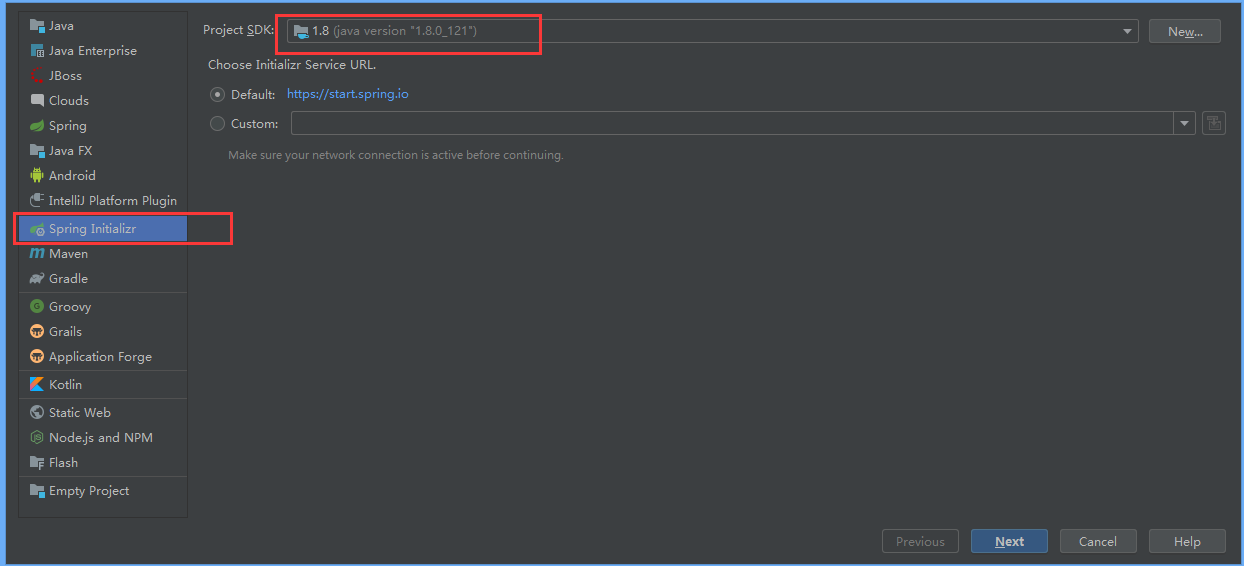
File ---- > New ----->Project ----> 然后选中Spring Initializr 继续创建:
2.添加spring boot ,mybatis plus 以及 mysql 相关的依赖:
 <dependencies>

        <!-- spring boot web启动 -->

        <dependency>

            <groupId>org.springframework.boot</groupId>

            <artifactId>spring-boot-starter-web</artifactId>

        </dependency>

        <dependency>

            <groupId>org.projectlombok</groupId>

            <artifactId>lombok</artifactId>

            <optional>true</optional>

        </dependency>

        <dependency>

            <groupId>org.springframework.boot</groupId>

            <artifactId>spring-boot-starter-test</artifactId>

            <scope>test</scope>

        </dependency>

        <!-- mysql 数据库连接 -->

        <dependency>

            <groupId>mysql</groupId>

            <artifactId>mysql-connector-java</artifactId>

            <scope>runtime</scope>

        </dependency>

        <!-- mybatis plus 代码生成器 -->

        <dependency>

            <groupId>com.baomidou</groupId>

            <artifactId>mybatis-plus-boot-starter</artifactId>

            <version>3.2.0</version>

        </dependency>

        <dependency>

            <groupId>com.alibaba</groupId>

            <artifactId>fastjson</artifactId>

            <version>1.2.47</version>

        </dependency>

        <!-- https://mvnrepository.com/artifact/javax.persistence/persistence-api -->

        <dependency>

            <groupId>javax.persistence</groupId>

            <artifactId>persistence-api</artifactId>

            <version>1.0</version>

        </dependency>

    </dependencies>
3. spring boot 的配置文件中配置项目启动名称,端口号,数据库连接等:
此处需要注意的是:spring boot 项目的配置文件是application.properties ,不是bootstrap.yml,bootstrap.yml是spring cloud 中定义解析配置文件的格式
server.port=8002

spring.datasource.driver-class-name=com.mysql.cj.jdbc.Driver

spring.datasource.url=jdbc:mysql://127.0.0.1:3306/test?autoReconnect=true&useUnicode=true&characterEncoding=utf8&useSSL=false&serverTimezone=UTC

spring.datasource.username=root

spring.datasource.password=root


# mybatis plus 调用打印 sql

mybatis-plus.configuration.log-impl=org.apache.ibatis.logging.stdout.StdOutImpl
并启动项目,查看启动日志,会打印spring 以及 mybatis plus 的banner 图案

4.创建用户表,定义表结构如下:
CREATE TABLE `user` (

  `id` bigint(20) NOT NULL COMMENT '主键ID',

  `name` varchar(30) DEFAULT NULL COMMENT '姓名',

  `age` int(11) DEFAULT NULL COMMENT '年龄',

  `email` varchar(50) DEFAULT NULL COMMENT '邮箱',

  PRIMARY KEY (`id`)

) ENGINE=InnoDB DEFAULT CHARSET=utf-8;
5. 业务代码:
5.1 创建实体类:
package com.example.demo.entity;

import lombok.Data;

import javax.persistence.Table;

@Data

@Table(name = "user")

public class User {

    private Long id;

    private String name;

    private int age;

    private String email;

}
5.2 创建 mapper,需要继承BaseMapper
mapper接口需要在项目启动时进行加载扫描,可以使用两种方式进行配置:
第一种可以使用 @Mapper注解,在每个mapper接口进行注解,第二种可以在启动类上使用 @MapperScan 注解,其中的值为mapper的包路径
其中@Repository 表示持久层
package com.example.demo.mapper;

import com.baomidou.mybatisplus.core.mapper.BaseMapper;

import com.example.demo.entity.User;

import org.apache.ibatis.annotations.Mapper;

import org.springframework.stereotype.Repository;

@Repository

//@Mapper

public interface UserMapper extends BaseMapper<User> {

}
5.3 创建service 接口,需要继承IService
package com.example.demo.service;

import com.baomidou.mybatisplus.extension.service.IService;

import com.example.demo.entity.User;

import java.util.List;

public interface UserService extends IService<User> {

    /**

     * query all

     * @return

     */

    List<User> queryAllUser();

}
5.4 实现service接口,需要继承 ServiceImpl
package com.example.demo.service.impl;

import com.baomidou.mybatisplus.extension.service.impl.ServiceImpl;

import com.example.demo.entity.User;

import com.example.demo.mapper.UserMapper;

import com.example.demo.service.UserService;

import org.springframework.beans.factory.annotation.Autowired;

import org.springframework.stereotype.Service;

import java.util.List;

@Service

public class UserServiceImpl extends ServiceImpl<UserMapper, User> implements UserService {

    @Autowired

    private UserMapper userMapper;

    @Override

    public List<User> queryAllUser() {

        return userMapper.selectList(null);

    }

}
5.5 创建controller
package com.example.demo.controller;

import com.example.demo.entity.User;

import com.example.demo.service.UserService;

import org.springframework.beans.factory.annotation.Autowired;

import org.springframework.web.bind.annotation.RequestMapping;

import org.springframework.web.bind.annotation.RestController;

import java.util.List;

@RestController

@RequestMapping("/user")

public class UserInfoController {

    @Autowired

    private UserService userService;

    @RequestMapping("/queryAllUser")

    public List<User> queryAllUser(){

        List<User> userList = userService.queryAllUser();

        return userList;

    }

}
6.测试类
测试类需要添加spring boot 的test依赖,其中已经依赖过了junit test 的依赖,不需要再进行单独添加。
package com.example.demo;

import com.alibaba.fastjson.JSON;

import com.baomidou.mybatisplus.core.conditions.query.QueryWrapper;

import com.example.demo.controller.UserInfoController;

import com.example.demo.entity.User;

import com.example.demo.mapper.UserMapper;

import com.example.demo.service.UserService;

import lombok.extern.slf4j.Slf4j;

import org.junit.jupiter.api.Test;

import org.springframework.beans.factory.annotation.Autowired;

import org.springframework.boot.test.context.SpringBootTest;

import java.util.List;

@Slf4j

@SpringBootTest

class DemoApplicationTests {

    @Autowired

    private UserMapper userMapper;

    @Autowired

    private UserService userService;

    @Autowired

    private UserInfoController userInfoController;

    @Test

    void test() {

        QueryWrapper<User> wrapper = new QueryWrapper<>();

        wrapper.eq("name", "2");

        User user = userMapper.selectOne(wrapper);

        log.info("userMapper.selectOne result is {}", JSON.toJSONString(user));

        int count = userService.count();

        System.out.println(count);

        log.info("userService.count() result is {}", count);

        List<User> userList = userInfoController.queryAllUser();

        log.info("userInfoController.queryAllUser() result is {}", JSON.toJSONString(userList));

    }

}
如果使用以上测试时,出现测试类中注入的bean一直为空时,可使用下面的方式:
@RunWith(SpringRunner.class)

@SpringBootTest(classes = GeneratorApp.class, webEnvironment = SpringBootTest.WebEnvironment.RANDOM_PORT)

public class UserTest {
   @Autowired

    private UserService userService;
}
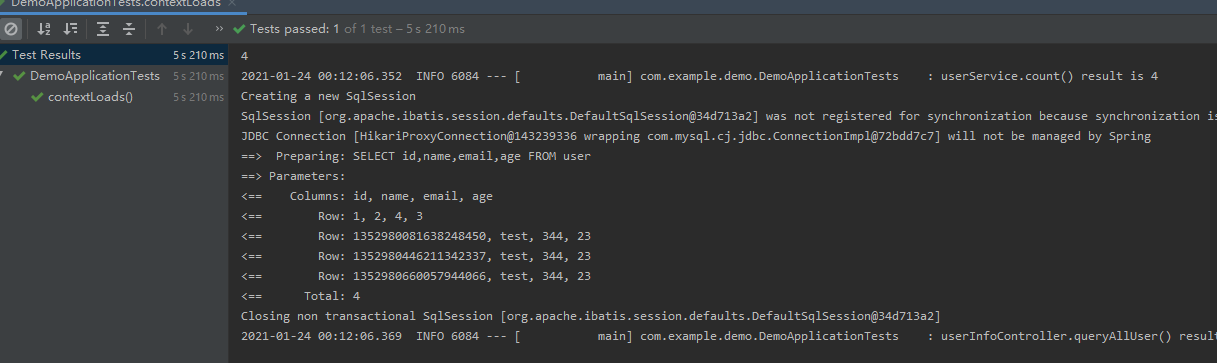
执行以上测试类截图:
7. 配置 mybatis plus 的分页
package com.example.demo.config;

import com.baomidou.mybatisplus.extension.plugins.PaginationInterceptor;

import org.springframework.context.annotation.Bean;

import org.springframework.context.annotation.Configuration;

@Configuration

public class MybatisPlusConfig {

    // 分页插件

    @Bean

    public PaginationInterceptor paginationInterceptor() {

        return new PaginationInterceptor();

    }

}
通过 junit 进行调试
 @Test

    void testPage() {

        Page<User> page = new Page<>(1, 5);

        IPage<User> paVo = userMapper.selectPage(page, null);

        log.info("------------------{}", JSON.toJSONString(paVo));

    }
mybatis plus 分页之后的格式如下:
{

    "current": 1,

    "orders": [],

    "pages": 1,

    "records": [{

        "age": 3,

        "email": "4",

        "id": 1,

        "name": "2"

    }, {

        "age": 23,

        "email": "344",

        "id": 1352980081638248450,

        "name": "test"

    }, {

        "age": 23,

        "email": "344",

        "id": 1352980446211342337,

        "name": "test"

    }, {

        "age": 23,

        "email": "344",

        "id": 1352980660057944066,

        "name": "test"

    }],

    "searchCount": true,

    "size": 5,

    "total": 4

}
搭建框架过程中遇到的坑:
1. spring boot start启动的依赖是 spring-boot-starter-web ,不是 spring-boot-starter
        <dependency>

            <groupId>org.springframework.boot</groupId>

            <artifactId>spring-boot-starter-web</artifactId>

        </dependency>
2. spring boot 默认解析的配置文件是 application.properties 文件,不是bootstrap.yaml , bootstrap.yaml 是spring cloud 中加载解析的配置文件格式
搭建 spring boot + mybatis plus 项目框架并进行调试的更多相关文章
- myEclipse 搭建 Spring boot+myBatis+maven 项目流程
1.新建一个工程 new-->maven project-->next-->next-->在filter中搜索webapp-->group id.Artifact id- ...
- spring boot+mybatis+quartz项目的搭建完整版
1. 利用spring boot提供的工具(http://start.spring.io/)自动生成一个标准的spring boot项目架构 2. 因为这里我们是搭建spring boot+mybat ...
- Maven 搭建spring boot多模块项目(附源码),亲测可以,感谢原创
原创地址:https://segmentfault.com/a/1190000005020589 我的DEMO码云地址,持续添加新功能: https://gitee.com/itbase/Spring ...
- Maven 搭建spring boot多模块项目
Maven 搭建spring boot多模块项目 备注:所有项目都在idea中创建 1.idea创建maven项目 1-1: 删除src,target目录,只保留pom.xml 1-2: 根目录pom ...
- spring Boot + MyBatis + Maven 项目,日志开启打印 sql
在 spring Boot + MyBatis + Maven 项目中,日志开启打印 sql 的最简单方法,就是在文件 application.properties 中新增: logging.leve ...
- idea搭建Spring Boot+Mybatis及使用教程
环境准备 idea 15 jDK tomcat maven 搭建方式 官网下载源码包解压缩 使用idea中的Spring initializr创建 这两种方法创建的项目完全相同,只是操作方式不一样 这 ...
- Maven搭建Spring+SpringMVC+Mybatis+Shiro项目详解
一. 环境搭建: 1. 开发工具:myeclipse 2014 / IDEA: 2. maven管理版本:apache-maven-3.0+: 3. jdk 1.7.0+4. Tomcat8.0 二: ...
- idea搭建Spring Boot+MyBatis
需要准备的环境: idea 2017.2 jdk1.8.0_144 Maven 3.5.0 请提前将idea与Maven.jdk配置好,本次项目用的都是比较新的. 步骤: 一.首先使用idea新建一个 ...
- spring boot + mybatis + layui + shiro后台权限管理系统
后台管理系统 版本更新 后续版本更新内容 链接入口: springboot + shiro之登录人数限制.登录判断重定向.session时间设置:https://blog.51cto.com/wyai ...
- Spring boot+Mybatis+MySQL插入中文乱码
转载:https://www.jianshu.com/p/bd0311a33c16 现象: 搭建spring boot+mybatis+mysql时出现插入mysql的中文出现乱码???. mys ...
随机推荐
- 神奇的 SQL ,高级处理之 Window Functions → 打破我们的局限!
开心一刻 今天儿子跟老婆聊天 儿子:妈妈,我为什么没有两个爸爸呀 老婆:每个人都只有一个爸爸呀,你看谁有两个爸爸了 儿子一脸真诚的看着老婆:那你为什么就有两个爸爸呢 老婆一脸疑惑的望向儿子:我哪有两个 ...
- python生成列表的时间复杂度
在刷题的时候,经常碰到需要生成非常大的邻接矩阵,往往我们都是用 list 存储,但是我在最近刷题的过程中就遇上了TLE的情况,原因就是生成邻接矩阵时间太花时间了. 先说结论:[ ]* n 比 [ fo ...
- Golang实现JAVA虚拟机-运行时数据区
原文链接:https://gaoyubo.cn/blogs/8ae1f4ca.html 前置 Golang实现JAVA虚拟机-解析class文件 一.运行时数据区概述 JVM学习: JVM-运行时数据 ...
- 【Python】【OpenCV】边缘检测和创建自定义核
对于使用OpenCV已有的算子,我们还可以自定义卷积核以达到不同的效果. filters.py 1 import cv2 2 import numpy 3 4 """ 定 ...
- ElasticSearch之Delete index API
删除指定的索引. 同时删除索引关联的数据.分片.元数据等相关的资源,因此执行前需要慎重. 命令样例如下: curl -X DELETE "https://localhost:9200/tes ...
- 从零玩转人脸识别验证-face
title: 从零玩转人脸识别验证 date: 2022-05-15 21:05:52.974 updated: 2023-05-16 00:00:11.594 url: https://www.yb ...
- 使用 C# 在Word中插入图表
Word中的图表功能将数据可视化地呈现在文档中.这为展示数据和进行数据分析提供了一种方便且易于使用的工具,使作者能够以直观的方式传达信息.要通过C#代码来实现在Word中绘制图表,可以借助 Spire ...
- 技术实践丨GaussDB(DWS)运维管理功能“升级”的原理和使用
摘要:本文将详细介绍GaussDB(DWS)重要运维管理功能"升级"的原理和使用. 运维管理模块是任何软件产品最基础和重要的一部分.是软件产品的门户,也是用户接触和使用软件产品的和 ...
- 使用LiteOS Studio图形化查看LiteOS在STM32上运行的奥秘
摘要:本文带来基于LiteOS一站式开发工具LiteOS Studio,通过单步调试,来动态分析LiteOS的启动流程. 编者按:在LiteOS大揭秘系列,我们和读者们分享了<LiteOS是怎么 ...
- 重磅!KubeEdge单集群突破10万边缘节点|云原生边缘计算峰会前瞻
摘要:<KubeEdge单集群突破10万边缘节点 | 技术报告>将会在6月25日即将开展的云原生边缘计算峰会(KubeEdge Summit 2022)中进行应用解析.我们先来一睹为快吧! ...