
[转帖]Nginx动静分离;资源分离;rewrite重写、跳转、伪静态、规则、日志
https://www.cnblogs.com/caodan01/p/14745562.html
一、动静分离
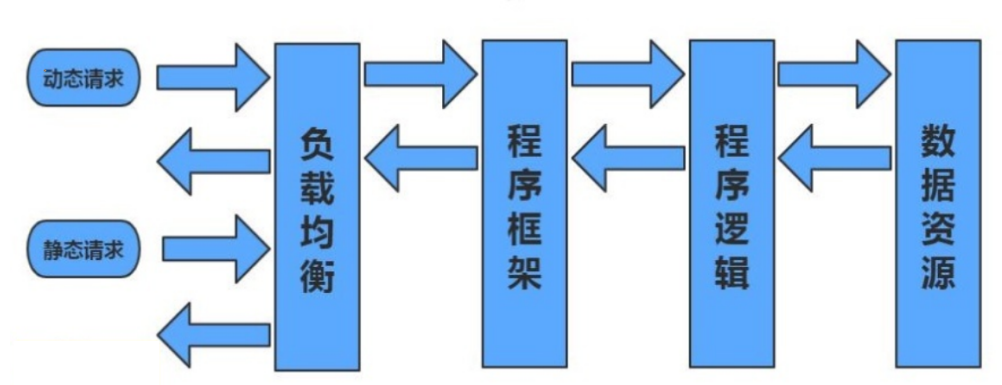
动静分离,通过中间件将动静请求和静态请求进行分离;

通过中间件将动态请求和静态请求分离,可以减少不必要的请求消耗,同时能减少请求的延时。

通过中间件将动态请求和静态请求分离,逻辑图如下:
二、配置动静分离
1.单台机器的动静分离
[root@web01 ~]# vim /etc/nginx/conf.d/dj.conf

server {

    listen 80;

    server_name dj.com;

    location / {

        root /code/wordpress;

        index index.php;

    }

	#如果请求的是以 .jpg或者png结尾的静态文件 就去/code/images 目录下访问

    location ~* \.(jpg|png)$ {

        root /code/images;

    }

    location ~* \.php$ {

        root /code/wordpress;

        fastcgi_pass 127.0.0.1:9000;

        fastcgi_param SCRIPT_FILENAME $document_root$fastcgi_script_name;

        include fastcgi_params;

    }

}

#创建目录

[root@web01 conf.d]# mkdir /code/images/

#实现动静分离

方式一:把文件挪到/code/images/

	cp -r /code/wordpress/wp-content /code/images/

方式二:做软连接

	cd /code

	ln -s wordpress images
2.多台机器动静分离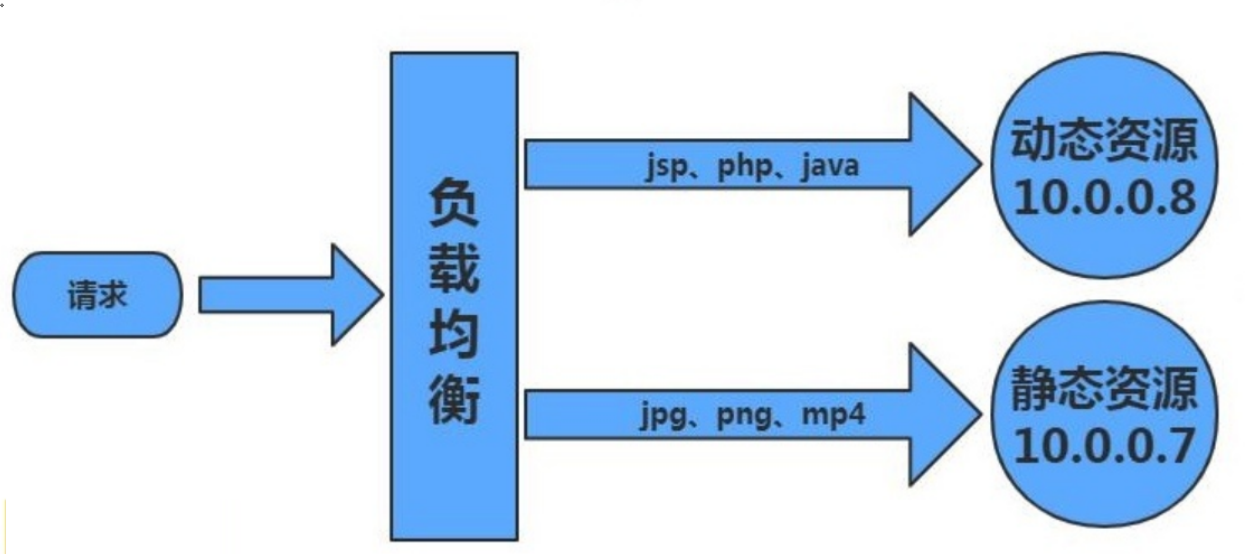
1)环境准备
| 主机 | 作用 | 服务 | 地址 |
|---|---|---|---|
| lb01 | 负载均衡 | nginx proxy | 192.168.15.5 |
| web01 | 静态资源 | nginx static | 192.168.15.7 |
| web02 | 动态资源 | tomcat server | 192.168.15.8 |
2)配置web01的静态内容
#配置nginx

[root@web01 ~]# vim /etc/nginx/conf.d/dj.com.conf

server {

    listen 80;

    server_name dj.com;

    location ~* \.(jpg|png|gif)${

        root /code/picture;

    }

}

#重启nginx

[root@web01 ~]# systemctl restart nginx

#上传图片

[root@web01 ~]# mkdir /code/picture

[root@web01 ~]# cd /code/picture/

[root@web01 picture]# rz 1.jpg

#配置hosts ,访问图片
3)在web02上配置动态资源
#安装tomcat    #测试时才会用yum安装,因为需要有jave环境

[root@web02 ~]# yum install -y tomcat

#配置动态内容

[root@web02 ~]# cd /usr/share/tomcat/webapps/

[root@web02 webapps]# mkdir ROOT

[root@web02 webapps]# vim ROOT/java_test.jsp

<%@ page language="java" import="java.util.*" pageEncoding="utf-8"%>

<HTML>

    <HEAD>

        <TITLE>JSP Page</TITLE>

    </HEAD>

    <BODY>

        <%

            Random rand = new Random();

            out.println("<h1>随机数:<h1>");

            out.println(rand.nextInt(99)+100);

        %>

    </BODY>

</HTML>

#启动tomcat

[root@web02 webapps]# systemctl start tomcat

#访问页面

http://192.168.15.8:8080/java_test.jsp
4)在负载均衡上配置页面
#配置负载均衡的nginx

[root@lb01 ~]# vim /etc/nginx/conf.d/dj.com.conf

upstream jt {

	server 172.16.1.7:80;

	server 172.16.1.9:80;

}

upstream dt {

	server 172.16.1.10:8080;

	server 172.16.1.8:8080;

}

server {

    listen 80;

    server_name dj.com;

    location / {

        root /code/dj;

        index index.html;

    }

    location ~* \.(jpg|gif|png)$ {

        proxy_pass http://jt;

        include proxy_params;   或者proxy_set_header HOST $http_host;

    }

    location ~ \.jsp$ {

        proxy_pass http://dt;

        include proxy_params;

    }

}

#重启nginx

[root@lb01 ~]# systemctl restart nginx

#配置host,访问页面

http://dj.com/java_test.jsp

http://dj.com/1.gif
5)整合静态内容和动态内容
1.创建站点目录

[root@lb01 ~]# mkdir /code/dj -p

2.编辑htm文件

[root@lb01 ~]# vim /code/dj/index.html

<html lang="en">

<head>

        <meta charset="UTF-8" />

        <title>测试ajax和跨域访问</title>

        <script src="http://libs.baidu.com/jquery/2.1.4/jquery.min.js"></script>

</head>

<script type="text/javascript">

$(document).ready(function(){

        $.ajax({

        type: "GET",

        url: "http://dj.com/java_test.jsp",

        success: function(data){

                $("#get_data").html(data)

        },

        error: function() {

                alert("失败了,回去检查你服务去~");

        }

        });

});

</script>

        <body>

                <h1>测试动静分离</h1>

                <img src="http://dj.com/1.gif">

                <div id="get_data"></div>

        </body>

</html>

#授权站点目录

[root@lb01 ~]# chown -R www.www /code/

#访问域名,测试,静态内容和动态内容关闭其一,互不影响
三、Nginx资源分离
1.资源分离
Nginx通过负载均衡实现手机与PC调度至不同的后端节点应用案例

使用pc访问时跳转到pc配置的页面,使用手机访问时可以跳转不同的页面
2.配置资源分离场景
1)环境准备
| 主机 | 主机作用 | 外网ip | 内网ip | 端口 |
|---|---|---|---|---|
| Lb01 | 负载均衡 | 192.168.15.4 | 172.16.1.4 | 80 |
| web01 | 提供Android手机页面 | 192.168.15.7 | 172.16.1.7 | 80 |
| web02 | 提供Iphone手机页面 | 192.168.15.8 | 172.16.1.8 | 80 |
| web03 | 提供电脑访问 | 192.168.15.9 | 172.16.1.9 | 80 |
2)配置服务器
[root@web01 ~]# vim /etc/nginx/conf.d/sj.com.conf

server {

    listen 8081;

    server_name sj.com;

    location / {

        root /code/android;

        index index.html;

    }

}

server {

    listen 8082;

    server_name sj.com;

    location / {

        root /code/iphone;

        index index.html;

    }

}

server {

    listen 8083;

    server_name sj.com;

    location / {

        root /code/pc;

        index index.html;

    }

}

#重启nginx
3)配置站点
[root@web01 ~]# mkdir /code/{android,pc,iphone}

[root@web01 ~]# echo "我是Android" > /code/android/index.html

[root@web01 ~]# echo "我是Iphone" > /code/iphone/index.html

[root@web01 ~]# echo "我是computer" > /code/pc/index.html
4)配置负载均衡
[root@lb01 ~]#  vim /etc/nginx/conf.d/sj.com.conf

upstream android {

	server 172.16.1.7:8081;

}

upstream iphone {

	server 172.16.1.7:8082;

}

upstream pc {

	server 172.16.1.7:8083;

}

server {

    listen 80;

    server_name sj.com;

    location / {

        if ($http_user_agent ~* "Android") {   #判断如果是安卓端

            proxy_pass http://android;        #代理到android虚拟主机池

        }

        if ($http_user_agent ~* "iPhone") {     #判断如果是苹果端

            proxy_pass http://iphone;          #代理到iphone虚拟主机池

        }

	   if ($http_user_agent ~* "Chrome") {   #判断如果是IE浏览器

            return 403;     			#直接返回403

        proxy_pass http://pc;   #如果没有匹配到以上内容,默认都代理到pc虚拟 主机池

        include proxy_params;

    }

}

#重启nginx

[root@lb01 conf.d]# systemctl restart nginx
5)配置hosts访问页面测试

四、Nginx的Rewrite重写
1.rewrite概述
Rewrite主要实现url地址重写,以及重定向,就是把传入web的请求重定向到其他url的过程。
2.rewrite使用场景
1、地址跳转,用户访问www.dan.com这个URL时,将其定向至一个新的域名mobile.dan.com

2、协议跳转,用户通过http协议请求网站时,将其重新跳转至https协议方式

3、伪静态,将动态页面显示为静态页面方式的一种技术,便于搜索引擎的录入,同时建上动态URL地址对外暴露过多的参数,提升更高的安全性。

4、搜索引擎,SEO优化依赖于url路径,好记的url便于智齿搜索引擎录入
3.rewrite配置语法
Syntax:	rewrite regex replacement [flag];

Default:	—

Context:	server, location, if

rewrite			 #模块命令

regex 			 #请求的链接(支持正则表达式)

replacement 	 #跳转的链接

[flag];			 #标签

#一般用于切换维护场景

rewrite ^(.*)$ /page/404.html last;
4.rewrite标记 flag
rewrite指令根据表达式来重定向URL,或者修改字符串,可以应用于server,location,if环境下,每行rewrite指令最 后跟一个flag标记,支持的flag标记有如下表格所示:
| flag | 作用 |
|---|---|
| last | 本条规则匹配完成后,停止匹配,不再匹配后面的规则 |
| break | 本条规则匹配完成后,停止匹配,不再匹配后面的规则 |
| redirect | 返回302临时重定向,地址栏会显示跳转后的地址 |
| permanent | 返回301永久重定向,地址栏会显示跳转后的地址 |
5.last和break的区别
1)配置nginx测试
#配置nginx

[root@web01 ~]# vim/etc/nginx/conf.d/rewrite.com.conf

server {

        listen 80;

        server_name rewrite.com;

        root /code/rewrite;

        location ~ ^/break {

                rewrite ^/break /test/ break;

        }

        location ~ ^/last {

                rewrite ^/last /test/ last;

        }

        location /test/ {

                default_type application/json;

                return 200 "ok";

        }

}

#重启nginx

[root@web01 conf.d]# systemctl restart nginx

#访问页面测试
2)测试后结论
break 只要匹配到规则,就回去本地路径目录中寻找请求的文件;

last  匹配到规则,跳转后没有内容,则带着跳转后的请求,重新的向server发起一次请求

break请求:

	1.请求rewrite.com/break;

	2.首先,会去查找本地的/code/rewrite/test/index.html;

	3.如果找到了,则返回/code/rewrite/test/index.html内容;

	4.如果没有找到则返回404,找到目录却没有主页,则返回403;

last请求:

	1.请求rewrite.com/last;

	2.首先,会去查找本地的/code/rewrite/test/index.html;

	3.如果找到了,则返回/code/rewrite/test/index.html内容;

	4.如果没找到,会带着新跳转的URI再向server发起一次请求,请求rewrite.com/test;

	5.如果匹配到新的location,则返回该location匹配的内容;

	6.如果没有匹配到新的,则再返回404或403;
6.redirect和permanent的区别
1)配置nginx测试
[root@web01 ~]## vim /etc/nginx/conf.d/rewrite.com.conf

server {

        listen 80;

        server_name rewrite.com;

        root /code/rewrite;

        location /test {

                rewrite ^(.*)$ http://www.mumusir.com redirect;

                #rewrite ^(.*)$ http://www.mumusir.com permanent;

        }

}

#配置两种跳转,关闭nginx测试,查看结果
2)结论
redirect:

	每次请求都会询问服务器,是否跳转,如果服务器不可用,则跳转失败

permanent:

	请求一次后,会记录跳转的地址,以后不再询问,直接跳转,通过浏览器缓存记录
7.rewrite规则匹配实例
- 用户访问/abc/1.html实际上真实访问的是/ccc/bbb/2.html
[root@web01 ~]# vim /etc/nginx/conf.d/rw.conf

server {

    listen 80;

    server_name rw.com;

    root /code;

    location ~ /abc {

        rewrite ^(.*)$ /ccc/bbb/2.html redirect;

    }

}
- 将http请求跳转到https
server {

	listen 80;

	server_name www.mumusir.com;

	#rewrite (.*) https://www.mumusir.com redirect;  或者

	return 302 https://www.mumusir.com;

}

server {

	listen 443;

	server_name www.mumusir.com;

	ssl on;

	ssl...... *.key;

	ssl..... *.crt;

}
五、rewrite伪静态实例
1.搭建discuz论坛
#创建站点目录

[root@web01 ~]# mkdir /code/discuz

[root@web01 ~]# rz Discuz_X3.3_SC_GBK.zip

[root@web01 ~]# unzip Discuz_X3.3_SC_GBK.zip -d /code/discuz/

#授权站点目录

[root@web01 ~]# chown -R www.www /code/discuz/

#配置discuz论坛的配置文件

[root@web01 ~]# vim /etc/nginx/conf.d/discuz.com.conf

server {

    listen 80;

    server_name discuz.com;

    location / {

        root /code/discuz/upload;

        index index.php;

    }

    location ~* \.php$ {

        root /code/discuz/upload;

        fastcgi_pass 127.0.0.1:9000;

        fastcgi_param SCRIPT_FILENAME $document_root$fastcgi_script_name;

        include fastcgi_params;

    }

}

#重启

[root@web01 ~]# nginx -t

[root@web01 ~]# systemctl restart nginx

#配置hosts访问

192.168.15.7 discuz.com

#创建数据库

[root@db02 ~]# mysql -uroot -p123456

... ...

MariaDB [(none)]> create database discuz charset utf8;

Query OK, 1 row affected (0.00 sec)

MariaDB [(none)]> grant all on discuz.* to discuz@'172.16.1.%' identified by '123456';

Query OK, 0 rows affected (0.04 sec)
2.配置hosts,访问论坛,发表帖子
#查看帖子地址http://discuz.com/forum.php?mod=viewthread&tid=1&extra=
3.配置rewrite伪静态
[root@web01 ~]# vim /etc/nginx/conf.d/discuz.com.conf

server {

    listen 80;

    server_name discuz.com;

    location / {

        root /code/discuz/upload;

        index index.php;

        rewrite ^([^\.]*)/topic-(.+)\.html$ $1/portal.php?mod=topic&topic=$2 last;

        rewrite ^([^\.]*)/article-([0-9]+)-([0-9]+)\.html$ $1/portal.php?mod=view&aid=$2&page=$3 last;

        rewrite ^([^\.]*)/forum-(\w+)-([0-9]+)\.html$ $1/forum.php?mod=forumdisplay&fid=$2&page=$3 last;

        rewrite ^([^\.]*)/thread-([0-9]+)-([0-9]+)-([0-9]+)\.html$ $1/forum.php?mod=viewthread&tid=$2&extra=page%3D$4&page=$3 last;

        rewrite ^([^\.]*)/group-([0-9]+)-([0-9]+)\.html$ $1/forum.php?mod=group&fid=$2&page=$3 last;

        rewrite ^([^\.]*)/space-(username|uid)-(.+)\.html$ $1/home.php?mod=space&$2=$3 last;

        rewrite ^([^\.]*)/blog-([0-9]+)-([0-9]+)\.html$ $1/home.php?mod=space&uid=$2&do=blog&id=$3 last;

        rewrite ^([^\.]*)/(fid|tid)-([0-9]+)\.html$ $1/archiver/index.php?action=$2&value=$3 last;

        rewrite ^([^\.]*)/([a-z]+[a-z0-9_]*)-([a-z0-9_\-]+)\.html$ $1/plugin.php?id=$2:$3 last;

        if (!-e $request_filename) {

            return 404;

        }

    }

    location ~* \.php$ {

        root /code/discuz/upload;

        fastcgi_pass 127.0.0.1:9000;

        fastcgi_param SCRIPT_FILENAME $document_root$fastcgi_script_name;

        include fastcgi_params;

    }

}

[root@web01 ~]# systemctl restart nginx
六、rewrite规则补充
1.rewrite匹配优先级
1) 优先级
1.先执行server块的rewrite指令

2.其次执行location匹配规则

3.最后执行location中的rewrite
3) 配置
server {

    listen 80;

    server_name youxianxji.com;

    rewrite (.*) http://www.baidu.com;

    location / {

    	rewrite (.*) http://www.jd.com;

    }

    location =/ {

        rewrite (.*) http://www.taobao.com;

    }

}
2.rewrite的环境变量
1)$server_name
$server_name    #当前用户请求的域名

server {

        listen 80;

        server_name linux.test.com;

        rewrite ^(.*)$ https://$server_name$1;

}
2)请求变量
$request_filename 请求的文件路径名(带网站的主目录/code/images/test.jpg)

$request_uri 当前请求的文件路径(不带网站的主目录/images/test.jpg)

#大多数用于http协议转gttps协议

server {

        listen 80;

        server_name linux.test.com;

        return 302 https://$server_name$request_uri;

}
3)$http_host
#很古董的配置方法

server {

        listen 80;

        server_name www.baidu.com baidu.com www.baidu.cn;

        if ($http_host = baidu.com){

            rewrite (.*) http://www.baidu.com$1;

        }

}

#推荐书写格式

server {

        listen 80;

        server_name baidu.com;

        rewrite (.*) http://www.baidu.com$1;

}

server {

        listen 80;

        server_name www.baidu.com;

        location / {...}

}
3.rewrite开启日志
[root@web01 ~]# vim /etc/nginx/nginx.conf

... ...

error_log  /var/log/nginx/error.log notice;

... ...

http {

    ... ...

    rewrite_log on;

    ... ...

}
[转帖]Nginx动静分离;资源分离;rewrite重写、跳转、伪静态、规则、日志的更多相关文章
- Nginx中的 location 匹配和 rewrite 重写跳转
Nginx中的location匹配和rewrite重写跳转 1.常用的Nginx正则表达式 2.location 3.rewrite 4.rewrite实例 1.常用的Nginx正则表达式: ^ :匹 ...
- Nginx中location匹配及rewrite重写
目录 一.常用的Nginx正则表达式 二.location 2.1.location三类匹配类型 2.2.常用的匹配规则 2.3.location优先级 2.3.1.举例说明 2.4.实际网站使用中, ...
- Nginx+Tomcat+Redis实现负载均衡、资源分离、session共享
Nginx+Tomcat+Redis实现负载均衡.资源分离.session共享 CentOS安装Nginx http://centoscn.com/CentosServer/www/2013/0910 ...
- Nginx常用伪静态规则(rewrite)-Discuz X3.2-WordPress-PHPCMS-ECSHOP-SHOPE(转)
当我们从apache服务器转向Nginx服务器的时候,它们的伪静态规则就不一样了,所以你熟悉Nginx服务器的伪静态规则,自己写当然也好.不了解Nginx服务器的伪静态规则的,为方便各位站长,收集了这 ...
- Nginx伪静态配置和常用Rewrite伪静态规则集锦
伪静态是一种可以把文件后缀改成任何可能的一种方法,如果我想把php文件伪静态成html文件,这种相当简单的,下面我来介绍nginx 伪静态配置方法 nginx里使用伪静态是直接在nginx.conf ...
- [转]Nginx伪静态配置和常用Rewrite伪静态规则集锦
Nginx伪静态配置和常用Rewrite伪静态规则集锦 作者: 字体:[增加 减小] 类型:转载 时间:2014-06-10 我要评论 伪静态是一种可以把文件后缀改成任何可能的一种方法,如果我想把ph ...
- 7.nginx伪静态规则
网上收集的一些常用的,要用的时候就仿照一下,或直接拿来用. WordPress伪静态规则 location / { index index.html index.php; if (-f $reques ...
- Nginx系列二:(Nginx Rewrite 规则、Nginx 防盗链、Nginx 动静分离、Nginx+keepalived 实现高可用)
一.Nginx Rewrite 规则 1. Nginx rewrite规则 Rewrite规则含义就是某个URL重写成特定的URL(类似于Redirect),从某种意义上说为了美观或者对搜索引擎友好, ...
- 第十七章 nginx动静分离和rewrite重写
一.动静分离 动静分离,通过中间件将动静分离和静态请求进行分离:通过中间件将动态请求和静态请求分离,可以减少不必要的请求消耗,同时能减少请求的延时.通过中间件将动态请求和静态请求分离,逻辑图如下: 1 ...
- nginx+ tomcat集群+动静资源分离
不知道为什么这个随便删不掉,写了也值显示一半一半不显示, 我把重新写了一遍: nginx + tomcat集群和动静资源分离
随机推荐
- SQL 的递归查询
在一般的业务场景中,特别是针对相关的业务线相关的功能开发时,可能会遇到一些具有层级关系的数据关联结构.比如,一个员工可能属于一个领导管辖,而同时,这个领导也被另一个更高级别的领导管辖--,而本质上这些 ...
- 让当前元素的width或者height达到父元素的尺寸
double.infifinity 和double.maxFinite可以让当前元素的width或者height达到父元素的尺寸: 区别: 我想成为我的父母所允许的最大的(double.infinit ...
- 什么是HuggingFace
一.HuggingFace简介 1.HuggingFace是什么 可以理解为对于AI开发者的GitHub,提供了模型.数据集(文本|图像|音频|视频).类库(比如transformers|peft|a ...
- PLG SaaS 案例:如何实践外链自动增长策略?
首先任何的商业逻辑,光流量增长,没法变现是没用的. 就像博客群发提效工具,得有对应的用户,更得有对应付费用户群体的画像.剩下的就是靠增长,被动让他们找到你的产品,用产品解决他们痛点,他们自然而然会付费 ...
- 盘点Python 中字符串的常用操作
摘要:盘点 Python 中字符串的几个常用操作,对新手极度的友好. 本文分享自华为云社区<盘点 Python 中字符串的常用操作,对新手极度友好>,作者:TT-千叶 . 在 Python ...
- 高并发中,那些不得不说的线程池与ThreadPoolExecutor类
摘要:从整体上认识下线程池中最核心的类之一--ThreadPoolExecutor,关于ThreadPoolExecutor的底层原理和源码实现,以及线程池中的其他技术细节的底层原理和源码实现. 本文 ...
- vue3,对比 vue2 有什么优点?
摘要:Vue3新版本的理念成型于 2018 年末,当时的 Vue 2 已经有两岁半了.比起通用软件的生命周期来这好像也没那么久,Vue3在2020年正式推出,在源码和API都有较大变化,性能得到了显著 ...
- 一文讲清楚FusionInsight MRS CDL如何使用
摘要:CDL是一种简单.高效的数据实时集成服务,能够从各种OLTP数据库中抓取Data Change事件,然后推送至Kafka中,最后由Sink Connector消费Topic中的数据并导入到大数据 ...
- vue2升级vue3: TSX Vue 3 Composition API Refs
在vue2时代,$refs 直接操作子组件 this.$refs.gridlayout.$children[index]; 虽然不推荐这么做,但是确实非常好用.但是vue2快速迁移到vue3,之前的这 ...
- 由浅入深,揭秘企业级OLAP数据引擎ByteHouse
更多技术交流.求职机会,欢迎关注字节跳动数据平台微信公众号,回复[1]进入官方交流群 在字节跳动各产品线飞速成长的过程中,对数据分析能力也提出了更高的要求,现有的主流数据分析产品都没办法完全满足业务要 ...