
httpURLConnection 请求发起post请求
常见请求头,在post请求之 前先了解一下,请求相关的基础
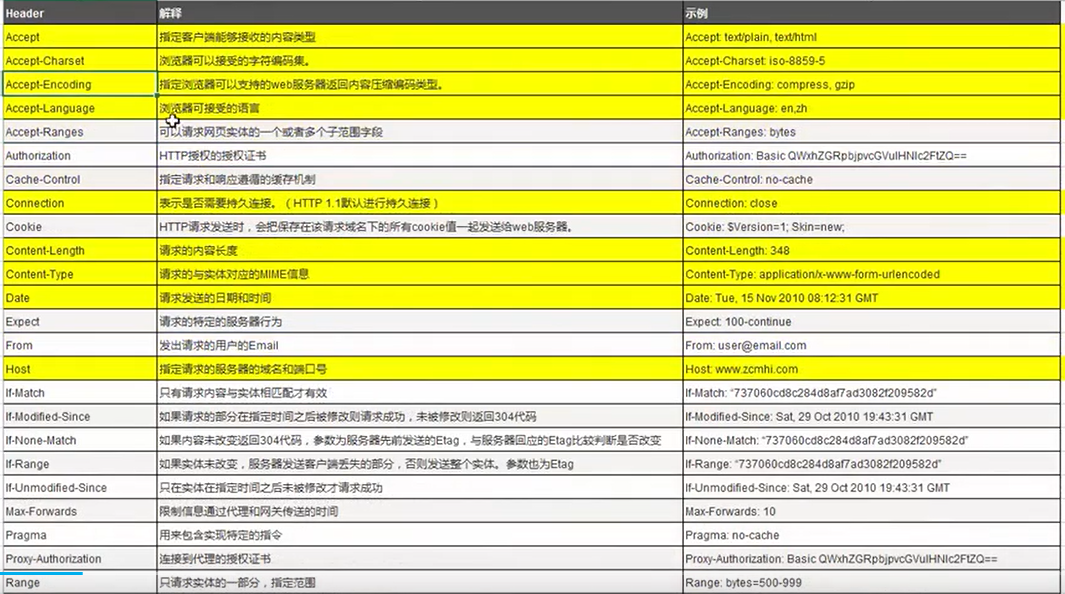
关于post 请求的方式比get 多了很多配置,其实大致一样,本想将get示例和post写在一起,这个博客功能有时有问题 一直在灰色的编辑框中跳不出去,只能另起一篇博客。
    private void doPost(String s) {

        try {

//            URl构建的是一上地址对象

         URL url =  new URL(UrlAddress);

//         创建一个连接

         HttpURLConnection httpURLConnection =(HttpURLConnection) url.openConnection();

//         由于是post 请求需要配置参数

         httpURLConnection.setDoInput(true);

         httpURLConnection.setDoOutput(true);

//         配置请求头

         httpURLConnection.setRequestMethod("POST");

//         配置请求是否有缓存

         httpURLConnection.setDefaultUseCaches(false);

         HttpURLConnection.setDefaultRequestProperty("Accept-Charset","UTF-8");

         HttpURLConnection.setDefaultRequestProperty("Content-Type","application/x-www-form-urlencoded");

//         配置好了尝试连接准备

         httpURLConnection.connect();

            DataOutputStream outputStream = new DataOutputStream(httpURLConnection.getOutputStream());

//            拼接请求参数,比如条件,性别,

           String content = "set="+s;

           outputStream.write(content.getBytes());

           outputStream.flush();

           outputStream.close();

//以下的处理和get 一样了

           if(httpURLConnection.getResponseCode() == 200){

               InputStream is =httpURLConnection.getInputStream();

               BufferedReader br = new BufferedReader(new InputStreamReader(is));

               StringBuffer Sbuffer = new StringBuffer();

               String readLine = "";

               while ((readLine = br.readLine())!=null){

                   Sbuffer.append(readLine);

               }

               is.close();

               br.close();

               httpURLConnection.disconnect();

               Log.d("Text",Sbuffer.toString());

           }

        } catch (MalformedURLException e) {

            throw new RuntimeException(e);

        } catch (IOException e) {

            throw new RuntimeException(e);

        } finally {

        }

    } //dopost  方法方法结束
用 HttpPost 封装好的组件的话比较直接,但是以下方法需要在另一线程调用,
private void doPost(String s) {

    HttpPost httpPost = new HttpPost(urlAddress + method);

    List<NameValuePair> params = new ArrayList<>();

    params.add(new BasicNameValuePair("sex", s));

    try {

        httpPost.setEntity(new UrlEncodedFormEntity(params, HTTP.UTF_8));

        HttpResponse httpResponse = new DefaultHttpClient().execute(httpPost);

        if (httpResponse.getStatusLine().getStatusCode() == 200) {

            String result = EntityUtils.toString(httpResponse.getEntity());

            Log.d("test", result);

        } else {

            Log.d("test","failed");

        }

    } catch (UnsupportedEncodingException e) {

        e.printStackTrace();

    } catch (ClientProtocolException e) {

        e.printStackTrace();

    } catch (IOException e) {

        e.printStackTrace();

    }

}
httpURLConnection 请求发起post请求的更多相关文章
- openresty开发系列29--openresty中发起http请求
openresty开发系列29--openresty中发起http请求 有些场景是需要nginx在进行请求转发 用户浏览器请求url访问到nginx服务器,但此请求业务需要再次请求其他业务:如用户请求 ...
- 关于java发起http请求
我们到底能走多远系列(41) 扯淡: 好久没总结点东西了,技术上没什么总结,感觉做事空牢牢的.最近也比较疲惫. 分享些东西,造福全人类~ 主题: 1,java模拟发起一个http请求 使用HttpUR ...
- [Java] 两种发起POST请求方法,并接收返回的响应内容的处理方式
1.利用apache提供的commons-httpclient-3.0.jar包 代码如下: /** * 利用HttpClient发起POST请求,并接收返回的响应内容 * * @param url ...
- java中两种发起POST请求,并接收返回的响应内容的方式 (转)
http://xyz168000.blog.163.com/blog/static/21032308201162293625569/ 2.利用java自带的java.net.*包下提供的工具类 代码如 ...
- Ajax_02之XHR发起异步请求
1.Ajax: AJAX:Asynchronous Javascript And Xml,异步的JS和XML: 同步请求:地址栏输入URL.链接跳转.表单提交-- 异步请求:使用Ajax发起,底层使用 ...
- python urllib2 发起http请求post
使用urllib2发起post请求 def GetCsspToken(): data = json.dumps({"userName":"wenbin", &q ...
- libcurl发起post请求时间延迟问题。except为空即可
最近在做团购酒店APP分享到qzone功能,使用libcurl访问qzone的分享cgi接口,酒店分享信息以POST方式传输,在测试的时候发现分享接口平均有2s的延迟,这延迟也太大了吧,于是乎问了空间 ...
- 发起post请求
string postUrl = "https://api.mch.weixin.qq.com/mmpaymkttransfers/gethbinfo"; //string req ...
- android4.0 HttpClient 以后不能在主线程发起网络请求
android4.0以后不能在主线程发起网络请求,该异步网络请求. new Thread(new Runnable() { @Override public void run() { // TODO ...
- php 使用curl发起https请求
今天一个同事反映,使用curl发起https请求的时候报错:“SSL certificate problem, verify that the CA cert is OK. Details: erro ...
随机推荐
- 春松客服入驻Rainbond开源应用商店
"做好开源客服系统" 春松客服是拥有坐席管理.渠道管理.机器人客服.数据分析.CRM 等功能于一身的新一代客服系统.将智能机器人与人工客服完美融合,同时整合了多种渠道,结合 CRM ...
- Qt-FFmpeg开发-视频播放(4)
音视频/FFmpeg #Qt Qt-FFmpeg开发-视频播放[软解码 + OpenGL显示YUV420P图像] 目录 音视频/FFmpeg #Qt Qt-FFmpeg开发-视频播放[软解码 + Op ...
- 无需搭建环境,零门槛带你体验Open-Sora文生视频应用
本文分享自华为云社区<Open-Sora 文生视频原来在AI Gallery上也能体验了>,作者:码上开花_Lancer. 体验链接:Open-Sora 文生视频案例体验 不久前,Open ...
- 京东web端h5st—4.7逆向分析
声明 本文章中所有内容仅供学习交流,抓包内容.敏感网址.数据接口均已做脱敏处理,严禁用于商业用途和非法用途,否则由此产生的一切后果均与作者无关,若有侵权,请联系我立即删除! 目标网站 aHR0cHM6 ...
- react 数组列表
<!DOCTYPE html> <html lang="en"> <head> <meta charset="UTF-8&quo ...
- webpack配置图片处理
# 安装 npm i -D url-loader html-loader file-loader # loader配置 module: { rules: [ // 图片处理 { test: /\.(p ...
- 使用 INFINI Console 实现 Elasticsearch 的增量数据迁移
功能介绍 # 在 INFINI Console 1.3.0 版本里,数据迁移功能增加了对增量迁移的支持.这篇文章将会介绍增量迁移的具体使用方法和实现原理. 场景介绍 # 以常见的日志场景为例,假设 A ...
- 安装nodejs易遇到的坑
@ 目录 背景描述 流程步骤 小结 背景描述 我的服务器是centos7.9,打算先直接通过yum安装,但是yum不能指定node版本,我直接指定显示404找不到,然后我设置了下node下载的源,还是 ...
- CentOS7学习笔记(四) 系统运行级别
什么是运行级别 在CentOS系统中包含七种运行级别,例如命令行或图形化界面就是最常用的运行级别 运行级别的两种表示方式及作用 运行级别 运行级别 作用说明 0 poweroff.target 关机 ...
- Fastjson基础环境配置与Java基础概念
Preface 此篇系列文章将会从 Java 的基础语法开始,以 Fastjson 的各个反序列化漏洞分析为结尾,详细记录如何从一个具有基础面向对象编程但毫无 Java 基础的小白成长为了解 Fast ...