
.NET Core 3.x 基于Autofac的AOP缓存
一、依赖包

二、定义一个简单的缓存接口
    /// <summary>

    /// 简单的缓存接口,只有查询和添加,以后会进行扩展

    /// </summary>

    public interface ICaching

    {

        object Get(string cacheKey);

        void Set(string cacheKey, object cacheValue, TimeSpan absoluteExpirationRelativeToNow);

    }
三、实现缓存接口
public class MemoryCaching : ICaching

{

	private IMemoryCache _cache;

	public MemoryCaching(IMemoryCache cache)

	{

		_cache = cache;

	}

	public object Get(string cacheKey)

	{

		return _cache.Get(cacheKey);

	}

	public void Set(string cacheKey, object cacheValue, TimeSpan absoluteExpirationRelativeToNow)

	{

		_cache.Set(cacheKey, cacheValue, absoluteExpirationRelativeToNow);

	}

}
四、定义缓存属性
/// <summary>

/// 这个Attribute就是使用时候的验证,把它添加到要缓存数据的方法中,即可完成缓存的操作。

/// 往Server层方法上添加即可使用 [CachingAttribute(AbsoluteExpiration = 10)] //使用缓存AOP 缓存10分钟

/// </summary>

[AttributeUsage(AttributeTargets.Method, Inherited = true)]

public class CachingAttribute : Attribute

{

	/// <summary>

	/// 缓存绝对过期时间(分钟)

	/// </summary>

	public int AbsoluteExpiration { get; set; } = 30;

}
五、AOP实现
/// <summary>

/// 面向切面的缓存使用

/// </summary>

public class BlogCacheAOP : IInterceptor

{

	//通过注入的方式,把缓存操作接口通过构造函数注入

	private readonly ICaching _cache;

	public BlogCacheAOP(ICaching cache)

	{

		_cache = cache;

	}

	//Intercept方法是拦截的关键所在,也是IInterceptor接口中的唯一定义

	public void Intercept(IInvocation invocation)

	{

		var method = invocation.MethodInvocationTarget ?? invocation.Method;

		//对当前方法的特性验证

		var qCachingAttribute = this.GetQCachingAttributeInfo(invocation.MethodInvocationTarget ?? invocation.Method);

		if (qCachingAttribute != null)

		{

			ProceedCaching(invocation, qCachingAttribute);

		}

		else

		{

			invocation.Proceed();//直接执行被拦截方法

		}

	}

	private CachingAttribute GetQCachingAttributeInfo(MethodInfo method)

	{

		return method.GetCustomAttributes(true).FirstOrDefault(x => x.GetType() == typeof(CachingAttribute)) as CachingAttribute;

	}

	private void ProceedCaching(IInvocation invocation, CachingAttribute attribute)

	{

		//获取自定义缓存键

		var cacheKey = CustomCacheKey(invocation);

		//根据key获取相应的缓存值

		var cacheValue = _cache.Get(cacheKey);

		if (cacheValue != null)

		{

			//将当前获取到的缓存值,赋值给当前执行方法

			invocation.ReturnValue = cacheValue;

			return;

		}

		//去执行当前的方法

		invocation.Proceed();

		//存入缓存

		if (!string.IsNullOrWhiteSpace(cacheKey))

		{

			_cache.Set(cacheKey, invocation.ReturnValue, TimeSpan.FromMinutes(attribute.AbsoluteExpiration));

		}

	}

	/// <summary>

	/// 自定义缓存的key

	/// </summary>

	/// <param name="invocation"></param>

	/// <returns></returns>

	protected string CustomCacheKey(IInvocation invocation)

	{

		var typeName = invocation.TargetType.Name;

		var methodName = invocation.Method.Name;

		var methodArguments = invocation.Arguments.Select(GetArgumentValue).Take(3).ToList();//获取参数列表,最多三个

		string key = $"{typeName}:{methodName}:";

		foreach (var param in methodArguments)

		{

			key = $"{key}{param}:";

		}

		return key.TrimEnd(':');

	}

	/// <summary>

	/// object 转 string

	/// </summary>

	/// <param name="arg"></param>

	/// <returns></returns>

	protected static string GetArgumentValue(object arg)

	{

		if (arg is DateTime || arg is DateTime?)

			return ((DateTime)arg).ToString("yyyyMMddHHmmss");

		if (arg is string || arg is ValueType || arg is Nullable)

			return arg.ToString();

		if (arg != null)

		{

			if (arg is Expression)

			{

				var obj = arg as Expression;

				var result = Resolve(obj);

				return Common.Helper.MD5Helper.MD5Encrypt16(result);

			}

			else if (arg.GetType().IsClass)

			{

				return Common.Helper.MD5Helper.MD5Encrypt16(Newtonsoft.Json.JsonConvert.SerializeObject(arg));

			}

		}

		return string.Empty;

	}

	private static string Resolve(Expression expression)

	{

		if (expression is LambdaExpression)

		{

			LambdaExpression lambda = expression as LambdaExpression;

			expression = lambda.Body;

			return Resolve(expression);

		}

		if (expression is BinaryExpression)

		{

			BinaryExpression binary = expression as BinaryExpression;

			if (binary.Left is MemberExpression && binary.Right is ConstantExpression)//解析x=>x.Name=="123" x.Age==123这类

				return ResolveFunc(binary.Left, binary.Right, binary.NodeType);

			if (binary.Left is MethodCallExpression && binary.Right is ConstantExpression)//解析x=>x.Name.Contains("xxx")==false这类的

			{

				object value = (binary.Right as ConstantExpression).Value;

				return ResolveLinqToObject(binary.Left, value, binary.NodeType);

			}

			if ((binary.Left is MemberExpression && binary.Right is MemberExpression)

				|| (binary.Left is MemberExpression && binary.Right is UnaryExpression))//解析x=>x.Date==DateTime.Now这种

			{

				LambdaExpression lambda = Expression.Lambda(binary.Right);

				Delegate fn = lambda.Compile();

				ConstantExpression value = Expression.Constant(fn.DynamicInvoke(null), binary.Right.Type);

				return ResolveFunc(binary.Left, value, binary.NodeType);

			}

		}

		if (expression is UnaryExpression)

		{

			UnaryExpression unary = expression as UnaryExpression;

			if (unary.Operand is MethodCallExpression)//解析!x=>x.Name.Contains("xxx")或!array.Contains(x.Name)这类

				return ResolveLinqToObject(unary.Operand, false);

			if (unary.Operand is MemberExpression && unary.NodeType == ExpressionType.Not)//解析x=>!x.isDeletion这样的

			{

				ConstantExpression constant = Expression.Constant(false);

				return ResolveFunc(unary.Operand, constant, ExpressionType.Equal);

			}

		}

		if (expression is MemberExpression && expression.NodeType == ExpressionType.MemberAccess)//解析x=>x.isDeletion这样的

		{

			MemberExpression member = expression as MemberExpression;

			ConstantExpression constant = Expression.Constant(true);

			return ResolveFunc(member, constant, ExpressionType.Equal);

		}

		if (expression is MethodCallExpression)//x=>x.Name.Contains("xxx")或array.Contains(x.Name)这类

		{

			MethodCallExpression methodcall = expression as MethodCallExpression;

			return ResolveLinqToObject(methodcall, true);

		}

		var body = expression as BinaryExpression;

		//已经修改过代码body应该不会是null值了

		if (body == null)

			return string.Empty;

		var Operator = GetOperator(body.NodeType);

		var Left = Resolve(body.Left);

		var Right = Resolve(body.Right);

		string Result = string.Format("({0} {1} {2})", Left, Operator, Right);

		return Result;

	}

	private static string GetOperator(ExpressionType expressiontype)

	{

		switch (expressiontype)

		{

			case ExpressionType.And:

				return "and";

			case ExpressionType.AndAlso:

				return "and";

			case ExpressionType.Or:

				return "or";

			case ExpressionType.OrElse:

				return "or";

			case ExpressionType.Equal:

				return "=";

			case ExpressionType.NotEqual:

				return "<>";

			case ExpressionType.LessThan:

				return "<";

			case ExpressionType.LessThanOrEqual:

				return "<=";

			case ExpressionType.GreaterThan:

				return ">";

			case ExpressionType.GreaterThanOrEqual:

				return ">=";

			default:

				throw new Exception(string.Format("不支持{0}此种运算符查找!" + expressiontype));

		}

	}

	private static string ResolveFunc(Expression left, Expression right, ExpressionType expressiontype)

	{

		var Name = (left as MemberExpression).Member.Name;

		var Value = (right as ConstantExpression).Value;

		var Operator = GetOperator(expressiontype);

		return Name + Operator + Value ?? "null";

	}

	private static string ResolveLinqToObject(Expression expression, object value, ExpressionType? expressiontype = null)

	{

		var MethodCall = expression as MethodCallExpression;

		var MethodName = MethodCall.Method.Name;

		switch (MethodName)

		{

			case "Contains":

				if (MethodCall.Object != null)

					return Like(MethodCall);

				return In(MethodCall, value);

			case "Count":

				return Len(MethodCall, value, expressiontype.Value);

			case "LongCount":

				return Len(MethodCall, value, expressiontype.Value);

			default:

				throw new Exception(string.Format("不支持{0}方法的查找!", MethodName));

		}

	}

	private static string In(MethodCallExpression expression, object isTrue)

	{

		var Argument1 = (expression.Arguments[0] as MemberExpression).Expression as ConstantExpression;

		var Argument2 = expression.Arguments[1] as MemberExpression;

		var Field_Array = Argument1.Value.GetType().GetFields().First();

		object[] Array = Field_Array.GetValue(Argument1.Value) as object[];

		List<string> SetInPara = new List<string>();

		for (int i = 0; i < Array.Length; i++)

		{

			string Name_para = "InParameter" + i;

			string Value = Array[i].ToString();

			SetInPara.Add(Value);

		}

		string Name = Argument2.Member.Name;

		string Operator = Convert.ToBoolean(isTrue) ? "in" : " not in";

		string CompName = string.Join(",", SetInPara);

		string Result = string.Format("{0} {1} ({2})", Name, Operator, CompName);

		return Result;

	}

	private static string Like(MethodCallExpression expression)

	{

		var Temp = expression.Arguments[0];

		LambdaExpression lambda = Expression.Lambda(Temp);

		Delegate fn = lambda.Compile();

		var tempValue = Expression.Constant(fn.DynamicInvoke(null), Temp.Type);

		string Value = string.Format("%{0}%", tempValue);

		string Name = (expression.Object as MemberExpression).Member.Name;

		string Result = string.Format("{0} like {1}", Name, Value);

		return Result;

	}

	private static string Len(MethodCallExpression expression, object value, ExpressionType expressiontype)

	{

		object Name = (expression.Arguments[0] as MemberExpression).Member.Name;

		string Operator = GetOperator(expressiontype);

		string Result = string.Format("len({0}){1}{2}", Name, Operator, value.ToString());

		return Result;

	}

}
六、注入缓存
/// <summary>

/// 缓存服务启动

/// </summary>

public static class MemoryCacheSetup

{

	public static void AddMemoryCacheSetup(this IServiceCollection services)

	{

		if (services == null) throw new ArgumentNullException(nameof(services));

		services.AddScoped<ICaching, MemoryCaching>();

		services.AddSingleton<IMemoryCache>(factory =>

		{

			var cache = new MemoryCache(new MemoryCacheOptions());

			return cache;

		});

	}

}
public class Startup

{        // This method gets called by the runtime. Use this method to add services to the container.

	public void ConfigureServices(IServiceCollection services)

	{//注入缓存

		services.AddMemoryCacheSetup();

	}

}
七、注册AOP
public class Startup

{

	public void ConfigureContainer(ContainerBuilder builder)

	{

		//other ...// AOP

		var cacheType = new List<Type>();

		builder.RegisterType<BlogCacheAOP>();

		cacheType.Add(typeof(BlogCacheAOP));

		// 获取 Service.dll 程序集服务,并注册

		var assemblysServices = Assembly.LoadFrom(servicesDllFile);

		builder.RegisterAssemblyTypes(assemblysServices)

					.AsImplementedInterfaces()

					.InstancePerDependency()

					.EnableInterfaceInterceptors()//引用Autofac.Extras.DynamicProxy;

					.InterceptedBy(cacheType.ToArray());//允许将拦截器服务的列表分配给注册。

		//other ...

	}

}
八、使用
服务层在需要缓存的方法上添加属性,就OK了
public class BlogArticleServices : BaseServices<BlogArticle>, IBlogArticleServices

{

	IBlogArticleRepository _dal;

	public BlogArticleServices(IBlogArticleRepository dal)

	{

		this._dal = dal;

		base.BaseDal = dal;

	}

	/// <summary>

	/// 获取博客列表

	/// </summary>

	/// <returns></returns>

	[CachingAttribute(AbsoluteExpiration = 10)] //使用缓存AOP 缓存10分钟

	public async Task<List<BlogArticle>> getBlogs()

	{

		var blogList = await _dal.Query(a => a.bID > 0, a => a.bID);

		return blogList;

	}

}
九、运行代码
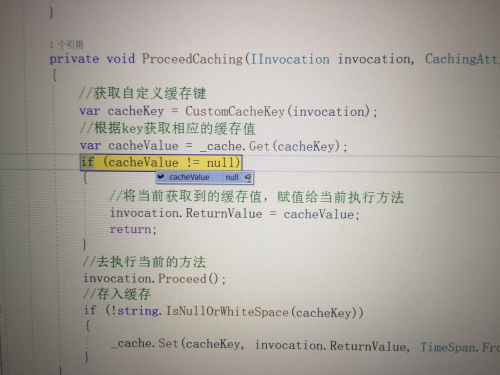
第一次进入没有缓存,走 set 缓存10分钟
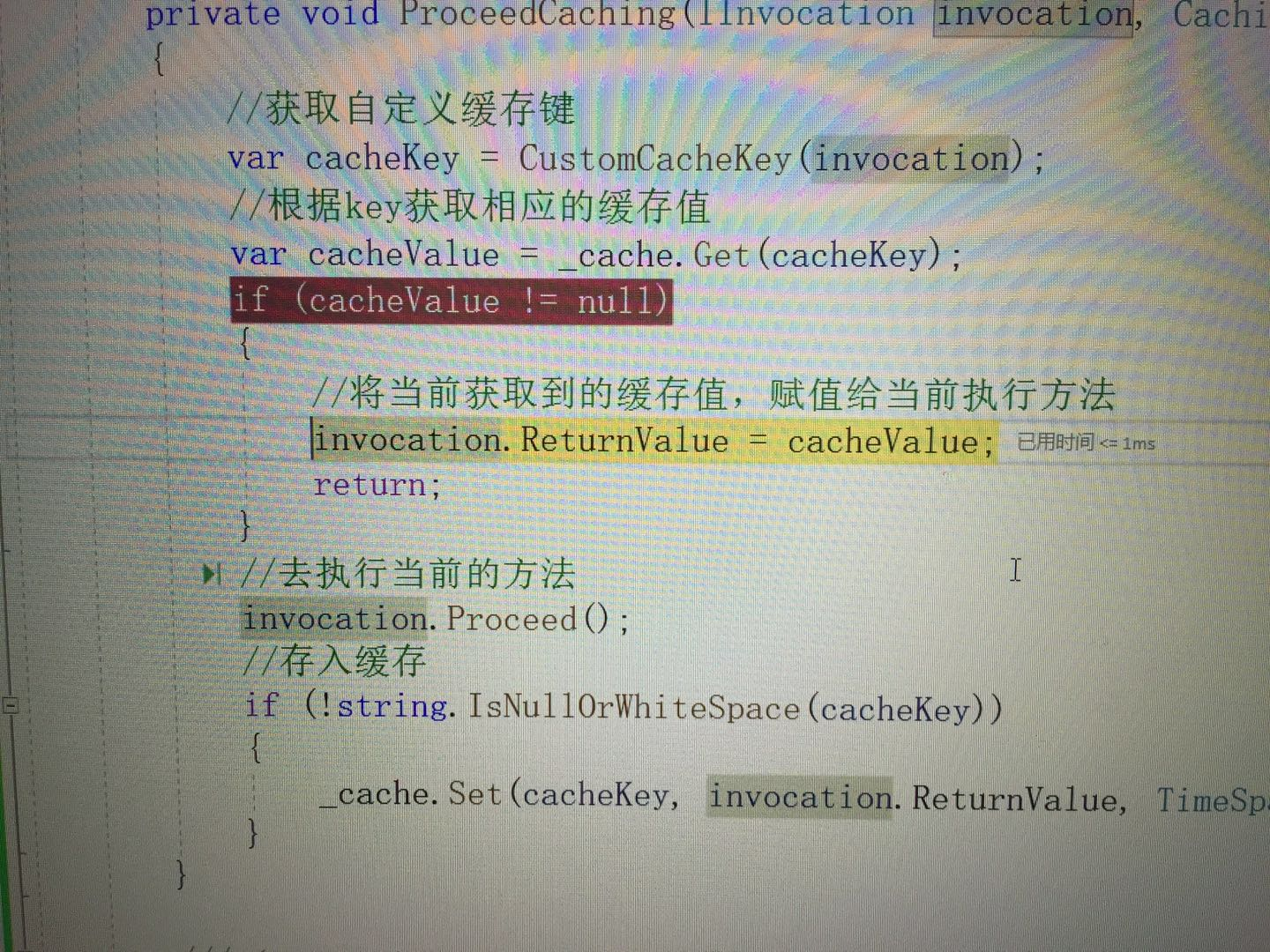
第二次进入,有缓存得到缓存直接返回
.NET Core 3.x 基于Autofac的AOP缓存的更多相关文章
- Asp.net Core 3.1基于AspectCore实现AOP,实现事务、缓存拦截器
最近想给我的框架加一种功能,就是比如给一个方法加一个事务的特性Attribute,那这个方法就会启用事务处理.给一个方法加一个缓存特性,那这个方法就会进行缓存. 这个也是网上说的面向切面编程AOP. ...
- .NET Core下自带容器IServiceCollection以及AutoFac以及AutoFac中AOP简介
https://www.cnblogs.com/artech/p/net-core-di-01.html 大内老A的在.NET Core下对这些的介绍,有一系列文章 https://www.cnblo ...
- Autofac实现AOP拦截
本文主要是详解一下在ASP.NET Core中,采用替换后的Autofac来实现AOP拦截. Aspect Oriented Programming(AOP),面向切面编程,是一个比较热门的话题.AO ...
- ASP.Net Core 3.1 With Autofac ConfigureServices returning an System.IServiceProvider isn't supported.
ASP.Net Core 3.1 With Autofac ConfigureServices returning an System.IServiceProvider isn't supported ...
- 基于autofac的属性注入
基于autofac的属性注入 什么是属性注入 在了解属性注入之前,要先了解一下DI(Dependency Injection),即依赖注入.在ASP.NET Core里自带了一个IOC容器,而且程序支 ...
- 基于Schema的AOP 配置使用详解
原文地址:http://jinnianshilongnian.iteye.com/blog/1418598 基于Schema的AOP从Spring2.0之后通过"aop"命名空间来 ...
- 开涛spring3(6.3) - AOP 之 6.3 基于Schema的AOP
6.3 基于Schema的AOP 基于Schema的AOP从Spring2.0之后通过“aop”命名空间来定义切面.切入点及声明通知. 在Spring配置文件中,所以AOP相关定义必须放在<a ...
- spring aop 基于schema的aop
AOP的基本概念: 连接点(Jointpoint):表示需要在程序中插入横切关注点的扩展点,连接点可能是类初始化.方法执行.方法调用.字段调用或处理异常等等,Spring只支持方法执行连接点,在AOP ...
- Spring_Spring与AOP_AspectJ基于注解的AOP实现
一.AspectJ.Spring与AOP的关系 AspectJ是一个面向切面的框架,它扩展了Java语言.AspectJ定义了AOP语法,所以它有一个专门的编译器用来生成遵守Java字节编码规范的Cl ...
- .Net Core 学习之路-AutoFac的使用
本文不介绍IoC和DI的概念,如果你对Ioc之前没有了解的话,建议先去搜索一下相关的资料 这篇文章将简单介绍一下AutoFac的基本使用以及在asp .net core中的应用 Autofac介绍 组 ...
随机推荐
- 5款超好用的AI换脸软件,一键视频直播换脸(附下载链接)
随着AIGC的火爆,AI换脸技术也被广泛应用于娱乐.广告.电影制作等领域,本期文章系统介绍了市面上超火的5款AI软件 换脸整合包收录了全部5款AI工具,请按照需要选择下载: 百度网盘:https:// ...
- linux内核参数调优和Linux实例常用内核网络参数介绍与常见问题处理
问题1 并发场景下,常常会出现一个进程最大文件句柄数不足的情况,会报如下错误: 24: Too many open files 解决办法 ulimit -a S:表示软限制,超出设定的值会告警. H ...
- Base64编码解码 支持解码为 16进制
https://base64.xhlylx.com/
- 申请并部署免费的 SSL/TLS 证书
对于囊中羞涩的我们来说,只要能白嫖,就绝不乱花钱.惯常申请免费 SSL/TLS 证书的途径有: 各大云服务平台限量提供.比如阿里云会给每个账号每年 20 个证书的申请额度.缺点是不支持泛域名,一年后须 ...
- JS+DOM简要笔记
js官方文档: https://www.w3school.com.cn/js/index.asp 简单理解:html是内容,css是控制样式,js是行为. 1,js弱类型特点 JavaScript 是 ...
- 第一次至第三次PTAJava大作业分析
(1)前言: 三次题目集的知识点: 正则表达式(Regular Expression,简称Regex或RegExp)是一个强大的文本处理工具,用于匹配.查找和替换字符串.以下是正则表达式的主要知识点总 ...
- 循环demo
// demo1,输出1-100所有可以同时被2和3同时整除的数值 //方法1 // 循环生成 1-100的数值 // for(var i = 1 ...
- react 装饰器
使用装饰器定义 装饰器是一种函数,写成 @函数名.它可以放在类和类方法的定义前面.react脚手架创建的项目默认是不支持装饰器,需要手动安装相关模块和添加配置文件. 安装相关模块 npm i -D c ...
- Yolov8和Yolov10的差异以及后处理实现
Yolo模型可分为4个维度的概念 模型版本.数据集.模型变体(Variants).动态/静态模型. Yolo各模型版本进展历史 Yolov(2015年华盛顿大学的 Joseph Redmon 和 Al ...
- win11 恢复Win10右键菜单的方法
1.Win+R运行CMD 2.输入:reg add HKCU\Software\Classes\CLSID\{86ca1aa0-34aa-4e8b-a509-50c905bae2a2}\InprocS ...