
【Spring-Security】Re07 持久化的记住我
Security记住我功能底层实现依赖于SpringJDBC组件,如果有持久层框架的话,就由持久层框架实现
演示案例的选型,MysqlJdbc + MybatisStarter
<dependency>

    <groupId>org.mybatis.spring.boot</groupId>

    <artifactId>mybatis-spring-boot-starter</artifactId>

    <version>2.1.2</version>

</dependency>

<dependency>

    <groupId>mysql</groupId>

    <artifactId>mysql-connector-java</artifactId>

</dependency>
如果是不同的数据库类型,就更换不同的驱动,链接参数的要求是一致的
数据源没有配置,默认使用了自带的Hikari
spring:

  datasource:

    driver-class-name: com.mysql.cj.jdbc.Driver

    url: jdbc:mysql://localhost:3308/spring-security?serverTimezone=Asia/Shanghai&useUnicode=true&characterEncoding=UTF-8&useSSL=true

    username: root

    password: 123456
配置类的更改:
package cn.zeal4j.configuration;

import cn.zeal4j.handler.CustomAccessDeniedHandler;

import cn.zeal4j.handler.FarsAuthenticationFailureHandler;

import cn.zeal4j.handler.FarsAuthenticationSuccessHandler;

import org.springframework.beans.factory.annotation.Autowired;

import org.springframework.beans.factory.annotation.Qualifier;

import org.springframework.context.annotation.Bean;

import org.springframework.context.annotation.Configuration;

import org.springframework.http.HttpMethod;

import org.springframework.security.config.annotation.web.builders.HttpSecurity;

import org.springframework.security.config.annotation.web.configuration.WebSecurityConfigurerAdapter;

import org.springframework.security.core.parameters.P;

import org.springframework.security.core.userdetails.UserDetails;

import org.springframework.security.core.userdetails.UserDetailsService;

import org.springframework.security.crypto.bcrypt.BCryptPasswordEncoder;

import org.springframework.security.crypto.password.PasswordEncoder;

import org.springframework.security.web.access.AccessDeniedHandler;

import org.springframework.security.web.authentication.rememberme.JdbcTokenRepositoryImpl;

import org.springframework.security.web.authentication.rememberme.PersistentTokenRepository;

import javax.sql.DataSource;

/**

 * @author Administrator

 * @file IntelliJ IDEA Spring-Security-Tutorial

 * @create 2020 09 27 21:55

 */

@Configuration

public class SecurityConfiguration extends WebSecurityConfigurerAdapter {

    @Autowired

    private AccessDeniedHandler accessDeniedHandler;

    @Qualifier("userDetailsServiceImpl")

    @Autowired

    private UserDetailsService userDetailsService;

    @Autowired

    private DataSource dataSource;

    @Autowired

    private PersistentTokenRepository persistentTokenRepository;

    @Bean

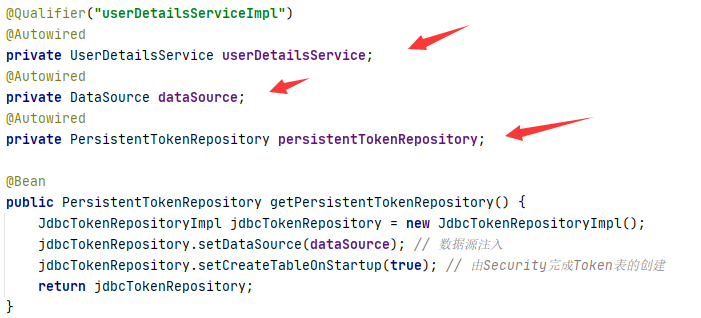
    public PersistentTokenRepository getPersistentTokenRepository() {

        JdbcTokenRepositoryImpl jdbcTokenRepository = new JdbcTokenRepositoryImpl();

        jdbcTokenRepository.setDataSource(dataSource); // 数据源注入

        jdbcTokenRepository.setCreateTableOnStartup(true); // 由Security完成Token表的创建

        return jdbcTokenRepository;

    }

    @Bean

    public PasswordEncoder getPasswordEncoder() {

        return new BCryptPasswordEncoder();

    }

    @Override

    protected void configure(HttpSecurity httpSecurity) throws Exception {

        httpSecurity.formLogin(). // 设置登陆行为方式为表单登陆

                // 登陆请求参数设置

                usernameParameter("username").

                passwordParameter("password").

                loginPage("/login.html"). // 设置登陆页面URL路径

                loginProcessingUrl("/login.action"). // 设置表单提交URL路径

                successForwardUrl("/main.page"). // 设置认证成功跳转URL路径 POST请求

                failureForwardUrl("/error.page");  // 设置认证失败跳转URL路径 POST请求

                //  successHandler(new FarsAuthenticationSuccessHandler("https://www.acfun.cn/")). // 使用自定义的重定向登陆

                //  failureHandler(new FarsAuthenticationFailureHandler("/error.html")).; // 跨域处理,不需要跳转了

        httpSecurity.authorizeRequests().

                regexMatchers(HttpMethod.POST, "正则表达式").permitAll(). // 还可以对符合正则表达式的请求方式进行要求,这个属性使用来制定请求的方式

                antMatchers("/**/*.js", "/**/*.css", "/**/images/*.*").permitAll(). // 静态资源放行

                antMatchers("/login.html").permitAll(). // 登陆页面允许任意访问

                antMatchers("/error.html").permitAll(). // 失败跳转后重定向的页面也需要被允许访问

                antMatchers("/admin.page").hasAnyAuthority("admin").

                /*antMatchers("/vip-01.page").hasAnyAuthority("vip-01").*/

                antMatchers("/vip-01.page").hasRole("vip-01").

                antMatchers("/ip.page").hasIpAddress("192.168.43.180").

                // mvcMatchers("/main.page").servletPath("/xxx").permitAll(). // mvcMatchers资源放行匹配

                // antMatchers("/xxx/main.page").permitAll(). // 或者多写MSP的前缀

                anyRequest().authenticated(); // 其他请求均需要被授权访问

                // anyRequest().access("@customServiceImpl.hasPermission(request, authentication)"); // 自定义Access配置

        // CSRF攻击拦截关闭

        httpSecurity.csrf().disable();

        httpSecurity.exceptionHandling().accessDeniedHandler(accessDeniedHandler);

        // 记住我

        httpSecurity.rememberMe().userDetailsService(userDetailsService).tokenRepository(persistentTokenRepository);

    }

}
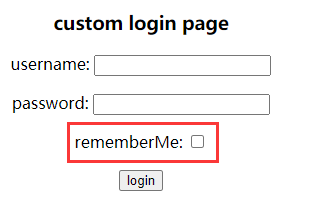
在之前的登陆页面中编写记住我选项框:
<!DOCTYPE html>

<html lang="en">

<head>

    <meta charset="UTF-8">

    <title>Title</title>

    <style type="text/css">

        h3,p {

            text-align: center;

        }

    </style>

</head>

<body>

    <h3>custom login page</h3>

    <form method="post" action="/login.action" >

        <p>username: <input type="text" name="username"></p>

        <p>password: <input type="password" name="password"></p>

        <p>rememberMe: <input type="checkbox" name="remember-me" value="true"></p>

        <p><input type="submit" value="login"></p>

    </form>

</body>

</html>
现在启动项目,会发现数据库多了一张persistent_logins表

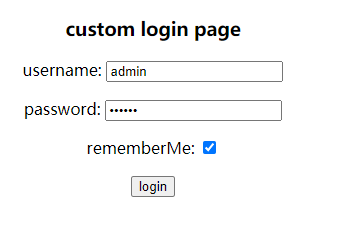
登陆访问勾选记住我,会插入用户的令牌和信息

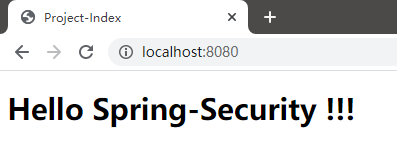
这时候关闭浏览器再打开,不需要验证就可以直接到首页了
持续时间是永久的,因为Token表的记录一直存在,除非记录被删除
或者调用HttpSecurity的方法,设置失效时间:
package cn.zeal4j.configuration;

import cn.zeal4j.handler.CustomAccessDeniedHandler;

import cn.zeal4j.handler.FarsAuthenticationFailureHandler;

import cn.zeal4j.handler.FarsAuthenticationSuccessHandler;

import org.springframework.beans.factory.annotation.Autowired;

import org.springframework.beans.factory.annotation.Qualifier;

import org.springframework.context.annotation.Bean;

import org.springframework.context.annotation.Configuration;

import org.springframework.http.HttpMethod;

import org.springframework.security.config.annotation.web.builders.HttpSecurity;

import org.springframework.security.config.annotation.web.configuration.WebSecurityConfigurerAdapter;

import org.springframework.security.core.parameters.P;

import org.springframework.security.core.userdetails.UserDetails;

import org.springframework.security.core.userdetails.UserDetailsService;

import org.springframework.security.crypto.bcrypt.BCryptPasswordEncoder;

import org.springframework.security.crypto.password.PasswordEncoder;

import org.springframework.security.web.access.AccessDeniedHandler;

import org.springframework.security.web.authentication.rememberme.JdbcTokenRepositoryImpl;

import org.springframework.security.web.authentication.rememberme.PersistentTokenRepository;

import javax.sql.DataSource;

/**

 * @author Administrator

 * @file IntelliJ IDEA Spring-Security-Tutorial

 * @create 2020 09 27 21:55

 */

@Configuration

public class SecurityConfiguration extends WebSecurityConfigurerAdapter {

    @Autowired

    private AccessDeniedHandler accessDeniedHandler;

    @Qualifier("userDetailsServiceImpl")

    @Autowired

    private UserDetailsService userDetailsService;

    @Autowired

    private DataSource dataSource;

    @Autowired

    private PersistentTokenRepository persistentTokenRepository;

    @Bean

    public PersistentTokenRepository getPersistentTokenRepository() {

        JdbcTokenRepositoryImpl jdbcTokenRepository = new JdbcTokenRepositoryImpl();

        jdbcTokenRepository.setDataSource(dataSource); // 数据源注入

        jdbcTokenRepository.setCreateTableOnStartup(true); // 由Security完成Token表的创建

        return jdbcTokenRepository;

    }

    @Bean

    public PasswordEncoder getPasswordEncoder() {

        return new BCryptPasswordEncoder();

    }

    @Override

    protected void configure(HttpSecurity httpSecurity) throws Exception {

        httpSecurity.formLogin(). // 设置登陆行为方式为表单登陆

                // 登陆请求参数设置

                usernameParameter("username").

                passwordParameter("password").

                loginPage("/login.html"). // 设置登陆页面URL路径

                loginProcessingUrl("/login.action"). // 设置表单提交URL路径

                successForwardUrl("/main.page"). // 设置认证成功跳转URL路径 POST请求

                failureForwardUrl("/error.page");  // 设置认证失败跳转URL路径 POST请求

                //  successHandler(new FarsAuthenticationSuccessHandler("https://www.acfun.cn/")). // 使用自定义的重定向登陆

                //  failureHandler(new FarsAuthenticationFailureHandler("/error.html")).; // 跨域处理,不需要跳转了

        httpSecurity.authorizeRequests().

                regexMatchers(HttpMethod.POST, "正则表达式").permitAll(). // 还可以对符合正则表达式的请求方式进行要求,这个属性使用来制定请求的方式

                antMatchers("/**/*.js", "/**/*.css", "/**/images/*.*").permitAll(). // 静态资源放行

                antMatchers("/login.html").permitAll(). // 登陆页面允许任意访问

                antMatchers("/error.html").permitAll(). // 失败跳转后重定向的页面也需要被允许访问

                antMatchers("/admin.page").hasAnyAuthority("admin").

                /*antMatchers("/vip-01.page").hasAnyAuthority("vip-01").*/

                antMatchers("/vip-01.page").hasRole("vip-01").

                antMatchers("/ip.page").hasIpAddress("192.168.43.180").

                // mvcMatchers("/main.page").servletPath("/xxx").permitAll(). // mvcMatchers资源放行匹配

                // antMatchers("/xxx/main.page").permitAll(). // 或者多写MSP的前缀

                anyRequest().authenticated(); // 其他请求均需要被授权访问

                // anyRequest().access("@customServiceImpl.hasPermission(request, authentication)"); // 自定义Access配置

        // CSRF攻击拦截关闭

        httpSecurity.csrf().disable();

        httpSecurity.exceptionHandling().accessDeniedHandler(accessDeniedHandler);

        // 记住我

        httpSecurity.rememberMe().

                tokenValiditySeconds(60). // 设置Token有效时间, 以秒为单位取值

                userDetailsService(userDetailsService).

                tokenRepository(persistentTokenRepository);

    }

}
除了使用持久化Token管理,另外一个是MemToken就是保存在内存中,应用程序来管理的
因为Token持久化接口仅有这两个实现,或者我们也可以自己写实现:
数据表的生成在Jdbc令牌持久化接口实现类中定义好了SQL语句,自动管理:

侧重点还需要这三个Bean的注入
【Spring-Security】Re07 持久化的记住我的更多相关文章
- Spring Security 之 Remember-Me (记住我)
效果:在用户的session(会话)过期或者浏览器关闭后,应用程序仍能记住它.用户可选择是否被记住.(在登录界面选择) “记住”是什么意思? 就是下次你再访问的时候,直接进入系统,而不需要 ...
- spring security实现记住我下次自动登录功能
目录 spring security实现记住我下次自动登录功能 一.原理分析 二.实现方式 2.1 简单实现方式 2.2 数据库实现方式 三.区分是密码登录还是rememberme登录 spring ...
- Spring Security构建Rest服务-0900-rememberMe记住我
Spring security记住我基本原理: 登录的时候,请求发送给过滤器UsernamePasswordAuthenticationFilter,当该过滤器认证成功后,会调用RememberMeS ...
- Spring Security 实现记住我
开篇一张图,道理全靠悟. 示例如下: 1. 新建Maven项目 remember_me 2. pom.xml <project xmlns="http://maven.ap ...
- Spring Security框架下实现两周内自动登录"记住我"功能
本文是Spring Security系列中的一篇.在上一篇文章中,我们通过实现UserDetailsService和UserDetails接口,实现了动态的从数据库加载用户.角色.权限相关信息,从而实 ...
- spring security remember me实现自动登录
1 默认策略 在我们自定义的login中增加一个选择框 <input type="submit" value="Login" /> <br/& ...
- Spring Security 入门详解(转)
1.Spring Security介绍 Spring Security是基于spring的应用程序提供声明式安全保护的安全性框架,它提供了完整的安全性解决方案,能够在web请求级别和方法调用级别 处理 ...
- Spring Security(12)——Remember-Me功能
目录 1.1 概述 1.2 基于简单加密token的方法 1.3 基于持久化token的方法 1.4 Remember-Me相关接口和实现类 1.4.1 Toke ...
- Spring Security 入门(1-3-5)Spring Security - remember me!
Remember-Me 功能 概述 Remember-Me 是指网站能够在 Session 之间记住登录用户的身份,具体来说就是我成功认证一次之后在一定的时间内我可以不用再输入用户名和密码进行登录了, ...
- Spring Security之Remember me详解
Remember me功能就是勾选"记住我"后,一次登录,后面在有效期内免登录. 先看具体配置: pom文件: <dependency> <groupId> ...
随机推荐
- js数据类型的检查
<!DOCTYPE html> <html lang="en"> <head> <meta charset="UTF-8 ...
- SonarQube代码质量扫描工具
1.什么是SonarQube 既然是学习devops 运维流水线构建 开发 ↓ 测试 ↓ 运维 华为devops软件开发流水线文档 https://support.huaweicloud.com/re ...
- 如何基于R包做GO分析?实现秒出图
GO分析 基因本体论(Gene Ontology, GO)是一个用于描述基因和基因产品属性的标准术语体系.它提供了一个有组织的方式来表示基因在生物体内的各种角色.基因本体论通常从三个层面对基因进行描述 ...
- javascript 生成器和迭代器
前置知识 生成器函数会返回一种称为Generator的迭代器 迭代器是一个对象,定义一个序列,并在终止时返回一个返回值 Symbol.iterator为每一个对象定义了默认的迭代器,可以被for..o ...
- Spring Cloud微服务核心架构分析
Spring Cloud是一个相对比较成熟的微服务框架.虽然,Spring Cloud于2016年才推出1.0的release版本, 时间最短, 但是相比Dubbo等RPC框架, Spring Clo ...
- 【译】Visual Studio 2022 - 17.10 性能增强
我们很高兴地宣布 Visual Studio 2022 的最新更新,它为您带来了 IDE 各个领域的一系列性能增强.在这篇博客中,我们将重点介绍17.10版本中一些最显著的改进,比如更快的 Windo ...
- Apache Kylin(一)Kylin介绍
1. 传统大数据分析的问题 在基于Hadoop 生态的传统大数据分析中,主要使用的技术是MPP(Massively Parallel Processing)大规模并行处理和列式存储.MPP使用线性增加 ...
- Qt 之 emit、signals、slot的使用
背景 ref : https://www.ibm.com/developerworks/cn/linux/guitoolkit/qt/signal-slot/index.html 信号和槽机制是 QT ...
- 【论文阅读】Causal Imitative Model for Autonomous Driving
Sensor/组织: EPFL Sharif University of Technology Status: Finished Summary: 看看框架图就行.高效缓解因果混淆问题,将因果作为学习 ...
- 三屏异显案例分享,基于全国产RK3568J工业平台!
在工业领域中,能否更灵活.更高效地在主屏幕进行主要任务,并在其他副屏幕上进行其他次要任务(例如查看参考资料.监控其他应用程序),一直都是许多工业领域客户面临的刚需,而"多屏异显"功 ...