
Linq操作XML生成XML,实体生成XML和互转
开发接口中难免会遇到一些数据对接需要转换城xml,看到很多之前的代码都使用很传统的方法循环集合并定义xml后一一生成的,代码之封锁 特此使用了简单易用linq操作分享给大家,希望可以帮到需要的同学
今天就带大家简单使用Linq生成XML,及Linq操作XML的基本操作。实体生成XML和XML生成实体互转
一、实体→XM的操作
如以下是演示的产品实体模型如下:
    public class Product

    {

        public int id { get; set; }

        public string Name { get; set; }

        public decimal Price { get; set; }

        public int Category { get; set; }

    }
操作集合list,生成xml
            //构造一个商品集合

            List<Product> list = new List<Product>();

            for (int i = 1; i < 21; i++)

            {

                list.Add(new Product { id = 1, Name = $"商品{i}", Price = new Random().Next(i, 1000), Category = new Random(i).Next(20) });

            }

            var xml = new XElement("products",

                from p in list

                select new XElement("product",

                new XAttribute("id", p.id),

                new XAttribute("name", p.Name),

                new XElement("price", p.Price),

                new XElement("category", p.Category)));

            Console.WriteLine(xml.ToString());
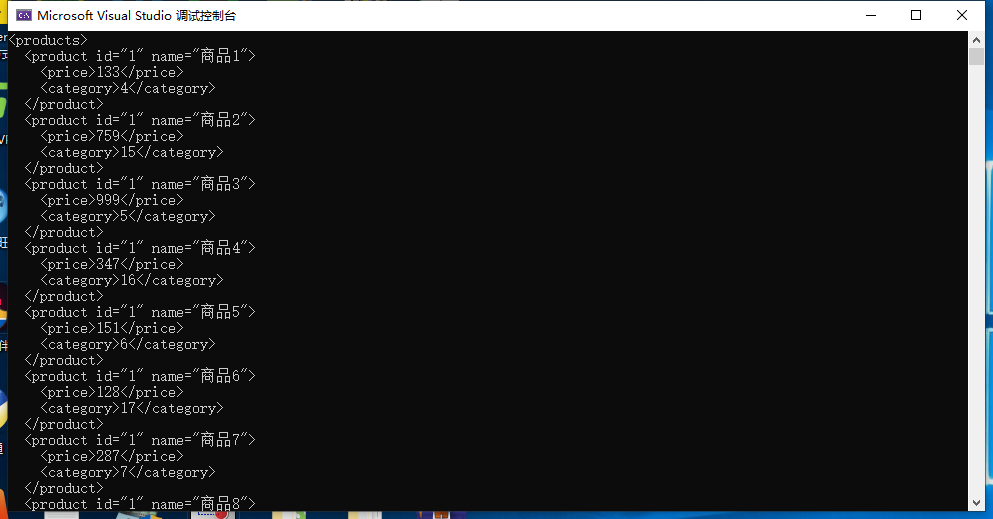
那么问题来了,当我们接口接收到xml时候如何又将xml转换为实体尼?
一、XML→实体的操作
操作是一样的快捷简单,linq肯定是少不了的,item.xml是文件,此处也可以是读取文件流,大家可以根据自己的需求修改。
            XDocument document = XDocument.Load("item.xml");

            var collection = document.Descendants("products")

                .Descendants("product").Select(

                node => new Product

                {

                    id = Convert.ToInt16(node.Attribute("id")),

                    Name = node.Attribute("name").Value,

                    Price = Convert.ToDecimal(node.Attribute("rice")),

                    Category = Convert.ToInt16(node.Attribute("category"))

                });
最终完整代码:
            List<Product> list = new List<Product>();

            for (int i = 1; i < 21; i++)

            {

                list.Add(new Product { id = 1, Name = $"商品{i}", Price = new Random().Next(i, 1000), Category = new Random(i).Next(20) });

            }

            var xml = new XElement("products",

                from p in list

                select new XElement("product",

                new XAttribute("id", p.id),

                new XAttribute("name", p.Name),

                new XElement("price", p.Price),

                new XElement("category", p.Category)));

            Console.WriteLine(xml.ToString());

            XDocument document = XDocument.Load("item.xml");

            var collection = document.Descendants("products")

                .Descendants("product").Select(

                node => new Product

                {

                    id = Convert.ToInt16(node.Attribute("id")),

                    Name = node.Attribute("name").Value,

                    Price = Convert.ToDecimal(node.Attribute("rice")),

                    Category = Convert.ToInt16(node.Attribute("category"))

                });

            foreach (var item in collection)

            {

                Console.WriteLine(item.Name);

            }
简单快捷明了,不知是否帮到了正在看帖的你?
Linq操作XML生成XML,实体生成XML和互转的更多相关文章
- 使用mybatis-generator-core工具自动生成mybatis实体
我们可以使用mybatis-generator-core这个工具将数据库对象转换成mybatis对象,具体步骤如下. 1.mybatis-generator-core下载 下载地址:http://do ...
- 生成XML文件,通过实体生成XML文件
实体 using System;using System.Collections.Generic;using System.Linq;using System.Text;using System.Xm ...
- Mybatis Generator生成Mybatis Dao接口层*Mapper.xml以及对应实体类
[前言] 使用Mybatis-Generator自动生成Dao.Model.Mapping相关文件,Mybatis-Generator的作用就是充当了一个代码生成器的角色,使用代码生成器不仅可以简化我 ...
- C# Linq方式生成SAP对接的XML格式内容(一般处理程序 ashx )
Linq生成XML的方法: string CreateXML(string strkey, string strDATAJSON) { XDeclaration dec = new XDeclarat ...
- Mybatis的逆向工程,自动生成代码(Mapper,xml,bean)
步骤: 1. 新建一个Maven项目: 然后导入maven依赖: <dependencies> <dependency> <groupId>org.mybatis& ...
- 生成当前目录文件的xml描述
需求场景:例如需要在当前目录下把相关文件组织成xml文件去描述.通常在组织项目中的升级文件时候可能会用到. 代码示例: using System; using System.Collections.G ...
- Android中XML文件的序列化生成与解析
xml文件是非常常用的,在android中json和xml是非常常用的两种封装数据的形式,从服务器中获取数据也经常是这两种形式的,所以学会生成和解析xml和json是非常有用的,json相对来说是比较 ...
- Android学习记录(1)—Android中XML文件的序列化生成与解析
xml文件是非常常用的,在android中json和xml是非常常用的两种封装数据的形式,从服务器中获取数据也经常是这两种形式的,所以学会生成和解析xml和json是非常有用的,json相对来说是比较 ...
- 5.20 mybatis反向生成的映射文件xml(如果需要自己定义其他sql语句时如下)
解决mybatis-generator 生成的mapper.xml覆盖自定义sql的问题 mybatis-generator是个好工具,一建即可生成基本增删改成功能的mapper.xml.但这些是不够 ...
- Android 生成和Pull解析xml
一.单个对象生成xml 生成以下xml,该怎么生成呢? <?xml version='1.0' encoding='UTF-8' standalone='yes' ?> <accou ...
随机推荐
- 全网最适合入门的面向对象编程教程:05 类和对象的Python实现-PyCharm代码标签(一个帮你提升coding效率的小技巧)
摘要: 本文介绍了PyCharm IDE中代码标签的定义.类型和使用方法. 往期推荐: 学嵌入式的你,还不会面向对象??! 全网最适合入门的面向对象编程教程:00 面向对象设计方法导论 全网最适合入门 ...
- windows服务开发demo
0.写在前面 windows7开始,windows服务运行在session 0, 用户程序都运行在session x (x >= 1) 而session之间是有隔离的,实践发现是无法在服务中直接 ...
- 【干货】顶级 Java 源码教程项目大汇总!
大家好,我是鱼皮,今天分享几个 GitHub 上顶级的 Java 源码教程项目. 区别于书籍.文档.视频等形式的教程,这些项目几乎都是由 精简的代码片段 和 Demo 组成的,能够轻松地在本地执行,非 ...
- Docker通信全视角:原理、实践与技术洞察
本文全面深入地探讨了Docker容器通信技术,从基础概念.网络模型.核心组件到实战应用.详细介绍了不同网络模式及其实现,提供了容器通信的技术细节和实用案例,旨在为专业从业者提供深入的技术洞见和实际操作 ...
- [oeasy]python0041_ 转义字符_转义序列_escape_序列_sequence
转义序列 回忆上次内容 上次回顾了5bit-Baudot博多码的来历 从 莫尔斯码 到 博多码 原来 人 来 收发电报 现在 机器 来 收发电报 输入方式 从 电键 改成 键盘 输出方式 从 纸带 变 ...
- oeasy教您玩转vim - 46 - # 范围控制
范围控制 回忆上节课内容 这次我们主要就是看命令行 首先是选择一个 [range] 这个范围 然后进行相应的操作 :11,30d :2,7y 还可以指定寄存器 :"a3,40y :&qu ...
- c# 多线程环境下控制对共享资源访问的办法
Monitor: 定义:Monitor 是 C# 中最基本的同步机制,通过 Enter 和 Exit 方法来控制对共享资源的访问.它提供了排他锁的功能,确保在任何时刻只有一个线程可以访问共享资源. 优 ...
- 【FTP】小米手机FTP传输
设置方法 打开[文件管理],右上角按钮选择[远程管理] 点击设置按钮 默认保持唤醒状态 设置FTP账户的用户名密码 Windows访问: 然后开启服务即可: 手机和电脑连接同一个网络内访问 每次接入网 ...
- AI4Science 再填新成员:谷歌推出天气模型MetNet-3 已落地相关产品、谷歌天气预报模型GraphCast登刊Science —— AI天气预报大模型
相关: https://zhidx.com/news/40169.html https://zhidx.com/news/40290.html PS. 要知道,华为公司的最高学术成果就是AI天气预报, ...
- baselines算法库common/retro_wrappers.py模块分析
retro_wrappers.py模块代码: from collections import deque import cv2 cv2.ocl.setUseOpenCL(False) from .at ...