
typescript json 转 bean
3个文件:
1.UserInfoGetResponse.ts
class UserInfoGetResponse{

    private userId: number;

    private userName: string;

    private userPwd: string;

    public getUserId(): number {

        return this.userId;

    }

    public setUserId(value: number) {

        this.userId = value;

    }

    public getUserName(): string {

        return this.userName;

    }

    public setUserName(value: string) {

        this.userName = value;

    }

    public getUserPwd(): string {

        return this.userPwd;

    }

    public setUserPwd(value: string) {

        this.userPwd = value;

    }

}

export = UserInfoGetResponse;
2.ts2bean.ts
import UserInfoGetResponse = require("./src/js/UserInfoGetResponse");

window.onload = ()=>{

    let wokao = this.document.getElementById("wokao");

    wokao.onclick = ()=>{

        let json = "{\"userId\":777,\"userName\":\"小李飞刀\",\"userPwd\":\"wokao123\"}";

        let res1 = new UserInfoGetResponse();

        let res2 = new UserInfoGetResponse();

        /*

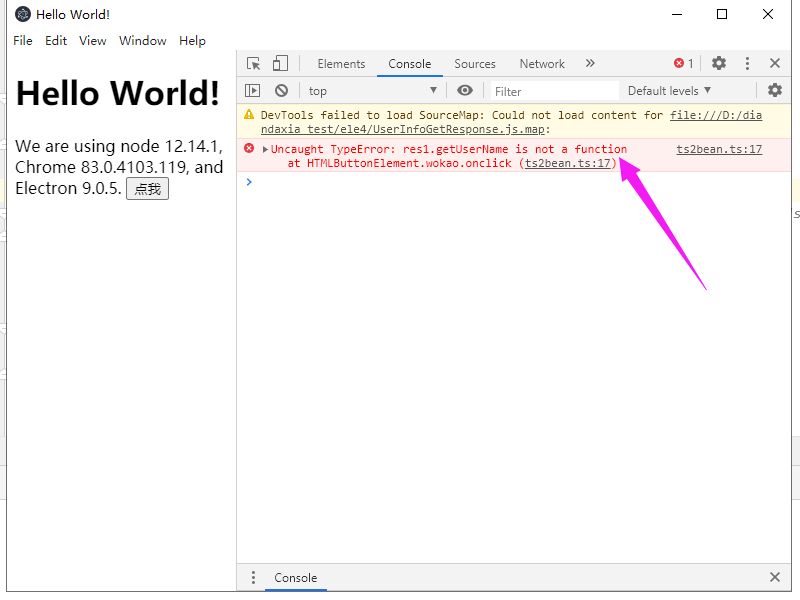
         1.这种方式会失去类型信息,导致 res1.getUserName() 报错,显示未定义

         */

        res1 = JSON.parse(json);

        //console.log(res1.getUserName()); 会报错。

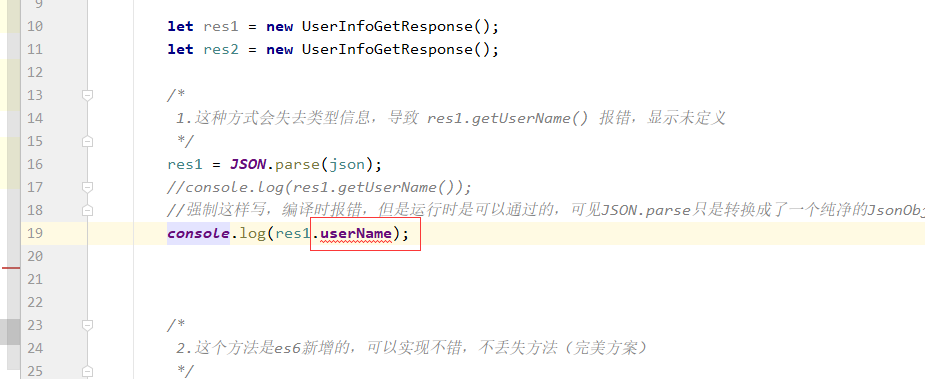
        //强制这样写,编译时报错,但是运行时是可以通过的,可见JSON.parse只是转换成了一个纯净的JsonObject,不包含方法

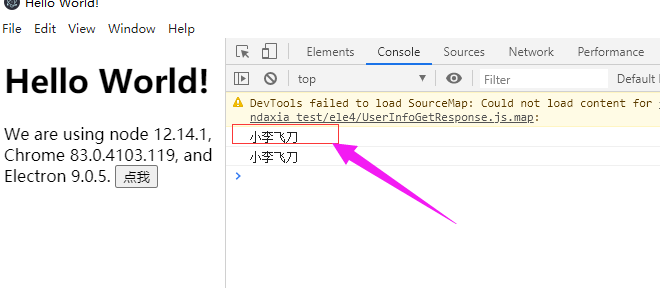
        //console.log(res1.userName);

        /*

         2.这个方法是es6新增的,可以实现不错,不丢失方法(完美方案)

         */

        Object.assign(res2, JSON.parse(json));

        console.log(res2.getUserName());

        //当然 像 res3这样直接写,也是可以的。

        //let res3: UserInfoGetResponse = Object.assign(new UserInfoGetResponse(), JSON.parse(json));

        /*

         是一件好事,仅仅留意下就可。

         注意事项,若实体类中不包含一个字段,而json中包含这个字段,那么转换后,虽然不能通过实例对象来获取,但是属性是已经加上了

         就是说,JSON.parse 会把 json中的 所有字段都加到对象上,而不管这个对象的类 有没有定义,有定义 就按有定义的来,没定义

         就直接增加上,但是 由于没有定义 所以写代码时 无法方法,但是运行时 是可以获取到的,这其实是一件好事。

         测试方法:

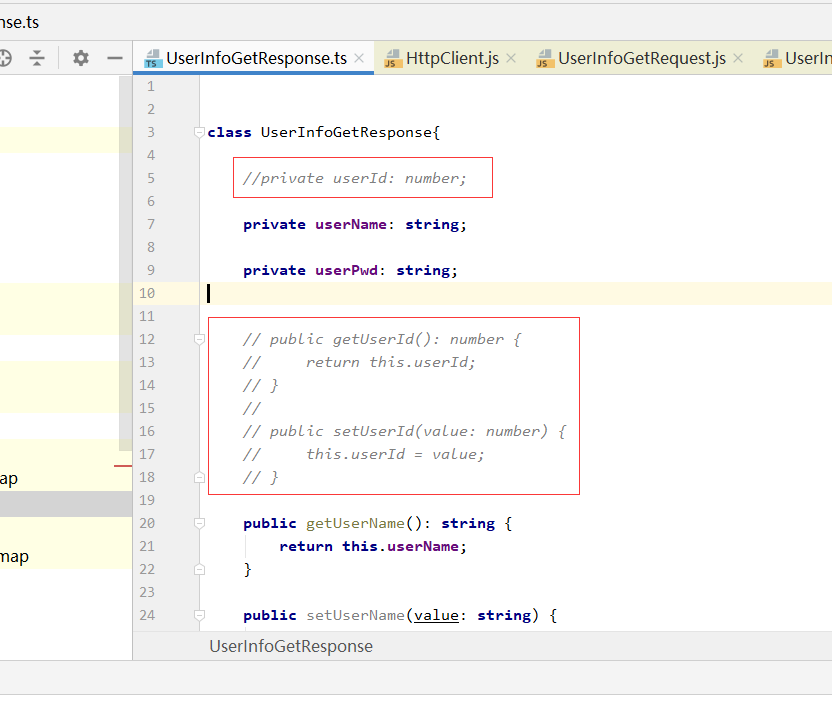
           1. 去除UserInfoGetResponse的 userId字段

           2. 然后 console.log(res2.userId()); 会发行IDE会报错因为没有定义,但是运行时 是没有问题的,可以获取到。

              通过 JSON.stringify 也会出来,是一件好事,不影响使用。

         */

    }

}

export = window.onload
res1 报错截图:
res1 直接写 userName 编译报错,运行正常截图:
res2 运行正常截图,这个省略了。
res2 去除 userId 后, 测试流程截图:
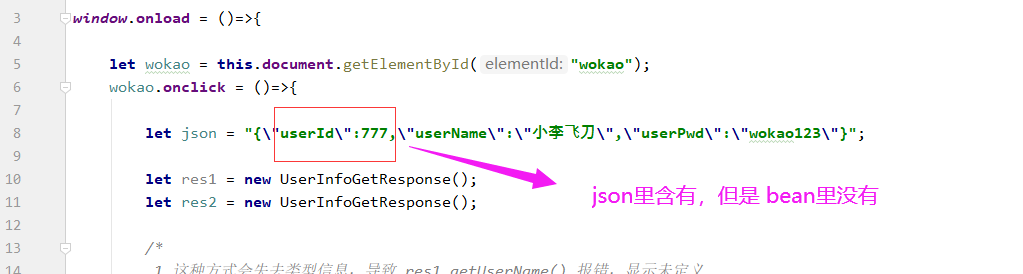
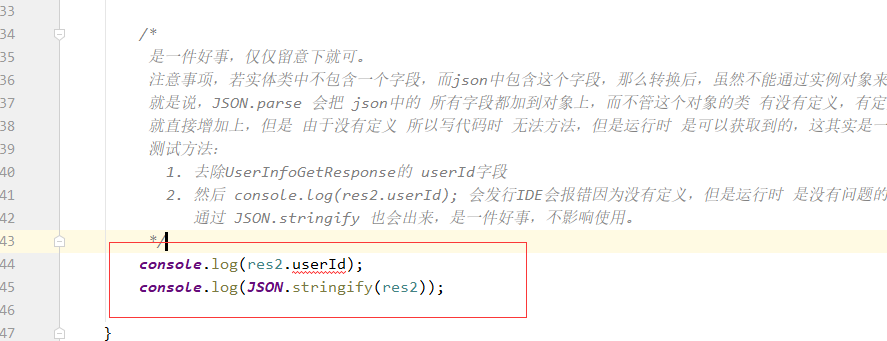
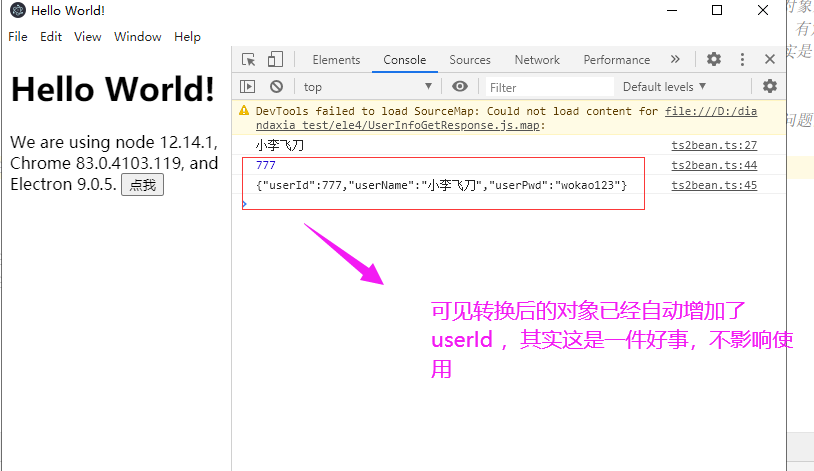
这个问题的来源是某一个人的提问,我也测试了下 不影响使用:https://stackoverflow.com/questions/43019452/typescript-json-to-typescript-object
3.index.html
<!DOCTYPE html>

<html>

<head>

    <meta charset="UTF-8">

    <title>Hello World!</title>

    <!-- https://electronjs.org/docs/tutorial/security#csp-meta-tag -->

    <meta http-equiv="Content-Security-Policy" content="script-src 'self' 'unsafe-inline';" />

    <script src="ts2bean.js"></script>

</head>

<body>

<h1>Hello World!</h1>

We are using node <script>document.write(process.versions.node)</script>,

Chrome <script>document.write(process.versions.chrome)</script>,

and Electron <script>document.write(process.versions.electron)</script>.

<button id = "wokao">点我</button>

</body>

</html>
typescript json 转 bean的更多相关文章
- JSON,Bean,XML,List,Map
http://blog.csdn.net/superit401/article/details/51728929 JSON-lib这个Java类包用于把bean,map和XML转换成JSON并能够把J ...
- [TypeScript] JSON对象转TypeScript对象范例
[TypeScript] JSON对象转TypeScript对象范例 Playground http://tinyurl.com/nv4x9ak Samples class DataTable { p ...
- Json与bean的相互转换
本文使用json-lib jar包实现Json与bean的相互转换 1.将字符串转为JSON 使用JSONObject.fromObject(str)方法即可将字符串转为JSON对象 使用JSONOb ...
- java中 json和bean list map之间的互相转换总结
JSON 与 对象 .集合 之间的转换 JSON字符串和java对象的互转[json-lib] 在开发过程中,经常需要和别的系统交换数据,数据交换的格式有XML.JSON等,JSON作为一个轻量级 ...
- Json与Bean互转,Timestamp类型的问题
Json与Java Bean互相转换时,Bean中的Timestamp字段是无法直接处理的,需要实现两个转换器. DateJsonValueProcessor的作用是Bean转换为Json时将Time ...
- JSON与Bean互转
转自: 关于json与javaBean之间的转换 废话不多说,直接进入主题,json与javaBean之间的互相转换 javaBean转换成json 直接使用提供的方法可以得到json JSONObj ...
- typescript Json Convert
关键代码 this.data={}; // json string this.dataStr=JSON.stringify(this.data); // json object this.conver ...
- json转bean对象
一下为个人收藏,以便下次使用. 前端传的json格式为: [{"suppliercode":"gylhld_gycqlt3_gycqlt1","pro ...
- jackson json转bean忽略没有的字段 not marked as ignorable
@JsonIgnore注解用来忽略某些字段,可以用在Field或者Getter方法上,用在Setter方法时,和Filed效果一样.这个注解只能用在POJO存在的字段要忽略的情况,不能满足现在需要的情 ...
- gson转换json到bean时重命名
@Expose @SerializedName("0001") public Map<String,ChannelBean> c0001 = new HashMap ...
随机推荐
- C语言常用字符串操作函数整理(详细全面)
目录 字符串相关 1.char *gets(char *s); #include<stdio.h> 2.char *fgets(char *s, intsize, FILE *stream ...
- 理解 Kubernetes volume 和 共享存储
1. Kubernetes volume 文章 介绍了 Docker volume.与 docker volume 类似的,在 kubernetes 中存在 Pod 级别的 volume,Pod 的 ...
- 基于python+django的旅游信息网站-旅游景点门票管理系统设计与实现
该系统是基于python+django开发的旅游景点门票管理系统.是给师弟做的课程作业.大家学习过程中,遇到问题可以在github咨询作者 演示地址 前台地址: http://travel.gitap ...
- Nacos源码 (5) Grpc服务端和客户端
Nacos 2.x在服务端与客户端直接增加了GRPC通信方式,本文通过2.0.2版本源码,简单分析GRPC通信方式: 服务器启动 客户端连接 客户端心跳 服务器监控检查 服务器 proto文件 api ...
- spring-transaction源码分析(2)EnableTransactionManagement注解
概述(Java doc) 该注解开启spring的注解驱动事务管理功能,通常标注在@Configuration类上面用于开启命令式事务管理或响应式事务管理. @Configuration @Enabl ...
- C#/.Net Core/WPF框架初建(国际化、主题色)
C#/.Net Core/WPF框架初建(国际化.主题色) English | 简体中文 作为 TerminalMACS 的一个子进程模块 - WPF管理端,目前搭建框架部分功能:本地化.国际化.主题 ...
- 问题--如何快速复制Typora(Markdown)中的代码块/区块等
使用快捷键ctrl+E,选中相同格式的文字,然后快速复制即可
- MyBatis06——动态SQL
动态SQL if choose (when, otherwise) trim (where, set) foreach 搭建环境 1.搭建数据库 CREATE TABLE `blog` ( `id` ...
- [转帖]nginx配置文件中对于if条件语句的写法(附nginx跨域文件配置)
前言 在nginx配置文件中,可以使用if语句,但是对于else语句其实是不支持的,并且and条件和or条件也是不支持的 实现 else条件的写法 新建一个开关变量flag,初始值为0,如果为1说明进 ...
- [转帖]linux audit审计(8)--开启audit对系统性能的影响
https://www.cnblogs.com/xingmuxin/p/8875783.html 我们使用测试性能的工具,unixbench,它有一下几项测试项目: Execl Throughput ...