
iOS中"查看更多/收起"功能实现
实现效果如图:
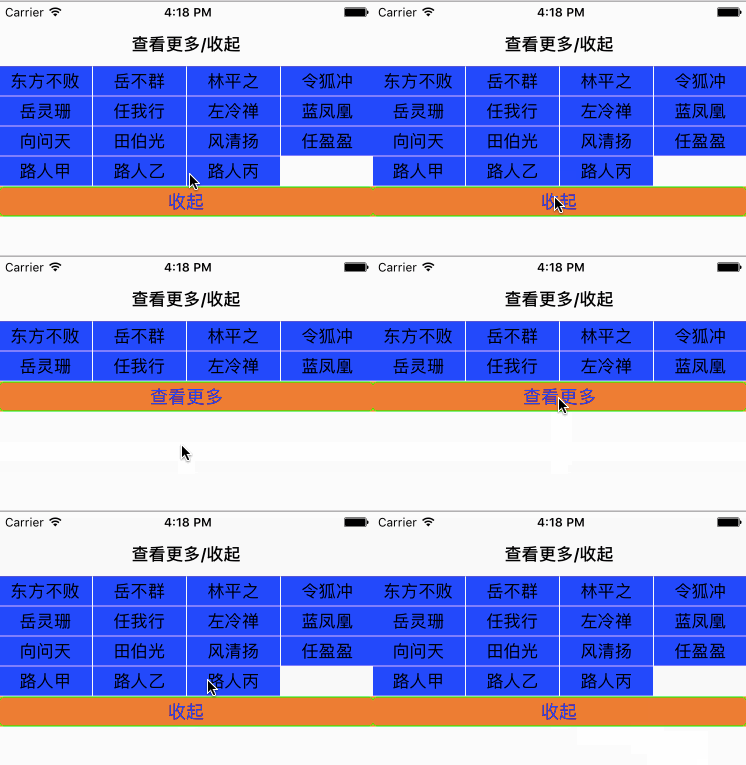
查看更多功能在很多app种都有应用,在这里简单的实现,介绍实现流程:
一个tableViewCell中包含一个collectionView,"查看更多"按钮是tableView的footerView
在控制器中ViewController .m中
#import "ViewController.h"

#import "ZSTableViewCell.h"

@interface ViewController ()<UITableViewDelegate,UITableViewDataSource>

@property (nonatomic,strong) UITableView *tableView;

//存放标题的数组

@property (nonatomic,strong) NSArray *titleArray;

@property (nonatomic,strong) UIButton *changeButton;

@property (nonatomic,assign) BOOL isOpen;

@property (nonatomic,assign) NSInteger showButtonNumber;

@end

@implementation ViewController

- (void)viewDidLoad {

    [super viewDidLoad];

    self.tableView = [[UITableView alloc]initWithFrame:[UIScreen mainScreen].bounds style:UITableViewStylePlain];

    [self.view addSubview:self.tableView];

    self.tableView.delegate = self;

    self.tableView.dataSource = self;

    [self.tableView registerClass:[ZSTableViewCell class] forCellReuseIdentifier:@"TheCell"];

    self.title = @"查看更多/收起";

    self.isOpen = NO;

    [self.changeButton setTitle:@"查看更多" forState:UIControlStateNormal];

    self.changeButton.backgroundColor = [UIColor clearColor];

    UICollectionViewFlowLayout *flowLayout = [[UICollectionViewFlowLayout alloc]init];

    flowLayout.itemSize = CGSizeMake(([UIScreen mainScreen].bounds.size.width - )/, );

    _showButtonNumber = ;

    _titleArray = @[@"东方不败",@"岳不群",@"林平之",@"令狐冲",@"岳灵珊",@"任我行",@"左冷禅",@"蓝凤凰",@"向问天",@"田伯光",@"风清扬",@"任盈盈",@"路人甲",@"路人乙",@"路人丙"];

}

#pragma  mark --懒加载

//查看更多/收起按钮

- (UIButton *)changeButton{

    if (_changeButton == nil) {

        _changeButton = [UIButton buttonWithType:UIButtonTypeCustom];

        _changeButton.frame = CGRectMake(, , [UIScreen mainScreen].bounds.size.width, );

        [_changeButton addTarget:self action:@selector(buttonClick:) forControlEvents:UIControlEventTouchUpInside];

        [_changeButton setTitleColor:[UIColor blueColor] forState:UIControlStateNormal];

        [_changeButton setBackgroundColor:[UIColor whiteColor]];

        _changeButton.layer.cornerRadius = ;

        _changeButton.layer.masksToBounds = YES;

        _changeButton.layer.borderWidth = ;

        _changeButton.layer.borderColor = [UIColor greenColor].CGColor;

    }

    return _changeButton;

}

//button点击事件

- (void)buttonClick:(UIButton *)sender{

    //如果不是展开状态

    if (self.isOpen == NO) {

        [self.changeButton setTitle:@"收起" forState:UIControlStateNormal];

        self.isOpen = YES;

        _showButtonNumber = _titleArray.count;

    }else{

        [self.changeButton setTitle:@"查看更多" forState:UIControlStateNormal];

        self.isOpen = NO;

        _showButtonNumber = ;

    }

    //刷新 动画效果 第0个section  NSIndexSet索引集合

    [self.tableView reloadSections:[NSIndexSet indexSetWithIndex:] withRowAnimation:(UITableViewRowAnimationAutomatic)];

    /*

     UITableViewRowAnimationFade,  消失

     UITableViewRowAnimationRight,  从右滑行     // slide in from right (or out to right)

     UITableViewRowAnimationLeft,

     UITableViewRowAnimationTop,

     UITableViewRowAnimationBottom,

     UITableViewRowAnimationNone,            // available in iOS 3.0

     UITableViewRowAnimationMiddle,

     UITableViewRowAnimationAutomatic 自动

     */

}

#pragma mark --

- (NSInteger)numberOfSectionsInTableView:(UITableView *)tableView{

    return ;

}

- (NSInteger)tableView:(UITableView *)tableView numberOfRowsInSection:(NSInteger)section{

    return ;

}

- (CGFloat)tableView:(UITableView *)tableView heightForRowAtIndexPath:(NSIndexPath *)indexPath{

    //根据标识返回不同的高度

    if (self.isOpen == YES) {

        //因为每行有4个item,要多出空余的item

        CGFloat height = (self.titleArray.count /  + ) * ;

        return height;

    }else{

        return ;

    }

}

- (CGFloat)tableView:(UITableView *)tableView heightForHeaderInSection:(NSInteger)section{

    return 0.5;

}

- (CGFloat)tableView:(UITableView *)tableView heightForFooterInSection:(NSInteger)section{

    return ;

}

- (UITableViewCell *)tableView:(UITableView *)tableView cellForRowAtIndexPath:(NSIndexPath *)indexPath{

    ZSTableViewCell *cell = [tableView dequeueReusableCellWithIdentifier:@"TheCell" forIndexPath:indexPath];

    [cell setupCellWithNum:_showButtonNumber ButtonNameArr:_titleArray];

    cell.buttonClick = ^(NSInteger index){

        NSLog(@"点击的按钮标签为%ld",index);

    };

    return  cell;

}

//footview

- (UIView *)tableView:(UITableView *)tableView viewForFooterInSection:(NSInteger)section{

    UIView *firstFootView = [[UIView alloc]initWithFrame:self.changeButton.frame];

    [firstFootView addSubview:self.changeButton];

    firstFootView.backgroundColor = [UIColor orangeColor];

    return firstFootView;

}

- (void)didReceiveMemoryWarning {

    [super didReceiveMemoryWarning];

    // Dispose of any resources that can be recreated.

}

@end
在tableViewCell的.h中
#import <UIKit/UIKit.h>

@interface ZSTableViewCell : UITableViewCell

//点击cell的回调

@property (nonatomic,copy) void (^buttonClick)(NSInteger index);

- (void)setupCellWithNum:(NSInteger)buttonCount ButtonNameArr:(NSArray *)buttonArray;

@end
tableViewCell的.m
#import "ZSTableViewCell.h"

#import "TheItemCell.h"

@interface ZSTableViewCell ()<UICollectionViewDataSource,UICollectionViewDelegate>

@property (nonatomic,strong) UICollectionView *collectionView;

@property (nonatomic,assign) NSInteger cellNum;//接受控制器传来的数组个数

@property (nonatomic,strong) NSArray *buttonTitleArray;

@end

@implementation ZSTableViewCell

- (instancetype)initWithStyle:(UITableViewCellStyle)style reuseIdentifier:(NSString *)reuseIdentifier{

    self = [super initWithStyle: style reuseIdentifier:reuseIdentifier];

    if (self) {

        //流水布局

        UICollectionViewFlowLayout *flowLayout = [[UICollectionViewFlowLayout alloc]init];

        flowLayout.itemSize = CGSizeMake(([UIScreen mainScreen].bounds.size.width - )/, );

        //行间距

        flowLayout.minimumLineSpacing = ;

        //列间距

        flowLayout.minimumInteritemSpacing = ;

        //设置item偏移量 上 左 下 右

        flowLayout.sectionInset = UIEdgeInsetsMake(, , , );

        self.collectionView.scrollEnabled = NO;

        CGFloat height = ( /  +) * ;

        self.collectionView = [[UICollectionView alloc]initWithFrame:CGRectMake(, , [UIScreen mainScreen].bounds.size.width,height) collectionViewLayout:flowLayout];

        [self.contentView addSubview:self.collectionView];

        //注册,必须先创建完collectionView,并且添加到父控件,才能注册,不然会报错

        [self.collectionView registerClass:[TheItemCell class] forCellWithReuseIdentifier:@"Cell"];

        self.collectionView.backgroundColor = [UIColor whiteColor];

        self.backgroundColor = [UIColor orangeColor];

    }

    self.collectionView.delegate = self;

    self.collectionView.dataSource = self;

    return self;

}

- (void)setupCellWithNum:(NSInteger)buttonCount ButtonNameArr:(NSArray *)buttonArray{

    self.cellNum = buttonCount;

    self.buttonTitleArray = buttonArray;

    [self.collectionView reloadData];

}

#pragma mark --

//返回item

- (NSInteger)collectionView:(UICollectionView *)collectionView numberOfItemsInSection:(NSInteger)section{

    NSLog(@"%ld",(long)_cellNum);

    return _cellNum;

}

//返回组

- (NSInteger)numberOfSectionsInCollectionView:(UICollectionView *)collectionView{

    return ;

}

- (UICollectionViewCell *)collectionView:(UICollectionView *)collectionView cellForItemAtIndexPath:(NSIndexPath *)indexPath{

    TheItemCell *cell = [collectionView dequeueReusableCellWithReuseIdentifier:@"Cell" forIndexPath:indexPath];

    cell.label.text = self.buttonTitleArray[indexPath.item];

    cell.backgroundColor = [UIColor blueColor];

    return cell;

}

//点击cell

- (void)collectionView:(UICollectionView *)collectionView didSelectItemAtIndexPath:(NSIndexPath *)indexPath{

    self.buttonClick(indexPath.row);

}

- (void)setSelected:(BOOL)selected animated:(BOOL)animated {

    [super setSelected:selected animated:animated];

    // Configure the view for the selected state

}

@end
在collectionViewCell.h
#import <UIKit/UIKit.h>

@interface TheItemCell : UICollectionViewCell

@property (nonatomic,strong) UILabel *label;

@end
collectionViewCell的.m中
#import "TheItemCell.h"

@implementation TheItemCell

- (instancetype)initWithFrame:(CGRect)frame{

    self = [super initWithFrame:frame];

    if (self) {

        self.label = [[UILabel alloc]initWithFrame:self.bounds];

        self.label.textAlignment = NSTextAlignmentCenter;

        [self.contentView addSubview:self.label];

    }

    return self;

}

@end
iOS中"查看更多/收起"功能实现的更多相关文章
- iOS Masonry 查看更多 收起
Masonry 查看更多 收起效果实现,带动画 demo下载地址: https://github.com/qqcc1388/MasonryDemo
- 如何在ios中集成微信登录功能
在ios中集成微信的登录功能有两种方法 1 用微信原生的api来做,这样做的好处就是轻量级,程序负重小,在Build Settings 中这样设置 然后设置 友盟的设置同上,但是要注意,加入你需要的所 ...
- ovs加dpdk在日志中查看更多运行细节的方法
想查看更多dpdk+ovs的更多运行细节,可以采用以下方法,增加更多运行日志. 在终端输入: ovs-appctl vlog/set dpdk:file:dbg ovs-appctl vlog/set ...
- iOS中键盘的收起
在UIViewController中收起键盘,除了调用相应控件的resignFirstResponder方法之外,还有另外三种方法: 重载UIViewController中的touchesBegin方 ...
- win10 关闭 “在时间线中查看更多日期” 提示
在组策略中,禁用允许上传用户活动
- iOS中打电话、打开网址、发邮件、发短信等
常用小功能 小功能简介 iOS中的很多小功能都是非常简单的,几行代码就搞定了,比如打电话.打开网址.发邮件.发短信等 打电话-方法1 最简单最直接的方式:直接跳到拨号界面 NSURL *url = [ ...
- iOS 用UISearchDisplayController实现查找功能
UISearchDisplayController是iOS中用于处理搜索功能的控制器,此控制器需要和UISearchBar结合使用 示例代码如下: // // WKRootViewController ...
- JS点击查看更多内容 控制段落文字展开折叠
JavaScript+jQuery实现的文字展开折叠效果,点击文字后文字内容会完整的显示出来,控制段落来显示文字,不需要的时候,可以再次点击后将内容折叠起来,也就是隐藏了一部分内容.点击查看更多的功能 ...
- 微信小程序——收起和查看更多功能
项目中做一些列表的时候,可能会需要做到 查看更多 及 收起功能,如下图所示: 大概的需求就是默认只显示2条,点击[查看更多]显示全部,点击[收起]还原. 实现的方法千万种.我来讲一下我的实现思路: 1 ...
随机推荐
- JVM 设置
按照基本回收策略分 引用计数(Reference Counting) 标记-清除(Mark-Sweep) 复制(Copying) 标记-整理(Mark-Compact) 按分区对待的方式分 增量收集( ...
- uCOS-II的信号量及使用
uCOS-II的信号量及使用 信号量的定义: OS_EVENT* Key1_SEM; OS_EVENT* Key2_SEM; OS_EVENT* Key3_SEM; 信号量的创建: Key1_SEM= ...
- QQ 自动接收远程连接之关闭了远程桌面
之前使用都好好的,后来就不知道怎么了突然就不行了,在另外一个远程桌面软件(向日葵)失效后,木有办法,查查查,终于查出来了,是我本机的时间服务停止了,导致我本机的时间和服务器时间不一致,所以连接不上.只 ...
- error: invalid 'asm': invalid operand for code 'w'
google 出结果 http://stackoverflow.com/questions/15623609/including-curl-into-the-android-aosp ........ ...
- opatch auto in windows db in 11.2.0.4
--prapare:copy 192.168.63.83 D:\oracle_patch\1612 to 192.168.2.169 D:\oracle_patch\1612cd D:\oracle_ ...
- POJ 2234 Matches Game 尼姆博弈
题目大意:尼姆博弈,判断是否先手必胜. 题目思路: 尼姆博弈:有n堆各a[]个物品,两个人轮流从某一堆取任意多的物品,规定每次至少取一个,多者不限,最后取光者得胜. 获胜规则:ans=(a[1]^a[ ...
- UITabBarController相关之tabBar文字不显示
1.在用tabBarController管理控制器的时候,出现了下面的问题 对应的代码: JingHuaController *jinghuaVC = [[JingHuaController allo ...
- 字符串编码问题(Ascii、Unicode、UCS-2、GBK、UTF-8)
1.字符编码的发展 第一阶段:ASCII阶段,(American Standard Code for Information Interchange, "美国信息交换标准码),计算机当时只支 ...
- 8633 回文划分(dp)
8633 回文划分 该题有题解 时间限制:1000MS 内存限制:1000K提交次数:169 通过次数:63 题型: 编程题 语言: G++;GCC Description 我们说一个字符串是回 ...
- hadoop在子节点上没有datanode进程
经常会有这样的事情发生:在主节点上start-all.sh后,子节点有TaskTracker进程,而没有DataNode进程.环境:1NameNode 2DataNode三台机器,Hadoop为1 ...