
How to create a repository in Github with Eclipse?
How to create a repository in Github with Eclipse? Here is an answer.
I will teach you how to do it step by step. Before creating your own repository in Github you need have a active account in Github.
Note: You can to go sign up if you haven't any Github account.
Here is my own eclipse version information.
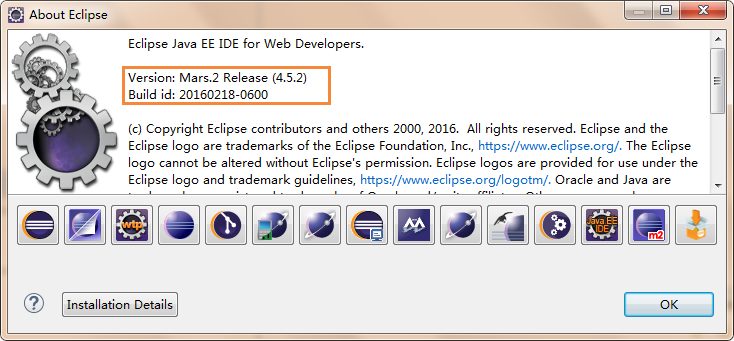
Here we go!!!
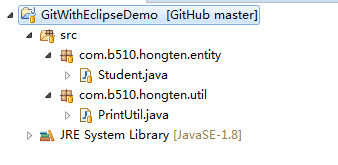
1. Create a java project(e.g GitWithEclipseDemo for my demo) in your eclipse. And create some classes
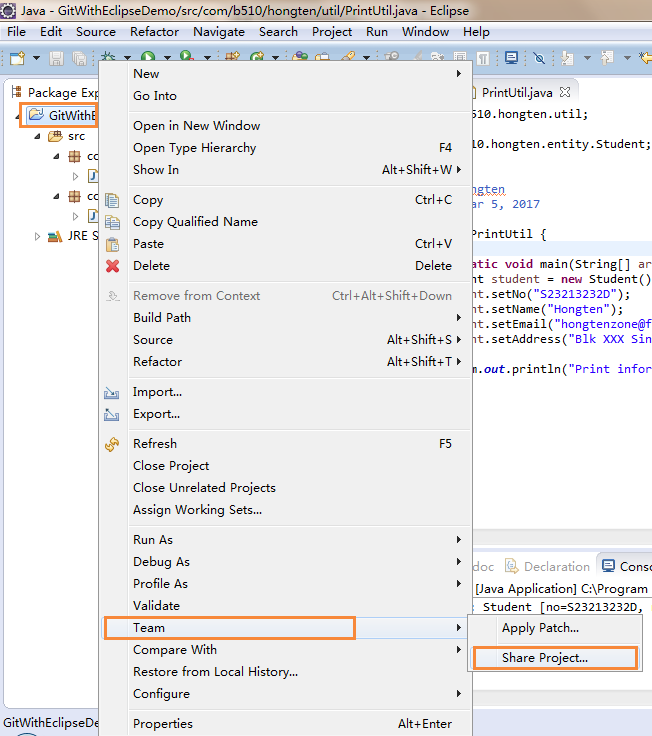
2. Right click project -> Team -> Share Project...
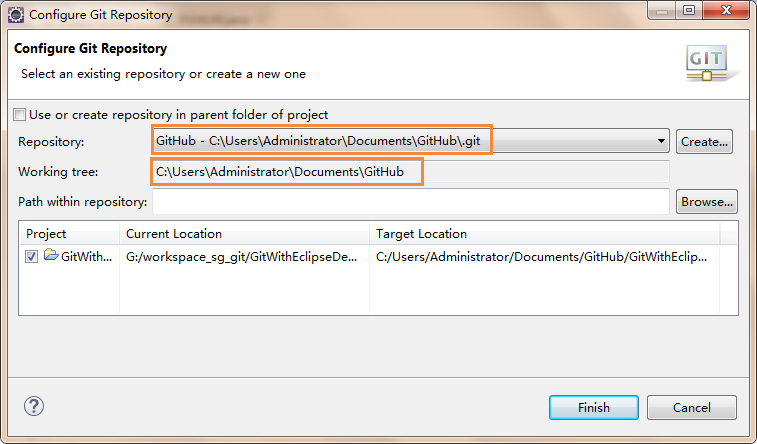
3. Configure Git Repository window will be displayed. Then click 'Create' button.

4. Click 'Browser..' button to select a folder in your PC to set repository directory. This direcory is a local git repository.
In this case, I set my repository directory is 'C:\Users\Administrator\Documents\GitHub', and click 'Finish' button.

5.Click 'Finish' button in the Configure Git Repository window.
6.Go to Window -> Show View -> Other. Then the 'Show View' window will be displayed and to find Git section. Select 'Git Repositories' and 'Git Staging' and click 'Ok' button.

7.As step 6 to select 'History' item under Team section.

8. Right click project -> Team -> Commit..
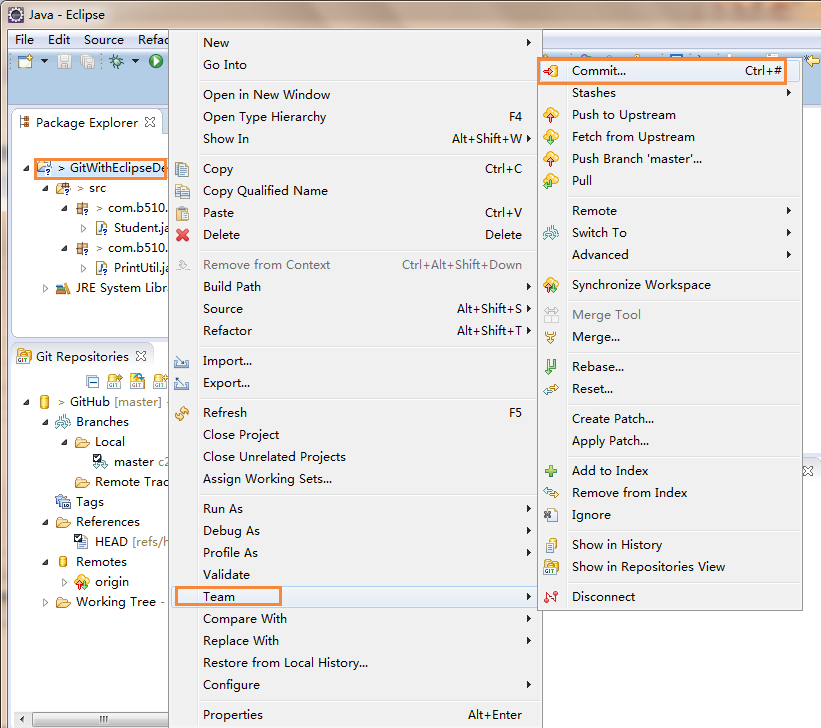
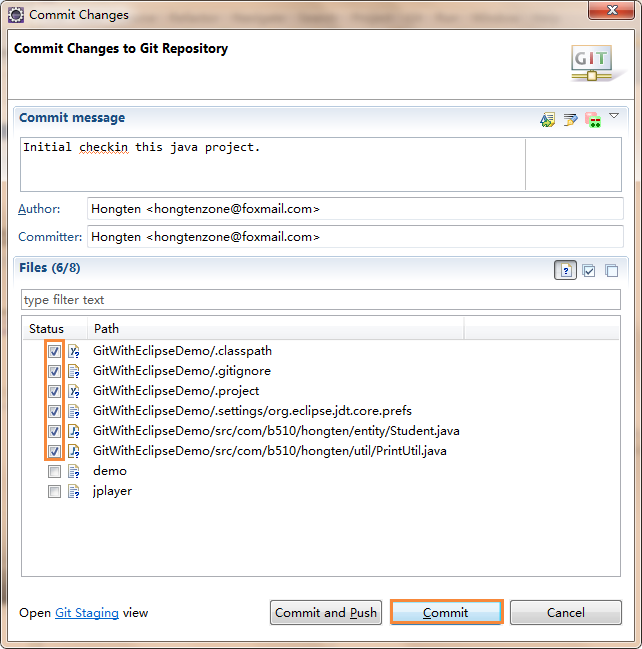
9. Commit Changes to Git Repository window will be displayed. Type Commit message and select files that you want to commit and click 'Commit' button to commit.
In this case, I want to commit all files under 'GitWithEclipseDemo' project
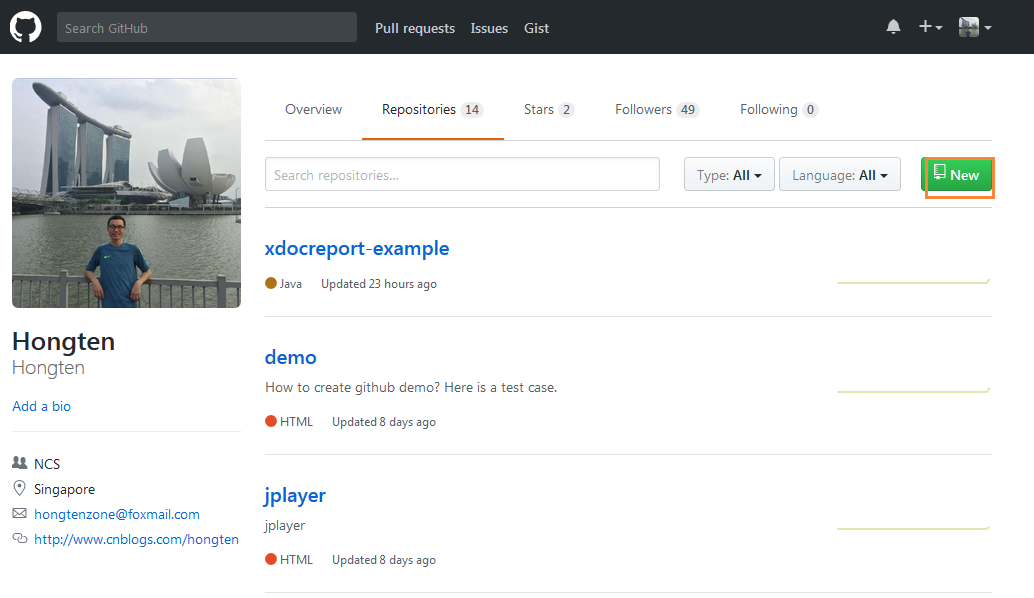
10.Go to your own github website and click 'New' button to create a new repository in Github.
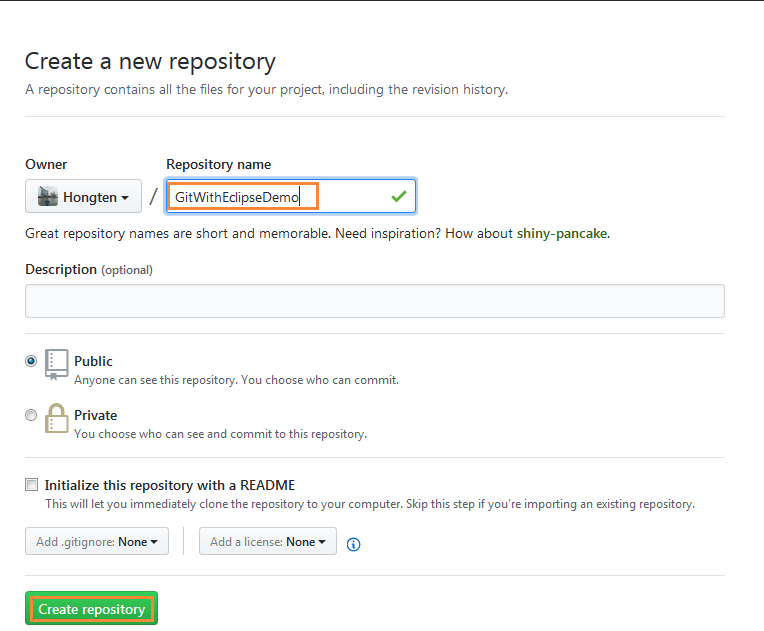
11. Type the Repository name and click 'Create Repository' button to create a new repository in Github.
In this case, I created 'GitWithEclipseDemo' repository in my Github.
12.Copy the URL the Github provided.
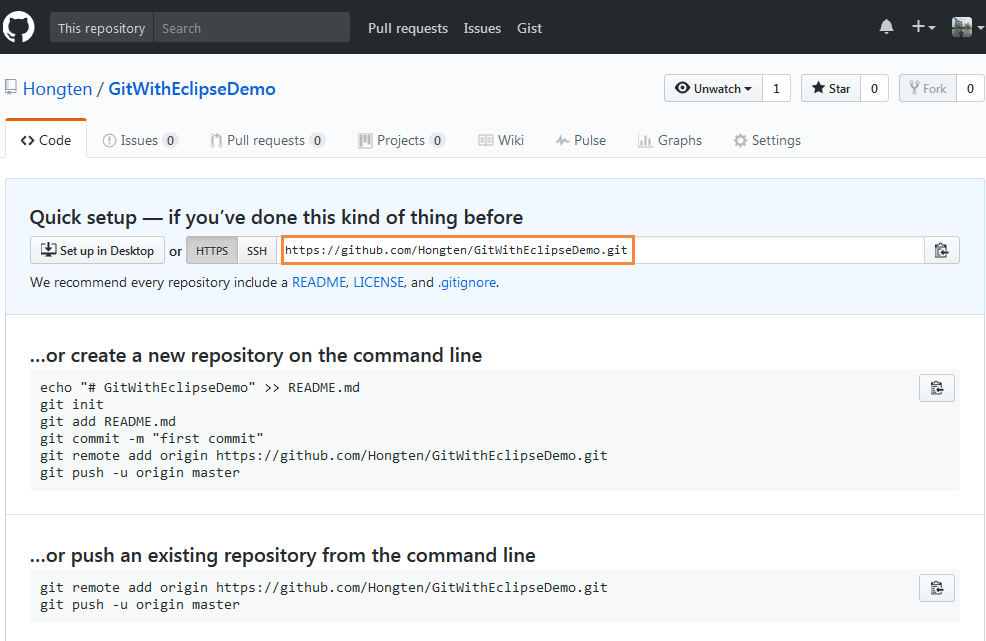
13.Back to eclipse and find Remotes under Git Repositories. Right click -> Create Remote...

14. Type the name for the new remote and click 'Ok' button
In this case, I used 'demo' for my remote name.

15. Configure push for remote 'demo' window will be displayed. Click 'Change' button.
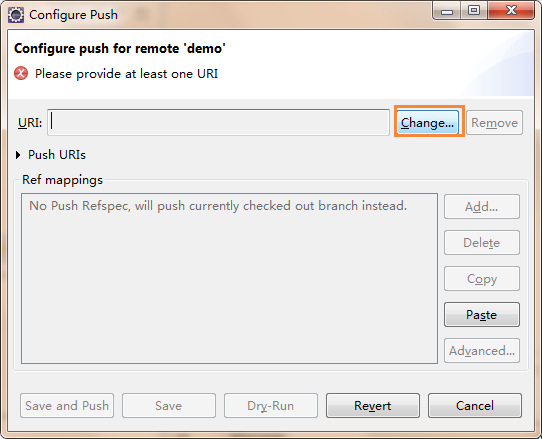
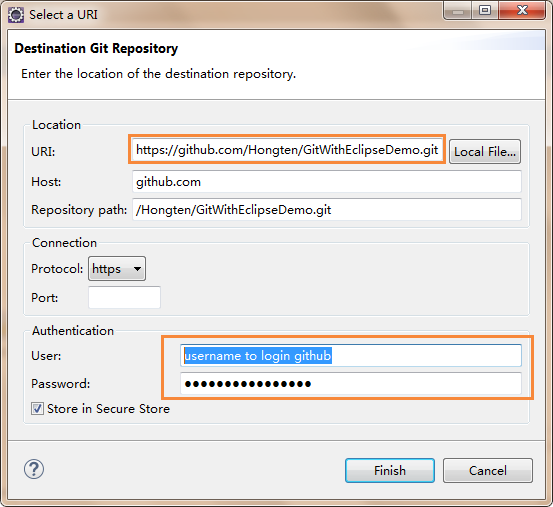
16. Copy the URL that provided by Github(Refer Step 12), and type the User and password(this user and password can login your github). Click 'Finish' button.
17. Click 'Advanced' button in the Configure push for remote 'demo' window.

18. Select 'master' for Source ref and click 'Add Spec' button.

19.A new Mode will be added after clicking 'Add Spec' button in the Step 18.
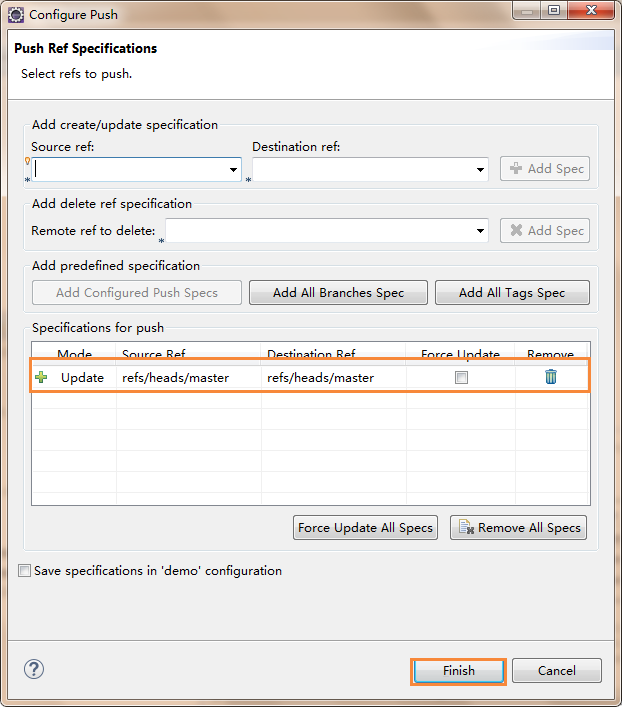
20. Find demo in the Remotes section under Git Repositories. Right click -> Push

21.A push results window will be displayed.

22.Go to your Github website, you can find your local sources had been pushed in Github now.

End. If you do some changes in your project(e.g. change code), you can Commit and Push it into Github.
You can find this 'GitWithEclipseDemo' in my Github.
Thanks for watching.
========================================================
More reading,and english is important.
I'm Hongten
E | hongtenzone@foxmail.com B | http://www.cnblogs.com/hongten
========================================================
How to create a repository in Github with Eclipse?的更多相关文章
- remote: Repository not found. fatal: repository 'https://github.com/***/***.git/' not found
通过命令添加新repository到git hub在执行最后一步命令(如下所示)的时候报错 git push -u origin master error:remote: Repository not ...
- 使用github管理Eclipse分布式项目开发
使用github管理Eclipse分布式项目开发 老关我在前面的博文(github管理iOS分布式项目开发)中介绍了github管理iOS分布式开发,今天老关将向大家介绍使用github管 理Ecli ...
- github import repository创建github仓库
现在,假设我们从零开发,那么最好的方式是先创建远程库,然后,从远程库克隆. 首先,登陆GitHub,创建一个新的仓库,名字叫blog: 1.先创建一个项目仓库 2. 我们勾选Initialize th ...
- Could not create local repository at /home/yizhenn/.m、IDEA倒入maven项目无法导报问题
问题描述: 用自己电脑新搭建环境,用idea倒入项目后发现无法倒入jar包,很少郁闷,折腾了很久,最终发现问题 settings文件中下面这个配置,需要是自己电脑的路径 <localReposi ...
- github与eclipse创建仓库及克隆仓库
1.前往github官网注册账号,并下载客户端: 2.为eclipse工程创建本地仓库: 1,目前大多eclipse都预装了egit插件,如果没有请自行安装 2,在eclipse内创建工程->右 ...
- github在eclipse中的配置
http://www.cnblogs.com/yejiurui/archive/2013/07/29/3223153.html http://blog.csdn.net/shehun1/article ...
- github与eclipse结合使用
github是现在流行的代码托管平台,今天以eclipse为例讲解github的使用,新建项目,提交eclipse项目到github,新建分支,合并分支 1.github上新建项目 记下githug项 ...
- 使用GitHub和Eclipse进行javaEE开发步骤
下载Git客户端:链接:http://pan.baidu.com/s/1jIueUEy 密码:7gef; 下载Eclipse javaee客户端:http://www.eclipse.org/down ...
- Github结合Eclipse出现的问题
半年前因为学习Git花费了很长时间,半年过去了,因为不使用,基本全部忘记了,最近在公司需要使用Eclipse开发相关项目,用到前期的测试数据挖掘的小算法,又重拾Git,不过这次不再是命令行模式,而是结 ...
随机推荐
- IOS设计模式--代理 (委托)
原文 http://blog.csdn.net/lovefqing/article/details/8270111 委托(delegate)也叫代理是iOS开发中常用的设计模式.我们借助于protoc ...
- eclipse修改主题配色
1.Java-->Editor---> Syntax Coloring修改类中的各种代码颜色 2.General-->Editors --->Text Editors
- php5.4下配置zend guard loader
前些日子的时候,zend官网下还没有支持PHP5.4的zend guard loader,今天再上去看的时候居然发现了,看来是我好久不关注它的缘故了... zend guard loader 干什么的 ...
- QT第六天学习
基本事件: 鼠标事件 键盘事件 绘制事件 1.QT中的事件: 事件是对各应用程序需要知道的由应用程序内部或外部产生的事情或动作的通称. QT中事件的处理: 在QT中使用一个对象来表示一个事件,继承自Q ...
- --@angularJS--angular与BootStrap3的应用
angularJS与BootStrap3是最佳搭档. 1.Form.html: <!doctype html><html ng-app="UserInfoModule&qu ...
- mysql 使用sqldump来进行数据库还原
MYSQLdump参数详解 mysqldump备份: 复制代码代码如下: mysqldump -u用户名 -p密码 -h主机 数据库 a -w “sql条件” –lock-all-tables > ...
- HTML 表单和输入
HTML 表单 表单是一个包含表单元素的区域. 表单元素是允许用户在表单中输入内容,比如:文本域(textarea).下拉列表.单选框(radio-buttons).复选框(checkboxes)等等 ...
- Quercus
其实,我不确定Quercus是否可以被认定为一门JVM语言:其次Quercus这个东东分开源版与商业版,开源版只能解释执行.而商业版能编译成Java字节码. 但我知道国内,阿里巴巴很早就在使用它,当然 ...
- 百度人脸识别api及face++人脸识别api测试(python)
一.百度人脸识别服务 1.官方网址:http://apistore.baidu.com/apiworks/servicedetail/464.html 2.提供的接口包括: 2.1 多人脸比对:请求多 ...
- 【js编程艺术】小制作六
1.html /* movie.html*/<!DOCTYPE html> <html> <head> <meta charset="utf-8&q ...