
你会用::before、::after吗
::before和::after伪元素的用法
一、介绍
css3为了区分伪类和伪元素,伪元素采用双冒号写法。
常见伪类——:hover,:link,:active,:target,:not(),:focus。
常见伪元素——::first-letter,::first-line,::before,::after,::selection。
::before和::after下特有的content,用于在css渲染中向元素逻辑上的头部或尾部添加内容。
这些添加不会出现在DOM中,不会改变文档内容,不可复制,仅仅是在css渲染层加入。
所以不要用:before或:after展示有实际意义的内容,尽量使用它们显示修饰性内容,例如图标。
举例:网站有些联系电话,希望在它们前加一个icon☎,就可以使用:before伪元素,如下:

<!DOCTYPE html>

<meta charset="utf-8" />

<style type="text/css">

    .phoneNumber::before {

    content:'\260E';

    font-size: 15px;

}

</style>

<p class="phoneNumber">12345645654</p>

Note:这些特殊字符的html,js和css的写法是不同的,具体可查看html特殊字符的html,js,css写法汇总。
二、content属性
::before和::after必须配合content属性来使用,content用来定义插入的内容,content必须有值,至少是空。默认情况下,伪类元素的display是默认值inline,可以通过设置display:block来改变其显示。
content可取以下值。
1、string
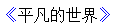
使用引号包一段字符串,将会向元素内容中添加字符串。如:a:after{content:""}
举例:
<!DOCTYPE html>

<meta charset="utf-8" />

<style type="text/css">

p::before{

    content: "《";

    color: blue;

}

p::after{

    content: "》";

    color: blue;

}

</style>

<p>平凡的世界</p>
2、attr()
通过attr()调用当前元素的属性,比如将图片alt提示文字或者链接的href地址显示出来。
<style type="text/css">

a::after{

    content: "(" attr(href) ")";

}

</style>

<a href="http://www.cnblogs.com/starof">starof</a>

3、url()/uri()
用于引用媒体文件。
举例:“百度”前面给出一张图片,后面给出href属性。
<style>

a::before{

    content: url("https://www.baidu.com/img/baidu_jgylogo3.gif");

}

a::after{

    content:"("attr(href)")";

}

a{

    text-decoration: none;

}

</style>

---------------------------

<body>

<a href="http://www.baidu.com">百度</a>

</body>
效果:

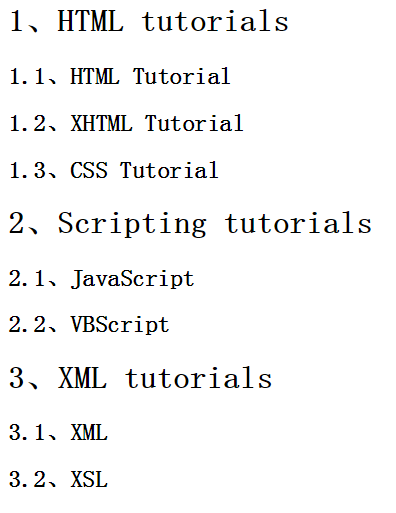
4、counter()
调用计数器,可以不使用列表元素实现序号功能。
配合counter-increment和counter-reset属性使用:
h2:before { counter-increment: chapter; content: "Chapter " counter(chapter) ". " }
代码:
<style>

body{

    counter-reset: section;

}

h1{

    counter-reset: subsection;

}

h1:before{

    counter-increment:section;

    content:counter(section) "、";

}

h2:before{

    counter-increment:subsection;

    content: counter(section) "." counter(subsection) "、";

}

</style>

------------------------------------------------

<body>

<h1>HTML tutorials</h1>

<h2>HTML Tutorial</h2>

<h2>XHTML Tutorial</h2>

<h2>CSS Tutorial</h2>

<h1>Scripting tutorials</h1>

<h2>JavaScript</h2>

<h2>VBScript</h2>

<h1>XML tutorials</h1>

<h2>XML</h2>

<h2>XSL</h2>

</body>
效果:
了解更多可参考:https://developer.mozilla.org/en-US/docs/Web/Guide/CSS/Counters
三、使用
1、清除浮动
清除浮动方法有多种,现在最常用的就是下面这种方法,仅需要以下样式即可在元素尾部自动清除浮动
.cf:before,

.cf:after {

    content: " ";

    display: table;

}

.cf:after {

    clear: both;

}

.cf {

    *zoom: 1;

}
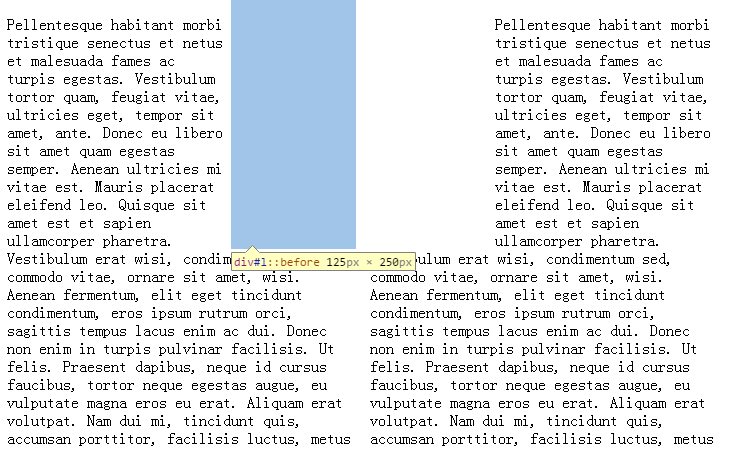
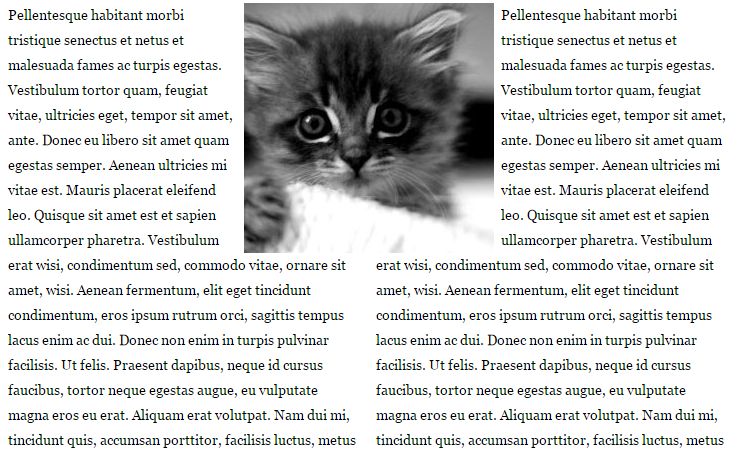
2、模拟float:center的效果
float没有center这个取值,但是可以通过伪类来模拟实现。
这个效果实现很有意思,左右通过::before float各自留出一半图片的位置,再把图片绝对定位上去。
核心css如下:
#page-wrap { width: 60%; margin: 40px auto; position: relative; }

#logo { position: absolute; top: 0; left: 50%; margin-left: -125px; }

#l, #r { width: 49%; }

#l { float: left; }

#r { float: right; }

#l:before, #r:before { content: ""; width: 125px; height: 250px; }

#l:before { float: right; }

#r:before { float: left; }
完整代码如下:
出自:https://css-tricks.com/float-center/
3、做出各种图形效果
举例:一个六角星
#star-six的div是一个正三角行,#star-six::after是一个倒三角形,通过绝对定位,调整其位置即可实现六角星的效果。
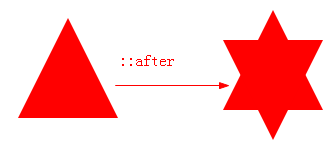
点我查看更多。
4、不使用图片创建小图标
举例:比如一个电话
很巧妙的应用一个div左border加圆角当机身,::before和::after配合圆角当听筒。
<style type="text/css">

    #phone{width:50px;height:50px;border-left:6px solid #EEB422;border-radius:20%;transform:rotate(-30deg);-webkit-transform:rotate(-30deg);margin:20px;margin-right:0px;position:relative;display: inline-block;top: -5px;}

    #phone:before{width:15px;height:15px;background:#EEB422;border-radius: 20%;content: "";position: absolute;left:-2px;top: 1px;}

    #phone:after{width:15px;height:15px;background:#EEB422;border-radius: 20%;content: "";position: absolute;left:-3px;top: 34px;}

</style>

<div id="wraper">

    <div id="phone"></div>

</div>

更多图标:
<!doctype html>

<html>

<head>

    <title>伪类标签使用</title>

</head>

<style type="text/css">

    #wraper{padding:10px;width:380px;height:380px;border:3px solid #ccc;margin:auto;}

    #power{width: 30px;height: 30px;margin:20px;border: 6px solid #EEB422;border-radius: 50%;position: relative;display: inline-block;}

    #power:before{width:7px;height:22px;background:#EEB422;position: absolute;left:8px;top:-13px;content: "";border: 3px solid #fff;}

    #play{width: 30px;height: 30px;margin:20px;border: 6px solid #EEB422;border-radius: 50%;position:relative;display: inline-block;background: #EEB422;}

    #play:before{border:11px solid transparent;border-left:17px solid #fff;content: "";position: absolute;left:9px;top: 3px;}

    #pause{width: 30px;height: 30px;margin:20px;border: 6px solid #EEB422;border-radius: 50%;position:relative;display: inline-block;background: #EEB422;}

    #pause:before{height:20px;width:5px;border:0px solid transparent;border-left:8px solid #fff;border-right:8px solid #fff;content: "";position: absolute;left:4px;top: 5px;}

    #stop{width: 30px;height: 30px;margin:20px;border: 6px solid #EEB422;border-radius: 50%;position:relative;display: inline-block;background: #EEB422;}

    #stop:before{height:17px;width:17px;background:#fff;content: "";position: absolute;left:6px;top: 6px;}

    #comment{width: 50px;height: 25px;margin:20px;border: 6px solid #EEB422;border-radius: 20%;position:relative;display: inline-block;background: #EEB422;}

    #comment:before{border:10px solid transparent;border-top:10px solid #EEB422;content: "";position: absolute;left:28px;top: 28px;}

    #comment:after{content: "....";position: absolute;color: #fff;font-size: 26px;top: -10px;left: 2px;}

    #like{width: 50px;height: 30px;margin:20px;border-radius: 55%;transform:rotate(55deg);-webkit-transform:rotate(55deg);position:relative;display: inline-block;background: #EEB422;}

    #like:before{width:50px;height:30px;border-radius: 55%;transform:rotate(-110deg);-webkit-transform:rotate(-110deg);background:#EEB422;content: "";position: absolute;left:8px;top: -12px;}

    #search{width: 20px;height: 20px;border:4px solid #EEB422;border-radius:50%;margin:20px;position:relative;display: inline-block;top: -5px;left: -5px;}

    #search:before{width:20px;height:5px;background:#EEB422;transform:rotate(45deg);-webkit-transform:rotate(45deg);content: "";position: absolute;left:15px;top: 22px;}

    #home{width: 30px;height: 30px;background:#EEB422;margin:20px;position:relative;display: inline-block;top: 5px;}

    #home:before{width:6px;height:12px;background:#fff;content: "";position: absolute;left:12px;top: 20px;}

    #home:after{border:25px solid transparent;border-bottom:20px solid #EEB422;content: "";position: absolute;top: -38px;left:-10px;}

    #photo{width:40px;height:30px;background:#EEB422;margin:20px;position:relative;display: inline-block;top: 5px;}

    #photo:before{width:13px;height:13px;border:4px solid #fff;border-radius:50%;background:#EEB422;content: "";position: absolute;left:10px;top: 5px;}

    #photo:after{width:15px;height:10px;background:#EEB422;content: "";position: absolute;top: -7px;left:13px;}

    #photo{width:40px;height:30px;background:#EEB422;margin:20px;position:relative;display: inline-block;top: 5px;}

    #email{width:50px;height:35px;background:#EEB422;margin:20px;position:relative;display: inline-block;top: 5px;}

    #email:before{border:25px solid transparent;border-top:20px solid #fff;content: "";position: absolute;left:0px;top: 2px;}

    #email:after{border:25px solid transparent;border-top:20px solid #EEB422;content: "";position: absolute;top:0px;}

    #file{width:30px;height:45px;border:4px solid #EEB422;margin:20px;position:relative;display: inline-block;top: 5px;}

    #file:before{border:10px solid #fff;border-right:10px solid #EEB422;border-bottom:10px solid #EEB422;content: "";position: absolute;left:-4px;top: -4px;}

    #file:after{width:20px;height:5px;border-top:3px solid #EEB422;border-bottom:3px solid #EEB422;content: "";position: absolute;left: 5px;top: 25px;}

    #history{width:35px;height:35px;border:4px solid #EEB422;border-radius: 50%;margin:20px;position:relative;display: inline-block;top: 5px;}

    #history:before{width:14px;height:14px;border-bottom:4px solid #EEB422;border-left:4px solid #EEB422;content: "";position: absolute;left:14px;top: 3px;}

    #video{width:50px;height:35px;background:#EEB422;border-radius: 20%;margin:20px;position:relative;display: inline-block;top: -5px;}

    #video:before{width:6px;height:6px;border:11px solid transparent;border-right:11px solid #EEB422;content: "";position: absolute;left:35px;top: 4px;}

    #video:after{width:10px;height:10px;border:6px solid transparent;border-top:6px solid #EEB422;border-left:6px solid #EEB422;transform:rotate(45deg);-webkit-transform:rotate(45deg);content: "";position: absolute;left:13px;top: 35px;}

    #tags{width:50px;height:25px;background:#EEB422;border-radius: 35% 0% 0% 35%;transform:rotate(45deg);-webkit-transform:rotate(45deg);margin:20px;margin-left:35px;position:relative;display: inline-block;top: -5px;}

    #tags:before{width:10px;height:10px;border-radius:50%;background:#fff;content: "";position: absolute;left:7px;top: 7px;}

    #phone{width:50px;height:50px;border-left:6px solid #EEB422;border-radius:20%;transform:rotate(-30deg);-webkit-transform:rotate(-30deg);margin:20px;margin-right:0px;position:relative;display: inline-block;top: -5px;}

    #phone:before{width:15px;height:15px;background:#EEB422;border-radius: 20%;content: "";position: absolute;left:-2px;top: 1px;}

    #phone:after{width:15px;height:15px;background:#EEB422;border-radius: 20%;content: "";position: absolute;left:-3px;top: 34px;}

    #profile{width: 40px;height:15px;background:#EEB422;border-radius: 45% 45% 0 0;margin:20px;position:relative;display: inline-block;top: 0px;}

    #profile:before{width: 20px;height:22px;background:#EEB422;border-radius:40%;content: "";position: absolute;left: 10px;top: -22px;}

</style>

<body>

    <div id="wraper">

        <div id="power"></div>

        <div id="play"></div>

        <div id="pause"></div>

        <div id="stop"></div>

        <div id="comment"></div>

        <div id="like"></div>

        <div id="search"></div>

        <div id="home"></div>

        <div id="photo"></div>

        <div id="email"></div>

        <div id="file"></div>

        <div id="history"></div>

        <div id="video"></div>

        <div id="tags"></div>

        <div id="phone"></div>

        <div id="profile"></div>

    </div>

</body>

</html>

这个效果来自:http://www.w3cfuns.com/blog-5444604-5402127.html
有大神用伪元素创建了84种小图标,具体可查看http://nicolasgallagher.com/pure-css-gui-icons/
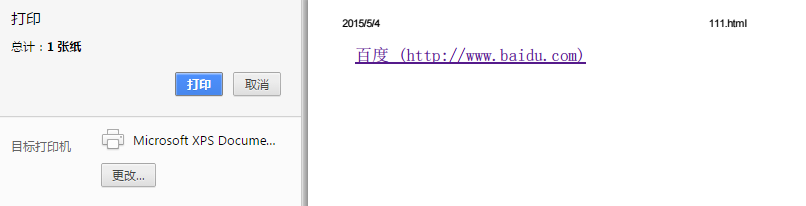
5、显示打印网页的URL
<style>

@media print {

  a[href]:after {

    content: " (" attr(href) ") ";

  }

}

</style><body>

<a href="http://www.baidu.com">百度</a>

</body>
6、给blockquote添加引号
经常用到给blockquote 引用段添加巨大的引号作为背景,可以用 ::before 来代替 background 。好处是即可以给背景留下空间,还可以直接使用文字而非图片:
<meta charset="utf-8"/>

<style type="text/css">

    blockquote::before {

    content: open-quote;

    color: #ddd;

    z-index: -1;

    font-size:80px;

}

</style>

<blockquote>引用一个段落,双引号用::before伪元素实现</blockquote>

7、超链接特效
举例:配合 CSS定位实现一个鼠标移上去,超链接出现方括号的效果
<meta charset="utf-8" />

<style type="text/css">

body{

    background-color: #425a6c;

}

    a {

    position: relative;

    display: inline-block;

    outline: none;

    color: #fff;

    text-decoration: none;

    font-size: 32px;

    padding: 5px 20px;

}

a:hover::before, a:hover::after { position: absolute; }

a:hover::before { content: "\5B"; left: -10px; }

a:hover::after { content: "\5D"; right:  -10px; }

</style>

<a>鼠标移上去出现方括号</a>
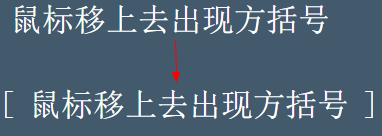
更多创意链接特效可参考: Creative Link Effects 。
8、::before和::after实现多背景图片
举例:一个标签应用5张背景图
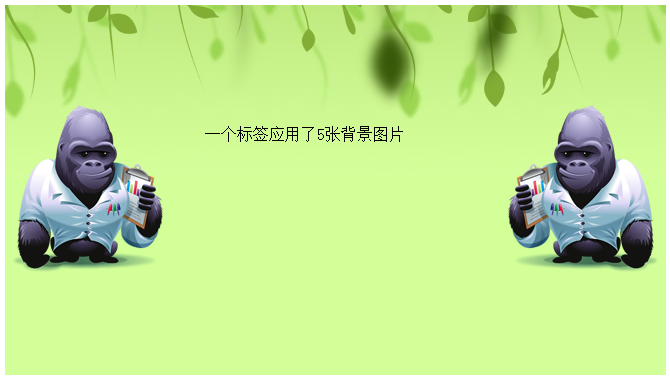
原效果来自:Multiple Backgrounds and Borders with CSS 2.1
这个效果看的真的是脑洞大开,虽然多背景图用css3的background-image很容易就能实现。但是这篇文章是10年写的,已经过去5年了,想想也正是他们这样的尝试和努力才加速了css3标准的制定,让今天的开发更easy。今天的我们又能为5年后的开发人员做些什么贡献呢?
本文作者starof,因知识本身在变化,作者也在不断学习成长,文章内容也不定时更新,为避免误导读者,方便追根溯源,请诸位转载注明出处:http://www.cnblogs.com/starof/p/4459991.html有问题欢迎与我讨论,共同进步。
随机推荐
- oc之里氏替换原则
1. 里氏替换原则. LSP 子类对象可以替换父类对象的位置,并且程序的功能不受影响. 为什么? 1). 指针是1个父类类型,但是我们确给了指针1个子类对象的地址. 这样做当然是可以的,因为你要1个父 ...
- Android libyuv应用系列(二)libyuv的使用
上篇文章Android libyuv使用系列(一)Android常用的几种格式:NV21/NV12/YV12/YUV420P的区别中我们了解了YUV相关的知识,而本篇文章我会介绍libyuv是什么,以 ...
- 高频交易算法研发心得--WAVT指标(Warensoft交易量趋势指标)算法及应用
高频交易算法研发心得--WAVT指标(Warensoft交易量趋势指标)算法及应用 注:WAVT指标由Warensoft(王宇)原创. 前面聊了一系列的常见应用指标,包括短线.长线的指标,并且也无耐的 ...
- [ios2]iOS 图片与内存 【转】
第一种解决方法:选择适当的加载方式 在程序的开发过程中,经常会用到很多的图片,适当的选择加载图片的方式就显得格外的重要,如果选择不得当,很容易造成内存吃紧而引起程序的崩溃. 这里介绍一下几种常见的加载 ...
- context.response.end()和return的区别
最近忽然想起这个问题,上网查了很多,觉得这个网友回答的很给力,从本质上剖析了问题.最后发现这篇文章也是转载自博客园的一位网友.http://www.cnblogs.com/adolphyang/p/4 ...
- 1 Selenium打开浏览器
[环境] Selenium3.0.1+Python3.6+unittest win7+IE10 1.打开FireFox浏览器 import unittest from selenium import ...
- Java实践 — SSH远程执行Shell脚本(转)
原文地址:http://www.open-open.com/lib/view/open1384351384024.html 1. SSH简介 SSH是Secure Shell的缩写,一 ...
- 【1】Hover 效果收集
各种 hover 效果 github repository>> git 仓库 1. 背景图的 hover 效果 原页面>> githubSite>>
- C#笔记(二)变量
C#把数据类型分为两种 ● 值类型 ● 引用类型 从概念上看:其区别是值类型直接存储其值,而引用类型存储对值的引用 这两种类型存储在内存的不同地方:值类型存储在堆栈中,而引用类型存储在托管堆上 如果变 ...
- CentOS 添加本地yum源
1 创建保存RPM包的路径: mkdir -p /share/CentOS/7/local/x86_64/RPMS 2 安装createrepo工具 yum install createrepo 3 ...