
Extjs4.1MVC详细解释
app.js
- Ext.onReady(function(){
- Ext.QuickTips.init();
- Ext.Loader.setConfig({ //开启自己主动载入功能
- enabled:true
- });
- Ext.application({
- name:'AM', //自己定义命名空间。通常都定义为AM
- appFolder:'app', //配置Ext框架所在的文件文件夹
- launch:function(){ //在全部资源都加载成功后执行
- Ext.create('Ext.container.Viewport',{
- items:{
- width:1500,
- height:500,
- xtype:'mainlayout' //这里引用了自己定义的组件mainlayout(视图层的MainLayout的别称)
- }
- });
- },
- controllers:[ //载入全部的控制器
- 'UserController'
- ]
- });
- });
控制层:
UserController.js
- Ext.define('AM.controller.UserController',{
- extend:'Ext.app.Controller',//继承Ext.app.Controller类
- init:function(){
- this.control({ //控制事件处理
- 'userlist button[id=add]':{
- click:function(){
- //do something
- }
- }
- });
- },
- views:[
- 'UserList', //放在MainLayout之前载入
- 'DeptList',
- 'MainLayout'
- ],
- stores:[
- 'UserStore',
- 'DeptStore'
- ],
- models:[
- 'UserModel'
- ]
- });
Model层:
UserModel.js
- Ext.define('AM.model.UserModel',{
- extend:'Ext.data.Model', //用来绑定到grid表字段
- fields:[
- {name:'id',type:'string'},
- {name:'name',type:'auto'},
- {name:'password',type:'string'},
- {name:'birth',type:'auto'},
- {name:'email',type:'auto'},
- {name:'intro',type:'string'}
- ]
- });
Store层:
UserStore.js
- Ext.define('AM.store.UserStore',{
- extend:'Ext.data.Store',
- model:'AM.model.UserModel',
- proxy:{
- type:'ajax',
- url:'/ExtjsTest/test/readuser',
- reader:{
- type:'json',
- root:'userinfo'
- },
- writer:{
- type:'json'
- }
- },
- autoLoad:true
- });
DeptStore.js
- Ext.define('AM.store.DeptStore',{
- extend:'Ext.data.TreeStore',
- defautRootId:'root',
- proxy:{
- type:'ajax',
- url:'/ExtjsTest/test/showuser',
- reader:{
- type:'json'
- },
- writer:{
- type:'json'
- }
- },
- autoLoad:true
- });
视图层:
UserList.js
- Ext.define('AM.view.UserList',{
- extend:'Ext.grid.Panel', //GridPanel组件
- alias:'widget.userlist', //别名
- // title:'用户信息',
- width:500,
- height:500,
- store:'UserStore', //绑定UserStore数据集
- selModel:{
- selType:'checkboxmodel'
- },
- tbar:[{text:"加入",id:'add'},{text:'删除',id:'del'},{text:'保存',id:'save'}], //button事件在控制层写
- columns:[{header:'编号',dataIndex:'id',field:{xtype:'textfield',allowBlank:false}},
- {header:'姓名',dataIndex:'name',field:{xtype:'textfield',allowBlank:false}},
- {header:'密码',dataIndex:'password',field:{xtype:'textfield',allowBlank:false}},
- {header:'生日',dataIndex:'birth',field:{xtype:'datefield',allowBlank:false}},
- {header:'邮件',dataIndex:'email',field:{xtype:'textfield',allowBlank:false}},
- {header:'简单介绍',dataIndex:'intro',field:{xtype:'textfield',allowBlank:false}}],
- ]
- });
DeptList.js
- Ext.define('AM.view.DeptList',{
- extend:'Ext.tree.Panel', //TreePanel组件
- alias:'widget.deptlist',
- // title:'树',
- width:300,
- height:500,
- rootVisible:false,
- dockedItems:[{
- xtype:'toolbar',
- dock:'left',
- items:[
- {xtype:'button',text:'add',id:'add'},
- {xtype:'button',text:'delete',id:'del'},
- {xtype:'button',text:'copy',id:'copy'}
- ]
- },
- store:'DeptStore', //绑定DeptStore数据集
- }
- });
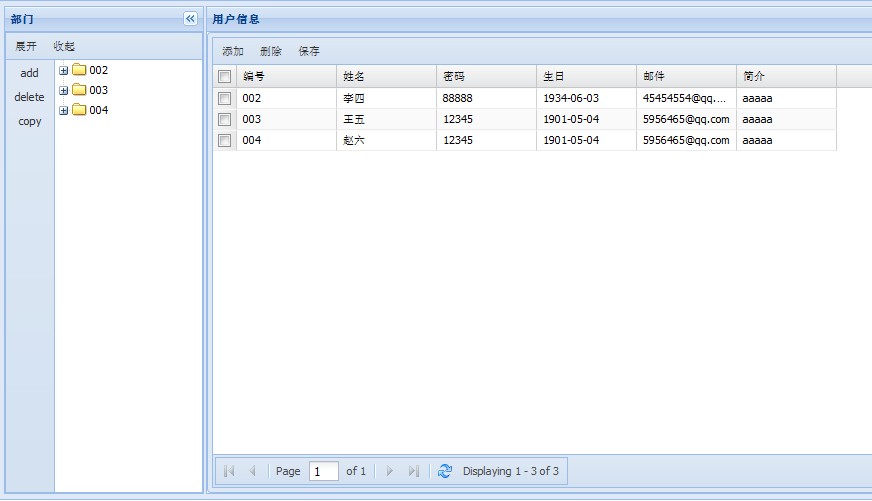
效果图:
版权声明:本文博客原创文章,博客,未经同意,不得转载。
Extjs4.1MVC详细解释的更多相关文章
- .htaccess语法之RewriteCond与RewriteRule指令格式详细解释
htaccess语法之RewriteCond与RewriteRule指令格式详细解释 (2012-11-09 18:09:08) 转载▼ 标签: htaccess it 分类: 网络 上文htacc ...
- cookie的详细解释
突然看到网页上中英文切换的效果,不明白怎么弄得查了查 查到了cookie 并且附有详细解释 就copy留作 以后温习 http://blog.csdn.net/xidor/article/detail ...
- tar命令的详细解释
tar命令的详细解释 标签: linuxfileoutputbashinputshell 2010-05-04 12:11 235881人阅读 评论(12) 收藏 举报 分类: linux/unix ...
- Linux学习笔记15——GDB 命令详细解释【转】
GDB 命令详细解释 Linux中包含有一个很有用的调试工具--gdb(GNU Debuger),它可以用来调试C和C++程序,功能不亚于Windows下的许多图形界面的调试工具. 和所有常用的调试工 ...
- C语言 - 结构体(struct)比特字段(:) 详细解释
结构体(struct)比特字段(:) 详细解释 本文地址: http://blog.csdn.net/caroline_wendy/article/details/26722511 结构体(struc ...
- 姿势体系结构的详细解释 -- C
我基本上总结出以下4部分: 1.问题的足迹大小. 2.字节对齐问题. 3.特别保留位0. 4.这种结构被存储在存储器中的位置. #include <stdio.h> #include &l ...
- Java - 面向对象(object oriented)计划 详细解释
面向对象(object oriented)计划 详细解释 本文地址: http://blog.csdn.net/caroline_wendy/article/details/24058107 程序包括 ...
- 设计模式 - 迭代模式(iterator pattern) Java 迭代器(Iterator) 详细解释
迭代模式(iterator pattern) Java 迭代器(Iterator) 详细解释 本文地址: http://blog.csdn.net/caroline_wendy 參考迭代器模式(ite ...
- 设计模式 - 观察者模式(Observer Pattern) 详细解释
观察者模式(Observer Pattern) 详细解释 本文地址: http://blog.csdn.net/caroline_wendy/article/details/26583157 版权全部 ...
随机推荐
- 《炉石传说》建筑设计欣赏(6):卡&在执行数据时,组织能力
上一篇文章我们看到了<炉石传说>核心存储卡的数据,今天,我们不断探索卡&身手. 基本的类 通过之前的分析,卡牌&技能涉及到几个类体系:Entity.Actor.Card.S ...
- Interpolator(插值器)的种类
Interpolator(插值器)的种类 Interpolator被用来修饰动画效果,定义动画的变化率,可以使存在的动画效果accelerated(加速),decelerated(减速),repeat ...
- (hdu step 6.3.5)Card Game Cheater(匹配的最大数:a与b打牌,问b赢a多少次)
称号: Card Game Cheater Time Limit: 2000/1000 MS (Java/Others) Memory Limit: 65536/32768 K (Java/Other ...
- 【C语言探索之旅】 第二部分第六课:创建你自己的变量类型
内容简介 1.课程大纲 2.第二部分第六课: 创建你自己的变量类型 3.第二部分第七课预告: 文件读写 课程大纲 我们的课程分为四大部分,每一个部分结束后都会有练习题,并会公布答案.还会带大家用C ...
- C# WinForm dataGridView 技巧小结
1.不显示第一个空白列RowHeaderVisible属性设置为false 2.点击cell选取整行SelectinModel属性FullRowSelectRowSelectinModel属性设置或用 ...
- org.hibernate.MappingException: Could not determine type for: java.util.List, at table: user, for...
异常详情: Caused by: org.hibernate.MappingException: Could not determine type for: java.util.List, at ta ...
- JTree
http://www.easyicon.net/ package swing.tree; import java.awt.BorderLayout; import java.awt.Component ...
- IntelliSense 无法仅由函数的返回类型重装分辨
IntelliSense:无法仅由函数的返回类型重装分辨 d:\programfiles (x86)\microsoft sdks\windows\v7.0a\include\winbas ...
- hud 1312 Red and Black
题目: 链接:pid=1312">点击打开链接 题意: DFS搜索 算法: dfs 思路: 简单题 代码: #include<iostream> #include<c ...
- 将node-expat扩展编译至node.exe中
1.下载node源代码 https://github.com/joyent/node (v:0.10.25) 2.下载node-expat源代码 https://github.com/node-xmp ...