
ASP.NET Core: Getting Started with ASP.NET MVC Core
1.
ASP.NET Core the Unified Framework
ASP.NET Core的统一框架

2.
New Solution Project
新的解决方案项目
- src folder: contains all projects that contain source code that make up your application.
- Program.cs: this file contains the Main method of an ASP.NET Core RC2 app, which is responsible for configuring and running the app.
- global.json: this is where you put solution-level settings and allows you to do project-to-project references.
- wwwroot: is a folder in which all your static files will be placed. These are the assets that the web app will serve directly to the clients, including HTML, CSS, Image and JavaScript files.
- project.json: contains project settings.
- Startup.cs: this is where you put your startup and configuration code.
- References: it contains the .NETCoreApp Version 1 runtime references.
3.
Configure the Application Pipeline
配置应用程序管道
public void Configure(IApplicationBuilder app){

            app.UseDeveloperExceptionPage();

            app.UseMvc(m => {

                m.MapRoute(

                    name: "default",

                    template: "{controller}/{action}/{id?}",

                    defaults: new { controller = "Home", action="Index"});

            });

}
连接mvc各个组件,添加相关依赖项
public void ConfigureServices(IServiceCollection services){

            services.AddMvc();

}
4.
Introducing Inject
新特性Inject
a.定义类或服务
using System.Linq;

using System.Threading.Tasks;

namespace MVCCoreDemo.Models

{

    public class HeroStats

    {

        private HeroManager _manager = new HeroManager();

        public async Task<int> GetHeroCount()

        {

            return await Task.FromResult(_manager.GetAll.Count());

        }

        public async Task<int> GetHeroCountByType(string type)

        {

            return await Task.FromResult(_manager.GetHeroesByType(type).Count);

        }

    }

}
b.在视图中使用
@model IEnumerable<MVCCoreDemo.Models.DOTAHero>

@inject MVCCoreDemo.Models.HeroStats Stats

<h3>My Favorite DOTA  Heroes</h3>

<ul>

    @foreach (var p in Model)

    {

        <li>@($"{p.Name} {p.Type}")</li>

    }

</ul>

<div>

    <h4>Stats</h4>

    <p>Number of Strength Heroes: @await Stats.GetHeroCountByType("strength")</p>

    <p>Number of Agility Heroes: @await Stats.GetHeroCountByType("agility")</p>

    <p>Number of Intelligence Heroes: @await Stats.GetHeroCountByType("intelligence")</p>

    <p>Total Heroes Heroes: @await Stats.GetHeroCount()</p>

</div>
c.依赖注入类或服务
public void ConfigureServices(IServiceCollection services){

            services.AddMvc();

            services.AddTransient<MVCCoreDemo.Models.HeroStats>();

}
5.
Introducing View Components
新特性View Components
遵循ViewComponent结尾约定
using System.Collections.Generic;

using System.Threading.Tasks;

using Microsoft.AspNetCore.Mvc;

using MVCCoreDemo.Models;

namespace MVCCoreDemo.ViewComponents

{

    public class HeroListViewComponent: ViewComponent

    {

        public async Task<IViewComponentResult> InvokeAsync(string type){

            var heroes = await GetHeroesAsync(type);

            return View(heroes);

        }

        private Task<IEnumerable<DOTAHero>> GetHeroesAsync(string type){

            return Task.FromResult(GetHeroes(type));

        }

        private IEnumerable<DOTAHero> GetHeroes(string type){

            HeroManager HM = new HeroManager();

            return HM.GetHeroesByType(type);

        }

    }

}
文件夹创建遵循Components文件夹,子文件夹命名遵循去除ViewCompont
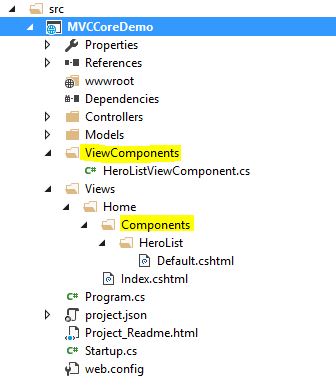
视图默认Default.cshtml
@model IEnumerable<MVCCoreDemo.Models.DOTAHero>

<h3>@Model.First().Type Heroes</h3>

<ul>

    @foreach (var p in Model)

    {

        <li>@p.Name</li>

    }

</ul>
调用ViewComponent
<div>

    @await Component.InvokeAsync("HeroList", new { type = "agility" })

</div>
ASP.NET Core: Getting Started with ASP.NET MVC Core的更多相关文章
- .net core 入坑经验 - 2、MVC Core之获取网站运行路径
这次是建立了asp.net mvc core项目,在controller中想获取网站在硬盘中的路径,找了一圈Server.MapPath() 已不存在,HttpContent也一样,经过查阅资料发现是 ...
- .net core 入坑经验 - 3、MVC Core之jQuery不能使用了?
在View中添加了一段jQuery代码用来控制一个按钮的点击事件.发现运行时提示$对象没有定义,经过在浏览器右键查看源文件发现,script代码在引用jquery代码的上方,执行时jquery还未引入 ...
- MVC Core
.NET Core 1.1 发布 文档下载资源汇总 https://www.microsoft.com/net/core#windowsvs2015 https://docs.microsoft.co ...
- .NET Core 1.0、ASP.NET Core 1.0和EF Core 1.0简介
.NET Core 1.0.ASP.NET Core 1.0和EF Core 1.0简介 英文原文:Reintroducing .NET Core 1.0, ASP.NET Core 1.0, and ...
- Professional C# 6 and .NET Core 1.0 - 40 ASP.NET Core
本文内容为转载,重新排版以供学习研究.如有侵权,请联系作者删除. 转载请注明本文出处:Professional C# 6 and .NET Core 1.0 - 40 ASP.NET Core --- ...
- .NET Core 2.0和ASP.NET Core 2.0正式版抢先体验
.NET Core 2.0和ASP.NET Core 2.0正式版抢先体验 .NET Standard 2.0 is final Broad platform support. .NET Standa ...
- ASP.NET Core 实战:使用 ASP.NET Core Web API 和 Vue.js 搭建前后端分离项目
一.前言 这几年前端的发展速度就像坐上了火箭,各种的框架一个接一个的出现,需要学习的东西越来越多,分工也越来越细,作为一个 .NET Web 程序猿,多了解了解行业的发展,让自己扩展出新的技能树,对自 ...
- ASP.NET Core 实战:将 .NET Core 2.0 项目升级到 .NET Core 2.1
一.前言 最近一两个星期,加班,然后回去后弄自己的博客,把自己的电脑从 Windows 10 改到 Ubuntu 18.10 又弄回 Windows 10,原本计划的学习 Vue 中生命周期的相关知 ...
- .NET CORE学习笔记系列(1)——ASP.NET MVC Core 介绍和项目解读
ASP.NET MVC Core 项目文件夹解读 一.项目文件夹总览 1.1.Properties——launchSettings.json 启动配置文件,你可以在项目中“Properties”文件夹 ...
随机推荐
- mvc4中jquery-ui日期控件datepicker的应用
mvc4中jquery-ui日期控件datepicker的应用 本文适合mvc中日期选择需要的同学: 假设读者已经具备了mvc4和javascript中的相关知识 一. 开始项目之前把项目中目录:/C ...
- strus2 action重复执行问题
近日做项目,有两个模块功能类似,就写到了一个action中,方法起名为getXXX1,getXXX2 最后在两个模块去调用的时候,分别调用DemoAction!getXXX1.action和DemoA ...
- web 富文本编辑器总结
前言 富文本编辑器,就是除了能输入不同的文本之外,还可以之间粘贴图画等其他的多媒体信息.也可说是所见即所得的编辑器. 目前可以使用的编辑器有很多, 在网络上有找到这样一份比较表格: 编辑器 产地 稳定 ...
- Aforge.net 一个专门为开发者和研究者基于C#框架设计
时间过得真快啊,转眼今年就要过去了,大半年都没有写博客了,要说时间嘛,花在泡妹子和搞英语去了,哈哈...前几天老大问我 怎么这么长时间都没写博客了,好吧,继续坚持,继续分享我的心得体会. 这个系列我们 ...
- Js面向对象编程
Js面向对象编程 1. 什么是面向对象编程? 我也不说不清楚什么是面向对象,反正就那么回事吧. 编程有时候是一件很快乐的事,写一些小游戏,用编程的方式玩游戏等等 2. Js如何定义一个 ...
- 封装使用ViewHolder模式的Adapter组件,及用其快速实现聊天界面
大家都对viewholder模式并不陌生吧,避免了重复调用findViewbyId,并对convertview进行重用.但是,开发中可能会有这样的困扰,每次在创建Adapter类时,总会有许多的重复代 ...
- IE6的那些css常见bug(汇总)
IE6的那些css常见bug(汇总) 我的微博终于在前几天建立了 虽说很早之前就知道博客园这个地方 但怕自己不能坚持去写一些东西一直没有建.这几天 我做了这个决定 把我的博客建起来 每周发一些看到的, ...
- Eclipse RCP /Plugin移除Search对话框
RCP:如何移除Search对话框中不需要的项 2013-08-18 22:31 by Binhua Liu, 231 阅读, 0 评论, 收藏, 编辑 前言 很久没写文章了,准备写一系列关于Ecli ...
- Archives for the category: Fisheye/Crucible
Archives for the category: Fisheye/Crucible Introducing FishEye and Crucible 3.0 – Search, visualize ...
- VIM 多行输入 数字递增 新方法 循环记录法
采用的是mario register这个方法,然后,把一段 auto-increament 操作记录下来,然后playback 循环往复多次.就达到了,每行都递增的目的. 我写的文字如下: vim 输 ...