
Remote验证及其改进(附源码)
Remote验证及其改进(附源码)
表单中的输入项,有些是固定的,不变的验证规则,比如字符长度,必填等。但有些是动态的,比如注册用户名是否存在这样的检查,这个需要访问服务器后台才能解决。这篇文章将会介绍MVC中如何使用【RemoteAttribute】来解决这类验证需求,同时会分析【RemoteAttribute】的不足,以及改进的方法.
本文相关的源代码在这里 MVC-Remote-Validation.zip
一, RemoteAttribute验证使用
如果需要用户把整个表单填完后,提交到后台,然后才告诉用户说,“你注册的用户已经被占用了,请换一个用户名”,估计很多用户都可能要飚脏话了. MVC中的Remote验证是通过Ajax实现的,也就是说,当你填写用户名的时候,就会自动的发送你填写的内容到后台,后台返回检查结果。
1. 实现Remote验证非常简单,首先需要有个后台的方法来响应验证请求, 也就是需要创建一个Controller, 这里我们用ValidationController:

public class ValidationController : Controller

{

       public JsonResult IsEmployeeNameAvailable(string employeeName)

       {

           //这里假设已经存在的用户是”justrun”, 如果输入的名字不是justrun,就通过验证

           if (employeeName != "justrun")

           {

               return Json(true, JsonRequestBehavior.AllowGet);

           }

           return Json("The name 'justrun' is not available, please try another name.", JsonRequestBehavior.AllowGet);

       }

}
2. 接着在我们的Employee Model上应用上RemoteAttribute
public class Employee

{

      public int EmpId { get; set; }

      [DisplayName("Employee Name")]

     [Remote("IsEmployeeNameAvailable", "Validation")] //使用RemoteAttribute,指定验证的Controller和Action

      public String EmployeeName { get; set; }

}
3. 对应的View
@using (Html.BeginForm()) {

    @Html.AntiForgeryToken()

    @Html.ValidationSummary()

    <fieldset>

        <legend>Registration Form</legend>

        <ol>

            <li>

                @Html.LabelFor(m => m.EmployeeName)

                @Html.EditorFor(m => m.EmployeeName)

                @Html.ValidationMessageFor(m => m.EmployeeName)

            </li>

        </ol>

        <input type="submit" value="Register" />

    </fieldset>

}
4. 最后,看看验证的效果
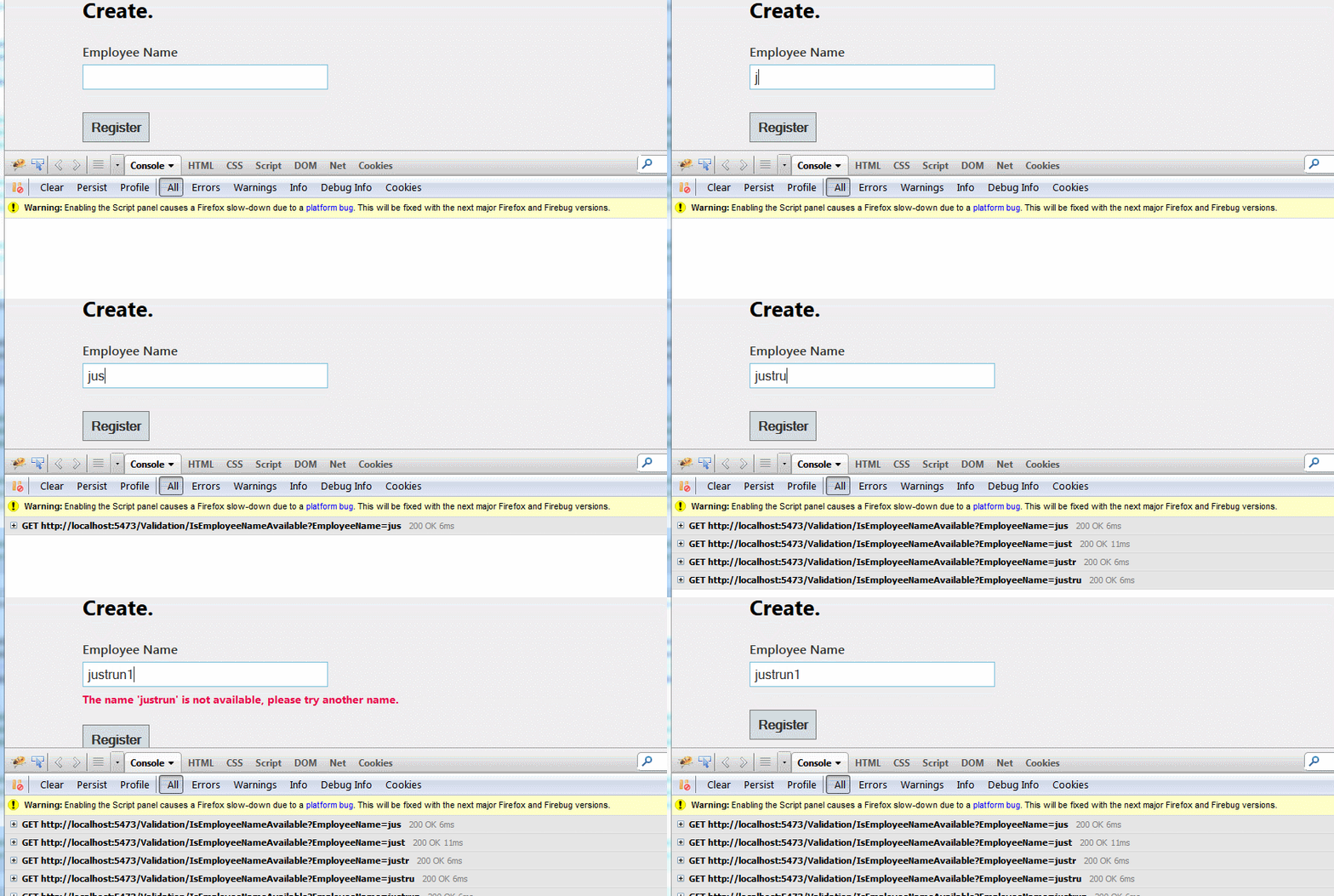
通过firebug能够看到,在填写表单的过程中,会不断的把表单的EmployeeName发送到我们指定的Controller, Action上做验证。
二, RemoteAttribute的局限性
使用 【RemoteAttribute】 来做远端验证的确是很棒– 它会自动的发起AJAX请求去访问后台代码来实现验证. 但是注意, 一旦表单提交了,就不会在存在这个验证了。比如当我用上【Required】这个验证标签的时候,无论在客户端还是服务器端,都存在着对于必填项的验证。服务器端可以通过ModelState.IsValid非常容易地判断,当前提交到后台的表单数据是否合法。但是【RemoteAttribute】只有客户端验证,而没有服务器端验证。 也就是说,如果用户的浏览器中,关闭js,我们的Remote检查就形同虚设。
是不是非常意外, 当接触Remote验证的时候,原以为默认的就会认为它会和其它验证标签一样。所以使用RemoteAttribute验证,是存在一定的安全隐患的。
三, RemoteAttribute的改进
先介绍一下对于RemoteAttribute的改进思路:
如果我们也想让RemoteAttribute和其它的验证特性一样工作,也就是说,如果不符合Remote的验证要求,我们希望ModelState.IsValid也是false, 同时会添加上相应的ModelError. 这里选择在MVC的Model binding的时候,做这个事情,因为在Model Binding的时候,正是将表单数据绑定到对应的model对象的时候。只要在绑定的过程中,如果发现Model中的属性有使用RemoteAttribute, 我们调用相应的验证代码。验证失败了,就添加上对于的ModelError.
由于涉及到了Model Binding和Atrribute的使用,如果有兴趣的,可以先看看这2篇文章:
Asp.net MVC使用Model Binding解除Session, Cookie等依赖
.Net Attribute详解(上)-Attribute本质以及一个简单示例
1. 继承RemoteAttribute, 创建CustomRemoteAttribute
public class CustomRemoteAttribute : RemoteAttribute

   {

       public CustomRemoteAttribute(string action, string controller)

           : base(action, controller)

       {

           Action = action;

           Controller = controller;

       }

       public string Action { get; set; }

       public string Controller { get; set; }

   }
看了上面的代码,你也学会说,这不是什么都没干吗? 是的,这个CustomRemoteAttribute 的确是什么都没干,作用只是公开了RemoteAttribute的Controller和Action属性,因为只有这样我们才能知道Model添加的remote验证,是要访问那段代码。
2. 替换RemoteAttribute为CustomRemoteAttribute
这个非常简单,没有什么要解释的。
public class Employee

  {

      public int EmpId { get; set; }

      [DisplayName("Employee Name")]

     [CustomRemote("IsEmployeeNameAvailable", "Validation")]

      public String EmployeeName { get; set; }

  }
3. 自定义的CustomModelBinder
下面的CustomModelBinder就是在Model绑定的时候,调用相应的Action方法做验证,失败了,就写ModelError. 注释中已经解释了整个代码的工作流程。
public class CustomModelBinder : DefaultModelBinder

   {

         protected override void BindProperty(ControllerContext controllerContext,

         ModelBindingContext bindingContext,

         PropertyDescriptor propertyDescriptor)

       {

           if (propertyDescriptor.PropertyType == typeof(string))

           {

               //检查Model绑定的属性中,是否应用了CustomRemoteAttribute

               var remoteAttribute =

                 propertyDescriptor.Attributes.OfType<CustomRemoteAttribute>()

                   .FirstOrDefault();

               if (remoteAttribute != null)

               {

                    //如果使用了CustomRemoteAttribute, 就开始找到CustomAttribute中指定的Controller

                   var allControllers = GetControllerNames();

                   var controllerType = allControllers.FirstOrDefault(x => x.Name ==

                                                                            remoteAttribute.Controller + "Controller");

                   if (controllerType != null)

                   {

                       //查找Controller中的Action方法

                       var methodInfo = controllerType.GetMethod(remoteAttribute.Action);

                       if (methodInfo != null)

                       {

                           //调用方法,得到验证的返回结果

                           string validationResponse = callRemoteValidationFunction(

                             controllerContext,

                             bindingContext,

                             propertyDescriptor,

                             controllerType,

                             methodInfo,

                             remoteAttribute.AdditionalFields);

                           //如果验证失败,添加ModelError

                           if (validationResponse != null)

                           {

                               bindingContext.ModelState.AddModelError(propertyDescriptor.Name,

                                 validationResponse);

                           }

                       }

                   }

               }

           }

           base.BindProperty(controllerContext, bindingContext, propertyDescriptor);

       }

       /// This function calls the indicated method on a new instance of the supplied

       /// controller type and return the error string. (NULL if not)

       private string callRemoteValidationFunction(

         ControllerContext controllerContext,

         ModelBindingContext bindingContext,

         MemberDescriptor propertyDescriptor,

         Type controllerType,

         MethodInfo methodInfo,

         string additionalFields)

       {

           var propertyValue = controllerContext.RequestContext.HttpContext.Request.Form[

               bindingContext.ModelName + propertyDescriptor.Name];

           var controller = (Controller)Activator.CreateInstance(controllerType);

           object result = null;

           var parameters = methodInfo.GetParameters();

           if (parameters.Length == 0)

           {

               result = methodInfo.Invoke(controller, null);

           }

           else

           {

               var parametersArray = new List<string> {propertyValue};

               if (parameters.Length == 1)

               {

                   result = methodInfo.Invoke(controller, parametersArray.ToArray());

               }

               else

               {

                   if (!string.IsNullOrEmpty(additionalFields))

                   {

                       foreach (var additionalFieldName in additionalFields.Split(','))

                       {

                           string additionalFieldValue =

                               controllerContext.RequestContext.HttpContext.Request.Form[

                                 bindingContext.ModelName + additionalFieldName];

                           parametersArray.Add(additionalFieldValue);

                       }

                       if (parametersArray.Count == parameters.Length)

                       {

                           result = methodInfo.Invoke(controller, parametersArray.ToArray());

                       }

                   }

               }

           }

           if (result != null)

           {

               return (((JsonResult)result).Data as string);

           }

           return null;

       }

       /// Returns a list of all Controller types

       private static IEnumerable<Type> GetControllerNames()

       {

           var controllerNames = new List<Type>();

           GetSubClasses<Controller>().ForEach(controllerNames.Add);

           return controllerNames;

       }

       private static List<Type> GetSubClasses<T>()

       {

           return Assembly.GetCallingAssembly().GetTypes().Where(

             type => type.IsSubclassOf(typeof(T))).ToList();

       }

   }
4. 在MVC项目中应Global.asax.cs用上CustomModelBinder
打开Global.asax.cs, 添加上这段代码
protected void Application_Start()

       {

           //修改MVC默认的Model Binder为CustomBinder

           ModelBinders.Binders.DefaultBinder = new CustomModelBinder();

           ……

      }
5. 关闭客户端验证,看看效果
打开web.config文件,ClientValidationEnabled设置成false, 关闭客户端验证
<appSettings>

    <add key="webpages:Version" value="2.0.0.0" />

    <add key="webpages:Enabled" value="false" />

    <add key="PreserveLoginUrl" value="true" />

    <add key="ClientValidationEnabled" value="false" />

    <add key="UnobtrusiveJavaScriptEnabled" value="true" />

  </appSettings>
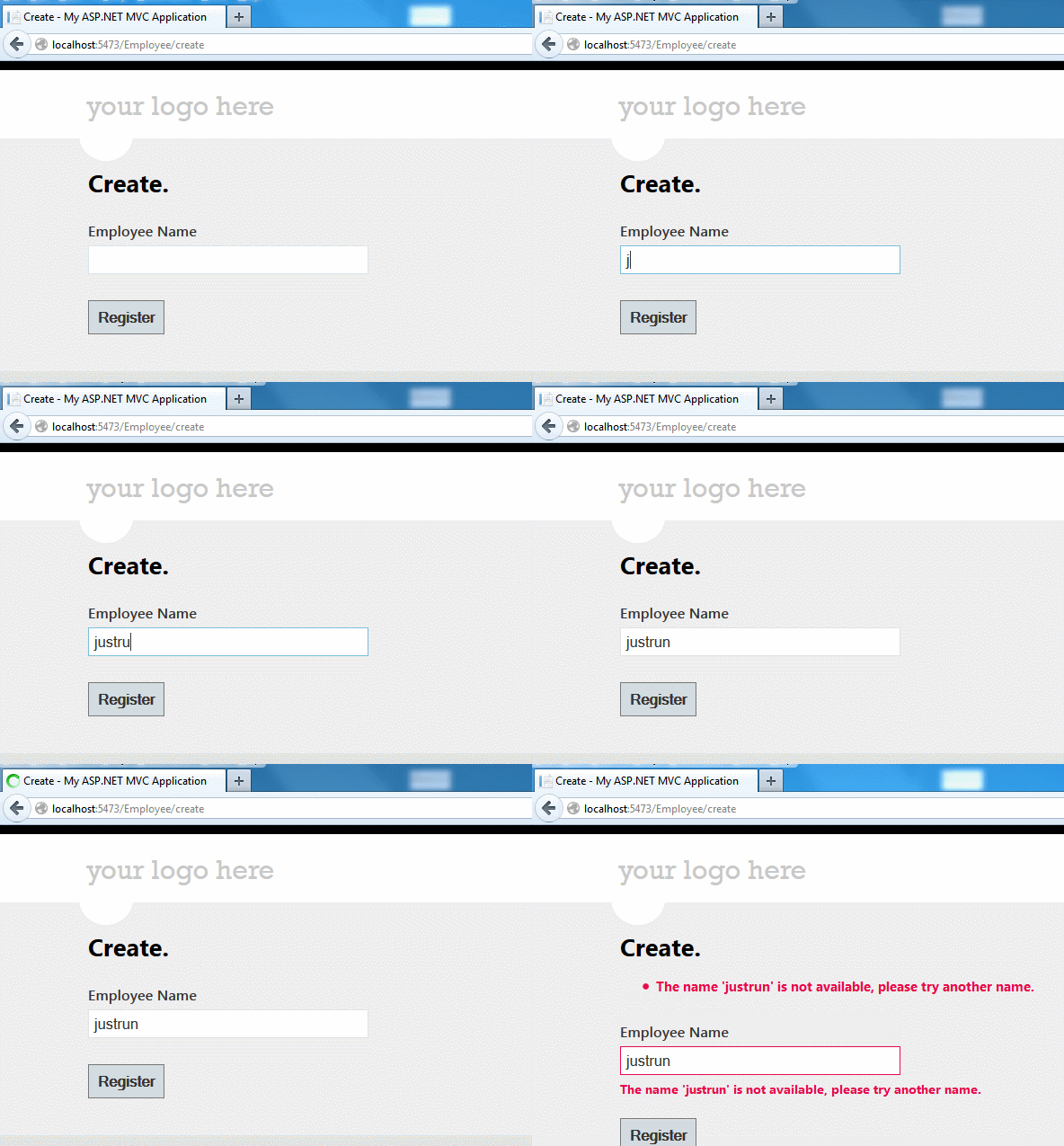
最终的运行效果如下,能够明显的看到,页面刷新,表单提交到了后台处理。
Remote验证及其改进(附源码)的更多相关文章
- Asp.net MVC验证哪些事(3)-- Remote验证及其改进(附源码)
表单中的输入项,有些是固定的,不变的验证规则,比如字符长度,必填等.但有些是动态的,比如注册用户名是否存在这样的检查,这个需要访问服务器后台才能解决.这篇文章将会介绍MVC中如何使用[RemoteAt ...
- Java钉钉开发_02_免登授权(身份验证)(附源码)
源码已上传GitHub: https://github.com/shirayner/DingTalk_Demo 一.本节要点 1.免登授权的流程 (1)签名校验 (2)获取code,并传到后台 (3) ...
- JAVA WEB项目中生成验证码及验证实例(附源码及目录结构)
[我是一个初学者,自己总结和网上搜索资料,代码是自己敲了一遍,亲测有效,现将所有的目录结构和代码贴出来分享给像我一样的初学者] 作用 验证码为全自动区分计算机和人类的图灵测试的缩写,是一种区分用户是计 ...
- 【转】.NET(C#):浅谈程序集清单资源和RESX资源 关于单元测试的思考--Asp.Net Core单元测试最佳实践 封装自己的dapper lambda扩展-设计篇 编写自己的dapper lambda扩展-使用篇 正确理解CAP定理 Quartz.NET的使用(附源码) 整理自己的.net工具库 GC的前世与今生 Visual Studio Package 插件开发之自动生
[转].NET(C#):浅谈程序集清单资源和RESX资源 目录 程序集清单资源 RESX资源文件 使用ResourceReader和ResourceSet解析二进制资源文件 使用ResourceM ...
- C#进阶系列——一步一步封装自己的HtmlHelper组件:BootstrapHelper(三:附源码)
前言:之前的两篇封装了一些基础的表单组件,这篇继续来封装几个基于bootstrap的其他组件.和上篇不同的是,这篇的有几个组件需要某些js文件的支持. 本文原创地址:http://www.cnblog ...
- (原创)通用查询实现方案(可用于DDD)[附源码] -- 简介
[声明] 写作不易,转载请注明出处(http://www.cnblogs.com/wiseant/p/3985353.html). [系列文章] 通用查询实现方案(可用于DDD)[附源码] -- ...
- C#共享内存实例 附源码
原文 C#共享内存实例 附源码 网上有C#共享内存类,不过功能太简单了,并且写内存每次都从开头写.故对此进行了改进,并做了个小例子,供需要的人参考. 主要改进点: 通过利用共享内存的一部分空间(以下称 ...
- 极限挑战—C#100万条数据导入SQL SERVER数据库仅用4秒 (附源码)
原文:极限挑战-C#100万条数据导入SQL SERVER数据库仅用4秒 (附源码) 实际工作中有时候需要把大量数据导入数据库,然后用于各种程序计算,本实验将使用5中方法完成这个过程,并详细记录各种方 ...
- wpf 模拟3D效果(和手机浏览图片效果相似)(附源码)
原文 wpf 模拟3D效果(和手机浏览图片效果相似)(附源码) pf的3D是一个很有意思的东西,类似于ps的效果,类似于电影动画的效果,因为动画的效果,(对于3D基础的摄像机,光源,之类不介绍,对于依 ...
随机推荐
- 排序(4)---------希尔(shell)排序(C语言实现)
由于考试耽搁了几天,不好意思~~~ 前面的介绍的三种排序算法,都属于简单排序,大家能够看下详细算法,时间复杂度基本都在0(n^2),这样呢,非常多计算机界.数学界的牛人就非常不爽了,他们在家里想啊想, ...
- 网络编程easy错误点-手知道
通常的网络编程socket编程.实际上.socket编程并不仅仅是满足网络间不同主机之间的通信,它也能实现同一台主机上不同进程间的通信需求. 其体如今创建socket时的參数的不同: int sock ...
- ENode框架初始化
ENode框架初始化 前言 Conference案例是使用ENode框架来开发的.之前我没有介绍过ENode框架是如何启动的,以及启动时要注意的一些点,估计很多人对ENode框架的初始化这一块感觉很复 ...
- hdu 亲和串(kmp)
Problem Description 人随着岁数的增长是越大越聪明还是越大越笨,这是一个值得全世界科学家思考的问题,同样的问题Eddy也一直在思考,因为他在很小的时候就知道亲和串如何判断了,但是发现 ...
- hdu 1814 Peaceful Commission (2-sat 输出字典序最小的路径)
Peaceful Commission Time Limit: 10000/5000 MS (Java/Others) Memory Limit: 32768/32768 K (Java/Oth ...
- hdu 4915 Parenthese sequence--2014 Multi-University Training Contest 5
主题链接:http://acm.hdu.edu.cn/showproblem.php?pid=4915 Parenthese sequence Time Limit: 2000/1000 MS (Ja ...
- ASP.NET MVC2.0 自定义filters
今天大家共同学习下ASP.NET MVC2.0中自定义filters,这一节主要学习下ActionFilterAttribute, ActionFilterAttribute继承IActionFilt ...
- java_ log4j的基本配置参数
目标: err级别发送邮件 ,要求美观 ,信息详细 开工: 材料: 三个jar ,版本不建议高,不能低. 方便起见,打包下载即可 http://pan.baidu.com/s/1mgmfyvY ...
- 【百度地图API】百度API卫星图使用方法和卫星图对比工具
原文:[百度地图API]百度API卫星图使用方法和卫星图对比工具 百度地图API推出卫星图接口也有一个月啦~ 本文除了介绍如何使用百度地图API来操作卫星图外,还顺带制作了个卫星图对比工具. 一.百度 ...
- 【百度地图API】今日小年大进步,齐头共进贺佳节——API优化升级上线,不再增加内存消耗
原文:[百度地图API]今日小年大进步,齐头共进贺佳节--API优化升级上线,不再增加内存消耗 任务描述: 今天是2011年01月26日,小年夜.百度地图API在小年夜献给广大API爱好者一份给力的礼 ...