
手把手教你Spring Boot整合Mybatis Plus 代码生成器
一、在pom.xml中添加所需依赖
<!-- MyBatis-Plus代码生成器-->

<dependency>

    <groupId>com.baomidou</groupId>

    <artifactId>mybatis-plus-generator</artifactId>

    <version>3.4.1</version>

</dependency>

<!--MyBatis-Plus逆向功能所需的模板引擎-->

<dependency>

    <groupId>org.freemarker</groupId>

    <artifactId>freemarker</artifactId>

    <version>2.3.30</version>

</dependency>
二、在application.yml中添加相关配置
#----------------mybatis plus配置-----------------------

mybatis-plus:

  # xml扫描,多个目录用逗号或者分号分隔(告诉 Mapper 所对应的 XML 文件位置)

  mapper-locations: classpath:mapper/*.xml

  configuration:

    # 是否开启自动驼峰命名规则映射:从数据库列名到Java属性驼峰命名的类似映射

    map-underscore-to-camel-case: true

    # 如果查询结果中包含空值的列,则 MyBatis 在映射的时候,不会映射这个字段

    call-setters-on-nulls: true

    # 这个配置会将执行的sql打印出来,在开发或测试的时候可以用

    log-impl: org.apache.ibatis.logging.stdout.StdOutImpl

  # 实体扫描,多个package用逗号或者分号分隔

  typeAliasesPackage: com.example.study.model.entity

  global-config:

    db-config:

      #主键类型 AUTO:"数据库ID自增" INPUT:"用户输入ID",ID_WORKER:"全局唯一ID (数字类型唯一ID)", UUID:"全局唯一ID UUID";

      id-type: auto

      #字段策略 IGNORED:"忽略判断"  NOT_NULL:"非 NULL 判断")  NOT_EMPTY:"非空判断"

      field-strategy: NOT_EMPTY

      #数据库类型

      db-type: MYSQL

      # 逻辑删除配置

      # 删除前

      logic-not-delete-value: 1

      # 删除后

      logic-delete-value: 0

      # 数据库表名的前缀

      table-prefix: t_
三、新建代码生成工具类CodeGenerateUtils.java
package com.example.study.util;

import com.baomidou.mybatisplus.core.exceptions.MybatisPlusException;

import com.baomidou.mybatisplus.core.toolkit.StringPool;

import com.baomidou.mybatisplus.core.toolkit.StringUtils;

import com.baomidou.mybatisplus.generator.AutoGenerator;

import com.baomidou.mybatisplus.generator.InjectionConfig;

import com.baomidou.mybatisplus.generator.config.*;

import com.baomidou.mybatisplus.generator.config.po.TableInfo;

import com.baomidou.mybatisplus.generator.config.rules.NamingStrategy;

import com.baomidou.mybatisplus.generator.engine.FreemarkerTemplateEngine;

import java.util.ArrayList;

import java.util.List;

import java.util.Scanner;

/**

 * mybatis-plus代码生成器

 *

 * @author 154594742@qq.com

 * @date 2021/2/24 16:32

 */

public class CodeGenerateUtils {

    /**

     * 读取控制台内容

     */

    private static String scanner(String tip) {

        Scanner scanner = new Scanner(System.in);

        StringBuilder help = new StringBuilder();

        help.append("请输入" + tip + ":");

        System.out.println(help.toString());

        if (scanner.hasNext()) {

            String ipt = scanner.next();

            if (StringUtils.isNotBlank(ipt)) {

                return ipt;

            }

        }

        throw new MybatisPlusException("请输入正确的" + tip + "!");

    }

    /**

     * 运行这个main方法进行代码生成

     */

    public static void main(String[] args) {

        // 代码生成器

        AutoGenerator mpg = new AutoGenerator();

        // 全局配置

        GlobalConfig gc = new GlobalConfig();

        String projectPath = System.getProperty("user.dir");

        gc.setOutputDir(projectPath + "/src/main/java");

        gc.setAuthor("Code Duck");

        gc.setOpen(false);

        gc.setSwagger2(true); // 实体属性 Swagger2 注解

        gc.setServiceName("%sService");

        mpg.setGlobalConfig(gc);

        // 数据源配置

        DataSourceConfig dsc = new DataSourceConfig();

        dsc.setUrl("jdbc:mysql://localhost:3306/study?useUnicode=true&useSSL=false&characterEncoding=utf8&serverTimezone=UTC");

        dsc.setDriverName("com.mysql.cj.jdbc.Driver");

        dsc.setUsername("root");

        dsc.setPassword("123456");

        mpg.setDataSource(dsc);

        /*

        包配置,可以根据自己的项目情况自定义生成后的存放路径

        entity默认路径为父目录.entity

        mapper默认路径为父目录.mapper

        service默认路径为父目录.service

        serviceImpl默认路径为父目录.service.impl

        controller默认路径为父目录.controller

        */

        PackageConfig pc = new PackageConfig();

        pc.setModuleName(null);

        //设置父目录

        pc.setParent("com.example.study");

        //自定义entity的生成位置

        pc.setEntity("model.entity");

        mpg.setPackageInfo(pc);

        // 自定义配置

        InjectionConfig cfg = new InjectionConfig() {

            @Override

            public void initMap() {

                // to do nothing

            }

        };

        // 如果模板引擎是 freemarker

        String templatePath = "/templates/mapper.xml.ftl";

        // 如果模板引擎是 velocity

        // String templatePath = "/templates/mapper.xml.vm";

        // 自定义输出配置

        List<FileOutConfig> focList = new ArrayList<>();

        // 自定义配置会被优先输出

        focList.add(new FileOutConfig(templatePath) {

            @Override

            public String outputFile(TableInfo tableInfo) {

                // 自定义输出文件名 , 如果你 Entity 设置了前后缀、此处注意 xml 的名称会跟着发生变化!!

                return projectPath + "/src/main/resources/mapper/"

                        + "/" + tableInfo.getEntityName() + "Mapper" + StringPool.DOT_XML;

            }

        });

        cfg.setFileOutConfigList(focList);

        mpg.setCfg(cfg);

        // 配置模板

        TemplateConfig templateConfig = new TemplateConfig();

        templateConfig.setXml(null);

        mpg.setTemplate(templateConfig);

        // 策略配置

        StrategyConfig strategy = new StrategyConfig();

        strategy.setNaming(NamingStrategy.underline_to_camel);

        strategy.setColumnNaming(NamingStrategy.underline_to_camel);

        strategy.setEntityLombokModel(true);

        strategy.setRestControllerStyle(true);

        strategy.setInclude(scanner("表名,多个英文逗号分割").split(","));

        strategy.setControllerMappingHyphenStyle(true);

        // 设置表前缀

        strategy.setTablePrefix("t_");

        mpg.setStrategy(strategy);

        mpg.setTemplateEngine(new FreemarkerTemplateEngine());

        mpg.execute();

    }

}
四、在数据库中新建一张角色表
CREATE TABLE `t_role` (

  `id` bigint NOT NULL AUTO_INCREMENT COMMENT '自增主键',

  `role_name` varchar(32) DEFAULT NULL COMMENT '角色名称',

  `role_description` varchar(32) DEFAULT NULL COMMENT '角色描述',

  PRIMARY KEY (`id`)

) ENGINE=InnoDB DEFAULT CHARSET=utf8 COMMENT='角色表'
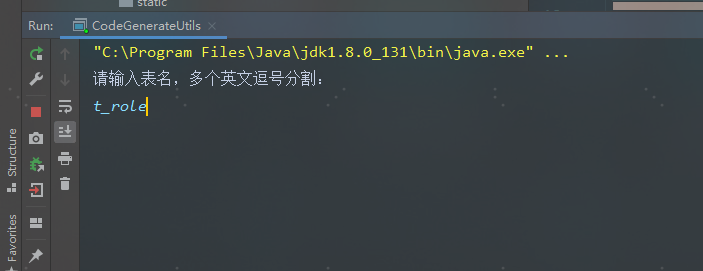
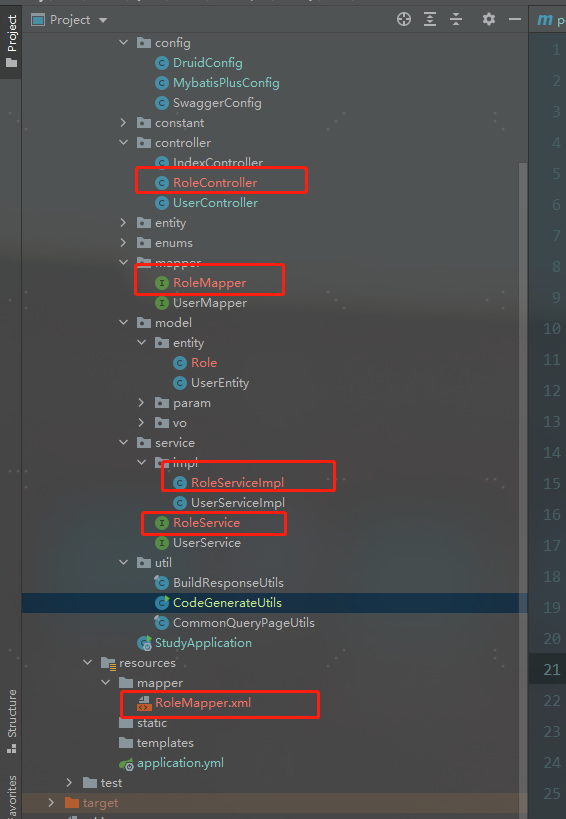
五、运行工具类中的main方法,然后输入需要逆向生成代码的数据表名然后回车,然后就可以看到代码已经成功生成了

手把手教你Spring Boot整合Mybatis Plus 代码生成器的更多相关文章
- 手把手教你Spring Boot整合Mybatis Plus和Swagger2
前言:如果你是初学者,请完全按照我的教程以及代码来搭建(文末会附上完整的项目代码包,你可以直接下载我提供的完整项目代码包然后自行体验!),为了照顾初学者所以贴图比较多,请耐心跟着教程来,希望这个项目D ...
- Spring Boot整合Mybatis并完成CRUD操作
MyBatis 是一款优秀的持久层框架,被各大互联网公司使用,本文使用Spring Boot整合Mybatis,并完成CRUD操作. 为什么要使用Mybatis?我们需要掌握Mybatis吗? 说的官 ...
- spring boot 整合 mybatis 以及原理
同上一篇文章一样,spring boot 整合 mybatis过程中没有看见SqlSessionFactory,sqlsession(sqlsessionTemplate),就连在spring框架整合 ...
- Spring Boot 整合mybatis时遇到的mapper接口不能注入的问题
现实情况是这样的,因为在练习spring boot整合mybatis,所以自己新建了个项目做测试,可是在idea里面mapper接口注入报错,后来百度查询了下,把idea的注入等级设置为了warnin ...
- Spring Boot整合Mybatis报错InstantiationException: tk.mybatis.mapper.provider.base.BaseSelectProvider
Spring Boot整合Mybatis时一直报错 后来发现原来主配置类上的MapperScan导错了包 由于我使用了通用Mapper,所以应该导入通用mapper这个包
- Spring Boot整合MyBatis(非注解版)
Spring Boot整合MyBatis(非注解版),开发时采用的时IDEA,JDK1.8 直接上图: 文件夹不存在,创建一个新的路径文件夹 创建完成目录结构如下: 本人第一步习惯先把需要的包结构创建 ...
- Spring Boot整合Mybatis完成级联一对多CRUD操作
在关系型数据库中,随处可见表之间的连接,对级联的表进行增删改查也是程序员必备的基础技能.关于Spring Boot整合Mybatis在之前已经详细写过,不熟悉的可以回顾Spring Boot整合Myb ...
- Spring Boot系列(三):Spring Boot整合Mybatis源码解析
一.Mybatis回顾 1.MyBatis介绍 Mybatis是一个半ORM框架,它使用简单的 XML 或注解用于配置和原始映射,将接口和Java的POJOs(普通的Java 对象)映射成数据库中的记 ...
- 太妙了!Spring boot 整合 Mybatis Druid,还能配置监控?
Spring boot 整合 Mybatis Druid并配置监控 添加依赖 <!--druid--> <dependency> <groupId>com.alib ...
随机推荐
- Vuejs 基础学习教程
(四)构建基础进阶-env文件与环境设置 我们在实际开发中,我们一般会经历项目的开发阶段,测试阶段,和最终上线阶段,每个阶段对于项目代码的需要可能都有所不同,那我们怎么让它在不同阶段呈现不同的效果呢? ...
- H - 看病要排队
看病要排队这个是地球人都知道的常识.不过经过细心的0068的观察,他发现了医院里排队还是有讲究的.0068所去的医院有三个医生(汗,这么少)同时看病.而看病的人病情有轻重,所以不能根据简单的先来先服务 ...
- 宝塔Linux面板FTP无法连接的解决办法
我使用的是阿里云服务器,需要在安全组设置中,对22.21端口放行,并且被动端口(39000 - 40000)也需要处于放行状态(即是指在阿里云安全组的添加端口范围为 39000/40000 的设置) ...
- Codeforces Round #626 Div2 D,E
比赛链接: Codeforces Round #626 (Div. 2, based on Moscow Open Olympiad in Informatics) D.Present 题意: 给定大 ...
- 2020ICPC·小米 网络选拔赛第一场 J.Matrix Subtraction (贪心,二维差分)
题意:给一个\(nXm\)的矩阵,可以选取\(aXb\)的子矩阵,使子矩阵中的所有元素减一,问最后是否能使矩阵中所有元素变为\(0\). 题解:首先贪心,我们看最左上角的元素,如果\(g[1][1]\ ...
- 牛客练习赛70 D.数树 (模拟,STL)
题意:每次有\(3\)中操作,对两个点连条边,删去某条边,或者问当前大小不为\(1\)的树的数量.连重边或者删去一条不存在的边,这样的白痴操作可以无视qwq. 题解:水题,用map存一下pair然后分 ...
- 洛谷 P5837 [USACO19DEC]Milk Pumping G (单源最短路,dijkstra)
题意:有一\(n\)个点,\(m\)条边的双向图,每条边都有花费和流量,求从\(1\)~\(n\)的路径中,求\(max\frac{min(f)}{\sum c}\). 题解:对于c,一定是单源最短路 ...
- IIS Web API 长时间不连接后第一次访问非常缓慢
搭建在 IIS 上的 Web API 若长时间不访问,会出现第一次访问耗时较长的现象,这与其调用应用程序池的 Idle Time-out(minutes) 即闲置超时设置有关.默认值为20,修改为0即 ...
- Python进阶丨如何创建你的第一个Python元类?
摘要:通过本文,将深入讨论Python元类,其属性,如何以及何时在Python中使用元类. Python元类设置类的行为和规则.元类有助于修改类的实例,并且相当复杂,是Python编程的高级功能之一. ...
- 使用networkx库可视化对称矩阵的网络图形
首先我的数据是.mat格式,讲讲如何用python读取.mat格式的数据(全套来) 我是python3版本 第一种读取方法: import h5py features_struct = h5py.Fi ...