
Hadoop企业开发场景案例,虚拟机服务器调优
Hadoop企业开发场景案例
1 案例需求
(1)需求:从1G数据中,统计每个单词出现次数。服务器3台,每台配置4G内存,4核CPU,4线程。
(2)需求分析:
1G/128m = 8个MapTask;1个ReduceTask:1个mrAppMaster
平均每个节点运行10个/3台 ≈ 3个任务(4 3 3)
2 HDFS参数调优
(1)修改:hadoop-env.sh
export HDFS_NAMENODE_OPTS = "-Dhadoop.security.logger=INFO,RFAS -Xmx1024m"

export HDFS_DATANODE_OPTS = "-Dhadoop.security.logger=ERROR,RFAS -Xmx1024m"
(2)修改:hdfs-site.xml
<!--NameNode有一个工作线程池,默认值是10-->

<property>

	<name>dfs.namenode.handler.count</name>

	<value>21</value>

</property>
(3)修改core-site.xml
<!-- 配置垃圾回收时间为 60 分钟 -->

<property>

	<name>fs.trash.interval</name>

	<value>60</value>

</property>
(4)将配置分发到三台服务器上
rsync -av 分发的文件名称 用户名@主机名称:储存配置文件地址
3 MapReduce 参数调优
(1)修改mapred-site.xml
<!-- 环形缓冲区大小,默认 100m -->

<property>

	<name>mapreduce.task.io.sort.mb</name>

	<value>100</value>

</property>

<!-- 环形缓冲区溢写阈值,默认 0.8 -->

<property>

	<name>mapreduce.map.sort.spill.percent</name>

	<value>0.80</value>

</property>

<!-- merge 合并次数,默认 10 个 -->

<property>

	<name>mapreduce.task.io.sort.factor</name>

	<value>10</value>

</property>

<!-- maptask 内存,默认 1g; maptask 堆内存大小默认和该值大小一致 mapreduce.map.java.opts -->

<property>

	<name>mapreduce.map.memory.mb</name>

	<value>-1</value>

	<description>

	The amount of memory to request from the scheduler for each map task. If this is not specified or is non-positive, it is inferred from mapreduce.map.java.opts and mapreduce.job.heap.memory-mb.ratio. If java-opts are also not specified, we set it to 1024.

	</description>

</property>

<!-- matask 的 CPU 核数,默认 1 个 -->

<property>

	<name>mapreduce.map.cpu.vcores</name>

	<value>1</value>

</property>

<!-- matask 异常重试次数,默认 4 次 -->

<property>

	<name>mapreduce.map.maxattempts</name>

	<value>4</value>

</property>

<!-- 每个 Reduce 去 Map 中拉取数据的并行数。默认值是 5 -->

<property>

	<name>mapreduce.reduce.shuffle.parallelcopies</name>

	<value>5</value>

</property>

<!-- Buffer 大小占 Reduce 可用内存的比例,默认值 0.7 -->

<property>

	<name>mapreduce.reduce.shuffle.input.buffer.percent</name>

	<value>0.70</value>

</property>

<!-- Buffer 中的数据达到多少比例开始写入磁盘,默认值 0.66。 -->

<property>

	<name>mapreduce.reduce.shuffle.merge.percent</name>

	<value>0.66</value>

</property>

<!-- reducetask 内存,默认 1g;reducetask 堆内存大小默认和该值大小一致 mapreduce.reduce.java.opts -->

<property>

	<name>mapreduce.reduce.memory.mb</name>

	<value>-1</value>

	<description>The amount of memory to request from the scheduler for each reduce task. If this is not specified or is non-positive, it is inferred from mapreduce.reduce.java.opts and mapreduce.job.heap.memory-mb.ratio. If java-opts are also not specified, we set it to 1024.

	</description>

</property>

<!-- reducetask 的 CPU 核数,默认 1 个 -->

<property>

	<name>mapreduce.reduce.cpu.vcores</name>

	<value>2</value>

</property>

<!-- reducetask 失败重试次数,默认 4 次 -->

<property>

	<name>mapreduce.reduce.maxattempts</name>

	<value>4</value>

</property>

<!-- 当MapTask完成的比例达到该值后才会为ReduceTask申请资源。默认是0.05-->

<property>

	<name>mapreduce.job.reduce.slowstart.completedmaps</name>

	<value>0.05</value>

</property>

<!-- 如果程序在规定的默认 10 分钟内没有读到数据,将强制超时退出 -->

<property>

	<name>mapreduce.task.timeout</name>

	<value>600000</value>

</property>
(2)服务器分发配置文件
rsync -av 分发的文件名称 用户名@主机名称:储存配置文件地址
4 Yarn参数调优
(1)修改Yarn-site.xml
<!-- 选择调度器,默认容量 -->

<property>

	<description>The class to use as the resource scheduler.</description>

	<name>yarn.resourcemanager.scheduler.class</name>

	<value>org.apache.hadoop.yarn.server.resourcemanager.scheduler.capacity.CapacityScheduler</value>

</property>

<!-- ResourceManager 处理调度器请求的线程数量,默认 50;如果提交的任务数大于 50,可以增加该值,但是不能超过 3 台 * 4 线程 = 12 线程(去除其他应用程序实际不能超过 8) -->

<property>

	<description>Number of threads to handle schedulerinterface.</description>

	<name>yarn.resourcemanager.scheduler.client.thread-count</name>

	<value>8</value>

</property>

<!-- 是否让 yarn 自动检测硬件进行配置,默认是 false,如果该节点有很多其他应用程序,建议

手动配置。如果该节点没有其他应用程序,可以采用自动 -->

<property>

	<description>Enable auto-detection of node capabilities such as memory and CPU.</description>

	<name>yarn.nodemanager.resource.detect-hardware-capabilities</name>

	<value>false</value>

</property>

<!-- 是否将虚拟核数当作 CPU 核数,默认是 false,采用物理 CPU 核数 -->

<property>

	<description>Flag to determine if logical processors(such as hyperthreads) should be counted as cores. Only applicable on Linux when yarn.nodemanager.resource.cpu-vcores is set to -1 and yarn.nodemanager.resource.detect-hardware-capabilities is true.

	</description>

	<name>yarn.nodemanager.resource.count-logical-processors-as-cores</name>

	<value>false</value>

</property>

<!-- 虚拟核数和物理核数乘数,默认是 1.0 -->

<property>

	<description>Multiplier to determine how to convert phyiscal cores to vcores. This value is used if yarn.nodemanager.resource.cpu-vcores is set to -1(which implies auto-calculate vcores) and yarn.nodemanager.resource.detect-hardware-capabilities is set to true. The number of vcores will be calculated as number of CPUs * multiplier.

	</description>

	<name>yarn.nodemanager.resource.pcores-vcores-multiplier</name>

	<value>1.0</value>

</property>

<!-- NodeManager 使用内存数,默认 8G,修改为 4G 内存 -->

<property>

	<description>Amount of physical memory, in MB, that can be allocated for containers. If set to -1 and

yarn.nodemanager.resource.detect-hardware-capabilities is true, it is automatically calculated(in case of Windows and Linux). In other cases, the default is 8192MB.

	</description>

	<name>yarn.nodemanager.resource.memory-mb</name>

	<value>4096</value>

</property>

<!-- nodemanager 的 CPU 核数,不按照硬件环境自动设定时默认是 8 个,修改为 4 个 -->

<property>

	<description>Number of vcores that can be allocated for containers. This is used by the RM scheduler when allocating resources for containers. This is not used to limit the number of CPUs used by YARN containers. If it is set to -1 and yarn.nodemanager.resource.detect-hardware-capabilities is true, it is

automatically determined from the hardware in case of Windows and Linux. In other cases, number of vcores is 8 by default.

	</description>

	<name>yarn.nodemanager.resource.cpu-vcores</name>

	<value>4</value>

</property>

<!-- 容器最小内存,默认 1G -->

<property>

	<description>The minimum allocation for every container request at the RM in MBs. Memory requests lower than this will be set to the value of this property. Additionally, a node manager that is configured to have

less memory than this value will be shut down by the resource manager.

	</description>

	<name>yarn.scheduler.minimum-allocation-mb</name>

	<value>1024</value>

</property>

<!-- 容器最大内存,默认 8G,修改为 2G -->

<property>

	<description>The maximum allocation for every container request at the RM in MBs. Memory requests higher than this will throw an InvalidResourceRequestException.

	</description>

	<name>yarn.scheduler.maximum-allocation-mb</name>

	<value>2048</value>

</property>

<!-- 容器最小 CPU 核数,默认 1 个 -->

<property>

	<description>The minimum allocation for every container request at the RM in terms of virtual CPU cores. Requests lower than this will be set to the value of this property. Additionally, a node manager that is configured to have fewer virtual cores than this value will be shut down by the

resource manager.

	</description>

	<name>yarn.scheduler.minimum-allocation-vcores</name>

	<value>1</value>

</property>

<!-- 容器最大 CPU 核数,默认 4 个,修改为 2 个 -->

<property>

	<description>The maximum allocation for every container request at the RM in terms of virtual CPU cores. Requests higher than this will throw an InvalidResourceRequestException.

	</description>

	<name>yarn.scheduler.maximum-allocation-vcores</name>

	<value>2</value>

</property>

<!-- 虚拟内存检查,默认打开,修改为关闭 -->

<property>

	<description>Whether virtual memory limits will be enforced for containers.</description>

	<name>yarn.nodemanager.vmem-check-enabled</name>

	<value>false</value>

</property>

<!-- 虚拟内存和物理内存设置比例,默认 2.1 -->

<property>

	<description>Ratio between virtual memory to physical memory when setting memory limits for containers. Container allocations are expressed in terms of physical memory, and virtual memory usage is allowed to exceed this allocation by this ratio.

	</description>

	<name>yarn.nodemanager.vmem-pmem-ratio</name>

	<value>2.1</value>

</property>
(2)服务器分发配置文件
rsync -av 分发的文件名称 用户名@主机名称:储存配置文件地址
10.3.5 执行程序
(1)重启集群
sbin/stop-yarn.sh

sbin/start-yarn.sh
(2)执行 WordCount 程序
hadoop jar share/hadoop/mapreduce/hadoop-mapreduce-examples-3.1.3.jar wordcount /wcinput /wcoutput
说明:在hadoop文件夹下运行命令,/input 为要统计的 1G 数据所在的文件夹目录,/output 为要输出统计结果的文件夹目录。
(3)观察 Yarn 任务执行页面
网址:hadoop103:8088
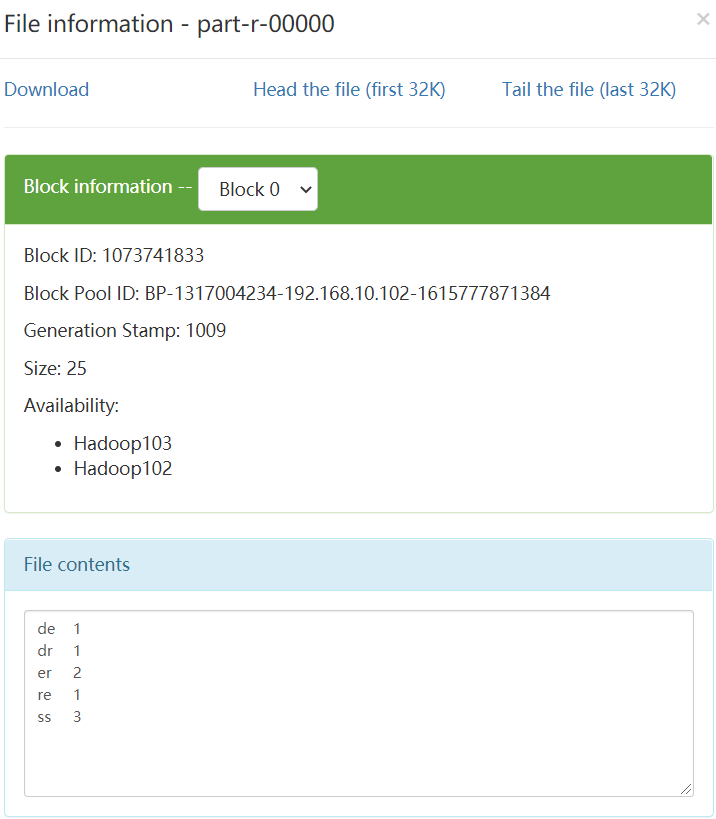
(4)运行结果
/wcinput/work.txt原内容:
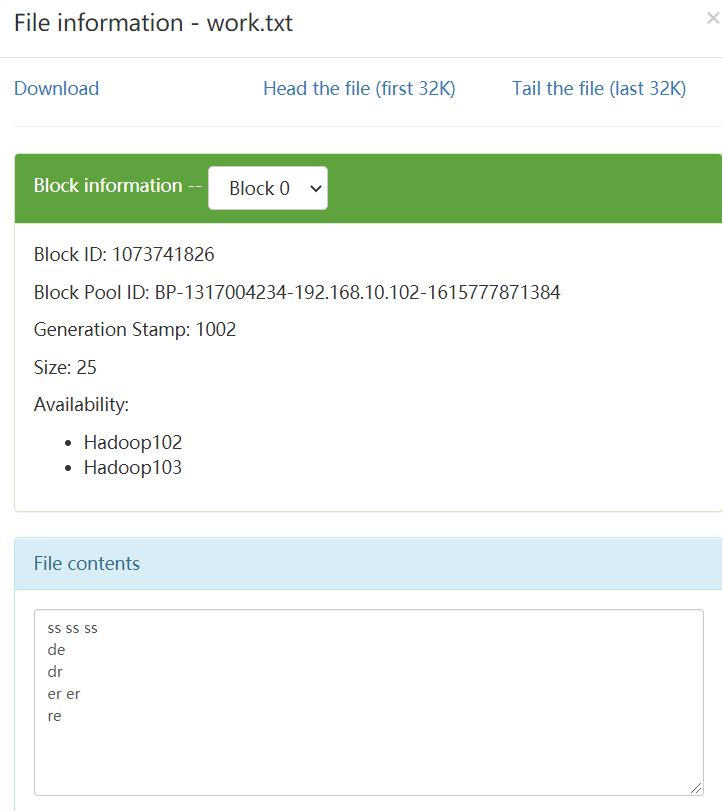
运行结果:生成文件夹/wcoutput
加入QQ群:947117563,一起加入小猿森林吧!!群里可以摘果实哦!!
Hadoop企业开发场景案例,虚拟机服务器调优的更多相关文章
- nginx服务器调优
nginx服务器调优措施总结: 1.选择合适的网络IO模型 epoll select poll 2.配置合适的启动进程数和每个进程处理请求的工作线程数 3.启用gzip压缩以减小通信量以减少网络IO ...
- Hadoop应用开发实战案例 第2周 Web日志分析项目 张丹
课程内容 本文链接: 张丹博客 http://www.fens.me 用Maven构建Hadoop项目 http://blog.fens.me/hadoop-maven-eclipse/程序源代码下载 ...
- 《深入理解Java虚拟机》调优案例分析与实战
上节学习回顾 在上一节当中,主要学习了Sun JDK的一些命令行和可视化性能监控工具的具体使用,但性能分析的重点还是在解决问题的思路上面,没有好的思路,再好的工具也无补于事. 本节学习重点 在书本上本 ...
- Nginx下载服务生产服务器调优
一.内存调优 内核关于内存的选项都在/proc/sys/vm目录下. 1.pdflush,用于回写内存中的脏数据到硬盘.可以通过 /proc/sys/vm/vm.dirty_background_ ...
- Java虚拟机性能调优相关
一.JVM内存模型及垃圾收集算法 1.根据Java虚拟机规范,JVM将内存划分为:New(年轻代)Tenured(年老代)永久代(Perm) 其中New和Tenured属于堆内存,堆内存会从JVM启动 ...
- Java虚拟机性能调优(一)
Java虚拟机监控与调优,借助Java自带分析工具. jps:JVM Process Status Tool,显示指定系统内所有的HotSpot虚拟机进程 jstat:JVM Statistics M ...
- java开发中涉及到的调优
JVM内存的调优 默认的Java虚拟机的大小比较小,在对大数据进行处理时java就会报错:java.lang.OutOfMemoryError. 1. Heap设定与垃圾回收Java Heap分为3个 ...
- 015_[小插曲]看黄老师《炼数成金Hadoop应用开发实战案例》笔记
1.大数据金字塔结构 Data Source-->Data Warehouses/Data Marts-->data exploration-->Data Mining-->D ...
- Hadoop应用开发实战案例 第2周
比如,封面,是一网页,可以看出用户在此网页上,鼠标呈现F形状. 海量Web日志分析 用Hadoop提取KPI统计指标 更详细原文博客:http://blog.fens.me/hadoop-mapred ...
随机推荐
- Gym 101480I Ice Igloos(思维乱搞)题解
题意:给个最多500 * 500的平面,有半径最多不为1的n个圆,现在给你1e5条线段,问你每条线段和几个圆相交,时限10s 思路: 因为半径<1,那么我其实搜索的范围只要在线段附近就好了.x1 ...
- git操作是出现Username for 'https://github.com':的验证问题
Username for 'https://github.com': 输入的是github上的邮箱账号, 而不是github中设置的username, 这是个巨坑!!!Password for 'ht ...
- git merge bug
git merge bug 本地分支 dev commit 后, 直接 pull 远程 dev 分支, 导致远程 dev 分支 merge 到本地 dev 分支了, 取消本次 merge 操作? Re ...
- ReactDOM API All In One
ReactDOM API All In One React DOM API render() hydrate() unmountComponentAtNode() findDOMNode() crea ...
- The best Fibonacci is achieved in js
The best Fibonacci is achieved in js the best realized by using js 斐波那契数列 "use strict"; /* ...
- Android vs iOS vs Web
Android vs iOS vs Web UI view Android ViewGroup ImageView TextView iOS UIView ImageView TextView Web ...
- js with All In One
js with All In One 不推荐,要废弃 function f(x, o) { with (o) { console.log(x); } } function f(foo, values) ...
- how HTTPS works
How HTTPS works HTTPS comic tutorials How HTTPS works ...in a comic! https://howhttps.works/ A cat e ...
- koa url path & koa-router
koa url path & koa-router url path & regex koa path router "use strict"; /** * * @ ...
- 为什么 Koa 的官方文档那么丑呀?
为什么 Koa 的官方文档那么丑呀? koa.js https://koajs.com/ 代码高亮 # $ nvm install 7, node.js v7.x.x+ $ yarn add koa ...