
JavaFX FileChooser文件选择器、DirectoryChooser目录选择器
参考:https://www.yiibai.com/javafx/javafx_filechooser.html
参考:https://blog.csdn.net/dorma_bin/article/details/78856952
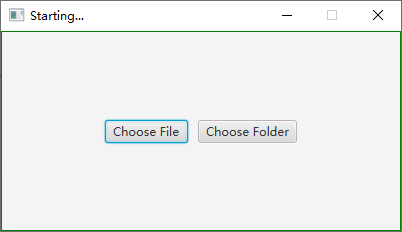
创建一个窗口,在窗口中放置两个按键:“Choose File”与“Choose Folder”。
当“Choose File”按键发生鼠标点击事件,打开文件选择器。如果用户选择了某一个文件,并点击“打开”,在控制台输出该文件的绝对路径。
当“Choose Folder”按键发生鼠标点击事件,打开目录选择器。如果用户选择了某一个文件,并点击“选择文件夹”,在控制台输出该文件的绝对路径。
 1 import java.io.File;

 2

 3 import javafx.application.Application;

 4 import javafx.event.ActionEvent;

 5 import javafx.event.EventHandler;

 6 import javafx.geometry.Insets;

 7 import javafx.geometry.Pos;

 8 import javafx.scene.Scene;

 9 import javafx.scene.control.Button;

10 import javafx.scene.layout.GridPane;

11 import javafx.stage.DirectoryChooser;

12 import javafx.stage.FileChooser;

13 import javafx.stage.FileChooser.ExtensionFilter;

14 import javafx.stage.Stage;

15

16 public class Main extends Application {

17

18     public static void main(String[] args) {

19         launch(args);

20     }

21

22     @Override

23     public void start(Stage primaryStage) throws Exception {

24         // Create a pane to hold a button

25         GridPane pane = new GridPane();

26         pane.setStyle("-fx-border-color: green;");

27         pane.setAlignment(Pos.CENTER);

28         pane.setPadding(new Insets(10, 10, 10, 10));

29         pane.setHgap(10);

30         pane.setVgap(10);

31

32         // Create a button to choose a file

33         Button btChooseFile = new Button("Choose File");

34         pane.add(btChooseFile, 0, 0);

35

36         // Create a button to choose a directory

37         Button btChooseDirectory = new Button("Choose Folder");

38         pane.add(btChooseDirectory, 1, 0);

39

40         // Set the primary stage properties

41         primaryStage.setScene(new Scene(pane, 400, 200));

42         primaryStage.setTitle("Starting...");

43         primaryStage.setResizable(false);

44         primaryStage.show();

45

46         //

47         btChooseFile.setOnAction(new EventHandler<ActionEvent>() {

48             @Override

49             public void handle(ActionEvent event) {

50                 FileChooser fileChooser = new FileChooser();

51                 fileChooser.setTitle("Choose File");

52 //                fileChooser.getExtensionFilters().add(new ExtensionFilter("Text Files", "*.txt"));

53 //                fileChooser.getExtensionFilters().add(new ExtensionFilter("All Files", "*.*"));

54                 fileChooser.getExtensionFilters().addAll(new ExtensionFilter("Text Files", "*.txt"), new ExtensionFilter("All Files", "*.*"));

55                 File file = fileChooser.showOpenDialog(primaryStage);

56                 if (file != null) {

57                     System.out.println(file.getAbsolutePath());

58                 }

59             }

60         });

61

62         btChooseDirectory.setOnAction(new EventHandler<ActionEvent>() {

63             @Override

64             public void handle(ActionEvent event) {

65                 DirectoryChooser directoryChooser = new DirectoryChooser();

66                 directoryChooser.setTitle("Choose Folder");

67                 File directory = directoryChooser.showDialog(new Stage());

68                 if (directory != null) {

69                     System.out.println(directory.getAbsolutePath());

70                 }

71             }

72         });

73     }

74 }
运行程序的UI:
点击按键“Choose File”,控制台的输出(有异常?),以及UI:
Qt: Untested Windows version 10.0 detected!

log4cplus:ERROR No appenders could be found for logger (AdSyncNamespace).

log4cplus:ERROR Please initialize the log4cplus system properly.

Qt: Untested Windows version 10.0 detected!

log4cplus:ERROR No appenders could be found for logger (AdSyncNamespace).

log4cplus:ERROR Please initialize the log4cplus system properly.

Qt: Untested Windows version 10.0 detected!

log4cplus:ERROR No appenders could be found for logger (AdSyncNamespace).

log4cplus:ERROR Please initialize the log4cplus system properly.

Qt: Untested Windows version 10.0 detected!

log4cplus:ERROR No appenders could be found for logger (AdSyncNamespace).

log4cplus:ERROR Please initialize the log4cplus system properly.

Qt: Untested Windows version 10.0 detected!

log4cplus:ERROR No appenders could be found for logger (AdSyncNamespace).

log4cplus:ERROR Please initialize the log4cplus system properly.

Qt: Untested Windows version 10.0 detected!

log4cplus:ERROR No appenders could be found for logger (AdSyncNamespace).

log4cplus:ERROR Please initialize the log4cplus system properly.

Qt: Untested Windows version 10.0 detected!

log4cplus:ERROR No appenders could be found for logger (AdSyncNamespace).

log4cplus:ERROR Please initialize the log4cplus system properly.

Qt: Untested Windows version 10.0 detected!

log4cplus:ERROR No appenders could be found for logger (AdSyncNamespace).

log4cplus:ERROR Please initialize the log4cplus system properly.

Qt: Untested Windows version 10.0 detected!

log4cplus:ERROR No appenders could be found for logger (AdSyncNamespace).

log4cplus:ERROR Please initialize the log4cplus system properly.

Qt: Untested Windows version 10.0 detected!

log4cplus:ERROR No appenders could be found for logger (AdSyncNamespace).

log4cplus:ERROR Please initialize the log4cplus system properly.

Qt: Untested Windows version 10.0 detected!

log4cplus:ERROR No appenders could be found for logger (AdSyncNamespace).

log4cplus:ERROR Please initialize the log4cplus system properly.

Qt: Untested Windows version 10.0 detected!

log4cplus:ERROR No appenders could be found for logger (AdSyncNamespace).

log4cplus:ERROR Please initialize the log4cplus system properly.

Qt: Untested Windows version 10.0 detected!

log4cplus:ERROR No appenders could be found for logger (AdSyncNamespace).

log4cplus:ERROR Please initialize the log4cplus system properly.

Qt: Untested Windows version 10.0 detected!

log4cplus:ERROR No appenders could be found for logger (AdSyncNamespace).

log4cplus:ERROR Please initialize the log4cplus system properly.

Qt: Untested Windows version 10.0 detected!

log4cplus:ERROR No appenders could be found for logger (AdSyncNamespace).

log4cplus:ERROR Please initialize the log4cplus system properly.

Qt: Untested Windows version 10.0 detected!

log4cplus:ERROR No appenders could be found for logger (AdSyncNamespace).

log4cplus:ERROR Please initialize the log4cplus system properly.

Qt: Untested Windows version 10.0 detected!

log4cplus:ERROR No appenders could be found for logger (AdSyncNamespace).

log4cplus:ERROR Please initialize the log4cplus system properly.

Qt: Untested Windows version 10.0 detected!

log4cplus:ERROR No appenders could be found for logger (AdSyncNamespace).

log4cplus:ERROR Please initialize the log4cplus system properly.

Qt: Untested Windows version 10.0 detected!

log4cplus:ERROR No appenders could be found for logger (AdSyncNamespace).

log4cplus:ERROR Please initialize the log4cplus system properly.

Qt: Untested Windows version 10.0 detected!

log4cplus:ERROR No appenders could be found for logger (AdSyncNamespace).

log4cplus:ERROR Please initialize the log4cplus system properly.
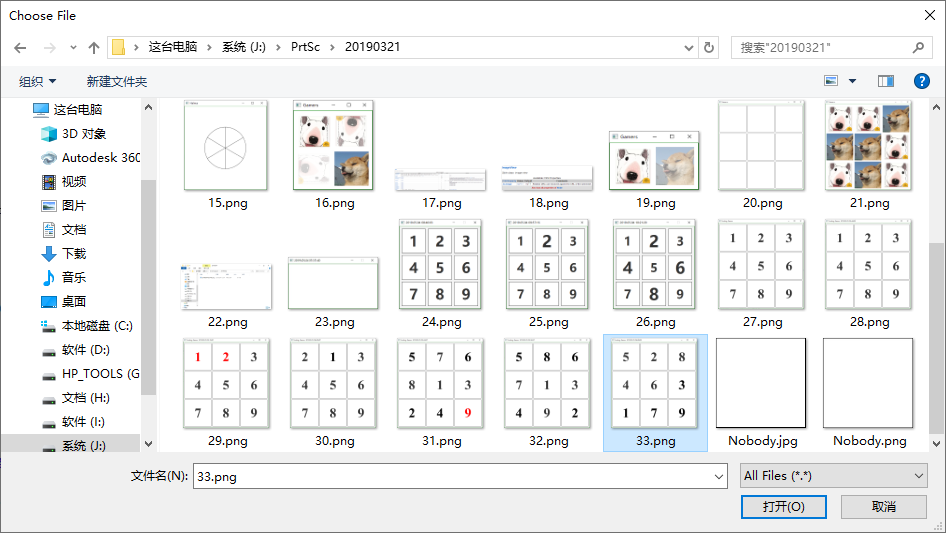
选择某一个文件,并点击按键“打开”,控制台输出:
J:\PrtSc\20190321\33.png
点击按键“Choose Folder”,控制台的输出(有异常?),以及UI:
Qt: Untested Windows version 10.0 detected!

log4cplus:ERROR No appenders could be found for logger (AdSyncNamespace).

log4cplus:ERROR Please initialize the log4cplus system properly.

Qt: Untested Windows version 10.0 detected!

log4cplus:ERROR No appenders could be found for logger (AdSyncNamespace).

log4cplus:ERROR Please initialize the log4cplus system properly.

Qt: Untested Windows version 10.0 detected!

log4cplus:ERROR No appenders could be found for logger (AdSyncNamespace).

log4cplus:ERROR Please initialize the log4cplus system properly.

Qt: Untested Windows version 10.0 detected!

log4cplus:ERROR No appenders could be found for logger (AdSyncNamespace).

log4cplus:ERROR Please initialize the log4cplus system properly.

Qt: Untested Windows version 10.0 detected!

log4cplus:ERROR No appenders could be found for logger (AdSyncNamespace).

log4cplus:ERROR Please initialize the log4cplus system properly.

Qt: Untested Windows version 10.0 detected!

log4cplus:ERROR No appenders could be found for logger (AdSyncNamespace).

log4cplus:ERROR Please initialize the log4cplus system properly.

Qt: Untested Windows version 10.0 detected!

log4cplus:ERROR No appenders could be found for logger (AdSyncNamespace).

log4cplus:ERROR Please initialize the log4cplus system properly.

Qt: Untested Windows version 10.0 detected!

log4cplus:ERROR No appenders could be found for logger (AdSyncNamespace).

log4cplus:ERROR Please initialize the log4cplus system properly.

Qt: Untested Windows version 10.0 detected!

log4cplus:ERROR No appenders could be found for logger (AdSyncNamespace).

log4cplus:ERROR Please initialize the log4cplus system properly.

Qt: Untested Windows version 10.0 detected!

log4cplus:ERROR No appenders could be found for logger (AdSyncNamespace).

log4cplus:ERROR Please initialize the log4cplus system properly.

Qt: Untested Windows version 10.0 detected!

log4cplus:ERROR No appenders could be found for logger (AdSyncNamespace).

log4cplus:ERROR Please initialize the log4cplus system properly.

Qt: Untested Windows version 10.0 detected!

log4cplus:ERROR No appenders could be found for logger (AdSyncNamespace).

log4cplus:ERROR Please initialize the log4cplus system properly.

Qt: Untested Windows version 10.0 detected!

log4cplus:ERROR No appenders could be found for logger (AdSyncNamespace).

log4cplus:ERROR Please initialize the log4cplus system properly.

Qt: Untested Windows version 10.0 detected!

log4cplus:ERROR No appenders could be found for logger (AdSyncNamespace).

log4cplus:ERROR Please initialize the log4cplus system properly.

Qt: Untested Windows version 10.0 detected!

log4cplus:ERROR No appenders could be found for logger (AdSyncNamespace).

log4cplus:ERROR Please initialize the log4cplus system properly.

Qt: Untested Windows version 10.0 detected!

log4cplus:ERROR No appenders could be found for logger (AdSyncNamespace).

log4cplus:ERROR Please initialize the log4cplus system properly.

Qt: Untested Windows version 10.0 detected!

log4cplus:ERROR No appenders could be found for logger (AdSyncNamespace).

log4cplus:ERROR Please initialize the log4cplus system properly.

Qt: Untested Windows version 10.0 detected!

log4cplus:ERROR No appenders could be found for logger (AdSyncNamespace).

log4cplus:ERROR Please initialize the log4cplus system properly.

Qt: Untested Windows version 10.0 detected!

log4cplus:ERROR No appenders could be found for logger (AdSyncNamespace).

log4cplus:ERROR Please initialize the log4cplus system properly.
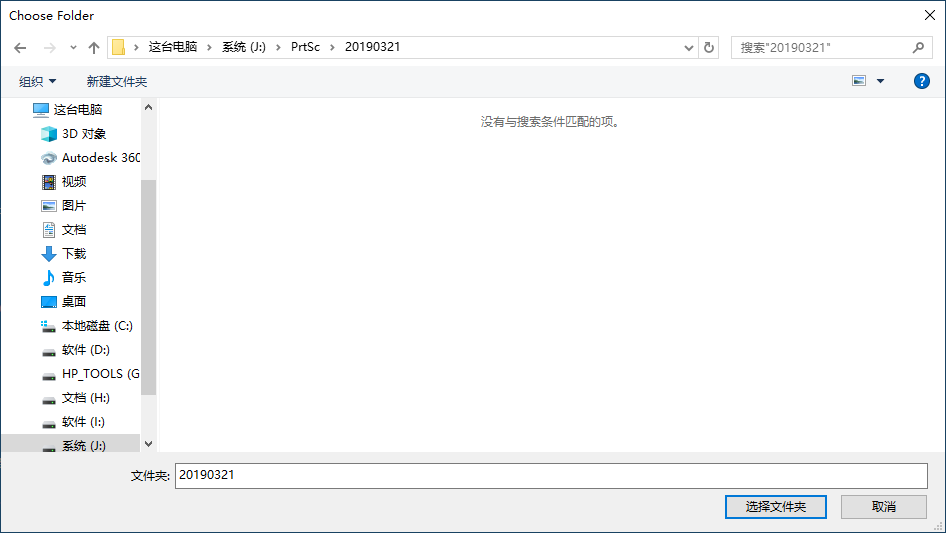
选择某一个文件夹,并点击按键“选择文件夹”,控制台输出:
J:\PrtSc\20190321
JavaFX FileChooser文件选择器、DirectoryChooser目录选择器的更多相关文章
- Java开发桌面程序学习(五)——文件选择器和目录选择器的使用
选择器的使用 DirectoryChooser目录选择器官方文档 FileChooser文件选择器官方文档 文件选择器的使用 JavaFx中有个FileChoser,可以打开一个对话框来选择文件 Fi ...
- JavaFX FileChooser文件选择器,缓存上一次打开的目录
例1:点击按钮Choose File打开文件选择器,并打开指定的目录.这是通过final void setInitialDirectory(final File value)方法实现的. 1 impo ...
- CSS 简介、 选择器、组合选择器
#CSS 装饰器引入<!DOCTYPE html> <html> <head> <meta charset="utf-8"> < ...
- CSS选择器,CSS3选择器
CSS选择器 ------->CSS选择器优先级 1>通配符选择器(CSS2) 选择所有元素,所有浏览器都支持. *{ margin:0; padding:o; } 2>元素选择器( ...
- CSS 简介、语法、派生选择器、id 选择器、类选择器、属性选择器
CSS 概述 CSS 指层叠样式表 (Cascading Style Sheets) 样式定义如何显示 HTML 元素 样式通常存储在样式表中 把样式添加到 HTML 4.0 中,是为了解决内容与表现 ...
- jQuery选择器与CSS选择器
1. 通过位置选择的几个操作: :first:默认情况下是相对整个页面来说的第一个,如:li:first表示整个页面的第一个li元素,而ul li:first表示整个页面的第一个li元素,并且是在ul ...
- CSS选择器详解(二)通用选择器和高级选择器
目录 通用选择器 高级选择器 子选择器 相邻兄弟选择器 属性选择器 通用选择器 通用选择器可以选择页面上的所有元素,并对它们应用样式,用 * 来表示. 语法: * { property1: value ...
- jQuery事件篇---过滤选择器 & 表单选择器
内容提纲: 过滤选择器 1.基本过滤器 2.内容过滤器 3.可见性过滤器 4.子元素过滤器 5.其他方法 表单选择器 6.常规选择器 7.表单选择器 8.表单过滤器 发文不易,转载请注明出处! 过滤选 ...
- 什么是 jQuery 和jQuery的基本选择器,层级选择器,基本筛选器
jQuery是什么? [1] jQuery由美国人John Resig创建,至今已吸引了来自世界各地的众多 javascript高手加入其team. [2] jQuery是继prototype ...
随机推荐
- Forward Rendering VS Deferred Rendering
http://gad.qq.com/article/detail/32731 Forward Rendering Deferred Rendering
- Linux 操作系统 基础
root: 管理员 /: 根目录[windows : 计算机] ~: 家目录: 管理员:/root/.. 非管理员:/home/... 命令提示符: [root@localhost abc]#: ro ...
- Codeforces Round #669 (Div. 2)/Codeforces1407 ABCD
A. Ahahahahahahahaha 通过作者半个小时的观察:全零和全一必定有一个是符合要求的答案,因为0的个数和1的个数至少有一个大于等于\(\frac{n}{2}\). B. Big Vova ...
- vue中实现后台管理路由标签页
<template> <section> <div class="navTabList el-tabs__nav-scroll" id="t ...
- Kubernetes的资源控制器和Service(四)
一.定义和分类 1,定义 k8s 中内建了很多控制器(controller ),这些相当于一个状态机,用来控制 Pod 的具体状态和行为. 2,类型 ReplicationController.Rep ...
- Java中AQS基本实现原理
一.AQS概述 AQS全名AbstractQueuedSynchronizer,意为抽象队列同步器,JUC(java.util.concurrent包)下面的Lock和其他一些并发工具类都是基于它来实 ...
- [PyTorch 学习笔记] 7.1 模型保存与加载
本章代码: https://github.com/zhangxiann/PyTorch_Practice/blob/master/lesson7/model_save.py https://githu ...
- [SSM项目]二-项目设计和框架搭建
一 10个实体类 选择Integer 而不是int的原因 :当值为空时,int类型会自动为其初始化,这是我们不希望的. 二 配置Maven 目录结构: src/main/java:业务代码 src/m ...
- 深入浅出Calcite与SQL CBO(Cost-Based Optimizer)优化
目录 Calcite简介与CBO介绍 Calcite背景与介绍 SQL优化与CBO Calcite优化器 HepPlanner优化器与VolcanoPlanner优化器 Calcite优化样例代码介绍 ...
- 原生js实现懒加载并节流
像淘宝网站等,页面中有着大量图片,一次性全部加载这些图片会使浏览器发送大量请求和造成浪费.采用懒加载技术,即用户浏览到哪儿,就加载该处的图片.这样节省网络资源.提升用户体验.减少服务器压力. 方法1: ...