
pytest文档33-Hooks函数获取用例执行结果(pytest_runtest_makereport)
前言
pytest提供的很多钩子(Hooks)方法方便我们对测试用例框架进行二次开发,可以根据自己的需求进行改造。
先学习下pytest_runtest_makereport这个钩子方法,可以更清晰的了解用例的执行过程,并获取到每个用例的执行结果。
pytest_runtest_makereport
先看下相关的源码,在_pytest/runner.py下,可以导入之后,点进去查看
from _pytest import runner

# 对应源码

def pytest_runtest_makereport(item, call):

    """ return a :py:class:`_pytest.runner.TestReport` object

    for the given :py:class:`pytest.Item` and

    :py:class:`_pytest.runner.CallInfo`.

    """
这里item是测试用例,call是测试步骤,具体执行过程如下:
- 先执行when='setup' 返回setup 的执行结果
- 然后执行when='call' 返回call 的执行结果
- 最后执行when='teardown'返回teardown 的执行结果
运行案例
conftest.py 写 pytest_runtest_makereport 内容,打印运行过程和运行结果
# conftest.py

import pytest

@pytest.hookimpl(hookwrapper=True, tryfirst=True)

def pytest_runtest_makereport(item, call):

    print('------------------------------------')

    # 获取钩子方法的调用结果

    out = yield

    print('用例执行结果', out)

    # 3. 从钩子方法的调用结果中获取测试报告

    report = out.get_result()

    print('测试报告:%s' % report)

    print('步骤:%s' % report.when)

    print('nodeid:%s' % report.nodeid)

    print('description:%s' % str(item.function.__doc__))

    print(('运行结果: %s' % report.outcome))
test_a.py写一个简单的用例
def test_a():

    '''用例描述:test_a'''

    print("上海-悠悠")
运行结果如下
D:\soft\code\pytest_jenkins_demo\demo>pytest -s

============================= test session starts =============================

platform win32 -- Python 3.6.0, pytest-4.5.0, py-1.5.4, pluggy-0.13.1

rootdir: D:\demo

plugins: html-1.19.0,

collected 1 item

test_a.py ------------------------------------

用例执行结果 <pluggy.callers._Result object at 0x0000027C547332B0>

测试报告:<TestReport 'test_a.py::test_a' when='setup' outcome='passed'>

步骤:setup

nodeid:test_a.py::test_a

description:用例描述:test_a

运行结果: passed

上海-悠悠

------------------------------------

用例执行结果 <pluggy.callers._Result object at 0x0000027C547332B0>

测试报告:<TestReport 'test_a.py::test_a' when='call' outcome='passed'>

步骤:call

nodeid:test_a.py::test_a

description:用例描述:test_a

运行结果: passed

.------------------------------------

用例执行结果 <pluggy.callers._Result object at 0x0000027C54750A20>

测试报告:<TestReport 'test_a.py::test_a' when='teardown' outcome='passed'>

步骤:teardown

nodeid:test_a.py::test_a

description:用例描述:test_a

运行结果: passed

========================== 1 passed in 0.06 seconds ===========================
从运行结果可以看出,运行用例的过程会经历三个阶段:setup-call-teardown,每个阶段都会返回的 Result 对象和 TestReport 对象,以及对象属性。
setup和teardown上面的用例默认都没有,结果都是passed。
setup和teardown
给用例写个fixture增加用例的前置和后置操作,conftest.py内容如下
import pytest

@pytest.hookimpl(hookwrapper=True, tryfirst=True)

def pytest_runtest_makereport(item, call):

    print('------------------------------------')

    # 获取钩子方法的调用结果

    out = yield

    print('用例执行结果', out)

    # 3. 从钩子方法的调用结果中获取测试报告

    report = out.get_result()

    print('测试报告:%s' % report)

    print('步骤:%s' % report.when)

    print('nodeid:%s' % report.nodeid)

    print('description:%s' % str(item.function.__doc__))

    print(('运行结果: %s' % report.outcome))

@pytest.fixture(scope="session", autouse=True)

def fix_a():

    print("setup 前置操作")

    yield

    print("teardown 后置操作")
运行结果如下
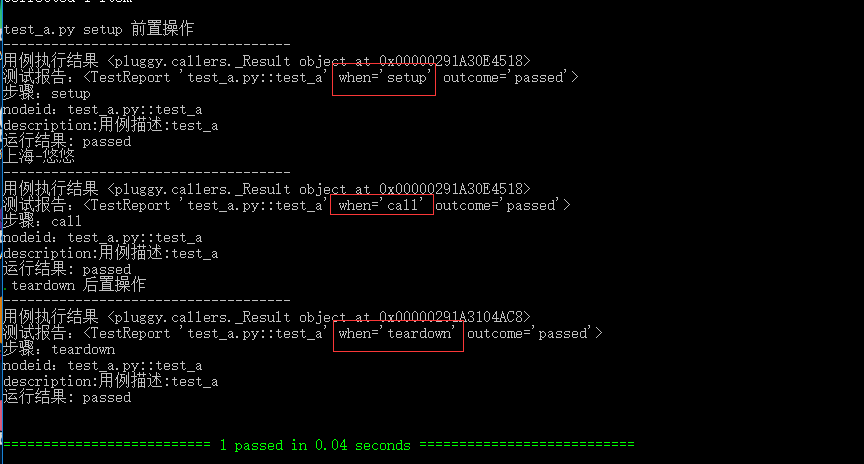
setup失败情况
当setup执行失败了,setup的执行结果的failed,后面的call用例和teardown都不会执行了
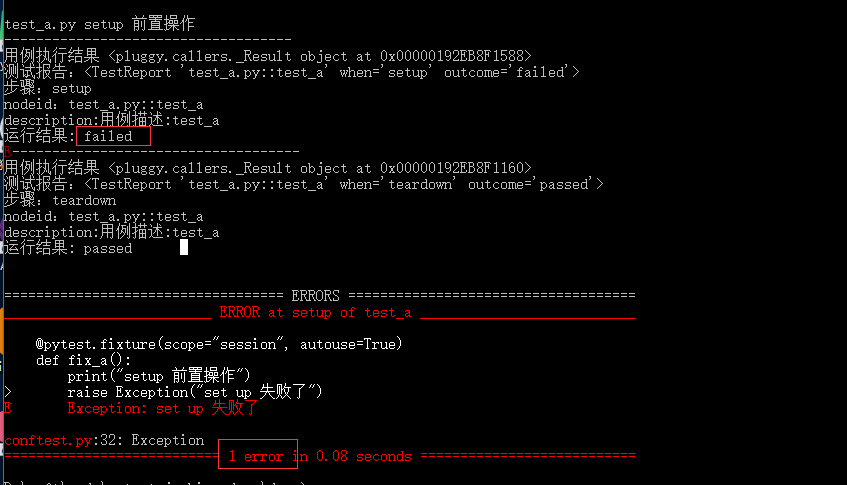
此时用例的状态是:error, 也就是用例(call)都还没开始执行,就异常了。
call失败情况
如果setup正常执行,但是测试用例call失败了
@pytest.fixture(scope="session", autouse=True)

def fix_a():

    print("setup 前置操作")

    yield

    print("teardown 后置操作")
test_a.py用例
def test_a():

    '''用例描述:test_a'''

    print("上海-悠悠")

    assert 1==0
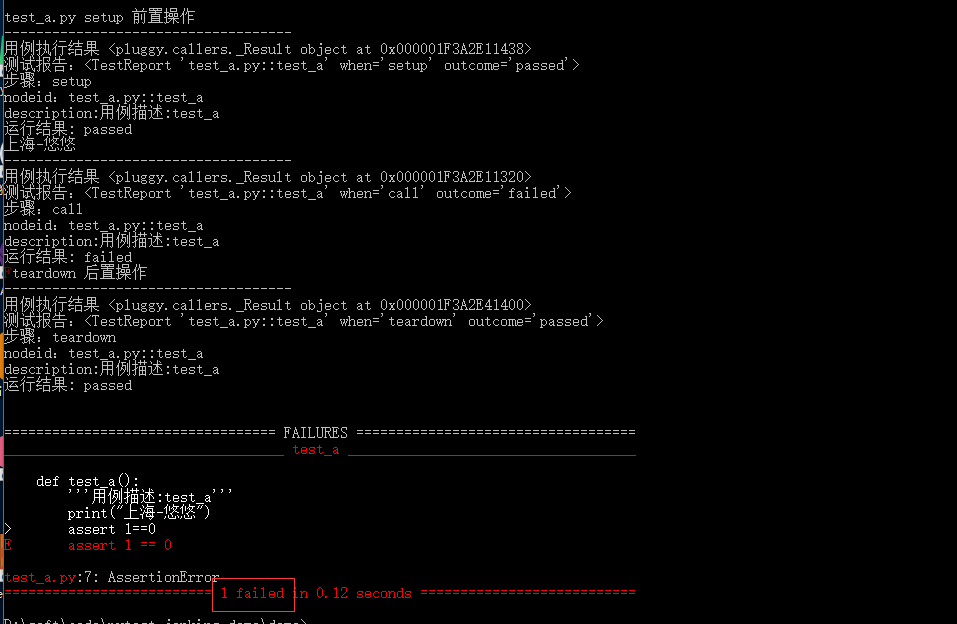
那么此时运行的结果就是failed
teardown失败了
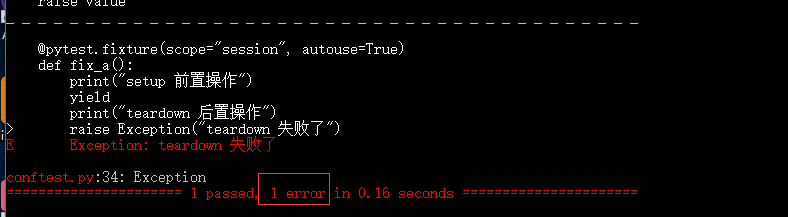
如果setup正常执行,测试用例call正常执行,teardown失败了,这种情况
@pytest.fixture(scope="session", autouse=True)

def fix_a():

    print("setup 前置操作")

    yield

    print("teardown 后置操作")

    raise Exception("teardown 失败了")
teat_a.py用例
def test_a():

    '''用例描述:test_a'''

    print("上海-悠悠")
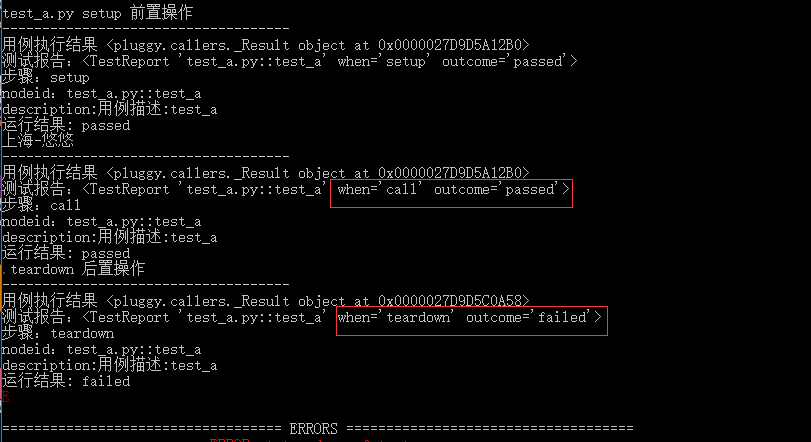
最终统计的结果: 1 passed, 1 error in 0.16 seconds
只获取call的结果
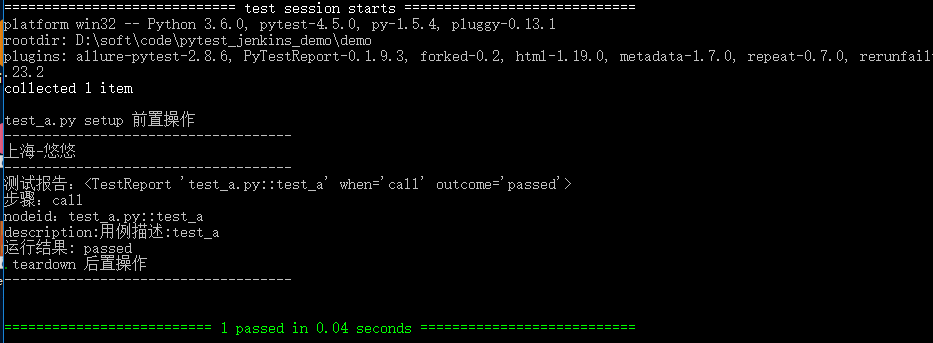
我们在写用例的时候,如果保证setup和teardown不报错情况,只关注测试用例本身的运行结果,前面的 pytest_runtest_makereport 钩子方法执行了三次。
可以加个判断:if report.when == "call"
import pytest

from _pytest import runner

'''

# 对应源码

def pytest_runtest_makereport(item, call):

    """ return a :py:class:`_pytest.runner.TestReport` object

    for the given :py:class:`pytest.Item` and

    :py:class:`_pytest.runner.CallInfo`.

    """

'''

@pytest.hookimpl(hookwrapper=True, tryfirst=True)

def pytest_runtest_makereport(item, call):

    print('------------------------------------')

    # 获取钩子方法的调用结果

    out = yield

    # print('用例执行结果', out)

    # 3. 从钩子方法的调用结果中获取测试报告

    report = out.get_result()

    if report.when == "call":

        print('测试报告:%s' % report)

        print('步骤:%s' % report.when)

        print('nodeid:%s' % report.nodeid)

        print('description:%s' % str(item.function.__doc__))

        print(('运行结果: %s' % report.outcome))

@pytest.fixture(scope="session", autouse=True)

def fix_a():

    print("setup 前置操作")

    yield

    print("teardown 后置操作")
运行结果
pytest文档33-Hooks函数获取用例执行结果(pytest_runtest_makereport)的更多相关文章
- pytest文档44-allure.dynamic动态生成用例标题
前言 pytest 结合 allure 描述用例的时候我们一般使用 @allure.title 和 @allure.description 描述测试用例的标题和详情. 在用例里面也可以动态更新标题和详 ...
- pytest文档41-参数化 ids 用例描述为中文时控制台输出unicode编码问题(pytest_collection_modifyitems)
前言 使用 pytest.mark.parametrize 参数化的时候,加 ids 参数用例描述有中文时,在控制台输出会显示unicode编码,中文不能正常显示. 使用 pytest_collect ...
- pytest文档26-运行上次失败用例(--lf 和 --ff)
前言 "80%的bug集中在20%的模块,越是容易出现bug的模块,bug是越改越多"平常我们做手工测试的时候,比如用100个用例需要执行,其中10个用例失败了, 当开发修复完bu ...
- pytest文档19-doctest测试框架
前言 doctest从字面意思上看,那就是文档测试.doctest是python里面自带的一个模块,它实际上是单元测试的一种. 官方解释:doctest 模块会搜索那些看起来像交互式会话的 Pytho ...
- pytest文档7-pytest-html生成html报告
前言 pytest-HTML是一个插件,pytest用于生成测试结果的HTML报告.兼容Python 2.7,3.6 pytest-html 1.github上源码地址[https://github. ...
- pytest文档3-pycharm运行pytest
前言 上一篇pytest文档2-用例运行规则已经介绍了如何在cmd执行pytest用例,平常我们写代码在pycharm比较多 写完用例之后,需要调试看看,是不是能正常运行,如果每次跑去cmd执行,太麻 ...
- pytest文档47-allure报告添加用例失败截图
前言 使用 selenium 做 web 自动化的时候,很多小伙伴希望用例失败的时候能截图,把异常截图展示到allure报告里面. pytest 有个很好的钩子函数 pytest_runtest_ma ...
- pytest文档43-元数据使用(pytest-metadata)
前言 什么是元数据?元数据是关于数据的描述,存储着关于数据的信息,为人们更方便地检索信息提供了帮助. pytest 框架里面的元数据可以使用 pytest-metadata 插件实现.文档地址http ...
- pytest文档6-fixture之yield实现teardown
前言 上一篇讲到fixture通过scope参数控制setup级别,既然有setup作为用例之前前的操作,用例执行完之后那肯定也有teardown操作. 这里用到fixture的teardown操作并 ...
随机推荐
- 重学Ajax
什么是Ajax Asynchronous JavaScript and xml 异步的JavaScript和XML 只是一种js的应用,在无需重新加载整个网页的情况下实现部分网页的数据更新的技术.减少 ...
- 关于input框仿百度/google自动提示的方法
引入jquery-autocomplete文件 链接:https://pan.baidu.com/s/1hW0XBYH8ZgJgMSY1Ce6Pig 密码:tv5b $(function() { $( ...
- charles 入门配置(win10+vivoX20)(Charles一)
charles的几个功能可以参考:https://www.cnblogs.com/mihoutao/p/10601171.html 首先是charles的下载 下载地址:https://www.cha ...
- 解决spark streaming集成kafka时只能读topic的其中一个分区数据的问题
1. 问题描述 我创建了一个名称为myTest的topic,该topic有三个分区,在我的应用中spark streaming以direct方式连接kakfa,但是发现只能消费一个分区的数据,多次更换 ...
- 初学 React native | 环境搭建(在模拟器上运行)
我的电脑是windows 所以就以 windows上+Android 配置React native 环境 网上的安装教程非常多,我总结了一下,配置环境时出错原因主要是node java python ...
- VS2017报错:未识别符vector
解决办法:添加头文件#include<vector>,添加命名空间 using namespace std.
- Vue iview Tree组件实现文件目录-基础实现
注册页面路由 router/router.js { path: 'folder_tree', name: 'folderTree', component: () => import('@/vie ...
- 容器云平台No.5~企业级私有镜像仓库Harbor V2.02
镜像仓库 仓库,顾名思义,就是存放东西的地方,Docker仓库,理所当然,就是存放docker镜像的地方了. Docker仓库分公有仓库和私有仓库.共有仓库有hub.docker.com.gcr.io ...
- xss的编码原理
把以前的笔记翻出来整理一下 最前方 xss如何选用编码原理,为什么 找到的挺清楚的文章了:https://www.cnblogs.com/p0laris/p/11898322.html浏览器解析有两种 ...
- 面试可能遇到的关联式容器(map、set等)相关问题
>>>. map与set的区别是什么,各有哪些优势? map中存储的数据是以键值对(key - value)形式并且通过排序(比较key,默认以 '<' 方式排序)存在的( ...