
spring-cloud-netflix-hystrix-turbine
Hystrix-dashboard是一款针对Hystrix进行实时监控的工具,通过Hystrix Dashboard我们可以在直观地看到各Hystrix Command的请求响应时间, 请求成功率等数据。但是只使用Hystrix Dashboard的话, 你只能看到单个应用内的服务信息, 这明显不够. 我们需要一个工具能让我们汇总系统内多个服务的数据并显示到Hystrix Dashboard上, 这个工具就是Turbine.
Turbine
在复杂的分布式系统中,相同服务的节点经常需要部署上百甚至上千个,很多时候,运维人员希望能够把相同服务的节点状态以一个整体集群的形式展现出来,这样可以更好的把握整个系统的状态。 为此,Netflix提供了一个开源项目(Turbine)来提供把多个hystrix.stream的内容聚合为一个数据源供Dashboard展示。
一、构建turbin服务,选择对应模块,pom.xml如下
<?xml version="1.0" encoding="UTF-8"?>

<project xmlns="http://maven.apache.org/POM/4.0.0" xmlns:xsi="http://www.w3.org/2001/XMLSchema-instance"

         xsi:schemaLocation="http://maven.apache.org/POM/4.0.0 https://maven.apache.org/xsd/maven-4.0.0.xsd">

    <modelVersion>4.0.0</modelVersion>

    <parent>

        <groupId>lf.liyouyou</groupId>

        <artifactId>spring-cloud-netflix-demo</artifactId>

        <version>1.0-SNAPSHOT</version>

    </parent>

    <groupId>lf.liyouyou</groupId>

    <artifactId>spring-cloud-turbin</artifactId>

    <version>0.0.1-SNAPSHOT</version>

    <name>spring-cloud-turbin</name>

    <description>Demo project for Spring Boot</description>

    <dependencies>

        <dependency>

            <groupId>org.springframework.boot</groupId>

            <artifactId>spring-boot-starter-actuator</artifactId>

        </dependency>

        <dependency>

            <groupId>org.springframework.cloud</groupId>

            <artifactId>spring-cloud-starter-netflix-turbine</artifactId>

        </dependency>

        <dependency>

            <groupId>org.springframework.cloud</groupId>

            <artifactId>spring-cloud-starter-netflix-hystrix-dashboard</artifactId>

        </dependency>

        <dependency>

            <groupId>org.springframework.cloud</groupId>

            <artifactId>spring-cloud-starter-netflix-hystrix</artifactId>

        </dependency>

        <dependency>

            <groupId>org.springframework.boot</groupId>

            <artifactId>spring-boot-starter-test</artifactId>

            <scope>test</scope>

            <exclusions>

                <exclusion>

                    <groupId>org.junit.vintage</groupId>

                    <artifactId>junit-vintage-engine</artifactId>

                </exclusion>

            </exclusions>

        </dependency>

    </dependencies>

</project>
二、启动类添加注解
package lf.liyouyou;

import org.springframework.boot.SpringApplication;

import org.springframework.boot.autoconfigure.SpringBootApplication;

import org.springframework.cloud.netflix.hystrix.EnableHystrix;

import org.springframework.cloud.netflix.hystrix.dashboard.EnableHystrixDashboard;

import org.springframework.cloud.netflix.turbine.EnableTurbine;

@SpringBootApplication

@EnableHystrixDashboard

@EnableTurbine

public class SpringCloudTurbinApplication {

    public static void main(String[] args) {

        SpringApplication.run(SpringCloudTurbinApplication.class, args);

    }

}
二、配置properties
spring.application.name=hystrix-dashboard-turbine

server.port=9092

turbine.appConfig=spring-cloud-netflix-consumer-hystrix,spring-cloud-service

turbine.aggregator.clusterConfig= default

turbine.clusterNameExpression= new String("default")

eureka.client.serviceUrl.defaultZone=http://localhost:8000/eureka/

#默认只开启了health和info,设置为*,则包含所有的web入口端点

management.endpoints.web.exposure.include=*

hystrix.dashboard.proxy-stream-allow-list=*
turbine.appConfig:配置Eureka中的serviceId列表,表明监控哪些服务turbine.aggregator.clusterConfig:指定聚合哪些集群,多个使用”,”分割,默认为default。可使用http://.../turbine.stream?cluster={clusterConfig之一}访问turbine.clusterNameExpression: 1. clusterNameExpression指定集群名称,默认表达式appName;此时:turbine.aggregator.clusterConfig需要配置想要监控的应用名称;2. 当clusterNameExpression: default时,turbine.aggregator.clusterConfig可以不写,因为默认就是default;3. 当clusterNameExpression: metadata[‘cluster’]时,假设想要监控的应用配置了eureka.instance.metadata-map.cluster: ABC,则需要配置,同时turbine.aggregator.clusterConfig: ABC- 新增服务工程
spring-cloud-service 调用spring-cloud-netflix-provider(复制一份spring-cloud-netflix-eureka-client-application服务即可)服务提供者的服务,
- 注意新增的
spring-cloud-service服务调用需要把actuator打开,不然监控该工程的调用
默认只开启了health和info,设置为*,则包含所有的web入口端点
management.endpoints.web.exposure.include=*
启动项目,访问http://localhost:9092/turbine.stream 返回

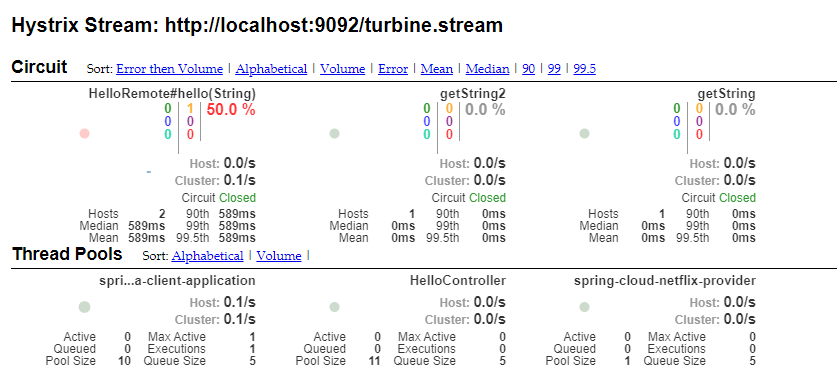
访问http://localhost:9092/hystrix,进入小熊页面,输入http://localhost:9092/turbine.stream,点击进入turbin聚合监控页
spring-cloud-netflix-hystrix-turbine的更多相关文章
- springcloud学习04- 断路器Spring Cloud Netflix Hystrix
依赖上个博客:https://www.cnblogs.com/wang-liang-blogs/p/12072423.html 1.断路器存在的原因 引用博客 https://blog.csdn.ne ...
- Spring Cloud Netflix Hystrix介绍和使用
前面我们搭建了具有服务降级功能的Hystrix客户端,现在我们来详细了解下Hystrix的一些功能. Hystrix的意思是豪猪,大家都知道,就是长满刺的猪...实际上,它表明了该框架的主要功能:自我 ...
- Spring Cloud Netflix项目进入维护模式
任何项目都有其生命周期,Spring Could Netflix也不例外,官宣已进入维护模式,如果在新项目开始考虑技术选型时要考虑到这点风险,并考虑绕道的可能性. 原创: itmuch IT牧场 这 ...
- spring cloud连载第三篇之Spring Cloud Netflix
1. Service Discovery: Eureka Server(服务发现:eureka服务器) 1.1 依赖 <dependency> <groupId>org.spr ...
- Spring Cloud Netflix概览和架构设计
Spring Cloud简介 Spring Cloud是基于Spring Boot的一整套实现微服务的框架.他提供了微服务开发所需的配置管理.服务发现.断路器.智能路由.微代理.控制总线.全局锁.决策 ...
- Spring Cloud netflix 概览和架构设计
pring Cloud是基于Spring Boot的一整套实现微服务的框架.他提供了微服务开发所需的配置管理.服务发现.断路器.智能路由.微代理.控制总线.全局锁.决策竞选.分布式会话和集群状态管理等 ...
- 从零开始学spring cloud(十一) -------- hystrix监控
一.官方文档阅读 服务启动后,可以通过/health和hystrix.stream查看效果,实际上,访问上述两个地址,会出现404,这是因为spring boot版本的问题, 我在这里使用的sprin ...
- 分布式微服务技术之 Spring Cloud Netflix
1 背景 Netflix 是全球十大视频网站中唯一收费站点,是美国互联网流媒体播放商,由于访问量巨大,转型为云计算公司. 由Netflix公司主持开发了一套代码框架和库Netflix OSS即open ...
- Spring Cloud之Hystrix服务保护框架
服务保护利器 微服务高可用技术 大型复杂的分布式系统中,高可用相关的技术架构非常重要. 高可用架构非常重要的一个环节,就是如何将分布式系统中的各个服务打造成高可用的服务,从而足以应对分布式系统环境中的 ...
- SpringCloud学习笔记(2)----Spring Cloud Netflix之Eureka的使用
1. Spring Cloud Netflix Spring Cloud Netflix 是Spring Cloud 的核心子项目,是对Netflix公司一系列开源产品的封装.它为Spring Bo ...
随机推荐
- 边缘计算k8s集群SuperEdge初体验
前言 手上一直都有一堆的学生主机,各种各样渠道途径拿来的机器. 一直管理里面都比较蛋疼,甚至也不太记得住它们在哪是什么IP,管理起来很是头疼. 有阵子空闲的时候想折腾了一下边缘计算集群方案. 希望能把 ...
- [Usaco2008 Mar]Cow Travelling游荡的奶牛
题目描述 奶牛们在被划分成N行M列(2 <= N <= 100; 2 <= M <= 100)的草地上游走,试图找到整块草地中最美味的牧草.Farmer John在某个时刻看见 ...
- xtrabakcup基本用法 安装、全量备份恢复、增量备份恢复
xtrabackup备份原理以及工作流程 备份流程日志分析:1.##读取mysql配置文件2.## 扫描innodb日志lsn并复制inndodb系统表空间3.## 缓冲写出到数据文件并锁表4.## ...
- tf
第2章 Tensorflow keras实战 2-0 写在课程之前 课程代码的Tensorflow版本 大部分代码是tensorflow2.0的 课程以tf.kerasAPI为主,因而部分代码可以在t ...
- JS实现鼠标移入DIV随机变换颜色
今天分享一个在 JavaScript中,实现一个鼠标移入可以随机变换颜色,本质就是js的随机数运用. 代码如下: <!DOCTYPE html> <html> <head ...
- 【Android初级】使用Gallery实现照片拖动的特效(附源码)
今天要分享一个非常简单的功能: 使用Android原生控件Gallery实现照片拖动的特效 实现思路如下: 在布局文件中定义一个Gallery控件 由于要显示多张图,为了方便,我直接引用了Androi ...
- jmeter---线程组执行顺序记录
一.默认未勾选测试计划中独立运行每个线程组时,线程组并行执行,如下,设置三个请求,每个线程组设置5秒启动5个线程. 未勾选独立运行 运行结果如下,三个线程并行执行 勾选后,一个线程组执行完后才执行下一 ...
- Redis 实战 —— 09. 实现任务队列、消息拉取和文件分发
任务队列 P133 通过将待执行任务的相关信息放入队列里面,并在之后对队列进行处理,可以推迟执行那些耗时对操作,这种将工作交给任务处理器来执行对做法被称为任务队列 (task queue) . P13 ...
- Connection reset by peer的常见原因及解决办法 RST 大文件上传
Connection reset by peer的常见原因及解决办法 Connection reset by peer的常见原因 - 简书 https://www.jianshu.com/p/263e ...
- asctime_s asctime
asctime_s asctime // rand随机数.cpp : 此文件包含 "main" 函数.程序执行将在此处开始并结束. // #include "pch.h ...