
spring-cloud-netflix-hystrix-turbine
Hystrix-dashboard是一款针对Hystrix进行实时监控的工具,通过Hystrix Dashboard我们可以在直观地看到各Hystrix Command的请求响应时间, 请求成功率等数据。但是只使用Hystrix Dashboard的话, 你只能看到单个应用内的服务信息, 这明显不够. 我们需要一个工具能让我们汇总系统内多个服务的数据并显示到Hystrix Dashboard上, 这个工具就是Turbine.
Turbine
在复杂的分布式系统中,相同服务的节点经常需要部署上百甚至上千个,很多时候,运维人员希望能够把相同服务的节点状态以一个整体集群的形式展现出来,这样可以更好的把握整个系统的状态。 为此,Netflix提供了一个开源项目(Turbine)来提供把多个hystrix.stream的内容聚合为一个数据源供Dashboard展示。
一、构建turbin服务,选择对应模块,pom.xml如下
<?xml version="1.0" encoding="UTF-8"?>

<project xmlns="http://maven.apache.org/POM/4.0.0" xmlns:xsi="http://www.w3.org/2001/XMLSchema-instance"

         xsi:schemaLocation="http://maven.apache.org/POM/4.0.0 https://maven.apache.org/xsd/maven-4.0.0.xsd">

    <modelVersion>4.0.0</modelVersion>

    <parent>

        <groupId>lf.liyouyou</groupId>

        <artifactId>spring-cloud-netflix-demo</artifactId>

        <version>1.0-SNAPSHOT</version>

    </parent>

    <groupId>lf.liyouyou</groupId>

    <artifactId>spring-cloud-turbin</artifactId>

    <version>0.0.1-SNAPSHOT</version>

    <name>spring-cloud-turbin</name>

    <description>Demo project for Spring Boot</description>

    <dependencies>

        <dependency>

            <groupId>org.springframework.boot</groupId>

            <artifactId>spring-boot-starter-actuator</artifactId>

        </dependency>

        <dependency>

            <groupId>org.springframework.cloud</groupId>

            <artifactId>spring-cloud-starter-netflix-turbine</artifactId>

        </dependency>

        <dependency>

            <groupId>org.springframework.cloud</groupId>

            <artifactId>spring-cloud-starter-netflix-hystrix-dashboard</artifactId>

        </dependency>

        <dependency>

            <groupId>org.springframework.cloud</groupId>

            <artifactId>spring-cloud-starter-netflix-hystrix</artifactId>

        </dependency>

        <dependency>

            <groupId>org.springframework.boot</groupId>

            <artifactId>spring-boot-starter-test</artifactId>

            <scope>test</scope>

            <exclusions>

                <exclusion>

                    <groupId>org.junit.vintage</groupId>

                    <artifactId>junit-vintage-engine</artifactId>

                </exclusion>

            </exclusions>

        </dependency>

    </dependencies>

</project>
二、启动类添加注解
package lf.liyouyou;

import org.springframework.boot.SpringApplication;

import org.springframework.boot.autoconfigure.SpringBootApplication;

import org.springframework.cloud.netflix.hystrix.EnableHystrix;

import org.springframework.cloud.netflix.hystrix.dashboard.EnableHystrixDashboard;

import org.springframework.cloud.netflix.turbine.EnableTurbine;

@SpringBootApplication

@EnableHystrixDashboard

@EnableTurbine

public class SpringCloudTurbinApplication {

    public static void main(String[] args) {

        SpringApplication.run(SpringCloudTurbinApplication.class, args);

    }

}
二、配置properties
spring.application.name=hystrix-dashboard-turbine

server.port=9092

turbine.appConfig=spring-cloud-netflix-consumer-hystrix,spring-cloud-service

turbine.aggregator.clusterConfig= default

turbine.clusterNameExpression= new String("default")

eureka.client.serviceUrl.defaultZone=http://localhost:8000/eureka/

#默认只开启了health和info,设置为*,则包含所有的web入口端点

management.endpoints.web.exposure.include=*

hystrix.dashboard.proxy-stream-allow-list=*
turbine.appConfig:配置Eureka中的serviceId列表,表明监控哪些服务turbine.aggregator.clusterConfig:指定聚合哪些集群,多个使用”,”分割,默认为default。可使用http://.../turbine.stream?cluster={clusterConfig之一}访问turbine.clusterNameExpression: 1. clusterNameExpression指定集群名称,默认表达式appName;此时:turbine.aggregator.clusterConfig需要配置想要监控的应用名称;2. 当clusterNameExpression: default时,turbine.aggregator.clusterConfig可以不写,因为默认就是default;3. 当clusterNameExpression: metadata[‘cluster’]时,假设想要监控的应用配置了eureka.instance.metadata-map.cluster: ABC,则需要配置,同时turbine.aggregator.clusterConfig: ABC- 新增服务工程
spring-cloud-service 调用spring-cloud-netflix-provider(复制一份spring-cloud-netflix-eureka-client-application服务即可)服务提供者的服务,
- 注意新增的
spring-cloud-service服务调用需要把actuator打开,不然监控该工程的调用
默认只开启了health和info,设置为*,则包含所有的web入口端点
management.endpoints.web.exposure.include=*
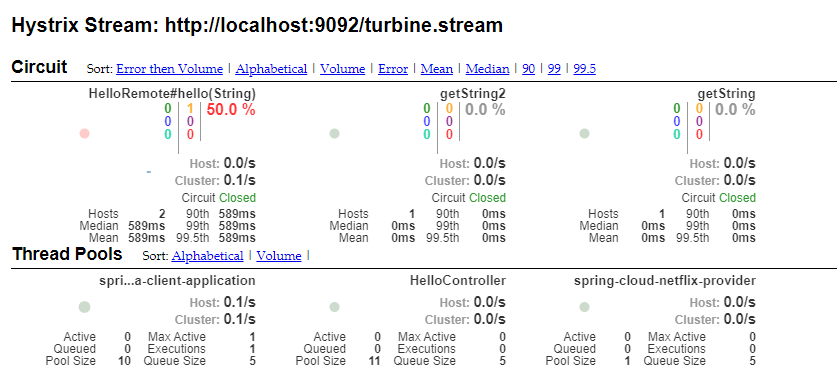
启动项目,访问http://localhost:9092/turbine.stream 返回

访问http://localhost:9092/hystrix,进入小熊页面,输入http://localhost:9092/turbine.stream,点击进入turbin聚合监控页
spring-cloud-netflix-hystrix-turbine的更多相关文章
- springcloud学习04- 断路器Spring Cloud Netflix Hystrix
依赖上个博客:https://www.cnblogs.com/wang-liang-blogs/p/12072423.html 1.断路器存在的原因 引用博客 https://blog.csdn.ne ...
- Spring Cloud Netflix Hystrix介绍和使用
前面我们搭建了具有服务降级功能的Hystrix客户端,现在我们来详细了解下Hystrix的一些功能. Hystrix的意思是豪猪,大家都知道,就是长满刺的猪...实际上,它表明了该框架的主要功能:自我 ...
- Spring Cloud Netflix项目进入维护模式
任何项目都有其生命周期,Spring Could Netflix也不例外,官宣已进入维护模式,如果在新项目开始考虑技术选型时要考虑到这点风险,并考虑绕道的可能性. 原创: itmuch IT牧场 这 ...
- spring cloud连载第三篇之Spring Cloud Netflix
1. Service Discovery: Eureka Server(服务发现:eureka服务器) 1.1 依赖 <dependency> <groupId>org.spr ...
- Spring Cloud Netflix概览和架构设计
Spring Cloud简介 Spring Cloud是基于Spring Boot的一整套实现微服务的框架.他提供了微服务开发所需的配置管理.服务发现.断路器.智能路由.微代理.控制总线.全局锁.决策 ...
- Spring Cloud netflix 概览和架构设计
pring Cloud是基于Spring Boot的一整套实现微服务的框架.他提供了微服务开发所需的配置管理.服务发现.断路器.智能路由.微代理.控制总线.全局锁.决策竞选.分布式会话和集群状态管理等 ...
- 从零开始学spring cloud(十一) -------- hystrix监控
一.官方文档阅读 服务启动后,可以通过/health和hystrix.stream查看效果,实际上,访问上述两个地址,会出现404,这是因为spring boot版本的问题, 我在这里使用的sprin ...
- 分布式微服务技术之 Spring Cloud Netflix
1 背景 Netflix 是全球十大视频网站中唯一收费站点,是美国互联网流媒体播放商,由于访问量巨大,转型为云计算公司. 由Netflix公司主持开发了一套代码框架和库Netflix OSS即open ...
- Spring Cloud之Hystrix服务保护框架
服务保护利器 微服务高可用技术 大型复杂的分布式系统中,高可用相关的技术架构非常重要. 高可用架构非常重要的一个环节,就是如何将分布式系统中的各个服务打造成高可用的服务,从而足以应对分布式系统环境中的 ...
- SpringCloud学习笔记(2)----Spring Cloud Netflix之Eureka的使用
1. Spring Cloud Netflix Spring Cloud Netflix 是Spring Cloud 的核心子项目,是对Netflix公司一系列开源产品的封装.它为Spring Bo ...
随机推荐
- springmvc 字符串转日期格式
http://www.mamicode.com/info-detail-2485490.html
- perl打开本地/服务器图片
index.html <html> <body> <h2> perl read img </h2> <img src = "displa ...
- Ansible自动化运维工具的使用
Ansible自动化运维工具的使用 host lnventory 管理主机 ip root账号密码 ssh端口 core mod ...
- ELK (elasticsearch+kibana+logstash+elasticsearch-head) 华为云下载地址
https://mirrors.huaweicloud.com/elasticsearch https://mirrors.huaweicloud.com/kibana https://mirrors ...
- 一文打尽 Linux/Windows端口复用实战
出品|MS08067实验室(www.ms08067.com) 本文作者:Spark(Ms08067内网安全小组成员) 定义:端口复用是指不同的应用程序使用相同端口进行通讯. 场景:内网渗透中,搭建隧道 ...
- assets和static的区别
相同点:assets和static两个都是存放静态资源文件.项目中所需要的资源文件图片,字体图标,样式文件等都可以放在这两个文件下,这是相同点不相同点:assets中存放的静态资源文件在项目打包时,也 ...
- Language Guide (proto3) | proto3 语言指南(十四)选项
Options - 选项 .proto文件中的单个声明可以使用许多 选项 进行注释.选项不会更改声明的总体含义,但可能会影响在特定上下文中处理声明的方式.可用选项的完整列表在google/protob ...
- GIS基本概念,空间分析
GIS基本概念,空间分析 一.GIS基本概念 1.1 要素模型(Feature) 1.2 矢量数据 1.3 空间分析 1.3.1 空间查询和空间量算 1.3.2 缓冲区分析 1.3.3 叠加分析 1. ...
- Java性能优化,操作系统内核性能调优,JYM优化,Tomcat调优
文章目录 Java性能优化 尽量在合适的场合使用单例 尽量避免随意使用静态变量 尽量避免过多过常地创建Java对象 尽量使用final修饰符 尽量使用局部变量 尽量处理好包装类型和基本类型两者的使用场 ...
- Git基本概念,流程,分支,标签及常用命令
Git基本概念,流程,分支,标签及常用命令 Git一张图 Git基本概念 仓库(Repository) 分支(Branch) Git工作流程 Git分支管理(branch) 列出分支 删除分支 分支合 ...