
【Azure Redis 缓存 Azure Cache For Redis】使用Redis自带redis-benchmark.exe命令测试Azure Redis的性能
问题描述
关于Azure Redis的性能问题,在官方文档中,可以查看到不同层级Redis的最大连接数,每秒处理请求的性能。
基本缓存和标准缓存
|
||||||||||||||||||||||||||||||||||||||||||||||||||||||
高级缓存
|
||||||||||||||||||||||||||||||||||||||||||||||||||||||
|
||||||||||||||||||||||||||||||||||||||||||||||||||||||
|
但以上的数据只是官方发布的数据,如果在排查业务的情况下,如何单独对Redis服务器进行测试呢?如果需要验证Redis的性能,如何来做呢?
答案就是使用redis-benchmark.exe,在Azure Redis的常规问答中,有简单的提到如何来做性能测试,但只是一句话,一个命令一晃而过。
如何进行基准检验和测试缓存的性能?
- 启用缓存诊断,以便可以监视缓存的运行状况。 可以在 Azure 门户中查看指标,也可以使用所选的工具下载和查看这些指标。
- 可以使用 redis-benchmark.exe 对 Redis 服务器进行负载测试。
- 确保负载测试客户端和 Azure Redis 缓存位于同一区域。
- 使用 redis-cli.exe,并使用 INFO 命令监视缓存。
- 如果负载导致出现大量内存碎片,则你应该扩展为更大的缓存大小。
- 有关下载 Redis 工具的说明,请参阅如何运行 Redis 命令?部分。
本章的内容就是从下载Redis-benchmark.exe开始,到使用命令完成测试。
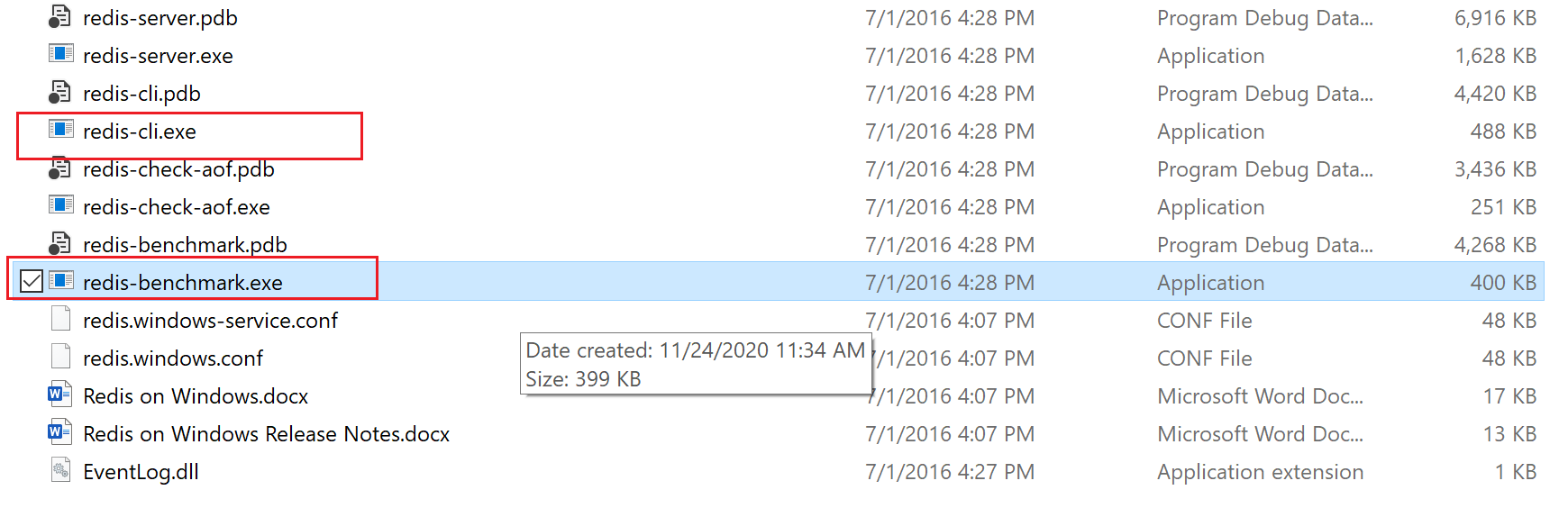
一:下载Redis-benchmark.exe
在Github中找到Redis:https://github.com/microsoftarchive/redis/releases,下载最新的ZIP包并解压( 如:Redis-x64-3.2.100.zip)
二:使用Azure Reids的访问密钥开启测试
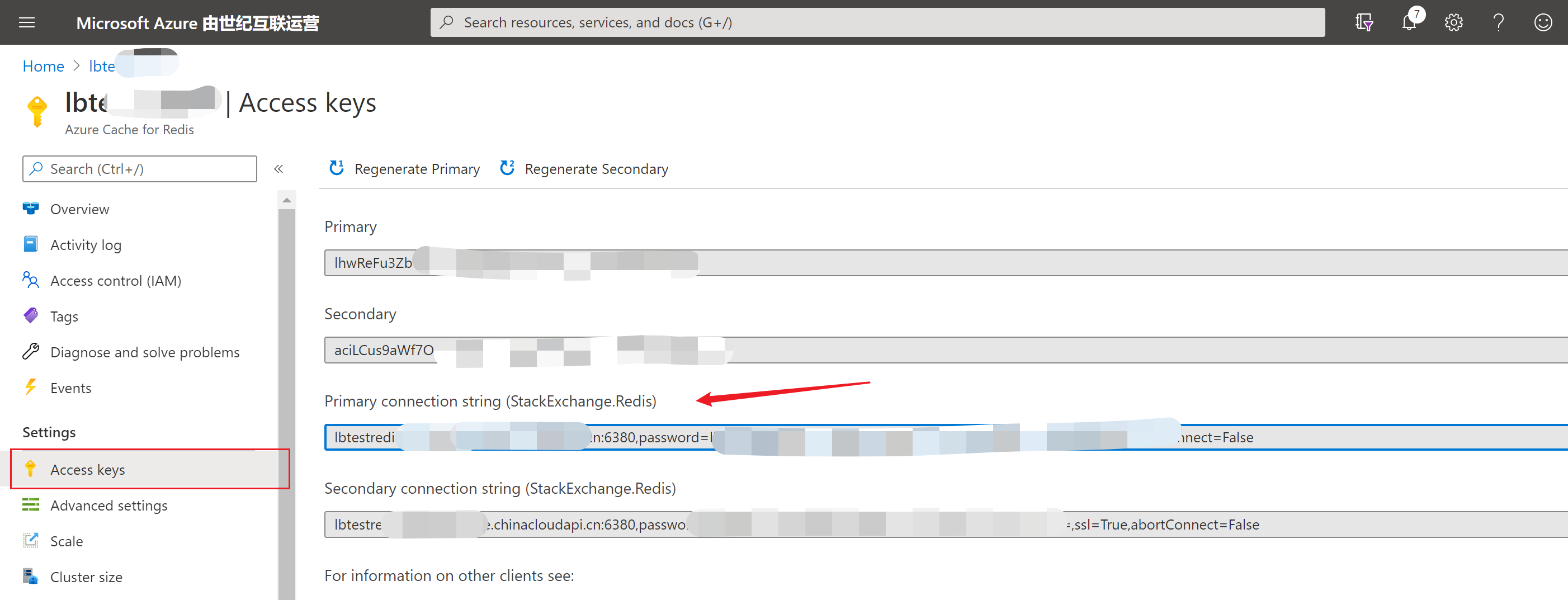
从Azure的Redis门户中复制出连接字符串,把redis name和access key填充到如下命令
redis-benchmark.exe -h **yourcache**.redis.cache.chinacloudapi.cn -a **yourAccesskey** -c 10 -n 10

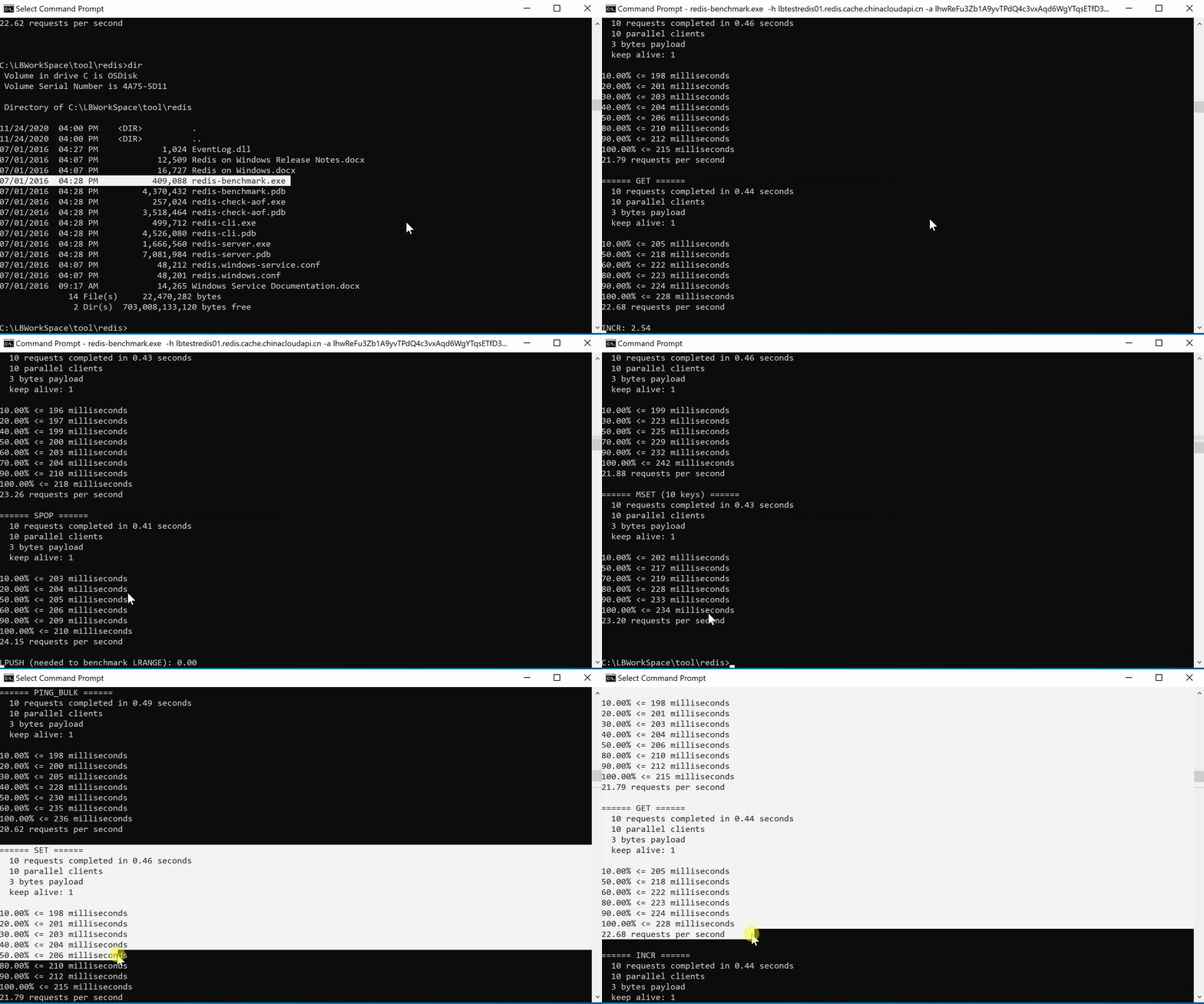
以上命令只是简单的发起一轮默认命令的测试(如ping,set,get,pop,push等),-c表示10个并发,-n表示10个请求。
在本机中运行redis-benchmark命令测试:
同时,我们也可以使用-t来指定用于测试的操作,如set,get。参考命令如下:
redis-benchmark.exe -h **yourcache**.redis.cache.chinacloudapi.cn -a **yourAccesskey** -t SET -n 1000000 -d 1024 -P 50

redis-benchmark.exe -h **yourcache**.redis.cache.chinacloudapi.cn -a **yourAccesskey** -t GET -n 1000000 -d 1024 -P 50
如需要使用SSL对Azure Redis进行6380端口的性能测试,则需要先确保本地安装了stunnel.exe并配置好redis-cli客户端信息
- 下载stunnel.exe
- 启动并配置redis-cli连接 (https://docs.azure.cn/zh-cn/azure-cache-for-redis/cache-how-to-redis-cli-tool#enable-access-for-redis-cliexe)
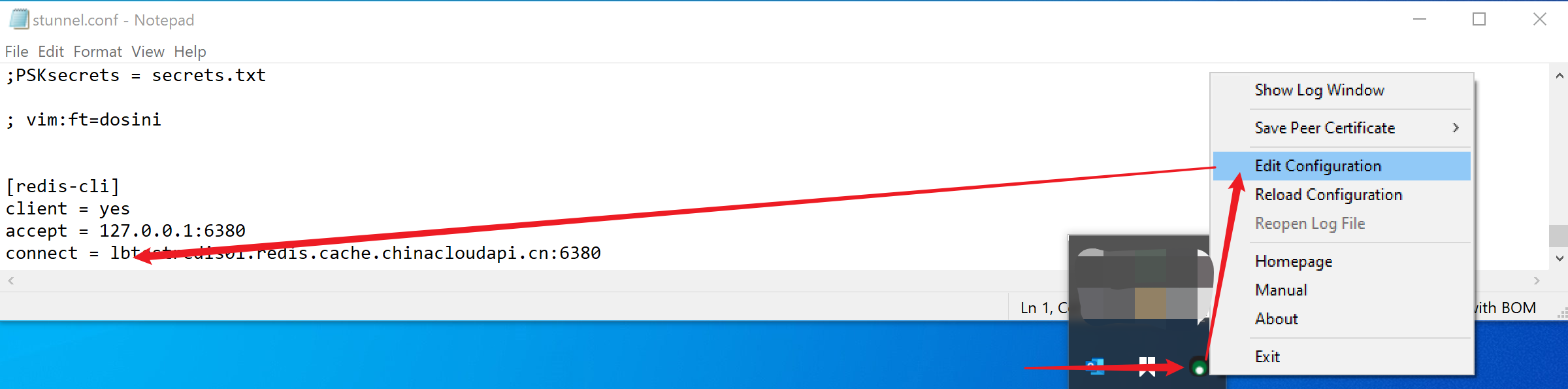
- 使用redis-cli确认是否已经连接

- 如能成功访问到6380端口,则可以使用如下命令开始测试
redis-benchmark.exe -a **your access key** -c 10 -n 10 -p 6380
测试的效果对比如下
| 6379 非SSL测试 | 6380 SSL测试 |
|
C:\redis>redis-benchmark.exe -h yourredisname.redis.cache.chinacloudapi.cn -a **youraccesskey** -c 10 -n 10 10.00% <= 198 milliseconds ====== PING_BULK ====== 10.00% <= 198 milliseconds ====== SET ====== 10.00% <= 198 milliseconds ====== GET ====== 10.00% <= 205 milliseconds ====== INCR ====== 10.00% <= 197 milliseconds ====== LPUSH ====== 10.00% <= 199 milliseconds ====== RPUSH ====== 10.00% <= 197 milliseconds ====== LPOP ====== 10.00% <= 198 milliseconds ====== RPOP ====== 10.00% <= 200 milliseconds ====== SADD ====== 10.00% <= 196 milliseconds ====== SPOP ====== 10.00% <= 203 milliseconds ====== LPUSH (needed to benchmark LRANGE) ====== 10.00% <= 203 milliseconds ====== LRANGE_100 (first 100 elements) ====== 10.00% <= 198 milliseconds ====== LRANGE_300 (first 300 elements) ====== 10.00% <= 196 milliseconds ====== LRANGE_500 (first 450 elements) ====== 10.00% <= 196 milliseconds ====== LRANGE_600 (first 600 elements) ====== 10.00% <= 199 milliseconds ====== MSET (10 keys) ====== 10.00% <= 202 milliseconds |
C:\redis>redis-benchmark.exe -a **youraccesskey** -c 10 -n 10 -p 6380 10.00% <= 597 milliseconds ====== PING_BULK ====== 10.00% <= 646 milliseconds ====== SET ====== 10.00% <= 628 milliseconds ====== GET ====== 10.00% <= 618 milliseconds ====== INCR ====== 10.00% <= 612 milliseconds ====== LPUSH ====== 10.00% <= 616 milliseconds ====== RPUSH ====== 10.00% <= 587 milliseconds ====== LPOP ====== 10.00% <= 644 milliseconds ====== RPOP ====== 10.00% <= 687 milliseconds ====== SADD ====== 10.00% <= 636 milliseconds ====== SPOP ====== 10.00% <= 607 milliseconds ====== LPUSH (needed to benchmark LRANGE) ====== 10.00% <= 614 milliseconds ====== LRANGE_100 (first 100 elements) ====== 10.00% <= 573 milliseconds ====== LRANGE_300 (first 300 elements) ====== 10.00% <= 630 milliseconds ====== LRANGE_500 (first 450 elements) ====== 10.00% <= 572 milliseconds ====== LRANGE_600 (first 600 elements) ====== 10.00% <= 566 milliseconds ====== MSET (10 keys) ====== 10.00% <= 606 milliseconds |
PS: 在SSL的情况下,每秒处理请求的能下有明显的下降。
三:对Redis Benchmark命令中携带参数的介绍
Usage: redis-benchmark [-h <host>] [-p <port>] [-c <clients>] [-n <requests]> [-k <boolean>]
 -h <hostname>      Server hostname (default 127.0.0.1)

 -p <port>          Server port (default 6379)//默认情况下,都使用6379端口,因Azure Redis默认只开通了6380端口,进行SSL通信。所以需要在Azure Redis门户中允许6379端口的非SSL访问。

 -s <socket>        Server socket (overrides host and port)

 -a <password>      Password for Redis Auth

 -c <clients>       Number of parallel connections (default 50)

 -n <requests>      Total number of requests (default 100000)

 -d <size>          Data size of SET/GET value in bytes (default 2)

 --dbnum <db>       SELECT the specified db number (default 0)

 -k <boolean>       1=keep alive 0=reconnect (default 1)

 -r <keyspacelen>   Use random keys for SET/GET/INCR, random values for SADD

  Using this option the benchmark will expand the string __rand_int__

  inside an argument with a 12 digits number in the specified range

  from 0 to keyspacelen-1. The substitution changes every time a command

  is executed. Default tests use this to hit random keys in the

  specified range.

 -P <numreq>        Pipeline <numreq> requests. Default 1 (no pipeline).

 -q                 Quiet. Just show query/sec values

 --csv              Output in CSV format

 -l                 Loop. Run the tests forever

 -t <tests>         Only run the comma separated list of tests. The test

                    names are the same as the ones produced as output.

 -I                 Idle mode. Just open N idle connections and wait.
参考资料:
Redis Release: https://github.com/microsoftarchive/redis/releases
如何进行基准检验和测试缓存的性能: https://docs.azure.cn/zh-cn/azure-cache-for-redis/cache-management-faq#how-can-i-benchmark-and-test-the-performance-of-my-cache
How fast is Redis: https://redis.io/topics/benchmarks
【Azure Redis 缓存 Azure Cache For Redis】使用Redis自带redis-benchmark.exe命令测试Azure Redis的性能的更多相关文章
- spring boot redis 缓存(cache)集成
Spring Boot 集成教程 Spring Boot 介绍 Spring Boot 开发环境搭建(Eclipse) Spring Boot Hello World (restful接口)例子 sp ...
- 【Azure Redis 缓存 Azure Cache For Redis】Azure Redis由低级别(C)升级到高级别(P)的步骤和注意事项, 及对用户现有应用的潜在影响,是否需要停机时间窗口,以及这个时间窗口需要多少的预估问题
问题描述 由于Azure Redis的性能在不同级别表现不同,当需要升级/缩放Redis的时候,从使用者的角度,需要知道有那些步骤? 注意事项? 潜在影响?停机事件窗口? 升级预估时间? 解决方案 从 ...
- 【Azure Redis 缓存】Linux虚拟机中使用6380端口(SSL方式)连接Azure Redis (redis-cli & stunnel)
问题描述 在Azure Redis的官方文档中,介绍了在Windows下,如何通过redis-cli.exe连接Redis, 包含如何配置stunnel使得通过 6380,SSL方式连接到Redis ...
- spring-boot-2.0.3之redis缓存实现,不是你想的那样哦!
前言 开心一刻 小白问小明:“你前面有一个5米深的坑,里面没有水,如果你跳进去后该怎样出来了?”小明:“躺着出来呗,还能怎么出来?”小白:“为什么躺着出来?”小明:“5米深的坑,还没有水,跳下去不死就 ...
- 使用方法拦截机制在不修改原逻辑基础上为 spring MVC 工程添加 Redis 缓存
首先,相关文件:链接: https://pan.baidu.com/s/1H-D2M4RfXWnKzNLmsbqiQQ 密码: 5dzk 文件说明: redis-2.4.5-win32-win64.z ...
- Spring优雅整合Redis缓存
“小明,多系统的session共享,怎么处理?”“Redis缓存啊!” “小明,我想实现一个简单的消息队列?”“Redis缓存啊!” “小明,分布式锁这玩意有什么方案?”“Redis缓存啊!” “小明 ...
- SpringBoot缓存管理(三) 自定义Redis缓存序列化机制
前言 在上一篇文章中,我们完成了SpringBoot整合Redis进行数据缓存管理的工作,但缓存管理的实体类数据使用的是JDK序列化方式(如下图所示),不便于使用可视化管理工具进行查看和管理. 接下来 ...
- Windows下Redis缓存服务器的使用 .NET StackExchange.Redis Redis Desktop Manager
Redis缓存服务器是一款key/value数据库,读110000次/s,写81000次/s,因为是内存操作所以速度飞快,常见用法是存用户token.短信验证码等 官网显示Redis本身并没有Wind ...
- 基于Redis缓存的Session共享(附源码)
基于Redis缓存的Session共享(附源码) 在上一篇文章中我们研究了Redis的安装及一些基本的缓存操作,今天我们就利用Redis缓存实现一个Session共享,基于.NET平台的Seesion ...
随机推荐
- GDB使用checkpoint复现bug
今天面试被问到一个问题,如何调试多进程的程序,我回答gdb attach [pid],之后又问如果程序中有些数据读取不对,但这种现象是偶然发生的,这时候要怎么操作,当时就懵了......,通过查找资料 ...
- 实战二:nacos服务注册与发现,openfeign服务调用
一,参照上一篇创建好微服务结构后,按业务需求编写各微服务逻辑 二,服务注册 1,安装nacos:下载,解压,运行startup.cmd 2,访问 http://localhost:8848/nacos ...
- 通过Relect反射方法创建对象,获得对象的方法,输出对象信息
package reflects; import java.lang.reflect.Constructor; import java.lang.reflect.Field; import java. ...
- iOS 14 egret 游戏卡顿问题分析和部分解决办法
现象 总体而言,iOS 14 渲染性能变差,可以从以下三个测试看出. 测试1:简单demo,使用egret引擎显示3000个图(都是同一个100*100 png 纹理),逐帧做旋转.(博客园视频播放可 ...
- eclipse之SSH配置spring【二】
第一篇中配置struts完成(http://www.cnblogs.com/dev2007/p/6475074.html),在此基础上,继续配置spring. web.xml中增加listener,依 ...
- SpringApplication.run(xxx.class, args)背后的东东——整体脉络
从spring到springmvc,再到springboot.springcloud,应用程序api开发调用方面都已经非常熟悉,但对spring背后的扩展机制:为何一个简单的main方法可以实现这么强 ...
- 2020 10月CUMTCTF wp
华为杯 × 签到杯√ 论比赛过程来说没什么很大收获 但看师傅们的wp感触很多 赛后复现慢慢学吧 Web babyflask flask ssti模板注入: payload{{key}}发现[]以及类似 ...
- CodeForces 题目乱做
是个补题记录. 1419 除了 F 场上都过了. CF1419A Digit Game 这题好多人 FST 啊-- 考虑如果串长为奇数那么最后操作的肯定是第一个人,串长为偶数的最后操作的肯定是第二个, ...
- python的高阶函数(map,filter,sorted,reduce)
高阶函数 关注公众号"轻松学编程"了解更多. 1.MapReduce MapReduce主要应用于分布式中. 大数据实际上是在15年下半年开始火起来的. 分布式思想:将一个连续的字 ...
- 快进来!花几分钟看一下 ReentrantReadWriteLock 的原理!
前言 在看完 ReentrantLock 之后,在高并发场景下 ReentrantLock 已经足够使用,但是因为 ReentrantLock 是独占锁,同时只有一个线程可以获取该锁,而很多应用场景都 ...