
Vue Login Form Component
Vue Login Form Component
Account Login
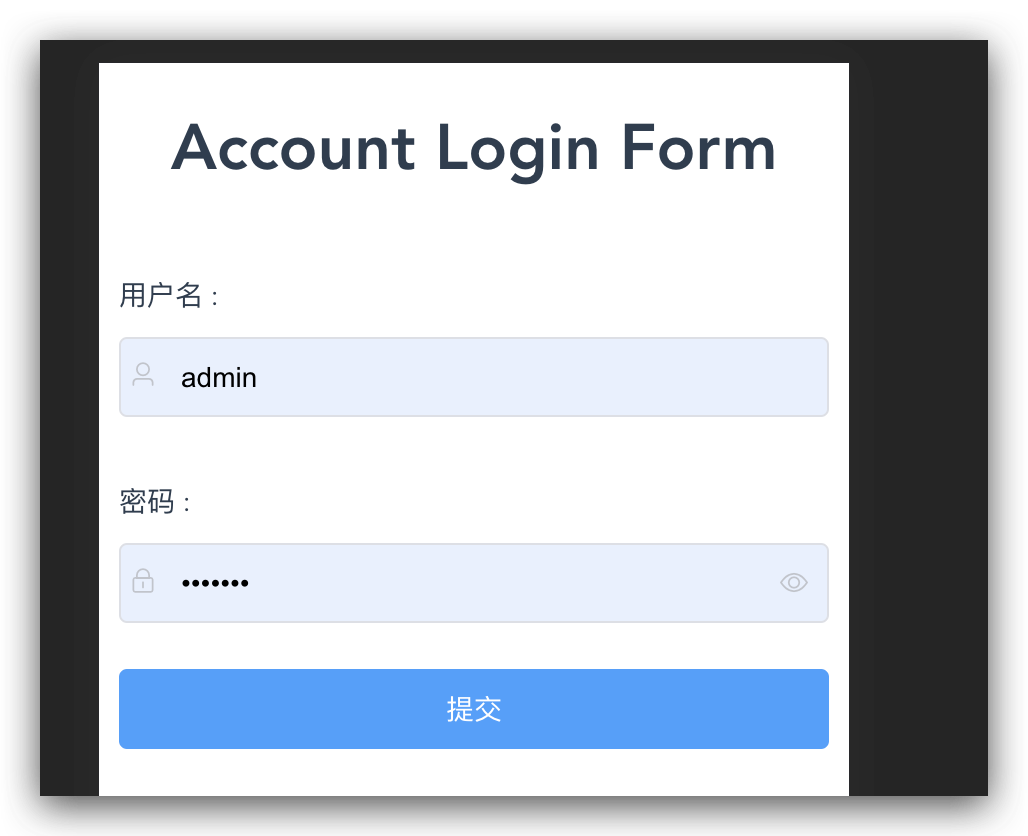
<template>

  <div>

    <slot></slot>

    <el-form

      class="account-form-container"

      status-icon

      :ref="loginFormRef"

      :model="loginForm"

      :rules="loginRules">

      <!-- <el-form-item label="用户名" label-width="80px"> -->

      <el-form-item prop="username">

        <span class="form-item-label">用户名</span>

        <el-input

          type="text"

          v-model="loginForm.username"

          @change="usernameChange"

          class="account-form-input"

          autocomplete="off"

          placeholder="请输入用户名"

          maxlength="8"

          aria-placeholder="">

          <i slot="prefix" class="el-icon-user"></i>

        </el-input>

      </el-form-item>

      <!-- <el-form-item label="密码" label-width="0px"> -->

      <el-form-item prop="password">

        <span class="form-item-label">密码</span>

        <el-input

          data-type="password"

          type="password"

          show-password

          v-model="loginForm.password"

          @change="passwordChange"

          maxlength="12"

          class="account-form-input"

          autocomplete="off"

          placeholder="请输入密码"

          aria-placeholder="">

          <i slot="prefix" class="el-icon-lock"></i>

        </el-input>

      </el-form-item>

      <el-form-item>

        <el-button

          type="primary"

          style="width: 100%;"

          @click="submit">

          提交

        </el-button>

      </el-form-item>

      <el-form-item>

        <el-button

          type="default"

          style="width: 100%;"

          @click="reset(`loginFormRef`)">

          重置

        </el-button>

      </el-form-item>

    </el-form>

  </div>

</template>

<script>

  const log = console.log;

  export default {

    name: "AccountLogin",

    components: {},

    props: {

      name: {

        type: String,

        required: false,

        default: "",

      },

      loginFormRef: {

        type: String,

        required: true,

        // default: {},

      },

      loginForm: {

        type: Object,

        required: true,

        // default: {},

      },

      loginRules: {

        type: Object,

        required: true,

        // default: {},

      },

    },

    // data: function () {return {};}

    data() {

      return {

        loading: false,

        data: [],

        // form: {

        //   username: '',

        //   password: '',

        // },

      };

    },

    watch: {

      name: {

        // Run as soon as the component loads

        immediate: true,

        handler() {

          // Set the 'componentname' value as props

          this.componentname = this.name;

        },

      },

    },

    methods: {

      fetchAPI(url = ``) {

        // this.data = [];

        log(`fetch url`, url);

      },

      usernameChange(value) {

        log(`username =`, value);

      },

      passwordChange(value) {

        log(`password =`, value);

      },

      submit() {

        const {

          username,

          password,

        } = this.loginForm;

        // } = this.$props.loginForm;

        // } = this.$data.form;

        // } = this.form;

        // 对整个表单验证

        this.$refs.loginFormRef.validate((valid, other) => {

          log(`valid, other`, valid, other)

          if (valid) {

            this.$emit(`successCallback`, ` awesome`);

          } else {

            this.$emit(`errorCallback`, ` holy shit`);

          }

        })

        log(`username, password =`, username, password);

        // if(username === "admin" && password === `1234567`) {

        //   this.$message({

        //     message: '登录成功消息 ',

        //     type: 'success',

        //     customClass: "message-class",

        //     duration: 0,

        //     showClose: true,

        //   });

        //   // this.$message.success('登录成功消息 !');

        // } else {

        //   this.$message({

        //     message: '登录失败消息 ',

        //     type: 'error',

        //     customClass: "message-class",

        //   });

        //   // this.$message.error(' 出错了!');

        // }

      },

      reset(formRefName) {

        // clear

        this.loginForm.username = ``;

        this.loginForm.password = ``;

        // reset

        this.$refs[formRefName].resetFields();

      },

    },

    beforeCreate() {

      log(`beforeCreate`, 1);

    },

    created() {

      log(`created`, 2);

    },

    beforeMount() {

      log(`beforeMount`, 3);

    },

    mounted() {

      log(`mounted`, 4);

    },

    beforeUpdate() {

      log(`beforeUpdate`, 5);

    },

    updated() {

      log(`updated`, 6);

    },

    beforeDestroy() {

      log(`beforeDestroy`, 7);

    },

    destroyed() {

      log(`destroyed`, 8);

    },

  }

</script>

<style scope lang="scss">

  .account-form-container {

    box-sizing: border-box;

    /* width: 500px; */

    /* border: 1px solid red; */

    padding: 10px;

  }

  .form-item-label{

    display: inline-block;

    width: 100%;

    text-align: left;

  }

  .form-item-label::after{

    content: " :";

  }

  .message-class{

    padding: 10px;

    min-width: 352px;

  }

</style>
Phone Login
demo
<template>

  <div>

    <div>

      <account-login

        @successCallback="successCallback"

        @errorCallback="errorCallback"

        :loginFormRef="loginFormRef"

        :loginForm="loginForm"

        :loginRules="loginRules">

        <h1>Account Login Form</h1>

      </account-login>

    </div>

    <div>

      <phone-login>

        <h1>Phone Login Form</h1>

      </phone-login>

    </div>

  </div>

</template>

<script>

const log = console.log;

import AccountLogin from "@/components/AccountLogin";

import PhoneLogin from "@/components/PhoneLogin";

export default {

  name: "Login",

  components: {

    AccountLogin,

    PhoneLogin,

  },

  props: {

    name: {

      type: String,

      required: false,

      default: "",

    },

  },

  // data: function () {return {};}

  data() {

    // const usernameChecker = (rule, value, callback) => {

    //   if (!value) {

    //     return callback(new Error(' 用户名不能为空'));

    //   }

    //   if (this.loginFormRef.username !== '') {

    //     this.$refs.loginFormRef.validateField('username');

    //   }

    //   callback();

    // }

    // const passwordChecker = (rule, value, callback) => {

    //   if (!value) {

    //     return callback(new Error(' 密码不能为空'));

    //   }

    //   if (this.loginFormRef.password !== '') {

    //     this.$refs.loginFormRef.validateField('password');

    //   }

    //   callback();

    // }

    return {

      loading: false,

      data: [],

      loginFormRef: "loginFormRef",

      loginForm: {

        username: ``,

        password: ``,

      },

      loginRules: {

        username: [

          {

            required: true,

            message: "用户名不可为空!",

            trigger: "blur",

          },

          {

            min: 4,

            max: 8,

            message: "用户名长度为 4 ~ 8 个字符!",

            trigger: "blur",

          },

          // {

          //   validator: usernameChecker,

          //   // regex validation

          //   trigger: "blur",

          // },

        ],

        password: [

          {

            required: true,

            message: "密码不可为空!",

            trigger: "blur",

          },

          {

            min: 6,

            max: 12,

            message: "用户名长度为 6 ~ 12 个字符!",

            trigger: "blur",

          },

          // {

          //   validator: passwordChecker,

          //   // regex validation

          //   trigger: "blur",

          // },

        ],

      },

    };

  },

  methods: {

    fetchAPI(url = ``) {

      // this.data = [];

      log(`fetch url`, url);

    },

    successCallback(value) {

      log(`success callback =`, value);

      this.$message({

        message: `登录成功消息 ${value}`,

        type: 'success',

        customClass: "message-class",

        duration: 0,

        showClose: true,

      });

    },

    errorCallback(error) {

      log(`error callback =`, error);

      this.$message({

        message: `登录失败消息 ${error}`,

        type: 'error',

        customClass: "message-class",

      });

    },

  },

  beforeCreate() {

    log(`beforeCreate`, 1);

  },

  created() {

    log(`created`, 2);

  },

  beforeMount() {

    log(`beforeMount`, 3);

  },

  mounted() {

    log(`mounted`, 4);

  },

  beforeUpdate() {

    log(`beforeUpdate`, 5);

  },

  updated() {

    log(`updated`, 6);

  },

  beforeDestroy() {

    log(`beforeDestroy`, 7);

  },

  destroyed() {

    log(`destroyed`, 8);

  },

}

</script>

<style scope lang="scss">

.className {

  color: #000;

  background: #fff;

}

</style>
refs
xgqfrms 2012-2020
www.cnblogs.com 发布文章使用:只允许注册用户才可以访问!
Vue Login Form Component的更多相关文章
- 第六章 组件 59 组件切换-使用Vue提供的component元素实现组件切换
<!DOCTYPE html> <html lang="en"> <head> <meta charset="utf-8&quo ...
- vue中extend/component/mixins/extends的区别
vue中extend/component/mixins/extends的区别 教你写一个vue toast弹窗组件 Vue.extend构造器的延伸
- how can I make the login form transparent?
This is how you can make the Login Form transparent: 1. Add this css to Server Module-> Custom cs ...
- [Angular] Implement a custom form component by using control value accessor
We have a form component: <label> <h3>Type</h3> <workout-type formControlName=& ...
- vue 组件复用 - component
vue 组件复用 - component vue 组件复用 就是对 component 标签的使用 先看图 下图看使用 结果: 可以看到 在箱包 这一项,我将banner 组件用了两次,我 每次 点击 ...
- 关于vue使用form上传文件
在vue中使用form表单上传文件文件的时候出现了一些问题,获取文件的时候一直返回null, 解决之后又出现发送到后台的file文件后台显示为空,解决源码 <template> <d ...
- vue el-upload form 同时提交
项目需要form 表单和文件上传同时在一个请求,废话不多说上代码: 上传的组件使用pug格式 .row.my-4 .col-12 el-form(:model='domain', :rules='va ...
- vue elementui form表单验证
最近我们公司将前端框架由easyui 改为 vue+elementui .自学vue两周 就开始了爬坑之路.业余时间给大家分享一下心得,技术新手加上第一次分享(小激动),有什么不足的地方欢迎大家指正, ...
- [Firebase] 3. Firebase Simple Login Form
Using $firebaseSimpleLogin service. Here we use three methods for login, logout, register and getCur ...
随机推荐
- 扩展PE头属性说明
CRC检测的算法就是checksum 以下是DllCharacteristics的参数说明
- grpc-metadata
https://github.com/grpc/grpc-go/blob/master/Documentation/grpc-metadata.md https://github.com/grpc/g ...
- TCP介绍
TCP协议,传输控制协议(英语:Transmission Control Protocol,缩写为 TCP)是一种面向连接的.可靠的.基于字节流的传输层通信协议,由IETF的RFC 793定义. TC ...
- easy-ui的datagrid
<div id="magazineGrid"></div> <script> $('#magazineGrid').datagrid({ hei ...
- UML——宏观总结
今天果断开始UML的学习,要不就要被12期赶超了.努力学习的效率 一.宏观导图把控 导图概要说明:RUP这块儿的内容相当于软件工程已经学过了,只不过这里换了个名词而已.面向对象,已经不再陌生,vb中早 ...
- 小白搭建WAMP详细教程---mysql安装与设置
MySQL分为安装版和解压版.为了以后MySQL出问题想重装时会出现各种不必要的麻烦,我们这里选择解压版MySQL.详细步骤如下: 一:Mysql官网下载Mysql解压版 到官网下载,网址为:http ...
- 深入理解Js中的this
深入理解Js中的this JavaScript作用域为静态作用域static scope,但是在Js中的this却是一个例外,this的指向问题就类似于动态作用域,其并不关心函数和作用域是如何声明以及 ...
- 从单页应用(SPA)到服务器渲染(SSR)
从单页应用(SPA)到服务器渲染(SSR) 情景回顾 在学习Vue开发一个电商网站的管理后台时,使用到了一个组件 vue-quill-editor 主要是一个快捷的一个富文本编辑器 在使用这个组件的组 ...
- AtCoder Beginner Contest 183
第二次ak,纪念一下. 比赛链接:https://atcoder.jp/contests/abc183/tasks A - ReLU 题解 模拟. 代码 #include <bits/stdc+ ...
- HDU - 2328 Corporate Identity(kmp+暴力)
传送门:http://acm.hdu.edu.cn/showproblem.php?pid=2328 题意:多组输入,n==0结束.给出n个字符串,求最长公共子串,长度相等则求字典序最小. 题解:(居 ...