
webpack + vuecli多页面打包基于(vue-template-admin)修改
转:
webpack + vuecli多页面打包基于(vue-template-admin)修改
遇见的问题TypeError: Cannot read property ‘tap’ of undefined
先看项目目录结构 :关于项目的修改及改造 再项目完事的时候会发布的


如果你也遇见这个问题的话 这一篇博客应该完全可以解决
问题描述:
building for sit environment...D:EVDownloadadminMPAnode_modulesscript-ext-html-webpack-pluginlibplugin.js:50

      compilation.hooks.htmlWebpackPluginAlterAssetTags.tap(PLUGIN, alterAssetTags);

                                                        ^

TypeError: Cannot read property 'tap' of undefined

    at ScriptExtHtmlWebpackPlugin.compilationCallback (D:EVDownloadadminMPAnode_modulesscript-ext-html-webpack-pluginlibplugin.js:50:57)

    at SyncHook.eval [as call] (eval at create (D:EVDownloadadminMPAnode_modulestapablelibHookCodeFactory.js:19:10), :11:1)

    at SyncHook.lazyCompileHook (D:EVDownloadadminMPAnode_modulestapablelibHook.js:154:20)

    at Compiler.newCompilation (D:EVDownloadadminMPAnode_moduleswebpacklibCompiler.js:504:26)

    at D:EVDownloadadminMPAnode_moduleswebpacklibCompiler.js:540:29

    at AsyncSeriesHook.eval [as callAsync] (eval at create (D:EVDownloadadminMPAnode_modulestapablelibHookCodeFactory.js:33:10), :6:1)

    at AsyncSeriesHook.lazyCompileHook (D:EVDownloadadminMPAnode_modulestapablelibHook.js:154:20)

    at Compiler.compile (D:EVDownloadadminMPAnode_moduleswebpacklibCompiler.js:535:28)

    at D:EVDownloadadminMPAnode_moduleswebpacklibCompiler.js:274:11

    at Compiler.readRecords (D:EVDownloadadminMPAnode_moduleswebpacklibCompiler.js:402:11)

    at D:EVDownloadadminMPAnode_moduleswebpacklibCompiler.js:271:10

    at AsyncSeriesHook.eval [as callAsync] (eval at create (D:EVDownloadadminMPAnode_modulestapablelibHookCodeFactory.js:33:10), :6:1)

    at AsyncSeriesHook.lazyCompileHook (D:EVDownloadadminMPAnode_modulestapablelibHook.js:154:20)

    at D:EVDownloadadminMPAnode_moduleswebpacklibCompiler.js:268:19

    at AsyncSeriesHook.eval [as callAsync] (eval at create (D:EVDownloadadminMPAnode_modulestapablelibHookCodeFactory.js:33:10), :15:1)

    at AsyncSeriesHook.lazyCompileHook (D:EVDownloadadminMPAnode_modulestapablelibHook.js:154:20)

npm ERR! code ELIFECYCLE

npm ERR! errno 1

npm ERR! admin@1.0.0 build:sit: `cross-env NODE_ENV=production env_config=sit node build/build.js`

npm ERR! Exit status 1

npm ERR!

npm ERR! Failed at the admin@1.0.0 build:sit script.

npm ERR! This is probably not a problem with npm. There is likely additional logging output above.

npm ERR! A complete log of this run can be found in:

npm ERR!     C:UserslAppDataRoamingnpm-cache_logs2020-11-10T02_45_03_911Z-debug.log
这个问题全网只有两个人写过博客 但是不适合我这个 (我也不知道为啥 )
如果你也有这样的问题可以尝试下:
第一篇博客解决办法发是 webpack 和 webpackServe 及 html-webpack-plugin 版本冲突 这个直接去重写install 个版本就好了
博客链接 : https://blog.csdn.net/qq_31290307/article/details/86158770
第二篇博客解决办法如下 :
set “html-webpack-plugin”: “^4.0.0-alpha” => “4.0.0-alpha”
remove node_modules
remove package-lock.json
npm install
博客链接: https://www.cnblogs.com/ybz94/p/9625864.html
以上两篇博客如果还不能解决你的问题 那你就跟着我走吧! 以下是我的解决思路
第一点 : 检查入口文件 是不是有多余的东西
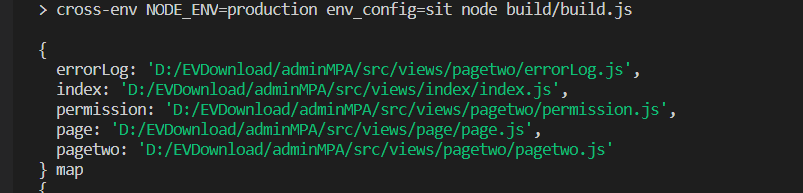
打印结果如下 :
对比图 
在这里我们发现入口文件 多了几个js 分别是 errorLog.js 和 permission.js
所以我们要做的操作是 将多余的js删除
入口函数写法如下
//多入口配置

// 通过glob模块读取views文件夹下的所有对应文件夹下的js后缀文件,如果该文件存在

// 那么就作为入口处理

exports.entries = function() {

  var entryFiles = glob.sync(PAGE_PATH + '/*/*.js')

  // console.log(entryFiles ,'entryCha')

  var map = {}

  entryFiles.forEach((filePath) => {

        var filename = filePath.substring(filePath.lastIndexOf('/') + 1, filePath.lastIndexOf('.'))

        map[filename] = filePath

  })

  delete map.errorLog ;

  delete map.permission ;

  console.log(map ,'map')

  return map

}
修改完入口文件后 我再次打包发现问题依旧 , 别灰心继续搞 , webpack 打包主要就是入口和出口 接下来我们研究下出口文件函数 我一开始写法如下 :
//多页面输出配置

// 与上面的多页面入口配置相同,读取pages文件夹下的对应的html后缀文件,然后放入数组中

exports.htmlPlugin = function() {

  // let entryHtml = path.resolve(__dirname + '../dist/*.html')

  let entryHtml = glob.sync(PAGE_PATH + '/*/*.html')

  let arr = []

  entryHtml.forEach((filePath) => {

      let filename = filePath.substring(filePath.lastIndexOf('/') + 1, filePath.lastIndexOf('.'))

      let conf = {

          // 模板来源

          template: filePath,

          // 文件名称

          filename: filename + '.html',

          // 页面模板需要加对应的js脚本,如果不加这行则每个页面都会引入所有的js脚本

          chunks: ['manifest', 'vendor', filename],

          inject: true,

          templateParameters: {

                BASE_URL: config.build.assetsPublicPath + config.build.assetsSubDirectory,

              },

      }

      if (process.env.NODE_ENV === 'production') {

          conf = merge(conf, {

              minify: {

                  removeComments: true,

                  collapseWhitespace: true,

                  removeAttributeQuotes: true

              },

              chunksSortMode: 'dependency'

          })

      }

      arr.push(new HtmlWebpackPlugin(conf))

  })

  console.log(arr , 'arr')

  return arr

}
我们看下打印的数据对不对
[

  HtmlWebpackPlugin {

    options: {

      template: 'D:/EVDownload/adminMPA/src/views/index/index.html',

      templateContent: false,

      templateParameters: [Object],

      filename: 'index.html',

      hash: false,

      inject: true,

      compile: true,

      favicon: false,

      minify: false,

      cache: true,

      showErrors: true,

      chunks: [Array],

      excludeChunks: [],

      chunksSortMode: 'auto',

      meta: {},

      title: 'Webpack App',

      xhtml: false

    },

    childCompilerHash: undefined,

    childCompilationOutputName: undefined,

    assetJson: undefined,

    hash: undefined,

    version: 4

  },

  HtmlWebpackPlugin {

    options: {

      template: 'D:/EVDownload/adminMPA/src/views/page/page.html',

      templateContent: false,

      templateParameters: [Object],

      filename: 'page.html',

      hash: false,

      inject: true,

      compile: true,

      favicon: false,

      minify: false,

      cache: true,

      showErrors: true,

      chunks: [Array],

      excludeChunks: [],

      chunksSortMode: 'auto',

      meta: {},

      title: 'Webpack App',

      xhtml: false

    },

    childCompilerHash: undefined,

    childCompilationOutputName: undefined,

    assetJson: undefined,

    hash: undefined,

    version: 4

  },

  HtmlWebpackPlugin {

    options: {

      template: 'D:/EVDownload/adminMPA/src/views/pagetwo/pagetwo.html',

      templateContent: false,

      templateParameters: [Object],

      filename: 'pagetwo.html',

      hash: false,

      inject: true,

      compile: true,

      favicon: false,

      minify: false,

      cache: true,

      showErrors: true,

      chunks: [Array],

      excludeChunks: [],

      chunksSortMode: 'auto',

      meta: {},

      title: 'Webpack App',

      xhtml: false

    },

    childCompilerHash: undefined,

    childCompilationOutputName: undefined,

    assetJson: undefined,

    hash: undefined,

    version: 4

  }

]
仔细瞅了一下 , 也没有大问题 ,但是当我打开config文件时 发现我在这里竟然也设置了build路径 【奔溃】,那么再重新修改下打包路径吧 。
第一步在 webpack.dev.conf.js 里修改
 plugins: [

    new webpack.DefinePlugin({

      'process.env': require('../config/dev.env')

    }),

    new webpack.HotModuleReplacementPlugin(),

    /* 在这开始插入代码*********************************************************/

    new htmlWebpackPlugin({

      filename : 'index.html',//输出的html路径

      template : 'index.html', //html模板路径

      //inject : 'head',  //js文件在head中,若为body则在body中

      inject : true,

      title : 'index',

      chunks : ['app'], //打包时只打包main和a的js文件,见entry,注意使用chunks时模板index.html文件里面不允许有script标签,即使注释掉也会报错

      templateParameters: {

        BASE_URL: config.dev.assetsPublicPath + config.dev.assetsSubDirectory

      }

    }),

  new htmlWebpackPlugin({

    filename : 'page.html',//输出的html路径

    template : 'page.html', //html模板路径

    //inject : 'head',  //js文件在head中,若为body则在body中

    inject : true,

    title : 'page',

    chunks : ['page'], //打包时只打包main和a的js文件,见entry,注意使用chunks时模板index.html文件里面不允许有script标签,即使注释掉也会报错

    templateParameters: {

      BASE_URL: config.dev.assetsPublicPath + config.dev.assetsSubDirectory

    }

  }),

  new htmlWebpackPlugin({

    filename : 'pagetwo.html',//输出的html路径

    template : 'pagetwo.html', //html模板路径

    //inject : 'head',  //js文件在head中,若为body则在body中

    inject : true,

    title : 'pagetwo',

    chunks : ['pagetwo'], //打包时只打包main和a的js文件,见entry,注意使用chunks时模板index.html文件里面不允许有script标签,即使注释掉也会报错

    templateParameters: {

      BASE_URL: config.dev.assetsPublicPath + config.dev.assetsSubDirectory

    }

  }),

  /* 在这结束插入代码*********************************************************/

    new webpack.NamedModulesPlugin(), // HMR shows correct file names in console on update.

    new webpack.NoEmitOnErrorsPlugin(),

    new CopyWebpackPlugin([

      {

        from: path.resolve(__dirname, '../static'),

        to: config.dev.assetsSubDirectory,

        ignore: ['.*']

      }

    ])

  ]

})
因为我这有三个动态项目 目前插如三个 new htmlWebpackPlugin
在webpack.prod.conf.js 里修改如下
 plugins: [

    // http://vuejs.github.io/vue-loader/en/workflow/production.html

    new webpack.DefinePlugin({

      'process.env': env

    }),

    // extract css into its own file

    new MiniCssExtractPlugin({

      filename: utils.assetsPath('css/[name].[contenthash:8].css'),

      chunkFilename: utils.assetsPath('css/[name].[contenthash:8].css')

    }),

    /* 开始插入代码 ************************************************/

    new HtmlWebpackPlugin({

      filename: config.build.app,

      template: 'index.html',

      inject: true,

      favicon: resolve('favicon.ico'),

      title: 'index',

      templateParameters: {

        BASE_URL: config.build.assetsPublicPath + config.build.assetsSubDirectory

      },

      chunks: ['manifest', 'vendor', 'app'],

      minify: {

        removeComments: true,

        collapseWhitespace: true,

        removeAttributeQuotes: true

        // more options:

        // https://github.com/kangax/html-minifier#options-quick-reference

      }

      // default sort mode uses toposort which cannot handle cyclic deps

      // in certain cases, and in webpack 4, chunk order in HTML doesn't

      // matter anyway

    }),

    new HtmlWebpackPlugin({

      filename: config.build.page,

      template: 'page.html',

      inject: true,

      favicon: resolve('favicon.ico'),

      title: 'page',

      templateParameters: {

        BASE_URL: config.build.assetsPublicPath + config.build.assetsSubDirectory

      },

      chunks: ['manifest', 'vendor', 'page'],

      minify: {

        removeComments: true,

        collapseWhitespace: true,

        removeAttributeQuotes: true

        // more options:

        // https://github.com/kangax/html-minifier#options-quick-reference

      }

      // default sort mode uses toposort which cannot handle cyclic deps

      // in certain cases, and in webpack 4, chunk order in HTML doesn't

      // matter anyway

    }),

    new HtmlWebpackPlugin({

      filename: config.build.pagetwo,

      template: 'pagetwo.html',

      inject: true,

      favicon: resolve('favicon.ico'),

      title: 'pagetwo',

      templateParameters: {

        BASE_URL: config.build.assetsPublicPath + config.build.assetsSubDirectory

      },

      chunks: ['manifest', 'vendor', 'pagetwo'],

      minify: {

        removeComments: true,

        collapseWhitespace: true,

        removeAttributeQuotes: true

        // more options:

        // https://github.com/kangax/html-minifier#options-quick-reference

      }

      // default sort mode uses toposort which cannot handle cyclic deps

      // in certain cases, and in webpack 4, chunk order in HTML doesn't

      // matter anyway

    }),

      /* 结束插入代码 ************************************************/

    new ScriptExtHtmlWebpackPlugin({

      //`runtime` must same as runtimeChunk name. default is `runtime`

      inline: /runtime..*.js$/

    }),

    // keep chunk.id stable when chunk has no name

    new webpack.NamedChunksPlugin(chunk => {

      if (chunk.name) {

        return chunk.name

      }

      const modules = Array.from(chunk.modulesIterable)

      if (modules.length > 1) {

        const hash = require('hash-sum')

        const joinedHash = hash(modules.map(m => m.id).join('_'))

        let len = nameLength

        while (seen.has(joinedHash.substr(0, len))) len++

        seen.add(joinedHash.substr(0, len))

        return `chunk-${joinedHash.substr(0, len)}`

      } else {

        return modules[0].id

      }

    }),

    // keep module.id stable when vender modules does not change

    new webpack.HashedModuleIdsPlugin(),

    // copy custom static assets

    new CopyWebpackPlugin([

      {

        from: path.resolve(__dirname, '../static'),

        to: config.build.assetsSubDirectory,

        ignore: ['.*']

      }

    ])

  ] ,
在这里也插入代码 (注释里有标记哦!!!!!!!!!!!)
好了 现在在运行下吧 看看效果咋样呢?

打包完成 成功啦 !
小记
这个bug 说白了 问题的根点在出口文件这 , 为什么会在这呢 ? 相关文档有说 是因为 webpack 新增 hook 属性 造成的看的我迷迷糊糊的 没明白 大致就是说你的出口文件应该怎么设置啥的。 哎!脑壳疼
为什么出口文件不能放在公共的utils 里呢 ? 目前这样打包问题虽然解决但是 每次的修改过于复杂 (脑壳疼), 如果有大神的话感谢指导下哈!!!后期我会把这个项目开源 详细请到个人中心查看
再此特别鸣谢 @璠哥 (一个温文尔雅的漂亮妹子) @劲琪 (一个阳光帅气的小帅哥)
遇见的问题TypeError: Cannot read property ‘tap’ of undefined
先看项目目录结构 :关于项目的修改及改造 再项目完事的时候会发布的
如果你也遇见这个问题的话 这一篇博客应该完全可以解决
问题描述:
building for sit environment...D:EVDownloadadminMPAnode_modulesscript-ext-html-webpack-pluginlibplugin.js:50
compilation.hooks.htmlWebpackPluginAlterAssetTags.tap(PLUGIN, alterAssetTags);
^
TypeError: Cannot read property 'tap' of undefined
at ScriptExtHtmlWebpackPlugin.compilationCallback (D:EVDownloadadminMPAnode_modulesscript-ext-html-webpack-pluginlibplugin.js:50:57)
at SyncHook.eval [as call] (eval at create (D:EVDownloadadminMPAnode_modulestapablelibHookCodeFactory.js:19:10), :11:1)
at SyncHook.lazyCompileHook (D:EVDownloadadminMPAnode_modulestapablelibHook.js:154:20)
at Compiler.newCompilation (D:EVDownloadadminMPAnode_moduleswebpacklibCompiler.js:504:26)
at D:EVDownloadadminMPAnode_moduleswebpacklibCompiler.js:540:29
at AsyncSeriesHook.eval [as callAsync] (eval at create (D:EVDownloadadminMPAnode_modulestapablelibHookCodeFactory.js:33:10), :6:1)
at AsyncSeriesHook.lazyCompileHook (D:EVDownloadadminMPAnode_modulestapablelibHook.js:154:20)
at Compiler.compile (D:EVDownloadadminMPAnode_moduleswebpacklibCompiler.js:535:28)
at D:EVDownloadadminMPAnode_moduleswebpacklibCompiler.js:274:11
at Compiler.readRecords (D:EVDownloadadminMPAnode_moduleswebpacklibCompiler.js:402:11)
at D:EVDownloadadminMPAnode_moduleswebpacklibCompiler.js:271:10
at AsyncSeriesHook.eval [as callAsync] (eval at create (D:EVDownloadadminMPAnode_modulestapablelibHookCodeFactory.js:33:10), :6:1)
at AsyncSeriesHook.lazyCompileHook (D:EVDownloadadminMPAnode_modulestapablelibHook.js:154:20)
at D:EVDownloadadminMPAnode_moduleswebpacklibCompiler.js:268:19
at AsyncSeriesHook.eval [as callAsync] (eval at create (D:EVDownloadadminMPAnode_modulestapablelibHookCodeFactory.js:33:10), :15:1)
at AsyncSeriesHook.lazyCompileHook (D:EVDownloadadminMPAnode_modulestapablelibHook.js:154:20)
npm ERR! code ELIFECYCLE
npm ERR! errno 1
npm ERR! admin@1.0.0 build:sit: `cross-env NODE_ENV=production env_config=sit node build/build.js`
npm ERR! Exit status 1
npm ERR!
npm ERR! Failed at the admin@1.0.0 build:sit script.
npm ERR! This is probably not a problem with npm. There is likely additional logging output above.
npm ERR! A complete log of this run can be found in:
npm ERR! C:UserslAppDataRoamingnpm-cache_logs2020-11-10T02_45_03_911Z-debug.log
这个问题全网只有两个人写过博客 但是不适合我这个 (我也不知道为啥 )
如果你也有这样的问题可以尝试下:
第一篇博客解决办法发是 webpack 和 webpackServe 及 html-webpack-plugin 版本冲突 这个直接去重写install 个版本就好了
博客链接 : https://blog.csdn.net/qq_31290307/article/details/86158770
第二篇博客解决办法如下 :
set “html-webpack-plugin”: “^4.0.0-alpha” => “4.0.0-alpha”
remove node_modules
remove package-lock.json
npm install
博客链接: https://www.cnblogs.com/ybz94/p/9625864.html
以上两篇博客如果还不能解决你的问题 那你就跟着我走吧! 以下是我的解决思路
第一点 : 检查入口文件 是不是有多余的东西
打印结果如下 :
对比图
在这里我们发现入口文件 多了几个js 分别是 errorLog.js 和 permission.js
所以我们要做的操作是 将多余的js删除
入口函数写法如下
//多入口配置
// 通过glob模块读取views文件夹下的所有对应文件夹下的js后缀文件,如果该文件存在
// 那么就作为入口处理
exports.entries = function() {
var entryFiles = glob.sync(PAGE_PATH + '/*/*.js')
// console.log(entryFiles ,'entryCha')
var map = {}
entryFiles.forEach((filePath) => {
var filename = filePath.substring(filePath.lastIndexOf('/') + 1, filePath.lastIndexOf('.'))
map[filename] = filePath
})
delete map.errorLog ;
delete map.permission ;
console.log(map ,'map')
return map
}
修改完入口文件后 我再次打包发现问题依旧 , 别灰心继续搞 , webpack 打包主要就是入口和出口 接下来我们研究下出口文件函数 我一开始写法如下 :
//多页面输出配置
// 与上面的多页面入口配置相同,读取pages文件夹下的对应的html后缀文件,然后放入数组中
exports.htmlPlugin = function() {
// let entryHtml = path.resolve(__dirname + '../dist/*.html')
let entryHtml = glob.sync(PAGE_PATH + '/*/*.html')
let arr = []
entryHtml.forEach((filePath) => {
let filename = filePath.substring(filePath.lastIndexOf('/') + 1, filePath.lastIndexOf('.'))
let conf = {
// 模板来源
template: filePath,
// 文件名称
filename: filename + '.html',
// 页面模板需要加对应的js脚本,如果不加这行则每个页面都会引入所有的js脚本
chunks: ['manifest', 'vendor', filename],
inject: true,
templateParameters: {
BASE_URL: config.build.assetsPublicPath + config.build.assetsSubDirectory,
},
}
if (process.env.NODE_ENV === 'production') {
conf = merge(conf, {
minify: {
removeComments: true,
collapseWhitespace: true,
removeAttributeQuotes: true
},
chunksSortMode: 'dependency'
})
}
arr.push(new HtmlWebpackPlugin(conf))
})
console.log(arr , 'arr')
return arr
}
我们看下打印的数据对不对
[
HtmlWebpackPlugin {
options: {
template: 'D:/EVDownload/adminMPA/src/views/index/index.html',
templateContent: false,
templateParameters: [Object],
filename: 'index.html',
hash: false,
inject: true,
compile: true,
favicon: false,
minify: false,
cache: true,
showErrors: true,
chunks: [Array],
excludeChunks: [],
chunksSortMode: 'auto',
meta: {},
title: 'Webpack App',
xhtml: false
},
childCompilerHash: undefined,
childCompilationOutputName: undefined,
assetJson: undefined,
hash: undefined,
version: 4
},
HtmlWebpackPlugin {
options: {
template: 'D:/EVDownload/adminMPA/src/views/page/page.html',
templateContent: false,
templateParameters: [Object],
filename: 'page.html',
hash: false,
inject: true,
compile: true,
favicon: false,
minify: false,
cache: true,
showErrors: true,
chunks: [Array],
excludeChunks: [],
chunksSortMode: 'auto',
meta: {},
title: 'Webpack App',
xhtml: false
},
childCompilerHash: undefined,
childCompilationOutputName: undefined,
assetJson: undefined,
hash: undefined,
version: 4
},
HtmlWebpackPlugin {
options: {
template: 'D:/EVDownload/adminMPA/src/views/pagetwo/pagetwo.html',
templateContent: false,
templateParameters: [Object],
filename: 'pagetwo.html',
hash: false,
inject: true,
compile: true,
favicon: false,
minify: false,
cache: true,
showErrors: true,
chunks: [Array],
excludeChunks: [],
chunksSortMode: 'auto',
meta: {},
title: 'Webpack App',
xhtml: false
},
childCompilerHash: undefined,
childCompilationOutputName: undefined,
assetJson: undefined,
hash: undefined,
version: 4
}
]
仔细瞅了一下 , 也没有大问题 ,但是当我打开config文件时 发现我在这里竟然也设置了build路径 【奔溃】,那么再重新修改下打包路径吧 。
第一步在 webpack.dev.conf.js 里修改
plugins: [
new webpack.DefinePlugin({
'process.env': require('../config/dev.env')
}),
new webpack.HotModuleReplacementPlugin(),
/* 在这开始插入代码*********************************************************/
new htmlWebpackPlugin({
filename : 'index.html',//输出的html路径
template : 'index.html', //html模板路径
//inject : 'head', //js文件在head中,若为body则在body中
inject : true,
title : 'index',
chunks : ['app'], //打包时只打包main和a的js文件,见entry,注意使用chunks时模板index.html文件里面不允许有script标签,即使注释掉也会报错
templateParameters: {
BASE_URL: config.dev.assetsPublicPath + config.dev.assetsSubDirectory
}
}),
new htmlWebpackPlugin({
filename : 'page.html',//输出的html路径
template : 'page.html', //html模板路径
//inject : 'head', //js文件在head中,若为body则在body中
inject : true,
title : 'page',
chunks : ['page'], //打包时只打包main和a的js文件,见entry,注意使用chunks时模板index.html文件里面不允许有script标签,即使注释掉也会报错
templateParameters: {
BASE_URL: config.dev.assetsPublicPath + config.dev.assetsSubDirectory
}
}),
new htmlWebpackPlugin({
filename : 'pagetwo.html',//输出的html路径
template : 'pagetwo.html', //html模板路径
//inject : 'head', //js文件在head中,若为body则在body中
inject : true,
title : 'pagetwo',
chunks : ['pagetwo'], //打包时只打包main和a的js文件,见entry,注意使用chunks时模板index.html文件里面不允许有script标签,即使注释掉也会报错
templateParameters: {
BASE_URL: config.dev.assetsPublicPath + config.dev.assetsSubDirectory
}
}),
/* 在这结束插入代码*********************************************************/
new webpack.NamedModulesPlugin(), // HMR shows correct file names in console on update.
new webpack.NoEmitOnErrorsPlugin(),
new CopyWebpackPlugin([
{
from: path.resolve(__dirname, '../static'),
to: config.dev.assetsSubDirectory,
ignore: ['.*']
}
])
]
})
因为我这有三个动态项目 目前插如三个 new htmlWebpackPlugin
在webpack.prod.conf.js 里修改如下
plugins: [
// http://vuejs.github.io/vue-loader/en/workflow/production.html
new webpack.DefinePlugin({
'process.env': env
}),
// extract css into its own file
new MiniCssExtractPlugin({
filename: utils.assetsPath('css/[name].[contenthash:8].css'),
chunkFilename: utils.assetsPath('css/[name].[contenthash:8].css')
}),
/* 开始插入代码 ************************************************/
new HtmlWebpackPlugin({
filename: config.build.app,
template: 'index.html',
inject: true,
favicon: resolve('favicon.ico'),
title: 'index',
templateParameters: {
BASE_URL: config.build.assetsPublicPath + config.build.assetsSubDirectory
},
chunks: ['manifest', 'vendor', 'app'],
minify: {
removeComments: true,
collapseWhitespace: true,
removeAttributeQuotes: true
// more options:
// https://github.com/kangax/html-minifier#options-quick-reference
}
// default sort mode uses toposort which cannot handle cyclic deps
// in certain cases, and in webpack 4, chunk order in HTML doesn't
// matter anyway
}),
new HtmlWebpackPlugin({
filename: config.build.page,
template: 'page.html',
inject: true,
favicon: resolve('favicon.ico'),
title: 'page',
templateParameters: {
BASE_URL: config.build.assetsPublicPath + config.build.assetsSubDirectory
},
chunks: ['manifest', 'vendor', 'page'],
minify: {
removeComments: true,
collapseWhitespace: true,
removeAttributeQuotes: true
// more options:
// https://github.com/kangax/html-minifier#options-quick-reference
}
// default sort mode uses toposort which cannot handle cyclic deps
// in certain cases, and in webpack 4, chunk order in HTML doesn't
// matter anyway
}),
new HtmlWebpackPlugin({
filename: config.build.pagetwo,
template: 'pagetwo.html',
inject: true,
favicon: resolve('favicon.ico'),
title: 'pagetwo',
templateParameters: {
BASE_URL: config.build.assetsPublicPath + config.build.assetsSubDirectory
},
chunks: ['manifest', 'vendor', 'pagetwo'],
minify: {
removeComments: true,
collapseWhitespace: true,
removeAttributeQuotes: true
// more options:
// https://github.com/kangax/html-minifier#options-quick-reference
}
// default sort mode uses toposort which cannot handle cyclic deps
// in certain cases, and in webpack 4, chunk order in HTML doesn't
// matter anyway
}),
/* 结束插入代码 ************************************************/
new ScriptExtHtmlWebpackPlugin({
//`runtime` must same as runtimeChunk name. default is `runtime`
inline: /runtime..*.js$/
}),
// keep chunk.id stable when chunk has no name
new webpack.NamedChunksPlugin(chunk => {
if (chunk.name) {
return chunk.name
}
const modules = Array.from(chunk.modulesIterable)
if (modules.length > 1) {
const hash = require('hash-sum')
const joinedHash = hash(modules.map(m => m.id).join('_'))
let len = nameLength
while (seen.has(joinedHash.substr(0, len))) len++
seen.add(joinedHash.substr(0, len))
return `chunk-${joinedHash.substr(0, len)}`
} else {
return modules[0].id
}
}),
// keep module.id stable when vender modules does not change
new webpack.HashedModuleIdsPlugin(),
// copy custom static assets
new CopyWebpackPlugin([
{
from: path.resolve(__dirname, '../static'),
to: config.build.assetsSubDirectory,
ignore: ['.*']
}
])
] ,
在这里也插入代码 (注释里有标记哦!!!!!!!!!!!)
好了 现在在运行下吧 看看效果咋样呢?
打包完成 成功啦 !
小记
这个bug 说白了 问题的根点在出口文件这 , 为什么会在这呢 ? 相关文档有说 是因为 webpack 新增 hook 属性 造成的看的我迷迷糊糊的 没明白 大致就是说你的出口文件应该怎么设置啥的。 哎!脑壳疼
为什么出口文件不能放在公共的utils 里呢 ? 目前这样打包问题虽然解决但是 每次的修改过于复杂 (脑壳疼), 如果有大神的话感谢指导下哈!!!后期我会把这个项目开源 详细请到个人中心查看
再此特别鸣谢 @璠哥 (一个温文尔雅的漂亮妹子) @劲琪 (一个阳光帅气的小帅哥)
转:
webpack + vuecli多页面打包基于(vue-template-admin)修改
webpack + vuecli多页面打包基于(vue-template-admin)修改的更多相关文章
- vue element Admin - 修改浏览器标签名 + 添加tagView标签 +固定导航头部 + 添加侧边栏Logo
1 .修改浏览器标签名称: 修改浏览器标签名称在文件:\src\settings.js image.png 2 .修改固定头部Header和侧边栏 Logo: image.png 1)侧边栏文 ...
- vue-electron脚手架安装及说明 打包基于Vue的 桌面应用程序
今天这篇文章是讲述一下 融合了vue-cli+electron的一种新的脚手架,省去许多繁琐配置,即vue-electron. 下面就说一下安装和使用,假设你的电脑已经安装node.js,并且已经全局 ...
- 前端基于vue,后台采用springboot+shiro的方式搭建的一个移动端商品展示平台
基于vue实现的移动端商品展示页,可以web-view的方式嵌入到小程序中,布局简约.大气,减少初学者或开发者不必要的工作量.后台维护采用的springboot+shiro的方式,为广大爱好者提供展示 ...
- webpack+react多页面开发(二)-终极架构
webpack4+react16多页面架构 webpack在单页面打包上应用广泛,以create-react-app为首的脚手架众多,单页面打包通常指的是将业务js,css打包到同一个html文件中, ...
- VUE 多页面打包webpack配置
思路:多配置一个main的文件,用于webpack入口使用, 然后路由的导向也应该默认指向新组件,最后通过webpack构建出一个新的独立的html文件. 缺点:生成多个html会new出多个vu ...
- vue之webpack+vuecli打包生成资源相对引用路径与背景图片的正确引用
问题描述 一般情况下,通过webpack+vue-cli默认打包的css.js等资源,路径都是绝对的 但当部署到带有文件夹的项目中,这种绝对路径就会出现问题,因为把配置的static文件夹当成了根路径 ...
- 使用vue+webpack的多页面架构(转+自己的情况)
按以下步骤可正常配置多页面架构 记得安装 node-glob 安装命令:npm install node-glob --save-dev 文件附加 webpack.base.conf.js --参 ...
- 基于Vue JS, Webpack 以及Material Design的渐进式web应用 [Part 1]
基于Vue JS, Webpack 以及Material Design的渐进式web应用 [Part 1] 原文:基于Vue JS, Webpack 以及Material Design的渐进式web应 ...
- 小记:vue 及 react 的工程项目入口小结及 webpack 配置多页面应用参考
一.前言 闲暇时间,看了下前端的基础知识,有幸参与了公司公众号项目前面的一个阶段,学习到了一些前端框架的相关知识 小结了一下 自己练习通过新建一个个文件组织起项目的过程中的一些理解 二.项目入口 vu ...
随机推荐
- HDU - 3613 Best Reward(manacher或拓展kmp)
传送门:HDU - 3613 题意:给出26个字母的价值,然后给你一个字符串,把它分成两个字符串,字符串是回文串才算价值,求价值最大是多少. 题解:这个题可以用马拉车,也可以用拓展kmp. ①Mana ...
- 1562: Fun House
Description American Carnival Makers Inc. (ACM) has a long history of designing rides and attraction ...
- HDU -1506 Largest Rectangle in a Histogram&&51nod 1158 全是1的最大子矩阵 (单调栈)
单调栈和队列讲解:传送门 HDU -1506题意: 就是给你一些矩形的高度,让你统计由这些矩形构成的那个矩形面积最大 如上图所示,如果题目给出的全部是递增的,那么就可以用贪心来解决 从左向右依次让每一 ...
- c++虚函数、子类中调用父类方法
全部 代码: 1 #include<stdio.h> 2 #include<string.h> 3 #include<iostream> 4 #include< ...
- VMX - block by NMI和 NMI unblockinig due to IRET 之间的关系
相关SDM章节: 27.2.3- Information About NMI Unblocking Due to IRET 最近收到同事发来的一个问题,即: VMCS 中的 Guest Interru ...
- SSM框架整合(Spring + SpringMVC + MyBatis)
搭建环境 使用Spring(业务层)整合其他的框架SpringMVC(表现层)和MyBatis(持久层) Spring框架 创建数据库表 CREATE DATABASE ssm; USE ssm; C ...
- js的变量,作用域,内存
一,基本类型和引用类型的值基本类型的值是按值访问的,引用类型的值是保存在内存中的对象1,动态的属性 只有引用类型的值可以添加属性方法 不能给基本类型添加属性和方法2,复制变量值 复制基本类型的值,两个 ...
- C# 类 (8) - 抽象方法
抽象 抽象方法 只能 定义在抽象类 里,并且抽象方法里没有具体的代码,像这种 为啥要定义一个空空如也的函数呢?这是为了用来约束 它的派生类 的行为, 这个例子,建立了一个数组,放了cat和dog,这两 ...
- asp.net 从Excel表导入数据到数据库中
http://www.cnblogs.com/hfzsjz/archive/2010/12/31/1922901.html http://hi.baidu.com/ctguyg/item/ebc857 ...
- bash copy multi files
bash copy multi files # copy one file $ cp file1.js /var/www/html # copy multi files ??? no space $ ...