
Java-GUI基础(二)java.awt
1. 组件与容器
容器就是窗口和面板,而组件为按钮、文本域、标签等(待续),二者的声明、设置很相似,
因此本文只做对于容器的详解。组件与容器的区别在于组件不能做容器,而部分容器可以兼顾组件和容器的特性
1.1 Frame(窗口)
属于容器,不可作为组件添加至其他容器中
声明
Frame frame = new Frame();
基本方法
public void setBounds(int x, int y, int width, int height);//设置窗口的初始位置和大小,可参照电脑屏幕:1900*1080

public void setTitle(String title);//设置窗口名称

public void setResizable(boolean resizable);//设置窗口大小是否可变,false-窗口大小只能以初始值显示

public void setBackground(Color bgColor);//设置窗口颜色

public void setLayout(LayoutManager mgr);//设置窗口布局

public void setVisible(boolean b);//设置窗口的可见性
import java.awt.*;

public class TheFirstFrame{

  public static void main(string[] args){

        Frame frame = new Frame();

        frame.setTitle("hello");

        //Frame frame = new Frame("hello");与前两句效果一致

        frame.setBounds(100,100,100,100);

        frame.seBackground(new Color(255,0,0));//Color(r,g,b);

        //frame.setLocation(100,100);

        //frame.setSize(100,100);以上两句与setBounds效果一致

        frame.setResizable(false);

        frame.setVisible(true);

    }

}
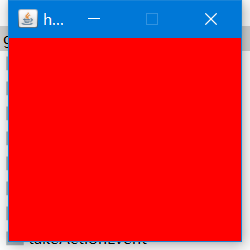 上例的运行结果
1.2 Panel(面板)
与Frame相似,可以作为组件被添加至容器中
Frame frame = new Frame();

Panel panel = new Panel();

frame.setLayout(new FlowLayout());//设置布局,默认布局为边框布局-居中

frame.add(panel);
2. 布局
绝对布局、非绝对布局
2.1 流式布局
FlowLayout,从上至下,从左至右依次在容器中排列组件,默认为从上到下居中
Frame frame = new Frame();

Button button01 = new Button(“button1”);//Button属于组件,不做解释

Button button02 = new Button("button2");

Button button03 = new Button("button3");

Button button04 = new Button("button4");

//布局

frame.setLayout(new FlowLayout(FlowLayout.LEFT));//意为从左对齐排列

//添加组件-add

frame.add(button1);

frame.add(button2);

frame.add(button3);

frame.add(button4);

//设置窗口属性

frame.setBounds(200,200,200,200);

frame.setVisible(true);

frame.ReSizeable(true);
2.2 边框布局
BorderLayout,分为东西南北中五个区域
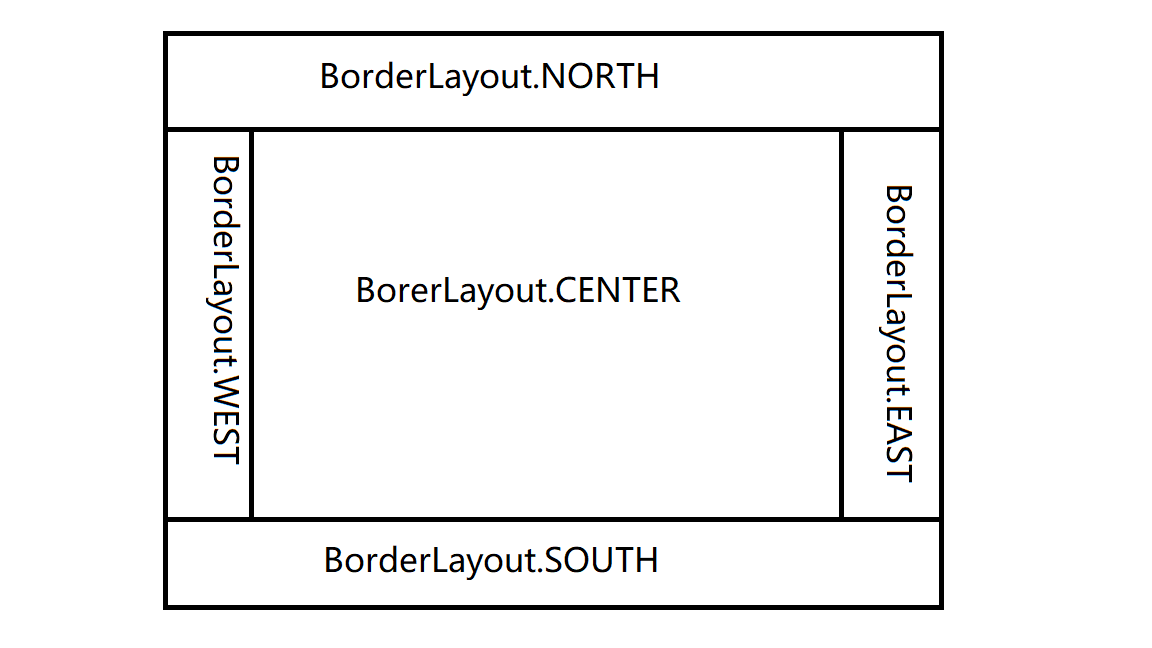
public class BorderLayoutDemo {

    public static void main(String[] args) {

        Frame frame = new Frame();

        Button button1 = new Button("1");

        Button button3 = new Button("1");

        Button button2 = new Button("1");

        Button button4 = new Button("1");

        Button button5 = new Button("1");

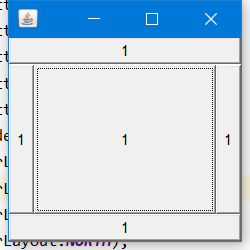
        frame.setLayout(new BorderLayout());

        frame.add(button1,BorderLayout.CENTER);

        frame.add(button2,BorderLayout.EAST);

        frame.add(button3,BorderLayout.WEST);

        frame.add(button4,BorderLayout.NORTH);

        frame.add(button5,BorderLayout.SOUTH);

        frame.setBounds(200,200,200,200);

        frame.setVisible(true);

    }

}
2.3 表格布局
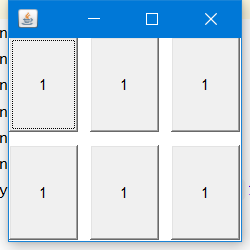
GridLayout,自定义表格的行列数以及行距
public class DemoForBlog01 {

    public static void main(String[] args) {

        Frame frame = new Frame();

        Button button1 = new Button("1");

        Button button3 = new Button("1");

        Button button2 = new Button("1");

        Button button4 = new Button("1");

        Button button5 = new Button("1");

        Button button6 = new Button("1");

        frame.setLayout(new GridLayout(2,2,10,10));

        frame.add(button1);

        frame.add(button2);

        frame.add(button3);

        frame.add(button4);

        frame.add(button5);

        frame.add(button6);

        frame.setVisible(true);

        frame.setBounds(200,200,200,200);

    }

}
3. 监听器
监听各个动作的发生并自定义下一个行为,
分为:事件监听、鼠标监听、窗口监听、键盘监听
3.1 事件监听
ActionListener,是一个接口,其中只有actionPerformed(ActionEvent e)一个抽象方法,定义当此事件(调用此监听的主体)发生时的行为
public interface ActionListener extends EventListener {

    /**

     * Invoked when an action occurs.

     * @param e the event to be processed

     */

    public void actionPerformed(ActionEvent e);

}
单一监听
一个监听器对应于一种事件
public class ActionDemo{

      public ActionDemo(){

           Frame frame = new Frame("ButtonDemo");

           MyListener myListener = new MyListener();

           Button button = new Button("actionListener");

           button.addActionListener(myListener);

           frame.add(button);

           frame.setBounds(200,200,200,200);

           frame.setVisible(true);

     }

     public static void main(){

           new ActionDemo();

     }

}

class MyListener implements ActionListener{

      @Override

      public void actionPerformed(){

            System.out.print("this is a button");

            //当事件(即按钮被点击)发生时,会打印出“this is a button”

      }

}
多对应监听
指写一个监听器的实现类同时监听两个事
public class ActionListenerDemo {

     public static void main(String[] args) {

     Frame frame = new Frame("actionListener");

        Button button01 = new Button("start");

        Button button02 = new Button("stop");

        button01.setActionCommand("button001");

        //actionCommand直译为事件注释,是除了按钮title外可以分辨而又不会显示在按钮上的文本信息,String类型

        MyListener myActionListener = new MyListener();

        button01.addActionListener(myActionListener);

        button02.addActionListener(myActionListener);

        //监听器通过add加在按钮事件上

        frame.setLayout(new FlowLayout(FlowLayout.LEFT));

        frame.add(button01);

        frame.add(button02);

        frame.setBounds(200,200,200,200);

        frame.setVisible(true);

    }

}

class MyListener implements ActionListener{

    @Override

    public void actionPerformed(ActionEvent e) {

      //参数e是调用此监听器的主体,即按钮

        String str = e.getActionCommand();

        if(str.equals("start")){

            System.out.println("start button");

        }

        else if(str.equals("stop")){

            System.out.println("stop button");

        }

    }

}
3.2 鼠标监听
MouseListener对鼠标事件的监听
首先,鼠标行为分为三种:按下、谈起、按住不放,同样地,它的方法也比较少:
public interface MouseListener extends EventListener {

    /**

     * Invoked when the mouse button has been clicked (pressed

     * and released) on a component.

     * @param e the event to be processed

     */

    public void mouseClicked(MouseEvent e);

    /**

     * Invoked when a mouse button has been pressed on a component.

     * @param e the event to be processed

     */

    public void mousePressed(MouseEvent e);

    /**

     * Invoked when a mouse button has been released on a component.

     * @param e the event to be processed

     */

    public void mouseReleased(MouseEvent e);

    /**

     * Invoked when the mouse enters a component.

     * @param e the event to be processed

     */

    public void mouseEntered(MouseEvent e);

    /**

     * Invoked when the mouse exits a component.

     * @param e the event to be processed

     */

    public void mouseExited(MouseEvent e);

}
适配器模式
鼠标监听中的方法我们不会全部使用,一般而言,只要mousePressed这一个即可。
但是如果直接实例化MouseListener接口的话就需要将其中的方法全部重写,此时我们引入一种设计模式【适配器模式】
可以简单地理解为在这种模式下可以选择性地重写方法。
使用
首先提供有一个adapter类(译为适配器)方法,是已经对MouseListener接口实例化了的一个类,直接对其继承即可
class MyMouse extends MouseAdapter{

        @Override

        public void mousePressed(MouseEvent e){
             System.out.println("mouse press");

        }

}
3.3 窗口监听
WindowListener接口,适配器:WindowsAdapter
窗口中比较常用的就是窗口关闭(closing)和窗口激活(activated),
如果没有设置窗口监听的话点击生成窗口上面的关闭按钮时不会起作用的
public class WindowListenerDemo{

    public static void main(String[] args) {

        Frame frame = new Frame();

        frame.setBounds(200,200,200,200);

        frame.setVisible(true);

        frame.addWindowListener(new MyWindowListener());//调用构造器

    }

}

class MyWindowListener extends WindowAdapter{

    @Override

    public void windowClosing(WindowEvent e) {

        System.out.println("window closing");

        System.exit(0);//结束程序(关闭窗口)

    }

    @Override

    public void windowActivated(WindowEvent e) {

        System.out.println("window activated");

    }

}
3.4 键盘监听
KeyLinstener,适配器:KeyAdapter,键盘事件有:按下,弹起,按住不放。一般只用按下(KeyPressed)这一个方法
键盘上每一个按键都是固定的,不能用其他名字等代替,为获取按键值使用getKeyCode()方法,int类型
KeyEvent表示键盘事件,通过类KeyEvent来获取按键,如KeyEvent.VK_Space表示空格
public class MouseListenerDemo {

    public MouseListenerDemo(){

        Frame frame = new Frame();

        frame.addKeyListener(new MyKey());

        frame.setBounds(200,200,200,200);

        frame.setVisible(true);

    }

    public static void main(String[] args) {

        new MouseListenerDemo();

    }

}

class MyKey extends KeyAdapter{

    @Override

    public void keyPressed(KeyEvent e) {

        int key = e.getKeyCode();

        if(key == KeyEvent.VK_SPACE){

            System.out.println("space");

        }

    }

}
Java-GUI基础(二)java.awt的更多相关文章
- java多线程基础(二)--java多线程的基本使用
java多线程的基本使用 在java中使用多线程,是通过继承Thread这个类或者实现Runnable这个接口或者实现Callable接口来完成多线程的. 下面是很简单的例子代码: package c ...
- java GUI编程二
java基础学习总结--GUI编程(二) 一.事件监听 测试代码一: 1 package cn.javastudy.summary; 2 3 import java.awt.*; 4 import j ...
- java基础(二)-----java的三大特性之继承
在<Think in java>中有这样一句话:复用代码是Java众多引人注目的功能之一.但要想成为极具革命性的语言,仅仅能够复制代码并对加以改变是不够的,它还必须能够做更多的事情.在这句 ...
- Java 数组基础,java.util.Arrays
定义数组 方式1(推荐,更能表明数组类型) 方式2(同C语言) 方式3定义时直接初始化 数组运用基础 数组长度 equals() 数组元素不为基本数据类型时 二维数组 二维数组基础 变长的二维数组 j ...
- Java 语言基础 (初识Java语言, 变量和数据类型, 运算符, 流程控制语句, 数组)
初始 Java 语言 Java SE -- Java Platform, Standard Edition 是 Java 平台的基础 Java SE 以前称为 J2SE, 可以编写桌面应用和基于 we ...
- Java语言基础及java核心
一.Java语言特点 1. 简单 2. 面向对象 3. 分布式 4. 健壮 5. 安全 6. 中性架构跨平台 7. 超强的可移植性 8. 高性能 9. 多线程 二.java的环境变量 JAVA_HOM ...
- 【Java并发基础】Java线程的生命周期
前言 线程是操作系统中的一个概念,支持多线程的语言都是对OS中的线程进行了封装.要学好线程,就要搞清除它的生命周期,也就是生命周期各个节点的状态转换机制.不同的开发语言对操作系统中的线程进行了不同的封 ...
- java线程基础知识----java线程模型
转载自http://www.cnblogs.com/nexiyi/p/java_memory_model_and_thread.html 1. 概述 多任务和高并发是衡量一台计算机处理器的能力重要指标 ...
- java线程基础知识----java daemon线程
java线程是一个运用很广泛的重点知识,我们很有必要了解java的daemon线程. 1.首先我们必须清楚的认识到java的线程分为两类: 用户线程和daemon线程 A. 用户线程: 用户线程可以简 ...
- 【Java并发基础】Java内存模型解决有序性和可见性
前言 解决并发编程中的可见性和有序性问题最直接的方法就是禁用CPU缓存和编译器的优化.但是,禁用这两者又会影响程序性能.于是我们要做的是按需禁用CPU缓存和编译器的优化. 如何按需禁用CPU缓存和编译 ...
随机推荐
- Python练习题 047:Project Euler 020:阶乘结果各数字之和
本题来自 Project Euler 第20题:https://projecteuler.net/problem=20 ''' Project Euler: Problem 20: Factorial ...
- Django新手图文入门教程
版权所有,转载需注明来源! 本文是广受大家欢迎的<Django1.10新手图文入门教程>的2.1版本升级篇,原1.10版本传送门点击我 本文面向有一些的Python基础,但刚接触web框架 ...
- JS之回调函数(callback)
1.什么是回调函数? -- 简单点说,一个函数被作为参数传递给另一个函数(在这里我们把另一个函数叫做"otherFunction"),回调函数在otherFunction中被调用. ...
- This is Riv3r1and.
总是要弄个博客来搞的嘛.
- Python实现的数据结构与算法之队列详解
本文实例讲述了Python实现的数据结构与算法之队列.分享给大家供大家参考.具体分析如下: 一.概述 队列(Queue)是一种先进先出(FIFO)的线性数据结构,插入操作在队尾(rear)进行,删除操 ...
- Arduino 串口的一些高级用法
来源: 1.配置串口通信数据位.校验位.停止位 通常我们使用Serial.begin(speed)来完成串口的初始化,这种方式,只能配置串口的波特率. 而使用Serial.begin(speed, c ...
- Java安全之Commons Collections1分析(二)
Java安全之Commons Collections1分析(二) 0x00 前言 续上篇文,继续调试cc链.在上篇文章调试的cc链其实并不是一个完整的链.只是使用了几个方法的的互相调用弹出一个计算器. ...
- RocketMQ消息丢失解决方案:事务消息
前言 上篇文章,王子通过一个小案例和小伙伴们一起分析了一下消息是如何丢失的,但没有提出具体的解决方案. 我们已经知道发生消息丢失的原因大体上分为三个部分: 1.生产者发送消息到MQ这一过程导致消息丢失 ...
- 多测师_肖sir _python 练习题(一)100以内奇数,偶数,质数胡计算
(1)求1~100的和方法: 方法一:print(sum(range(1,101))) 方法二: sum1 = 0 i = 1 while True: sum1 = sum1 + i if i == ...
- MacBook连接蓝牙鼠标、蓝牙键盘失败的解决方案
问题: keychron k4连接不上MacBook,但是win10和iPhone都可以成功连接. 解决方法: 1.关闭wifi: 2.连接蓝牙键盘: 3.稍等一会,再连接wifi就可以了. 另外,苹 ...