
Android成长之路-编码实现软件界面
实现一个登陆界面:
相对布局:
- package cn.csdn.codeui;
- import android.app.Activity;
- import android.os.Bundle;
- import android.view.ViewGroup.LayoutParams;
- import android.widget.Button;
- import android.widget.EditText;
- import android.widget.RelativeLayout;
- import android.widget.TextView;
- public class LoginRelativeActivity extends Activity {
- protected void onCreate(Bundle savedInstanceState) {
- super.onCreate(savedInstanceState);
- initUI();
- }
- private void initUI() {
- RelativeLayout rlayout = new RelativeLayout(this);
- int id = 100;
- /**添加一个TextView*/
- TextView textView1 = new TextView(this);
- /**android:id=""*/
- textView1.setId(id);
- /**android:text="用户名:"*/
- textView1.setText("用户名:");
- /**android:layout_width="wrap_content"
- android:layout_height="wrap_content"*/
- RelativeLayout.LayoutParams textParams1 = new RelativeLayout.LayoutParams(
- LayoutParams.WRAP_CONTENT, LayoutParams.WRAP_CONTENT);
- /**android:layout_alignParentLeft="true"*/
- textParams1.addRule(RelativeLayout.ALIGN_PARENT_LEFT);
- rlayout.addView(textView1, textParams1);
- //////////
- int id1 = 200;
- EditText userEdit = new EditText(this);
- userEdit.setId(id1);
- RelativeLayout.LayoutParams EditParams1 = new RelativeLayout.LayoutParams(
- LayoutParams.FILL_PARENT, LayoutParams.WRAP_CONTENT);
- /**android:layout_toRightOf="id的值"*/
- EditParams1.addRule(RelativeLayout.RIGHT_OF, id);
- rlayout.addView(userEdit, EditParams1);
- //////////
- int Id = 300;
- TextView textView2 = new TextView(this);
- textView2.setId(Id);
- textView2.setText("密码 :");
- RelativeLayout.LayoutParams TextParams2 = new RelativeLayout.LayoutParams(
- LayoutParams.WRAP_CONTENT, LayoutParams.WRAP_CONTENT);
- TextParams2.addRule(RelativeLayout.BELOW, id1);
- rlayout.addView(textView2, TextParams2);
- //////////
- int Id1 = 400;
- EditText passEdit = new EditText(this);
- passEdit.setId(Id1);
- RelativeLayout.LayoutParams EditParams2 = new RelativeLayout.LayoutParams(
- LayoutParams.FILL_PARENT, LayoutParams.WRAP_CONTENT);
- EditParams2.addRule(RelativeLayout.BELOW, id1);
- EditParams2.addRule(RelativeLayout.RIGHT_OF, Id);
- rlayout.addView(passEdit, EditParams2);
- //////////
- int Id2 = 500;
- Button login = new Button(this);
- login.setId(Id2);
- login.setText("登陆");
- RelativeLayout.LayoutParams loginParams = new RelativeLayout.LayoutParams(
- LayoutParams.WRAP_CONTENT, LayoutParams.WRAP_CONTENT);
- loginParams.addRule(RelativeLayout.BELOW, Id1);
- loginParams.addRule(RelativeLayout.ALIGN_PARENT_RIGHT);
- rlayout.addView(login, loginParams);
- //////////
- Button insert = new Button(this);
- insert.setText("注册");
- RelativeLayout.LayoutParams insertParams = new RelativeLayout.LayoutParams(
- LayoutParams.WRAP_CONTENT, LayoutParams.WRAP_CONTENT);
- insertParams.addRule(RelativeLayout.BELOW, Id1);
- insertParams.addRule(RelativeLayout.LEFT_OF, Id2);
- rlayout.addView(insert, insertParams);
- setContentView(rlayout);
- }
- }
效果图:

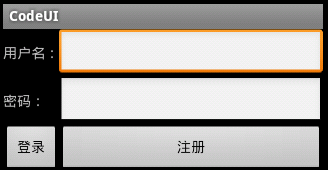
表格布局:
- package cn.csdn.codeui;
- import android.app.Activity;
- import android.os.Bundle;
- import android.view.ViewGroup.LayoutParams;
- import android.widget.Button;
- import android.widget.EditText;
- import android.widget.TableLayout;
- import android.widget.TableRow;
- import android.widget.TextView;
- public class LoginTableActivity extends Activity {
- protected void onCreate(Bundle savedInstanceState) {
- super.onCreate(savedInstanceState);
- initUI();
- }
- private void initUI() {
- ///表格布局
- TableLayout tlayout = new TableLayout(this);
- tlayout.setColumnStretchable(1, true);
- ///行
- TableRow tableRow1 = new TableRow(this);
- TextView textView1 = new TextView(this);
- textView1.setText("用户名:");
- tableRow1.addView(textView1);
- EditText userEdit = new EditText(this);
- tableRow1.addView(userEdit);
- tlayout.addView(tableRow1);
- TableRow tableRow2 = new TableRow(this);
- TextView textView2 = new TextView(this);
- textView2.setText("密码:");
- tableRow2.addView(textView2);
- EditText passEdit = new EditText(this);
- tableRow2.addView(passEdit);
- tlayout.addView(tableRow2);
- TableRow tableRow3 = new TableRow(this);
- Button btn0 = new Button(this);
- btn0.setText("登录");
- tableRow3.addView(btn0);
- Button btn1 = new Button(this);
- btn1.setText("注册");
- tableRow3.addView(btn1);
- tlayout.addView(tableRow3);
- setContentView(tlayout);
- }
- }
效果图:
线性布局:
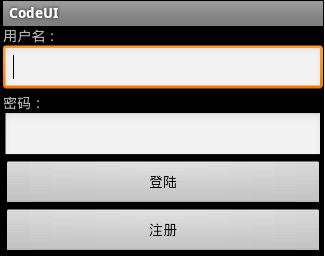
- package cn.csdn.codeui;
- import android.app.Activity;
- import android.os.Bundle;
- import android.view.ViewGroup.LayoutParams;
- import android.widget.Button;
- import android.widget.EditText;
- import android.widget.LinearLayout;
- import android.widget.TextView;
- public class LoginLinearActivity extends Activity {
- @Override
- protected void onCreate(Bundle savedInstanceState) {
- // TODO Auto-generated method stub
- super.onCreate(savedInstanceState);
- init();
- }
- private void init() {
- //线性布局
- LinearLayout linearLayout = new LinearLayout(this);
- /**android:orientation="vertical"*/
- linearLayout.setOrientation(LinearLayout.VERTICAL);
- LayoutParams layoutParams = new LayoutParams(LayoutParams.FILL_PARENT,
- LayoutParams.FILL_PARENT);
- //////////
- TextView userText = new TextView(this);
- userText.setText("用户名:");
- LayoutParams userTextParams = new LayoutParams(
- LayoutParams.FILL_PARENT, LayoutParams.WRAP_CONTENT);
- linearLayout.addView(userText, userTextParams);
- //////////
- EditText userEdit = new EditText(this);
- LayoutParams userEditParams = new LayoutParams(
- LayoutParams.FILL_PARENT, LayoutParams.WRAP_CONTENT);
- linearLayout.addView(userEdit, userEditParams);
- //////////
- TextView passText = new TextView(this);
- passText.setText("密码:");
- LayoutParams passTextParams = new LayoutParams(
- LayoutParams.FILL_PARENT, LayoutParams.WRAP_CONTENT);
- linearLayout.addView(passText, passTextParams);
- //////////
- EditText passEdit = new EditText(this);
- LayoutParams passEditParams = new LayoutParams(
- LayoutParams.FILL_PARENT, LayoutParams.WRAP_CONTENT);
- linearLayout.addView(passEdit, passEditParams);
- //////////
- Button login = new Button(this);
- login.setText("登陆");
- LayoutParams loginParams = new LayoutParams(LayoutParams.FILL_PARENT,
- LayoutParams.WRAP_CONTENT);
- linearLayout.addView(login, loginParams);
- //////////
- Button insert = new Button(this);
- insert.setText("注册");
- LayoutParams insertParams = new LayoutParams(LayoutParams.FILL_PARENT,
- LayoutParams.WRAP_CONTENT);
- linearLayout.addView(insert, insertParams);
- setContentView(linearLayout, layoutParams);
- }
- }
效果图:
Android成长之路-编码实现软件界面的更多相关文章
- Android成长之路-实现简单动画
实现简单动画: 在drawable目录中放入图片, 并且创建xml文件 frame.xml 存入图片,如下: <pre class="html" name="cod ...
- Android成长之路-手势库的创建
手势库的创建: 使用SDK自带的例子GestureBuilder建立手势库,这个文件夹存在于android\android-sdk-windows \samples\android-10\Gest ...
- Android成长之路-手势识别的实现
手势识别系统: 先把手势库放到项目中:(创建手势库见下一篇博客) 在res文件夹下新建一个名为raw的文件夹,然后把手势库放进去 然后开始项目的创建: strings.xml: <?xml ...
- Android成长之路-LayoutInflater和inflate的用法
在这里用Tabhost的例子来说明: package cn.csdn.activity; import android.app.TabActivity; import android.os.Bundl ...
- Android成长之路-实现监听器的三种方法
第一种: 在Test类中 定义一个类接口OnClickListener 第二种:直接在Test类上写一个接口 其中的this相当于new OnClickListener()对象, 即class ...
- 单片机成长之路(51基础篇) - 004 STC89C52MCU 软件实现系统复位
用户应用程序在运行过程中,有时会有特殊需求,需要实现单片机系统复位(热启动之一),传统的8051单片机由于硬件上未支持此功能,用户必须用软件模拟实现,实现起来较麻烦.STC单片机增加了相应的硬件功能, ...
- 【腾讯Bugly干货分享】JSPatch 成长之路
本文来自于腾讯bugly开发者社区,非经作者同意,请勿转载,原文地址:http://dev.qq.com/topic/579efa7083355a9a57a1ac5b Dev Club 是一个交流移动 ...
- 介绍开发Android手持终端PDA盘点APP软件
介绍开发Android手持终端PDA盘点APP软件 软件需要自动识别我导入的TXT格式或者excl格式的盘点表,然后自动生成一个复盘数据,做AB比对,界面上需要显示的有总数量,单品数量,条码,编码,商 ...
- --专访雷果国: 从1.5K到18K 一个程序员的5年成长之路--
导语:今年三月份,在CSDN博客和新浪微博上有一篇<从1.5K到18K,一个程序员的5年成长之路>被众人分享和传阅,这篇博文首先介绍了作者自学之初薄弱的基础,然后通过流水账形式分享了那个从 ...
随机推荐
- hdu 1532 Drainage Ditches (最大流)
最大流的第一道题,刚开始学这玩意儿,感觉好难啊!哎····· 希望慢慢地能够理解一点吧! #include<stdio.h> #include<string.h> #inclu ...
- 关于hessian接口类方法顺序及对象序列化的实战研究
前段时间,提供出去的hessian接口被调用时,调用方出现序列化异常以及其他莫名的异常.同事说hessian接口使用有2个注意事项: 1.对于已经存在的hessian接口,后续增加的方法只能加在文件末 ...
- Setup SS5 Socks Proxy
Install and configure ss5 socks proxy with simple authentication SS5 is a high performance socks pro ...
- FIS3配置fis-conf.js
设置规则的配置接口: fis.match(selector, props); 1.添加md5戳:对 js.css.png 图片引用 URL 添加 md5 戳: fis.match('*.{js,css ...
- SASS详解之编译输出的样式
SASS是一种CSS预处理语言,没有装环境的话是不能被解析的.但是有了koala编译工具之后,解析SASS不需要环境也毫无压力了.SASS的输出格式有四种:嵌套.扩大.紧凑和压缩.下面结合小例子为大家 ...
- C#装饰者模式实例代码
using System; using System.Collections.Generic; using System.Linq; using System.Text; namespace 装饰者 ...
- 阿里云 Ubuntu 14.04 安装mysql 5.6
1. 升级apt-get apt-get update 如果出现 : 说明没有你不是root用户,则需要用sudo命令 sudo apt-get update 下面出现权限问题都可以参照这个方法. 2 ...
- android4.0 USB Camera实例(三)UVC
前面我写了两篇文章说明了zc301的实现 详细请看 http://blog.csdn.net/hclydao/article/details/21235919 以下顺便把通用的USB也写上 前面的ZC ...
- VMWARE虚拟机安装64位系统此主机支持IntelVTx 但IntelVTx处于禁用状态
1.进入BIOS(我的电脑是Thinkpad e480,进入按钮是F12/ Fn+F12) 2.选择App Menu,再选择第一项Setup,进入 3.选择Security,选择下面第四项Virtua ...
- 将项目的版本控制从Vss迁移到Git
之前在Vs2008上一直使用的是Vss版本控制,现在将版本控制更改为Git 迁移原因是其他公司想要在我们公司开发的一个CRM系统做一些定制(个性化需求,将软件上的公司名称和链接更改为他们的或一些跟我们 ...