
Android软键盘弹出将底部栏顶上去并不会挤压界面
界面需要,找到了一种不需要去设置android:windowSoftInputMode属性的解决keyboard和layout不适问题
有关设置android:windowSoftInputMode的资料,可自行百度。
我的方法就是,将xml文件的根布局设置成ScrollView,将之前的布局嵌套在里面就行了,不需要去设置以上的任何属性
在中间没有控件显示的地方,使用view设置weight去占位置
下面给出我的xml布局
<ScrollView xmlns:android="http://schemas.android.com/apk/res/android"

    xmlns:tools="http://schemas.android.com/tools"

    android:layout_width="match_parent"

    android:layout_height="match_parent"

    android:fillViewport="true"

    tools:context="com.example.richedit.TestInputMethodActivity" >

    <LinearLayout

        android:layout_width="fill_parent"

        android:layout_height="fill_parent"

        android:orientation="vertical">

        <LinearLayout

            android:layout_width="fill_parent"

            android:layout_height="40dp"

            android:background="#332423">

        </LinearLayout>

        <View android:layout_width="match_parent"

            android:layout_height="0dp"

            android:layout_weight="1"/>

        <EditText

            android:layout_width="match_parent"

            android:layout_height="wrap_content"/>

        <EditText

            android:layout_width="match_parent"

            android:layout_height="wrap_content"/>

        <View

            android:layout_width="match_parent"

            android:layout_height="0dp"

            android:layout_weight="1"/>

        <RelativeLayout

            android:layout_width="fill_parent"

            android:layout_height="54dip"

            android:background="@android:drawable/bottom_bar">

            <Button

                android:id="@+id/manual_setup"

                android:text="zuozuo"

                android:layout_height="wrap_content"

                android:layout_width="wrap_content"

                android:minWidth="100dp"

                android:layout_alignParentLeft="true"

                android:layout_centerVertical="true" />

            <Button

                android:id="@+id/next"

                android:text="youyou"

                android:layout_height="wrap_content"

                android:layout_width="wrap_content"

                android:minWidth="100dp"

                android:layout_alignParentRight="true"

                android:layout_centerVertical="true" />

        </RelativeLayout>

    </LinearLayout>

</ScrollView>
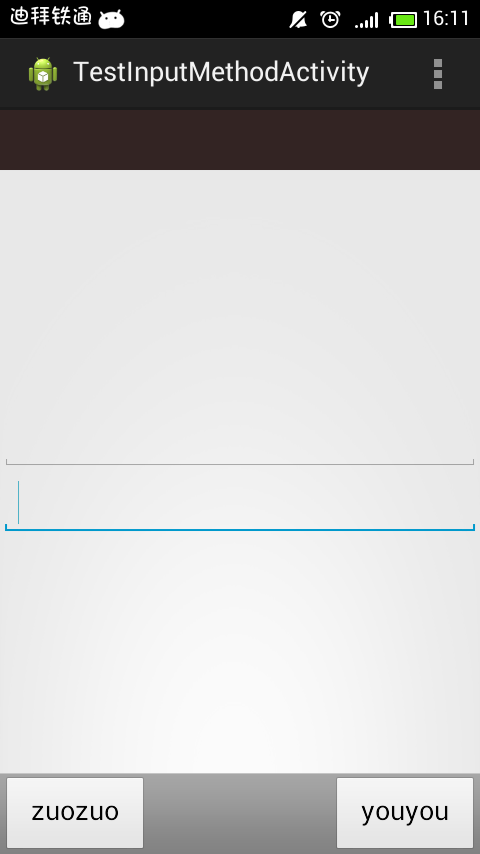
这里给出keyb弹出时和没弹出时的效果图,很好的将底部栏顶了上去

Android软键盘弹出将底部栏顶上去并不会挤压界面的更多相关文章
- ios 软键盘弹出布局被顶上去 已解决
document.body.addEventListener('focusout', () => { //软键盘收起的事件处理 set ...
- Android软键盘弹出,覆盖h5页面输入框问题
之前我们在使用vue进行 h5 表单录入的过程中,遇到了Android软键盘弹出,覆盖 h5页面 输入框 问题,在此进行回顾并分享给大家: 系统:Android 条件:当输入框在可视区底部或者偏下的位 ...
- android软键盘弹出引起的各种不适终极解决方案
android软键盘弹出引起的各种不适终极解决方案 以下描述如何解决ListView高度小于0时出现的UI问题. 创建RelativeLayout的子类TxrjRelativeLayout publi ...
- Android 软键盘弹出,界面整体上移
在做搜索功能的时候,点击搜索框,搜索框获取焦点,键盘弹出:现在问题出来了,android软键盘弹出的时候,android整个界面上移,布局被挤压,很难看:要解决这个问题,我们需要用到 windowSo ...
- Android软键盘弹出时把布局顶上去的解决方法
原文: 解决Andriod软键盘出现把原来的布局给顶上去的方法(转) 链接:http://blog.sina.com.cn/s/blog_9564cb6e0101g2eb.html 决方法,在main ...
- H5页面关于android软键盘弹出顶起底部元素的解决方案
应用场景:用div在移动端页面设置一个底部工具栏,css的代码大概如下: .tool{ width: 100%; height: 60px; position: fixed; left: 0px; b ...
- Android 软键盘弹出时把布局顶上去,控件乱套解决方法
解决办法:方法一:在你的activity中的oncreate中setContentView之前写上这个代码getWindow().setSoftInputMode(WindowManager.Layo ...
- Android软键盘弹出时布局问题
最近项目需要做一个类似聊天室的模块,基于Socket实现的,这部分稍后一段时间再做总结,功能上的相关点都实现了小例子也做出来了,最后发现一个比较腻歪的问题就是软键盘弹出时总是会把标题“挤出”屏幕,(无 ...
- Android 软键盘弹出时把原来布局顶上去的解决方法
键盘弹出时,会将布局底部的导航条顶上去. 解决办法: 在mainfest.xml中,在和导航栏相关的activity中加: <activity android:name=& ...
随机推荐
- CocoaPods Mac App的安装和使用
CocoaPods桌面应用版下载地址:https://cocoapods.org/app打开应用会提示你是否安装命令行工具,选择install就也可以在命令行使用Pod了.省去了上面的步骤们,方便快捷 ...
- vue.js 源代码学习笔记 ----- instance event
/* @flow */ import { updateListeners } from '../vdom/helpers/index' import { toArray, tip, hyphenate ...
- Ubuntu循环登录libGL error: fbConfigs swrast等
Ubuntu16.04更新NVIDIA驱动后,无法进入桌面,使用vim .xsession-errors 查看错误信息,如下: libGL error: No matching fbConfigs o ...
- Vue Devtools--vue调式工具
当浏览器控制台出现:Download the Vue Devtools extension for a better development experience: 1:安装 地址:https://g ...
- 【Python】下载图片
import requests import bs4 import urllib.request import urllib import os hdr = {'User-Agent': 'Mozil ...
- JVM原理一
简述: 这个其实不是很重要,一般配好环境就好了,如果不对jvm做啥动作不需要搞清楚这个. JVM ---->< JVM.DLL 挂接到JNIENV的实例 JAVA程序和操作系统的一个沟通者 ...
- Java多线程小例子(三个窗口卖火车票)
class Ticket implements Runnable{ private int TicketNum = 100; //100张火车票 private boolean flag = true ...
- Uoj 441 保卫王国
Uoj 441 保卫王国 动态 \(dp\) .今天才来写这个题. 设 \(f[u][0/1]\) 表示子树 \(u\) 中不选/选 \(u\) 时的最小权值和,显然有:\(f[u][0]=\sum ...
- String.format()格式化日期(2)
在以前的开发中,日期格式化一直使用的是SimpleDateFormat进行格式化.今天发现String.format也可以格式化.当 然,两种方式的优劣没有进行深入分析. 1. 日期格式化 (2018 ...
- 关于MySQL 通用查询日志和慢查询日志分析
MySQL中的日志包括:错误日志.二进制日志.通用查询日志.慢查询日志等等.这里主要介绍下比较常用的两个功能:通用查询日志和慢查询日志. 1)通用查询日志:记录建立的客户端连接和执行的语句. 2)慢查 ...