
关于Mac上使用ideviceinstaller操作iPhoneXR等24位UDID设备报“ERROR: Invalid UDID specified”解决办法
最近新申请了一台iPhone XR, 测试时发现使用ideviceinstaller命令老是报错:
Jackeys-MacBook-Pro:~ jackey$ ideviceinstaller -u -xxxxxxxxxxxx -U com.xxxx.xxxxxxxx

ERROR: Invalid UDID specified

Usage: ideviceinstaller OPTIONS

Manage apps on iOS devices.

  -u, --udid UDID    Target specific device by its -digit device UDID.

  -l, --list-apps    List apps, possible options:

       -o list_user    - list user apps only (this is the default)

       -o list_system    - list system apps only

       -o list_all    - list all types of apps

       -o xml        - print full output as xml plist

  -i, --install ARCHIVE    Install app from package file specified by ARCHIVE.

                           ARCHIVE can also be a .ipcc file for carrier bundles.

  -U, --uninstall APPID    Uninstall app specified by APPID.

  -g, --upgrade ARCHIVE    Upgrade app from package file specified by ARCHIVE.

  -L, --list-archives    List archived applications, possible options:

       -o xml        - print full output as xml plist

  -a, --archive APPID    Archive app specified by APPID, possible options:

       -o uninstall    - uninstall the package after making an archive

       -o app_only    - archive application data only

       -o docs_only    - archive documents (user data) only

       -o copy=PATH    - copy the app archive to directory PATH when done

       -o remove    - only valid when copy=PATH is used: remove after copy

  -r, --restore APPID    Restore archived app specified by APPID

  -R, --remove-archive APPID  Remove app archive specified by APPID

  -o, --options        Pass additional options to the specified command.

  -h, --help        prints usage information

  -d, --debug        enable communication debugging
提示udid错误, ideviceinstaller只支持40位UDID
看了下ideviceinstaller官方仓库 https://github.com/libimobiledevice/ideviceinstaller
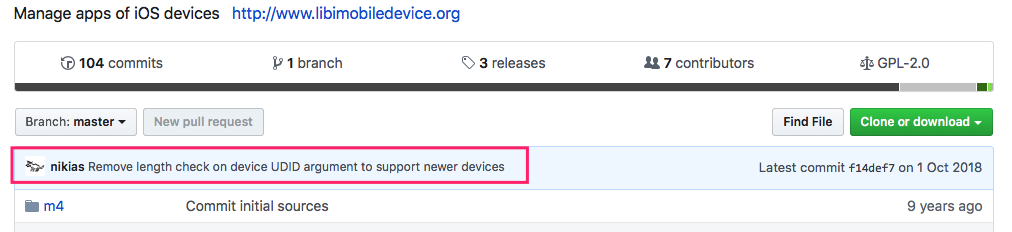
最新的代码已经解决了这个问题, 所以我们需要是用源码安装最新的版本
如果只下载ideviceinstaller源码进行安装的话会提示libimobiledevice版本低了, 所以我们需要把libimobiledevice跟ideviceinstaller都使用最新的源码安装下
以下是操作步骤:
1.如果当前的libimobiledevice跟ideviceinstaller不能正常使用, 可以使用以下方式恢复
brew uninstall --ignore-dependencies libimobiledevice

brew uninstall --ignore-dependencies usbmuxd

brew install --HEAD usbmuxd
brew unlink usbmuxd

brew link usbmuxd
brew install --HEAD libimobiledevice

brew install ideviceinstaller

brew link --overwrite ideviceinstaller
安装过程中可能会提示缺少后一个库, 使用brew install --HEAD ***安装下再重试就可以了; 如果只是提示安装失败就一般再试一次就可以
2.下载libimobiledevice源码
git clone https://github.com/libimobiledevice/libimobiledevice.git
进入libimobiledevice代码路径, 执行
./autogen.sh --disable-openssl
会提示缺少依赖, 使用brew install --HEAD ***安装下再重试
执行
make

sudo make install
3.下载ideviceinstaller源码
git clone https://github.com/libimobiledevice/ideviceinstaller.git
进入ideviceinstaller代码路径, 执行
./autogen.sh --disable-openssl

make

sudo make install
这样就OK了, 再试试操作手机
Jackeys-MacBook-Pro:ideviceinstaller jackey$ ideviceinstaller -u -xxxxxxxxxxxxx -U com.xxxxxxx.xxxxxxx

Uninstalling 'com.xxxxxxx.xxxxxxxxx'

Uninstall: RemovingApplication (%)

Uninstall: GeneratingApplicationMap (%)

Uninstall: Complete
大功告成
关于Mac上使用ideviceinstaller操作iPhoneXR等24位UDID设备报“ERROR: Invalid UDID specified”解决办法的更多相关文章
- Mac上打开拷贝到移动硬盘里的文件提示“已经被osx使用不能打开”解决办法
在终端里面粘贴xattr -d com.apple.FinderInfo(此处按一下空格),然后把文件拖进终端窗口,按一下回车就好了
- Java:Linux上java -jar xxx.jar命令执行jar包时出现Error: Invalid or corrupt jarfile xxx.jar解决方案
背景: 从ftp上上传jar包到linux上,之后在linux上通过ftp命令下载jar包文件,开始执行Java-jar,一直提示错误:Error: Invalid or corrupt jarfil ...
- 升级MAC OS到10.13, 10.14系统后UNITY工程无法加载资源的解决办法
升级MAC OS到10.13, 10.14系统后,出现UNITY工程无法加载资源的情况: Unity项目中Asset目录显示为空! 解决办法一: 打开Launchpad中的磁盘工具 (也就是实用工具下 ...
- 上传报错,ITMS-90167,解决办法
ERROR ITMS-90167 No .app bundles found in the package 报这个错误的原因是上传工具的版本问题或者本地网络问题. 解决办法是使用在线最新的上传工具,推 ...
- 在mac上安装pydev for eclipse时,在eclipse的Preferences中无法显示出来的解决方法
参考http://pydev.org/manual_101_install.html 中的说明,该插件依赖java7,在我安装eclipse之前并没有安装jdk,打开eclipse之后,自动安装了一个 ...
- Excel word “由于本机的限制_该操作已被取消_请与管理员联系”的已生效解决办法 (转 )
正常解决方法: 1.打开开始菜单,在运行里输入regedit,回车 2.在注册表中,导航到HKEY_CURRENT_USER\Software\Classes\.html 项 3.在默认项上点右键选择 ...
- 电脑上已经安装mysql之后安装wamp,wamp中的mysql无法启动的解决办法
Wampserver安装完成后无法启动MySQL这有可能是你之前安装过MysqL,因为wampserver内置MySQL.解决的方法就是配置环境变量. 找到我的电脑或计算机右键,打开属性,然后打开高级 ...
- “64位调试操作花费的时间比预期要长",无法运行调试解决办法
以管理员身份在命令提示符那里打入如下命令: netsh winsock reset catalognetsh int ip reset reset.log hit 或者是 打开Microsoft Vi ...
- VS2017:"64位调试操作花费的时间比预期要长",无法运行调试解决办法
关于这个问题网上搜了好久,参考http://www.yishimei123.com/network/685.html这篇文章,最后终于解决了,在此表示非常感谢! 我的环境是:win10+VS2017 ...
随机推荐
- Leetcode 236
思路:1.如果p或q就是根节点,那么LCA=p或q,返回根节点(递归出口) 2.分治 2.1 Divide:分别计算左字树和右子树的LCA 2.2 Conquer:如果左字树和右子树的计算结果均不为空 ...
- 2017浙江省赛 C - What Kind of Friends Are You? ZOJ - 3960
地址:http://acm.zju.edu.cn/onlinejudge/showProblem.do?problemCode=3960 题目: Japari Park is a large zoo ...
- JVM性能调优(转)
本文转自:http://www.cnblogs.com/chen77716/archive/2010/06/26/2130807.html 最近因项目存在内存泄漏,故进行大规模的JVM性能调优 , 现 ...
- I.MX6中PC连接开发板问题
修改板端的文件 添加登录密码: passwd vi /etc/network/interrfaces 在auto eth0下增加auto eth1 如果采用固定ip方式可以在后面增加一段固定ip设置 ...
- 枚举转SelectList扩展方法
public enum Avbc { Red=1, Blue=2, Whilt=3, Black=4 } public st ...
- 延迟环境变量扩展(bat)
延迟环境变量扩展(bat) 之前遇到一些环境变量的问题,简单记录下 From:http://www.cnblogs.com/dongzhiquan/archive/2012/09/05/2671218 ...
- 基于tomcat集群做session共享
前端代理服务器nginx:192.168.223.136 tomcat服务器:采用的一台多实例192.168.223.146:8081,192.168.223.146:8082(如何构建多实例tomc ...
- 20145328 《Java程序设计》实验一实验报告
20145328 <Java程序设计>实验一实验报告 实验名称 Java开发环境的熟悉(Windows + IDEA) 实验内容 使用JDK编译.运行简单的Java程序: 使用IDEA 编 ...
- 收藏 19 个 ES6常用的简写技巧
代码精炼是每个有追求的程序所向往的,本文总结了19个JavaScript的简写技术,其中包括三元操作符.短路求值简写方式.声明变量简写方法等等,还有些自己的理解加上去:希望对你有帮助. 三元操作符 当 ...
- python-打印进度条
progress_bar.py #!/usr/bin/python3.6 #__*__uft8__*__ import sys import time def progress(percent,wid ...