
Android——Android Bundle类(转)
今天发现自己连Bundle类都没有搞清楚,于是花时间研究了一下。
根据google官方的文档(http://developer.android.com/reference/android/os/Bundle.html)
Bundle类是一个key-value对,“A mapping from String values to various Parcelable types.”
类继承关系:
java.lang.Object
android.os.Bundle
Bundle类是一个final类:
public final class
Bundle
extends Objectimplements Parcelable Cloneable
两个activity之间的通讯可以通过bundle类来实现,做法就是:
(1)新建一个bundle类
Bundle mBundle = new Bundle();
(2)bundle类中加入数据(key -value的形式,另一个activity里面取数据的时候,就要用到key,找出对应的value)
mBundle.putString("Data", "data from TestBundle");
(3)新建一个intent对象,并将该bundle加入这个intent对象
Intent intent = new Intent();

intent.setClass(TestBundle.this, Target.class);

intent.putExtras(mBundle);
完整代码如下:
android mainfest.xml如下:
<?xml version="1.0" encoding="utf-8"?>

<manifest xmlns:android="http://schemas.android.com/apk/res/android"

      package="com.tencent.test"

      android:versionCode="1"

      android:versionName="1.0">

    <application android:icon="@drawable/icon" android:label="@string/app_name">

        <activity android:name=".TestBundle"

                  android:label="@string/app_name">

            <intent-filter>

                <action android:name="android.intent.action.MAIN" />

                <category android:name="android.intent.category.LAUNCHER" />

            </intent-filter>

        </activity>

    <activity android:name=".Target"></activity>

    </application>

    <uses-sdk android:minSdkVersion="7" />

</manifest>
两个类如下:intent从TestBundle类发起,到Target类。
类1:TestBundle类:
import android.app.Activity;

import android.content.Intent;

import android.os.Bundle;

import android.view.View;

import android.view.View.OnClickListener;

import android.widget.Button;

public class TestBundle extends Activity {

    private Button button1;

    private OnClickListener cl;

    public void onCreate(Bundle savedInstanceState) {

        super.onCreate(savedInstanceState);

        setContentView(R.layout.main);

        button1 = (Button) findViewById(R.id.button1);

        cl = new OnClickListener(){

            @Override

            public void onClick(View arg0) {

                // TODO Auto-generated method stub

                Intent intent = new Intent();

                intent.setClass(TestBundle.this, Target.class);

                Bundle mBundle = new Bundle();

                mBundle.putString("Data", "data from TestBundle");//压入数据

                intent.putExtras(mBundle);

                startActivity(intent);

            }

        };

        button1.setOnClickListener(cl);

    }

}
类2: Target
import android.app.Activity;

import android.os.Bundle;

public class Target extends Activity{

    public void onCreate(Bundle savedInstanceState) {

        super.onCreate(savedInstanceState);

        setContentView(R.layout.target);

        <span style="color:#ff6600;">Bundle bundle = getIntent().getExtras();   </span> //得到传过来的bundle

        String data = bundle.getString("Data");//读出数据

        setTitle(data);

    }

}
布局文件:
main.xml
<?xml version="1.0" encoding="utf-8"?>

<LinearLayout xmlns:android="http://schemas.android.com/apk/res/android"

    android:orientation="vertical"

    android:layout_width="fill_parent"

    android:layout_height="fill_parent"

    >

<TextView

    android:layout_width="fill_parent"

    android:layout_height="wrap_content"

    android:text="@string/hello"

    />

<Button

    android:layout_width="fill_parent"

    android:layout_height="wrap_content"

    android:text="@string/button"

    android:id = "@+id/button1"

    />

</LinearLayout>
target.xml
<?xml version="1.0" encoding="utf-8"?>

<LinearLayout xmlns:android="http://schemas.android.com/apk/res/android"

    android:orientation="vertical"

    android:layout_width="fill_parent"

    android:layout_height="fill_parent"

    >

<TextView

    android:layout_width="fill_parent"

    android:layout_height="wrap_content"

    android:text="@string/target"

    />

</LinearLayout>
String.xml
<?xml version="1.0" encoding="utf-8"?>

<resources>

    <string name="hello">Hello World, TestBundle!</string>

    <string name="app_name">测试Bundle用法</string>

    <string name="button">点击跳转</string>

    <string name="target">来到target activity</string>

</resources>
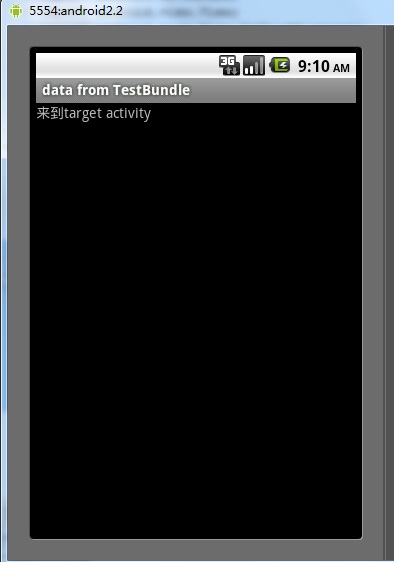
结果:
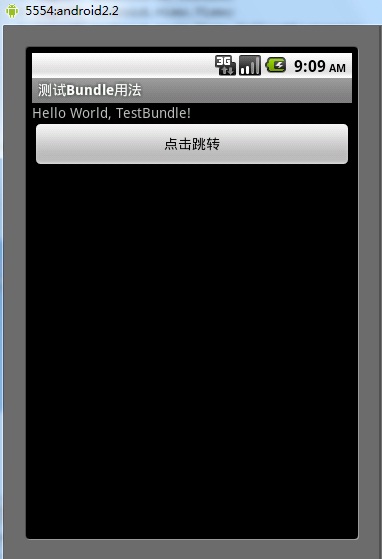
跳转结果:
Android——Android Bundle类(转)的更多相关文章
- Android之Bundle类
API文档说明 1.介绍 用于不同Activity之间的数据传递 1.重要方法 clear():清除此Bundle映射中的所有保存的数据. clone():克隆当前Bundle containsKey ...
- android 18 Bundle类
Bundle类:竖屏的activity换到横屏的activity的时候,会把竖屏的activity杀掉横屏的activity创建,竖屏的activity会有一些计算结果,可以用数据存起来,存到内存里面 ...
- Android笔记——Bundle类的作用
Bundle类用作携带数据,它类似于Map,用于存放key-value键值对形式的值.相对于Map,它提供了各种常用类型的putXxx()/getXxx()方法,如:putString()/getSt ...
- Android Bundle类
根据google官方的文档(http://developer.android.com/reference/android/os/Bundle.html) Bundle类是一个key-value对,“A ...
- Android中Path类的lineTo方法和quadTo方法画线的区别
转载:http://blog.csdn.net/stevenhu_223/article/details/9229337 当我们需要在屏幕上形成画线时,Path类的应用是必不可少的,而Path类的li ...
- Android 自定义Dialog类,并在Activity中实现按钮监听。
实际开发中,经常会用到Dialog,比如退出时候会弹出是否退出,或者还有一些编辑框也会用Dialog实现,效果图如下: 开发中遇到的问题无非在于如果在Activity中监听这个Dialog中实现的 ...
- Android中GPS类及方法简介
GPS是Global Positioning System(全球定位系统)的简称,它的作用就是为全球的物体提供定位功能.GPS定位是一门高新技术,但对于Android程序员来说,开发GPS功能的应用程 ...
- Android之TelephonyManager类的方法详解
TelephonyManager类主要提供了一系列用于访问与手机通讯相关的状态和信息的get方法.其中包括手机SIM的状态和信息.电信网络的状态及手机用户的信息.在应用程序中可以使用这些get方法获取 ...
- android中Handle类的用法
android中Handle类的用法 当我们在处理下载或是其他需要长时间执行的任务时,如果直接把处理函数放Activity的OnCreate或是OnStart中,会导致执行过程中整个Activity无 ...
随机推荐
- 小课堂week19 编程范式巡礼最终季 超级范式
编程范式巡礼(最终季)--超级范式 本周是编程范式系列的最后一次分享,让我们拉长视角,看向远方,进入"元编程"的领域,在<冒号课堂>中起了个很酷的名字:"超级 ...
- 配置文件格式用哪个?文件夹+纯文本文件,XML,SQLite
稍具规模的软件都会须要一个配置文件来支持软件的执行.眼下常见的配置文件格式有纯文本.XML.SQLite.自己定义二进制格式,怎样进行选择呢? 1 纯文本--永远不会失效的文件格式 文本化是传统Uni ...
- selenium 问题:OSError: [WinError 6] 句柄无效
问题: 执行多个用例的时候,会抛出异常: File "xxxxxx.py", line 16, in get_driver driver = webdriver.Chrome(ex ...
- 黑马程序员:多线程Socket
---------------------- ASP.Net+Android+IOS开发..Net培训.期待与您交流! ----------------------- 一.Socket一般应用模式(服 ...
- 扩展MSEG 加入Z字段
append MSEG append IMSEG append BAPI_TE_XMSEG 实现 BADI: MB_BAPI_GOODSMVT_CREATE BAPI中: BAPI_ ...
- 大话设计模式C++实现-第1章-简单工厂模式
一.UML图 二.包括的角色 简单工厂模式包括三个角色: (1)工厂类Factory:工厂类是用来制造产品的. 因此,在Factory中有一个用于制造产品的Create函数或者Generate函数之类 ...
- ffmpeg Win8移植记(一)
最近和同事一起合作,移植ffmepg到Win8平台上. Windows Store 要求3个架构X86 X64 ARM, 我们主要做的就是X86和ARM的平台, X86的平台移植的文章已经很多了.我推 ...
- 谋哥:我跟CEO们都说了啥
昨天,我和谋天团会员杨过(cdywq7070)--杨总,聊他公司的App,针对女性社交的"闪聊". 杨总增加谋天团,主要是想让我帮他策划推广,我说你让我策划一次.还不如增加谋天团. ...
- js无缝滚动,不平滑(求高人指点)
<!DOCTYPE html PUBLIC "-//W3C//DTD XHTML 1.0 Strict//EN" "http://www.w3.org/TR/xht ...
- jquery prop('checked', true)解决attr('checked', true)不能选中radio问题
正如标题所言,使用:prop('checked', true)就可以了