
angular2.x 下拉多选框选择组件
angular2.x - 5.x 的下拉多选框选择组件 ng2 -- ng5。最近在学angular4,经常在交流群看见很多人问 下拉多选怎么做。。。 今天就随便写的个。
组件源码 百度云 链接:https://pan.baidu.com/s/1SHV4_ccNPXyqpyEQZ8QQGg 密码: 2uv4
下面贴代码:
界面
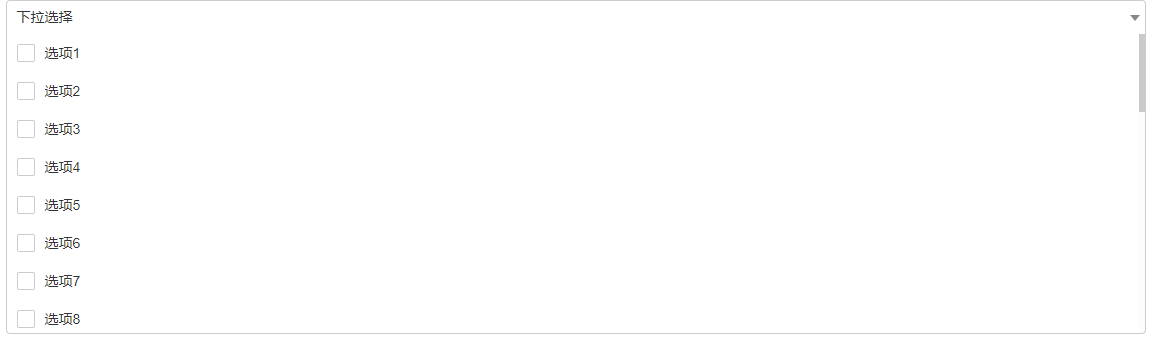

引用 selectList 是 下拉框的数据列表 redSelList() 方法是获取 选择完成后的数据
<app-select-checkbox [itemList]="selectList" (selListOut)="redSelList($event)"></app-select-checkbox>
    // 初始化下拉框数据列表 放在 ngOnInit 里

this.selectList = [];

      for(let i = 1; i<= 30; i++){

        this.selectList.push({

          id: i,

          name: "选项"+ i

        })

      }

// 获取传递过来的数组

redSelList(event){

    console.log(event);

    this.selList = event;

}
html
<div class="select-checkbox-div" [ngClass]="{ 'selectOpen' : isSelectOpen }">

  <div class="select-checkbox-show clear-float" (click)="clickSelect()">

    <div class="show-data">{{ selectedName }}</div>

    <i class="fa-select"></i>

  </div>

  <div class="select-checkbox-content">

    <div class="select-checkbox-list">

      <div class="select-checkbox-item" *ngFor="let item of itemList">

        <div>{{i}}</div>

        <div class="input-checkbox-div"><input type="checkbox" [checked]="isCheck(item)" (click)="clickItem($event,item)" /></div>

        <div class="item-name" (click)="checkItem($event, item)">{{ item.name }}</div>

      </div>

    </div>

  </div>

</div>
ts
import { Component, OnInit, Input, Output, EventEmitter } from '@angular/core';

import * as $ from 'jquery';

@Component({

  selector: 'app-select-checkbox',

  templateUrl: './select-checkbox.component.html',

  styleUrls: ['./select-checkbox.component.css']

})

export class SelectCheckboxComponent implements OnInit {

  @Input() itemList: Array<any>;

  @Output() selListOut = new EventEmitter();

  public selected: Array<any>;

  public selectName: Array<any>;

  public selectItemList: Array<any>;

  public selectedName: string;

  public isSelectOpen: boolean;

  constructor() { }

  ngOnInit() {

    this.selected = [];

    this.selectName = [];

    this.selectItemList = [];

    this.isSelectOpen = false;

    this.selectedName = "下拉选择";

    let thisT = this;

    document.addEventListener("click", (e) =>{

      var target = $(e.target);

      if(target.closest('.select-checkbox-div').length == 0){

        thisT.isSelectOpen = false;

      }

    })

  }

  // 点击了显示框( 是否打开下拉框 )

  clickSelect(){

    this.isSelectOpen = !this.isSelectOpen;

  }

  // 点击整块div执行选择

  checkItem(e, item){

    const ele = e.target;

    const checkbox = ele.previousElementSibling.firstElementChild;

    const action = (checkbox.checked ? 'remove' : 'add');

    this.updateSelected(action, item);

  }

  //   点击input时执行

  clickItem(e, item) {

    const checkbox = e.target;

    const action = (checkbox.checked ? 'add' : 'remove');

    this.updateSelected(action, item);

  }

  // 用来判断input 的checked

  isCheck(item) {

    return this.selected.findIndex(value => value == item.id) >= 0;

  }

  //  执行增加、删除

  private updateSelected(action, item) {

    if (action == 'add' && this.selected.findIndex(value => value == item.id) == -1) {

      this.selected.push(item.id);

      this.selectName.push(item.name);

      this.selectItemList.push(item);

    }

    if (action == 'remove' && this.selected.findIndex(value => value == item.id) != -1) {

      this.selectItemList.splice(this.selected.findIndex(value => value == item.id), 1);

      this.selectName.splice(this.selected.findIndex(value => value == item.id), 1);

      this.selected.splice(this.selected.findIndex(value => value == item.id), 1);

    }

    if(this.selectName.length === 0){

      this.selectedName = "下拉选择";

    }else{

      this.selectedName = this.selectName.join(",");

    }

    this.selListOut.emit(this.selectItemList);

  }

}
css:
input[type="radio"], input[type="checkbox"]{

    margin:;

}

.clear-float:after{

    content: "";

    display: block;

    clear: both;

}

.select-checkbox-item:hover{

    background-color: #eee;

}

.select-checkbox-item{

    cursor: pointer;

    -moz-user-select: none;

    -ms-user-select: none;

    -webkit-user-select: none;

    user-select: none;

}

.input-checkbox-div{

    float: left;

    height: 18px;

    box-sizing: content-box;

}

.input-checkbox-div input[type=checkbox]{

    outline: none!important;

    -webkit-appearance: none;

    -moz-appearance: none;

    line-height: 18px;

    vertical-align: top;

    margin:;

    padding: 10px;

}

.input-checkbox-div input[type=checkbox]:before{

    content: url(../../assets/images/checkbox1.png);

    display: block;

}

.input-checkbox-div input[type=checkbox]:checked:before{

    content: url(../../assets/images/checkbox2.png);

    display: block;

}

.item-name{

    line-height: 18px;

    padding: 10px 0;

}

.check-item{

    float: left;

    padding: 1px 0 1px 10px;

    position: relative;

    border: 1px solid #ccc;

    border-radius: 4px;

    margin-right: 5px;

}

.check-close{

    float: right;

    width: 20px;

    height: 20px;

    line-height:;

    padding: 2px;

    box-sizing: border-box;

    background-color: #fff;

    cursor: pointer;

    text-align: center;

}

.select-checkbox-div {

    position: relative;

}

.select-checkbox-content{

    display: none;

    position: absolute;

    left:;

    right:;

    top: 34px;

    max-height: 300px;

    overflow-y: auto;

    overflow-x: hidden;

    background-color: #fff;

    border-color: #ccc;

    border-width: 0 1px 1px 1px;

    border-style: solid;

    border-radius: 0 0 4px 4px;

    z-index:;

}

.selectOpen .select-checkbox-content{

    display: block;

}

.selectOpen .select-checkbox-show{

    border-width: 1px 1px 0 1px;

    border-radius: 4px 4px 0 0;

}

.select-checkbox-show{

    padding: 6px 18px 6px 10px;

    border: 1px solid #ccc;

    border-radius: 4px;

    width: 100%;

    height: 34px;

    position: relative;

    cursor: pointer;

    -webkit-user-select: none;

    -moz-user-select: none;

    -ms-user-select: none;

    user-select: none;

}

.fa-select{

    display: block;

    border-color: #888 transparent transparent transparent;

    border-style: solid;

    border-width: 6px 5px 0 5px;

    right: 5px;

    top: 14px;

    position: absolute;

    z-index:;

}

.show-data{

    width: 100%;

    overflow-y: hidden;

    overflow-x: auto;

    white-space: nowrap;

}

.show-data::-webkit-scrollbar {

    width: 6px;

    height: 6px;

}

.show-data::-webkit-scrollbar-track {

    -webkit-box-shadow: inset 0 0 6px rgba(0,0,0,0);

        background-color: rgba(0,0,0,0.01);

}

    .show-data::-webkit-scrollbar-track:hover {

        background-color: rgba(0,0,0,0.01);

    }

    .show-data::-webkit-scrollbar-track:active {

        background-color: rgba(0,0,0,0.05);

    }

.show-data::-webkit-scrollbar-thumb {

    background-color: rgba(0,0,0,0.2);

}

.show-data:hover::-webkit-scrollbar-thumb {

    background-color: rgba(0,0,0,0.2);

}

.show-data::-webkit-scrollbar-thumb:hover {

    background-color: rgba(0,0,0,0.4);

}

.show-data::-webkit-scrollbar-thumb:active {

    background: rgba(0,0,0,0.6)

}

.select-checkbox-content::-webkit-scrollbar {

    width: 6px;

    height: 6px;

}

.select-checkbox-content::-webkit-scrollbar-track {

    -webkit-box-shadow: inset 0 0 6px rgba(0,0,0,0);

    background-color: rgba(0,0,0,0.01);

}

.select-checkbox-content::-webkit-scrollbar-track:hover {

    background-color: rgba(0,0,0,0.01);

}

.select-checkbox-content::-webkit-scrollbar-track:active {

    background-color: rgba(0,0,0,0.05);

}

.select-checkbox-content::-webkit-scrollbar-thumb {

    background-color: rgba(0,0,0,0.2);

}

.select-checkbox-content:hover::-webkit-scrollbar-thumb {

    background-color: rgba(0,0,0,0.2);

}

.select-checkbox-content::-webkit-scrollbar-thumb:hover {

    background-color: rgba(0,0,0,0.4);

}

.select-checkbox-content::-webkit-scrollbar-thumb:active {

    background: rgba(0,0,0,0.6)

}
angular2.x 下拉多选框选择组件的更多相关文章
- 使用jQuery为文本框、单选框、多选框、下拉框、下拉多选框设值及返回值的处理
<!DOCTYPE html PUBLIC "-//W3C//DTD HTML 4.01 Transitional//EN" "http://www.w3.org/ ...
- 品优购商城项目(二)AngularJS、自动代码生成器、select2下拉多选框
品优购商城想项目第二阶段 AngularJS.自动代码生成器.select2下拉多选框 完成了课程第三天.第四天的的任务. 1.学习了AngularJs前端的mvc分层思想,js部分分成control ...
- 自定义实现 PyQt5 下拉复选框 ComboCheckBox
一.前言 由于最近的项目需要具有复选功能,但过多的复选框会影响界面布局和美观,因而想到把 PyQt5 的下拉列表和复选框结合起来,但在 PyQt5 中并没有这样的组件供我们使用,所以想要自己实现一个下 ...
- 我的第一个jquery插件:下拉多选框
<!DOCTYPE HTML> <html> <head> <title> New Document </title> <meta n ...
- 自己用ul模拟实现下拉多选框,
模拟实现下拉多选框 效果如下 <!DOCTYPE html> <html lang="en"> <head> <meta charset= ...
- jquery--获取多选框的值、获取下拉多选框的值
获取多选框的值 var packageCodeList=new Array(); $('#server_id:checked').each(function(){ packageCodeList.pu ...
- selectpicker下拉多选框ajax异步或者提前赋值=》默认值
Bootstrap select多选下拉框赋值 success: function (data) { var oldnumber = new Array(); $.each(data, functio ...
- DevExpress下拉多选框 CheckComboboxEdit、CheckedListBoxControl
CheckComboboxEdit //清空项 checkedComboBoxEdit1.Properties.Items.Clear(); //自定义数组 ...
- Extjs下拉多选框
//------录入时间,下拉列表框------ var inputTimeRow = new Ext.data.Record.create([ { name : 'value' },{ name : ...
随机推荐
- Shiro Annotation保护实例
之前介绍了Shiro的Web訪问控制和缓存配置,事实上Shiro和Spring一样能够使用Annotation来配置方法级别的安全.省去自己每次获取Subject去做权限验证,比方在改动用户passw ...
- Secure Sockets Layer(安全套接层)
SSL SSL(Secure Sockets Layer安全套接层)及其继任者传输层安全(Transport Layer Security,TLS)是为网络通信提供安全及数据完整性的一种安全协议.TL ...
- 需求用例分析之五:业务用例之Rational系
版权声明:作者:张克强.未经作者允许不得转载. https://blog.csdn.net/zhangmike/article/details/28134897 作者:张克强 作者微博:张克强- ...
- 图文讲解zabbix安装全过程(5)
在了解<zabbix硬件.软件需求>之后,在你心里应该有备选的机器.今天开始安装zabbix.zabbix需要LNMP或者LAMP环境.环境的搭建不在本章范围内. LNMP环境配置Linu ...
- 如何制作一款HTML5 RPG游戏引擎——第二篇,烟雨+飞雪效果
今天我们来实现烟雨+飞雪效果.首先来说,一款经典的RPG游戏难免需要加入天气的变化.那么为了使我们的RPG游戏引擎更完美,我们就只好慢慢地实现它. 本文为该系列文章的第二篇,如果想了解以前的文章可以看 ...
- UVA10341:Solve It(二分+math.h库)
题目:http://acm.hust.edu.cn/vjudge/contest/view.action?cid=68990#problem/E 题目要求:p*e-x+ q*sin(x) + r*co ...
- Delphi APP 開發入門(九)拍照與分享
Delphi APP 開發入門(九)拍照與分享 分享: Share on facebookShare on twitterShare on google_plusone_share 閲讀次數:30 ...
- java 将小数拆分为两部分+浮点型精度丢失问题
问题:将一个String类型的小数拆分为整数部分和小数部分,如9.9拆分为9和0.9 1.将小数的整数和小数部分拆分开 public float numberSub(String totalMoney ...
- Restful概念
文章节选自: http://www.ruanyifeng.com/blog/2011/09/restful https://www.zhihu.com/question/28557115/answer ...
- hadoop 一些命令
关闭访问墙 service iptables stop hadoop dfs -mkdir input hadoop dfs -copyFromLocal conf/* input hadoop j ...