
脚本kafka-configs.sh用法解析
引用博客来自李志涛:https://www.cnblogs.com/lizherui/p/12275193.html
前言介绍
网络上针对脚本kafka-configs.sh用法,也有一些各种文章,但都不系统不全面,介绍的内容是有缺失的,总让人看起来很懂,用起来难,例如:动态配置内部关系不清晰、有些重点配置参数主从同步配额限流也没有解释清楚,除非去看代码。所以我希望读者通过深入阅读此文,更便捷利用此脚本解决实际运维和开发中遇到的问题,同时也为大家节省学习时间。
脚本语法解析
kafka-configs.sh参数解析
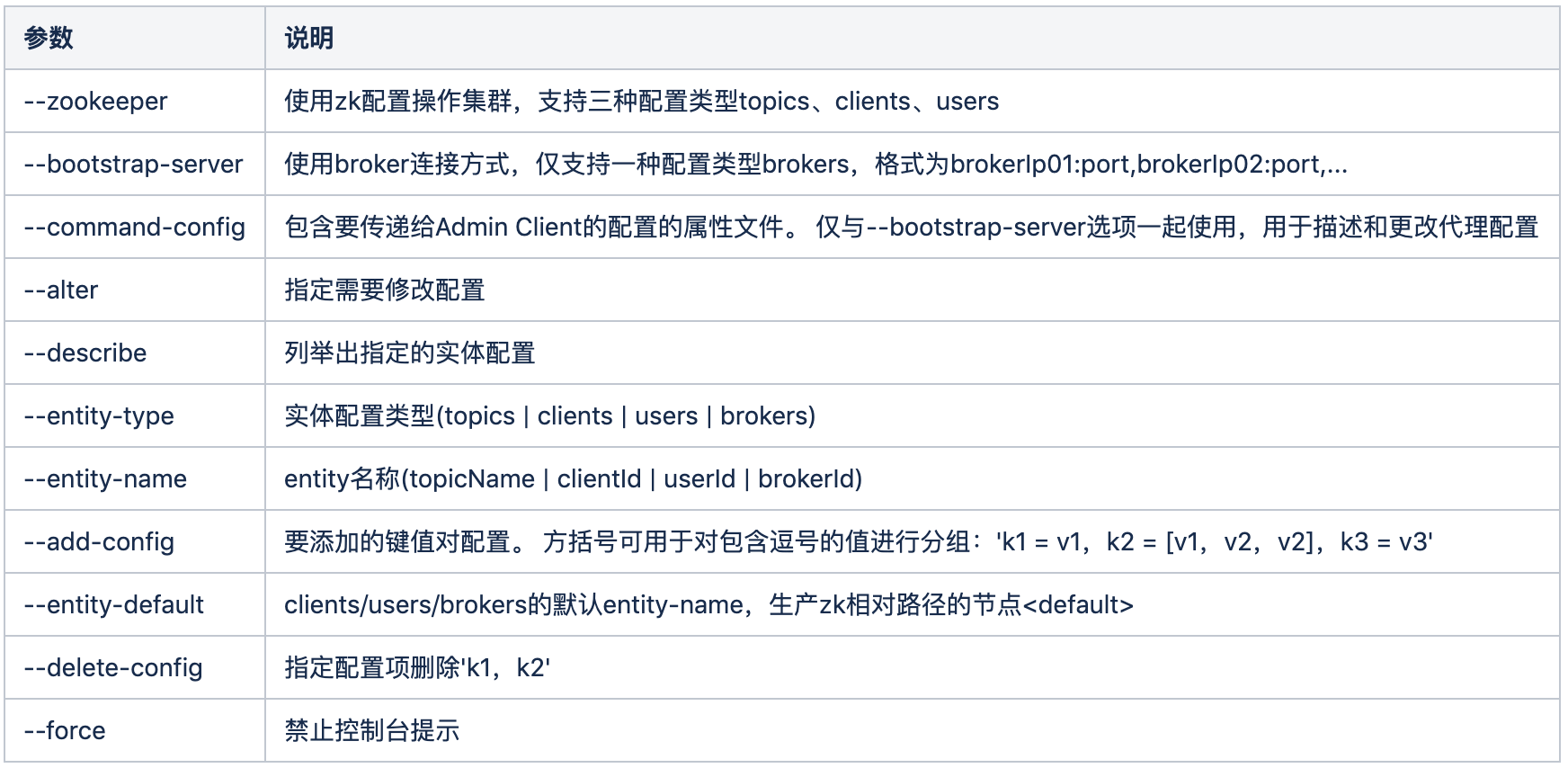
语法格式
增加配置项
某个topic配置对象
bin/kafka-configs.sh --zookeeper localhost:2181/kafkacluster --alter --entity-type topics --entity-name topicName --add-config 'k1=v1, k2=v2, k3=v3'
所有clientId的配置对象
bin/kafka-configs.sh --zookeeper localhost:2181/kafkacluster --alter --entity-type clients --entity-default --add-config 'k1=v1, k2=v2, k3=v3'
例子
bin/kafka-configs.sh --zookeeper localhost:2181/kafkacluster --alter --entity-type topics --entity-name topicName --add-config 'max.message.bytes=50000000, flush.messages=50000, flush.ms=5000'
bin/kafka-configs.sh --zookeeper localhost:2181/kafkacluster --alter --entity-type topics --entity-name topicName --add-config 'max.message.bytes=50000000' --add-config 'flush.messages=50000'
删除配置项
bin/kafka-configs.sh --zookeeper localhost:2181/kafkacluster --alter --entity-type topics --entity-name topicName --delete-config ‘k1,k2,k3’
bin/kafka-configs.sh --zookeeper localhost:2181/kafkacluster --alter --entity-type clients --entity-name clientId --delete-config ‘k1,k2,k3’
bin/kafka-configs.sh --bootstrap-server localhost:9092 --alter --entity-type brokers --entity-name $brokerId --delete-config ‘k1,k2,k3’
bin/kafka-configs.sh --bootstrap-server localhost:9092 --alter --entity-type brokers --entity-default --delete-config ‘k1,k2,k3’
例子
bin/kafka-configs.sh --zookeeper localhost:2181/kafkacluster --alter --entity-type topics --entity-name test-cqy --delete-config 'segment.bytes'
修改配置项
修改配置项与增加语法格式相同,相同参数后端直接覆盖
列出entity配置描述
bin/kafka-configs.sh --zookeeper localhost:2181/kafkacluster --entity-type topics --entity-name topicName --describe
bin/kafka-configs.sh--bootstrap-server localhost:9092 --entity-type brokers --entity-name $brokerId --describe
bin/kafka-configs.sh --bootstrap-server localhost:9092 --entity-type brokers --entity-default --describe
bin/kafka-configs.sh --zookeeper localhost:2181/kafkacluster --entity-type users --entity-name user1 --entity-type clients --entity-name clientA --describe
其他依次类推,不一一列举
配置管理用法
客户端配额限流
kafka支持配额管理,从而可以对Producer和Consumer的produce&fetch操作进行流量限制,防止个别业务压爆服务器。本文主要介绍如何使用kafka的配额管理功能
配额限流简介
Kafka配额限流由3种粒度配置:
- users + clients
- users
- clients
以上3种都是对接入的client的身份进行的认定方式。其中clientid是每个接入kafka集群的client的一个身份标志,在ProduceRequest和FetchRequest中都需要带上;users只有在开启了身份认证的kafka集群才有。producer和consumer的clientid默认值分别为producer-自增序号、groupid
配置优先级
以上三种粒度配置会组合成8个配置对象,相同配置项作用域范围不同,高优先级覆盖低优先级,下面为配置优先级

配置项列表

配置用例
1.配置users + clients
bin/kafka-configs.sh --zookeeper localhost:2181/kafkacluster --alter --entity-type users --entity-name user1 --entity-type clients --entity-name clientA --add-config 'producer_byte_rate=20971520,consumer_byte_rate=20971520'
bin/kafka-configs.sh --zookeeper localhost:2181/kafkacluster --alter --entity-type users --entity-name user1 --entity-type clients --entity-default --add-config 'producer_byte_rate=20971520,consumer_byte_rate=20971520'
bin/kafka-configs.sh --zookeeper localhost:2181/kafkacluster --alter --entity-type users --entity-default --entity-type clients --entity-default --add-config 'producer_byte_rate=20971520,consumer_byte_rate=20971520'
2.配置users
broker内所有的users累加总和最大producer生产&消费速率为20MB/sec
bin/kafka-configs.sh --zookeeper localhost:2181/kafkacluster --entity-type users --entity-default --alter --add-config 'producer_byte_rate=20971520,consumer_byte_rate=20971520'
broker内userA的最大producer生产&消费速率为20MB/sec
bin/kafka-configs.sh --zookeeper localhost:2181/kafkacluster --entity-type users --entity-name userA --alter --add-config 'producer_byte_rate=20971520,consumer_byte_rate=20971520'
3.配置clients
broker内所有clientId累加总和最大producer生产速率为20MB/sec
bin/kafka-configs.sh --zookeeper localhost:2181/kafkacluster --alter --entity-type clients --entity-default --add-config 'producer_byte_rate=20971520'
broker内clientA的最大producer生产速率为20MB/sec
bin/kafka-configs.sh --zookeeper localhost:2181/kafkacluster --alter --entity-type clients --entity-name clientA --add-config 'producer_byte_rate=20971520'
超出限流存在的问题
如果producer和consumer超出了流量限制,kafka会怎么处理呢?
- 对于Producer。如果Producer超出限流,先把数据append到log文件,再计算延时时间,并在等待ThrottleTime时间后响应给Producer。kafka没有客户端反馈机制,所以producer写入超时会重发,写入消息会重复。
- 对于Consumer。如果Consumer超出限流,先计算延时时间,并在等待ThrottleTime时间后,Kafka从log读取数据并响应Consumer。如果consumer的QequestTimeout < ThrottleTime,则consumer在ThrottleTime时间内会不断重发fetch请求,kafka会堆积大量无效请求,占用资源。
Brokers类型配置
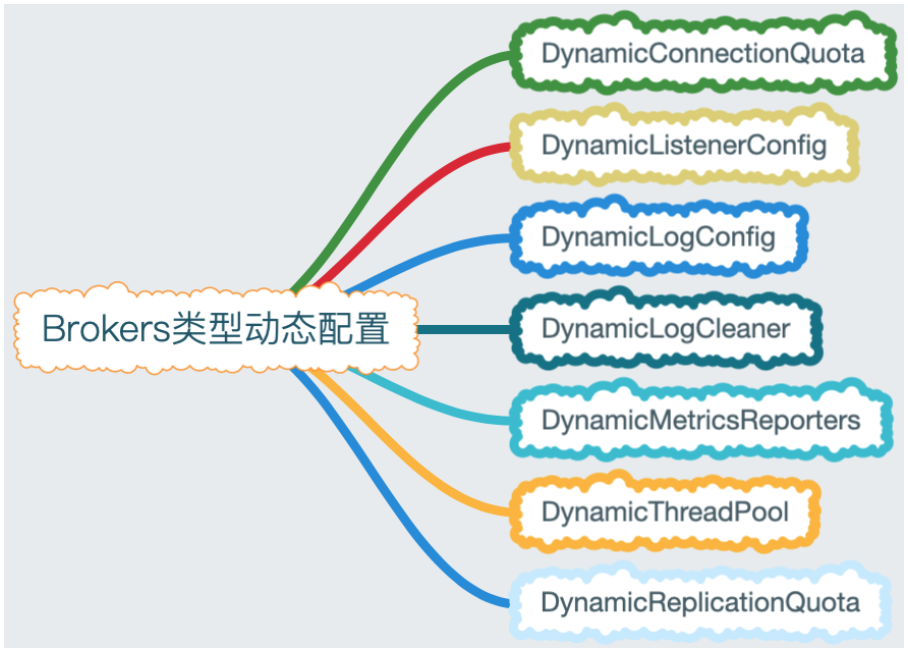
brokers配置比较复杂,配置项众多,Kafka内部把brokers配置分为7个模块,具体如下表格所示:

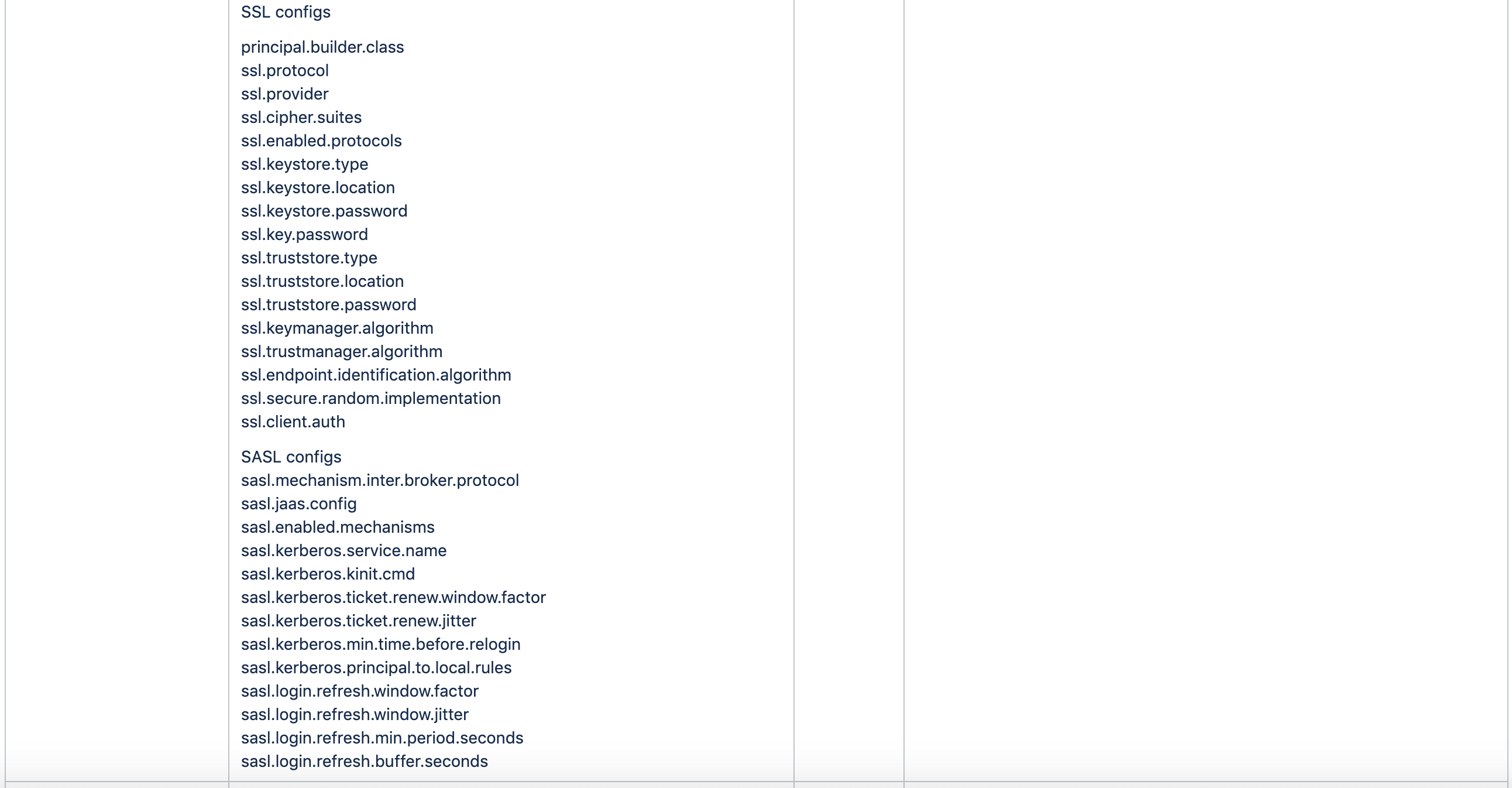


brokers类型配置并不支持所有的配置项,例如:Broker升级相关协议和group、zookeeper、内置Transaction、Controlled、内置offset相关就不能动态更改。配置brokers只能指定--bootstrap-server,zk不支持
增加配置项
bin/kafka-configs.sh --bootstrap-server localhost:9092 --alter --entity-type brokers --entity-default --add-config 'max.connections.per.ip=200,max.connections.per.ip.overrides=[ip1:100,ip2:120]'
bin/kafka-configs.sh --bootstrap-server localhost:9092--alter --entity-type brokers --entity-name $brokerId --add-config 'max.connections.per.ip=200,max.connections.per.ip.overrides=[ip1:100]'
删除配置项
bin/kafka-configs.sh --bootstrap-server localhost:9092 --alter --entity-type brokers --entity-default --delete-config 'max.connections.per.ip,max.connections.per.ip.overrides'
bin/kafka-configs.sh --bootstrap-server localhost:9092 --alter --entity-type brokers --entity-name $brokerId --delete-config 'max.connections.per.ip,max.connections.per.ip.overrides'
列出配置描述
bin/kafka-configs.sh --bootstrap-server localhost:9092 --entity-type brokers --entity-default --describe
bin/kafka-configs.sh --bootstrap-server localhost:9092 --entity-type brokers --entity-name $brokerId --describe
Topics类型配置
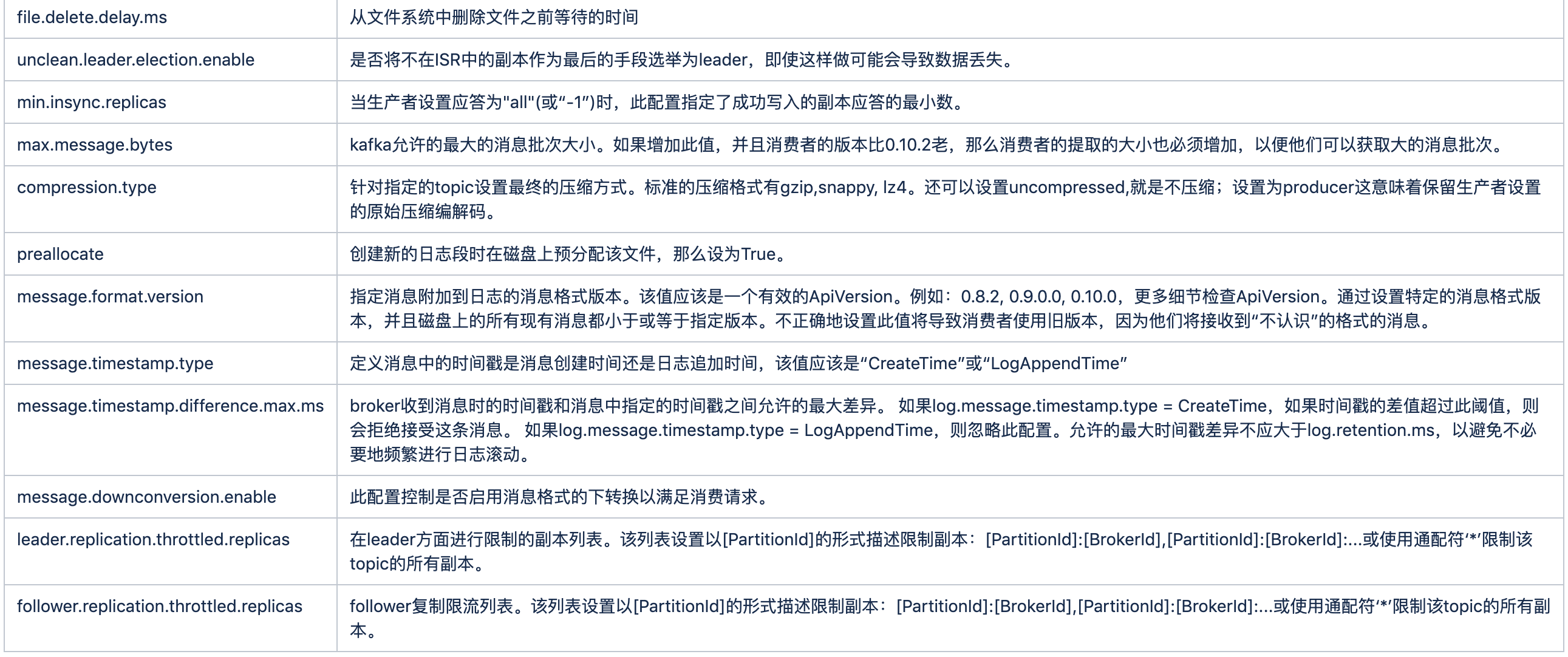
Topics类型配置是Brokers类型配置的子集,Brokers类型包含Topics类型所有配置,brokers只是在topics配置项前加了前缀。还有一个特例区别是参数message.format.version在brokers动态配置暂时是不支持的

增加配置项
bin/kafka-configs.sh --zookeeper localhost:2181/kafkacluster --alter --entity-type topics --entity-name test-cqy --add-config 'max.message.bytes=50000000,flush.messages=50000,flush.ms=5000'
删除配置项
bin/kafka-configs.sh --zookeeper localhost:2181/kafkacluster --alter --entity-type topics --entity-name test-cqy --delete-config 'max.message.bytes,flush.messages,flush.ms'
列出配置描述
bin/kafka-configs.sh --zookeeper localhost:2181/kafkacluster --entity-type topics --entity-name test-cqy --describe
Brokers配额限流
broker之间复制数据配额限流

Kafka提供一个broker之间复制传输的流量限制功能,限制了partitions数据复制从一个broker节点到另一个broker节点的带宽上限。当重新平衡集群,引导新broker添加或移除老的broker方便很有用。配置注意事项如下:
- topic是DynamicReplicationQuota限流的载体,只有作用于具体topic,配额限流才有效
- leader|follower.xxx.throttled.replicas与leader|follower.xxx.throttled.rate同时都配置才有效
- 配置只对xxx.throttled.replicas范围限流,其他topics不做限流处理
Kafka复制配额限流还是挺灵活的,用两个参数作rate和replicas前置限制,保证只对配置topics才有效。例如某个场景一个集群扩容增加broker,需要对制定topics进行迁移分摊IO压力,如果所有topics都限流了,就会对正常运行业务造成影响。
设置xxx.throttled.rate的语法(只能设置brokerId,设置--entity-default无效)
bin/kafka-configs.sh --zookeeper localhost:2181/kafkacluster --alter --entity-type brokers --entity-name $brokerId --add-config 'leader.replication.throttled.rate=10485760'
配额流量2两种方式
方式1
bin/kafka-configs.sh --bootstrap-server localhost:9092 --entity-type brokers --entity-name 105 --alter --add-config 'leader.replication.throttled.rate=10485760,follower.replication.throttled.rate=10485760'
bin/kafka-configs.sh --zookeeper localhost:2181/kafkacluster --entity-type topics --entity-name topicA --alter --add-config 'leader.replication.throttled.replicas=*,follower.replication.throttled.replicas=*'
方式2
用reassign脚本设置leader&follower.xxx.throttled.rate限流,在操作partitions迁移时同时设置限流,避免IO过大网卡打爆,下面throttle实际最终生成leader&follower.xxx.throttled.rate=31457280。reassign在底层还是调用kafka-configs.sh的API实现,逐个设置move.json覆盖到的brokers进行配置
bin/kafka-reassign-partitions.sh --zookeeper localhost:2181/kafkacluster --reassignment-json-file move.json --throttle 31457280 --execute
当上面partitions数据迁移完成时,执行以下脚本,删除--throttle参数配置
bin/kafka-reassign-partitions.sh --zookeeper localhost:2181/kafkacluster --reassignment-json-file reassign.json --verify
fetchRequest和fetchResponse二者作用:
- fetchRequest向leader发起复制请求,用于follower.replication.throttled.rate限流,当follower请求流量大于阀值时,不允许限制topics发送本次fetchRequest请求,下次请求未达到阀值可以成功发送
- leader向follower响应内容fetchResponse,用于leader.replication.throttled.rate限流,当leader响应流量大于阀值时,不允许限制topics应答fetchResponse响应,下次应答未达到阀值可以成功响应
broker内partitions目录数据迁移配额限流
为什么有目录迁移呢?主要原因是随着硬件高速发展,CPU性能大幅提升,一台物理机会挂载多块磁盘,而且集群扩容可能也会加入不同型号机型,挂载数量和性能也有差异,所以kafka提供了broker内部目录之间迁移数据流量限制功能,限制数据拷贝从一个目录到另外一个目录带宽上限。常用于broker内挂载点间partitions数量数据均衡和降低IO压力
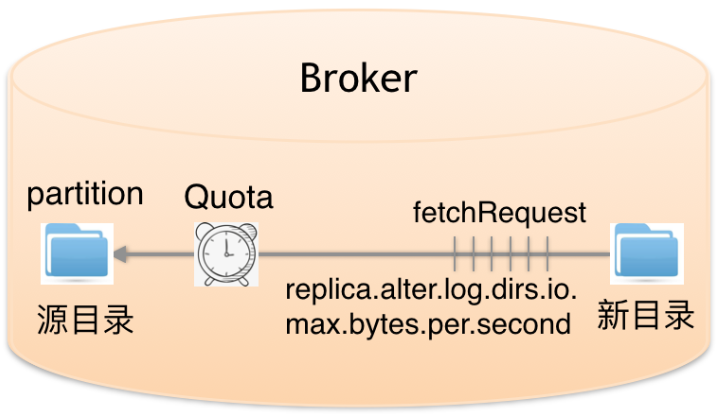
当在目前间迁移数据时,会设置具体的partitions,这些partitions就是限流的载体。具体操作如下:
具体broker内partitions迁移脚本用法,请查看partitions目录数据迁移
bin/kafka-configs.sh --bootstrap-server localhost:9092 --entity-type brokers --entity-name 105 --alter --add-config 'replica.alter.log.dirs.io.max.bytes.per.second=104857600'
目录数据迁移被设置为独立的FutureLocalReplica角色,不受broker间复制配额限流功能影响
总结
- 文章开头列出了kafka-configs.sh详尽的语法格式,便于读者阅读使用
- 客户端配额限流3种粒度配置生成8种优先级组合
- Brokers类型7个配置模块有2种优先级,除了DynamicReplicationQuota仅只是brokerId局部作用域,其他模块都可以用于全局作用域
- broker之间复制限流需要2种类型组合配置实现,分别为brokers和topics
- broker内partitions目录迁移限流,需要kafka-reassign-partitions.sh脚本结合,配置具体partitions的replicas及迁移目录
引用博客来自李志涛:https://www.cnblogs.com/lizherui/p/12275193.html
脚本kafka-configs.sh用法解析的更多相关文章
- Linux shell脚本中shift的用法说明【转】
本文转载自:http://blog.csdn.net/zhu_xun/article/details/24796235 Linux shell脚本中shift的用法说明 shift命令用于对参数的移动 ...
- extern "c"用法解析
转自: extern "c"用法解析 - 简书 引言 C++保留了一部分过程式语言的特点,因而它可以定义不属于任何类的全局变量和函数.但是,C++毕竟是一种面向对象的程序设计语言, ...
- 主机巡检脚本:OSWatcher.sh
主机巡检脚本:OSWatcher.sh 2016-09-26更新,目前该脚本只支持Linux操作系统,后续有需求可以继续完善. 注意: 经测试,普通用户执行脚本可以顺利执行前9项检查: 第10项,普通 ...
- Oracle巡检脚本:ORAWatcher.sh
Oracle巡检脚本:ORAWatcher.sh #!/usr/bin/ksh echo "" echo "ORAWatcher Version:1.0.1" ...
- HTML文档、javascript脚本的加载与解析
1.onload事件 1.1 onload事件分类 a.文档加载完成事件(包括脚本.图片等资源都加载完),绑定方法:<body onload="doSomething()"& ...
- WordPress的have_posts()和the_post()用法解析
原文地址:http://www.phpvar.com/archives/2316.html 网上找到一篇介绍WordPress的have_posts()和the_post()用法解析的文章,觉得不错! ...
- extern "C" 用法解析
extern "c"用法解析 作者 作者Jason Ding ,链接http://www.jianshu.com/p/5d2eeeb93590 引言 C++保留了一部分过程式语言的 ...
- Linux下如何将数据库脚本文件从sh格式变为sql格式
在从事软件开发的过程中,经常会涉及到在Linux下将数据库脚本文件从sh格式变为sql格式的问题.本文以一个实际的脚本文件为例,说明格式转换的过程. 1. sh文件内容 本文中的文件名为 ...
- Kakfa揭秘 Day4 Kafka中分区深度解析
Kakfa揭秘 Day4 Kafka中分区深度解析 今天主要谈Kafka中的分区数和consumer中的并行度.从使用Kafka的角度说,这些都是至关重要的. 分区原则 Partition代表一个to ...
随机推荐
- HDU 5477: A Sweet Journey
A Sweet Journey Time Limit: 2000/1000 MS (Java/Others) Memory Limit: 65536/65536 K (Java/Others) ...
- oracle 的存储过程
-----推荐视频 https://ke.qq.com/webcourse/index.html#course_id=292495&term_id=100346599&taid= ...
- InstrumentationTextCase 测试
<instrumentation android:name="android.test.InstrumentationTestRunner" an ...
- C++基础--引用做函数参数
引用,简单粗暴的解释叫做别名,简单粗暴的例子就是,我是熊叫大雄,但是很多时候别人不叫我熊叫大雄,会叫我大雄,粤语地区朋友爱叫我阿雄,有人叫我雄,所以,熊叫大雄这个变量的值是我,雄.大雄.阿雄是熊叫大雄 ...
- JDBC批处理方法
每次新建Connection的时候相当于建了一座桥,每次一辆车(PreparedStatement)运送货物(ResultSet)成本太高! 每次都建立网络连接的时间远远大于本地的时间,为了处理大量的 ...
- B站 React教程笔记day1(4)调色板案例
视频地址 main.js import React from "react" import { render } from "react-dom" import ...
- StringBuffer类、StringBuilder类详解
StringBuffer是一个字符串缓冲区,是一个容器,而且长度可变,可以直接操作多个数据类型, 最终会通过toString()方法变成字符串. 容器的功能有: 1.存储 public StringB ...
- 一天一个设计模式——Strategy策略模式
一.模式说明 策略模式比较好理解,就是将程序中用到的算法整体的拿出来,并有多个不同版本的算法实现,在程序运行阶段,动态的决定使用哪个算法来解决问题. 举个实际的例子:排序算法的问题,假如我们的程序中需 ...
- 配置gitlab代码提交之后自动触发jenkins
https://www.cnblogs.com/bugsbunny/p/7919993.html
- 软件设计之基于Java的连连看小游戏(三)——所有功能的实现
新年快乐!期末接二连三的考试实在太忙了忘记连连看没有更新完,今天想要学习生信时才发现.所以这次直接把连连看所有功能全部放上. 在传统的连连看的基础上,我增加了上传头像的功能,即可以自行上传图片作为游戏 ...