
Redhat FreeIPA Server 安装服务端和客户端 (实验:VMware环境下)
实验环境:windows7 + vmware 15 + redhat 7
1:准备2台虚拟机:
虚拟机VMnet8,Subnet IP:192.168.145.0
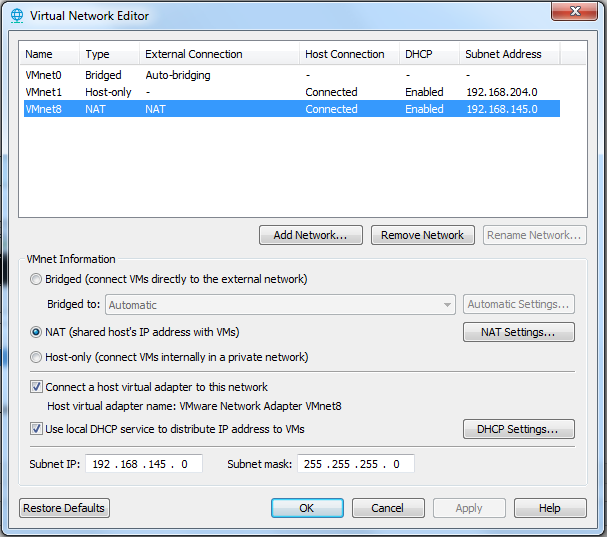
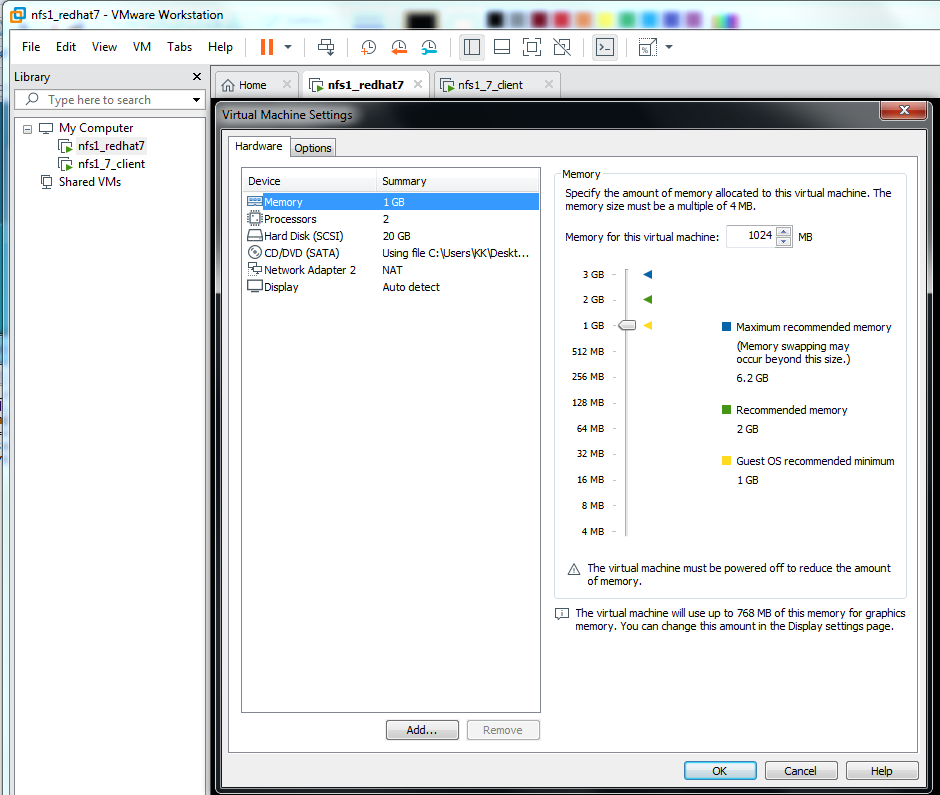
Redhat 7(Server With GUI),1-2G内存
网络配置如下:
服务端:ipa.nfs1.example.com 192.168.145.134
客户端:client.nfs1.example.com 192.168.145.138
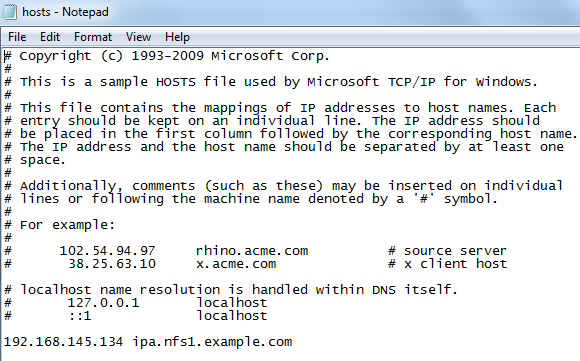
2:在Windows7的C:\Windows\System32\drivers\etc\hosts中加入:
192.168.145.134 ipa.nfs1.example.com
IPA成功配置后,可以在windows浏览器下操作。
========================================================================================
服务端 客户端都要做的步骤:
[确定iso已经挂载到VMware],*****将没有注册的redhat 7中将repo 指向DVD*****
#mount #检查
#umount /dev/sr0 #卸载iso
#mount /dev/sr0 /mnt #挂载iso到mnt
#cd /mnt
#rpm --import RPM-GPG-KEY-redhat-release
#cd Packages/
#rpm -ivh createrepo-0.9.9-23.el7.noarch.rpm
#vi /etc/yum.repos.d/file.repo #编辑repo
[DVDRepo]
name=DVD Repository
baseurl=file:///mnt/
enabled=1
gpgcheck=0
:wq
#cd
#yum clean all
#yum list all
====================================================================
服务端安装
#yum install ipa-server bind dns-ldap bind-dyndb-ldap
#nmtui #依次设置网络
Addresses 192.168.145.134
Gateway 192.168.145.2
DNS servers 192.168.145.2
Search domains nfs1.example.com
hostname ipa.nfs1.example.com
exit #退出
#vi /etc/resolv.conf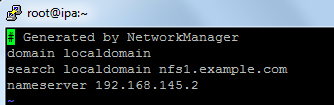
#vi /etc/hosts

#systemctl stop chronyd.service
#systemctl disable chronyd.service
#systemctl restart network
ipa-server-install --setup-dns #开始配置IPA(下面是过程主要内容)
**********************************************************************************
Existing BIND configuration detected, overwrite? [no]:yes
Server host name [ipa.nfs1.example.com]: ipa.nfs1.example.com
Please confirm the domain name [nfs1.example.com]:
Please provide a realm name [NFS1.EXAMPLE.COM]:
Directory Manager password:
IPA admin password:
The IPA Master Server will be configured with:
Hostname: ipa.nfs1.example.com
IP address: 192.168.145.134
Domain name: nfs1.example.com
Realm name: NFS1.EXAMPLE.COM
BIND DNS server will be configured to serve IPA domain with:
Forwarders: 8.8.8.8
Reverse zone: 145.168.192.in-addr.arpa.
Global DNS configuration in LDAP server is empty
You can use 'dnsconfig-mod' command to set global DNS options that
would override settings in local named.conf files
Restarting the web server
Setup complete
Next steps:
1. You must make sure these network ports are open:
TCP Ports:
* 80, 443: HTTP/HTTPS
* 389, 636: LDAP/LDAPS
* 88, 464: kerberos
* 53: bind
UDP Ports:
* 88, 464: kerberos
* 53: bind
* 123: ntp
2. You can now obtain a kerberos ticket using the command: 'kinit admin'
This ticket will allow you to use the IPA tools (e.g., ipa user-add)
and the web user interface.
Be sure to back up the CA certificate stored in /root/cacert.p12
This file is required to create replicas. The password for this
file is the Directory Manager password
*****************************************************************************
DM_password 是kerberos的管理员密码
admin_password 是389-ds的管理员密码
按结束语中的要求修改防火墙:
#firewall-cmd --permanent --add-service=http
#firewall-cmd --permanent --add-service=https
#firewall-cmd --permanent --add-service=ldap
#firewall-cmd --permanent --add-service=ldaps
#firewall-cmd --permanent --add-service=kerberos
#firewall-cmd --permanent --add-port=53/tcp
#firewall-cmd --permanent --add-port=53/udp
#firewall-cmd --permanent --add-port=88/udp
#firewall-cmd --permanent --add-port=123/udp
#firewall-cmd --reload
#firewall-cmd --list
#firewall-cmd --list-all
这时可以在Windows下浏览器打开https://ipa.nfs1.example.com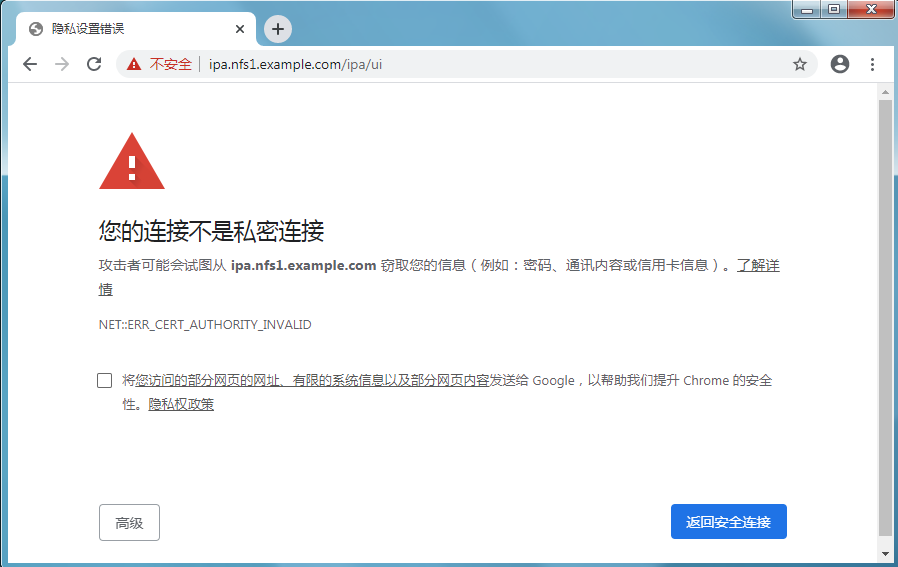

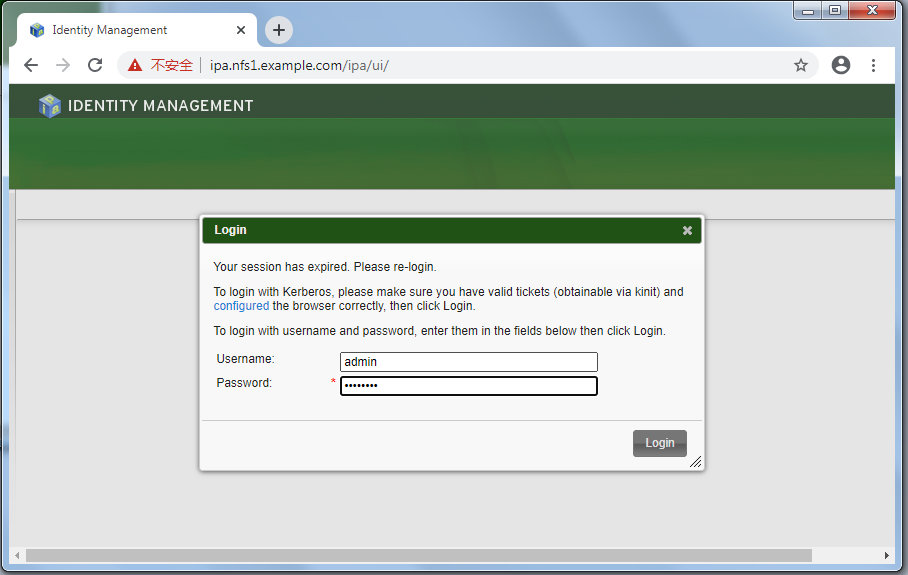
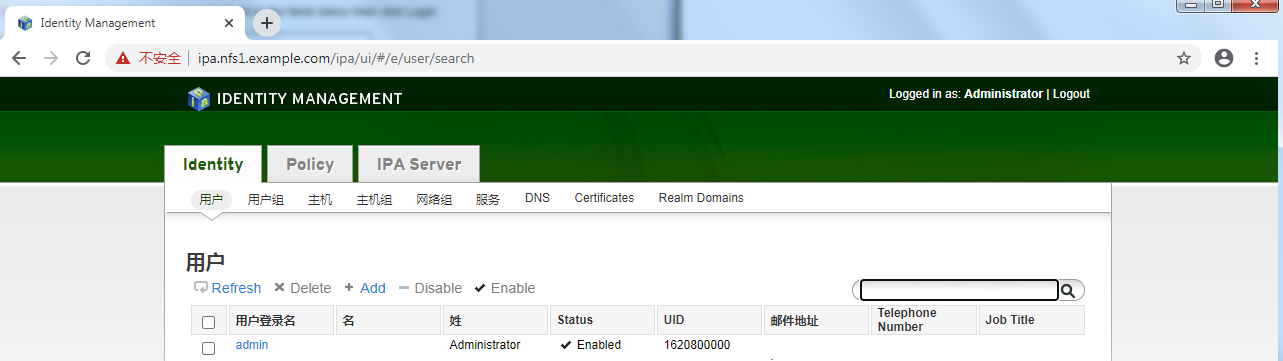
不同浏览器可能略有不同
****************************************************************************************************************************************************************************************************************************
客户端安装
#nmtui
ip:192.168.145.138
gateway:192.168.145.134 (请特别留意此项)
search domain:nfs1.example.com
hostname: client.nfs1.example.com
#vi /etc/resolv.conf
nameserver 192.168.145.134 (请特别留意此项)
#vi /etc/hosts
192.168.145.138 client.nfs1.example.com (请特别留意此项)
#systemctl restart network
#yum install nss-pam-ldapd pam_krg5 ipa-client
#ipa-client-install #开始配置IPA客户端(下面是过程主要内容)
=======================================================================
WARNING: ntpd time&date synchronization service will not be configured as
conflicting service (chronyd) is enabled
Use --force-ntpd option to disable it and force configuration of ntpd
Discovery was successful!
Hostname: client.nfs1.example.com
Realm: NFS1.EXAMPLE.COM
DNS Domain: nfs1.example.com
IPA Server: ipa.nfs1.example.com
BaseDN: dc=nfs1,dc=example,dc=com
Continue to configure the system with these values? [no]: yes
User authorized to enroll computers: admin
Synchronizing time with KDC...
Password for admin@NFS1.EXAMPLE.COM:
Successfully retrieved CA cert
Subject: CN=Certificate Authority,O=NFS1.EXAMPLE.COM
Issuer: CN=Certificate Authority,O=NFS1.EXAMPLE.COM
Valid From: Wed Jun 24 03:23:40 2020 UTC
Valid Until: Sun Jun 24 03:23:40 2040 UTC
Enrolled in IPA realm NFS1.EXAMPLE.COM
Created /etc/ipa/default.conf
New SSSD config will be created
Configured /etc/sssd/sssd.conf
Configured /etc/krb5.conf for IPA realm NFS1.EXAMPLE.COM
trying https://ipa.nfs1.example.com/ipa/xml
Forwarding 'ping' to server 'https://ipa.nfs1.example.com/ipa/xml'
Forwarding 'env' to server 'https://ipa.nfs1.example.com/ipa/xml'
Hostname (client.nfs1.example.com) not found in DNS
DNS server record set to: client.nfs1.example.com -> 192.168.145.138
Adding SSH public key from /etc/ssh/ssh_host_rsa_key.pub
Adding SSH public key from /etc/ssh/ssh_host_ecdsa_key.pub
Forwarding 'host_mod' to server 'https://ipa.nfs1.example.com/ipa/xml'
SSSD enabled
Configured /etc/openldap/ldap.conf
Configured /etc/ssh/ssh_config
Configured /etc/ssh/sshd_config
Client configuration complete.
==========================================================================
systemctl stop chronyd.service
systemctl disable chronyd.service
这时client.nfs1.example.com 成功加入IPA的管理中。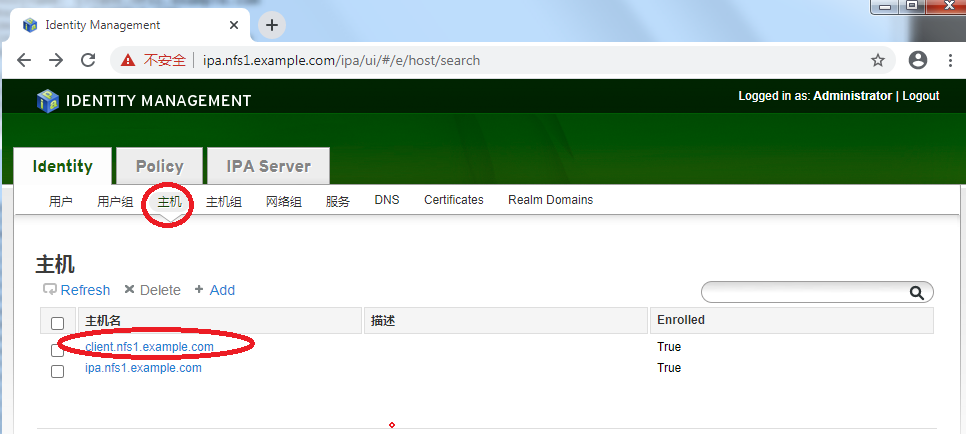
如果在管理器中添加用户,相当于添加了一个域用户。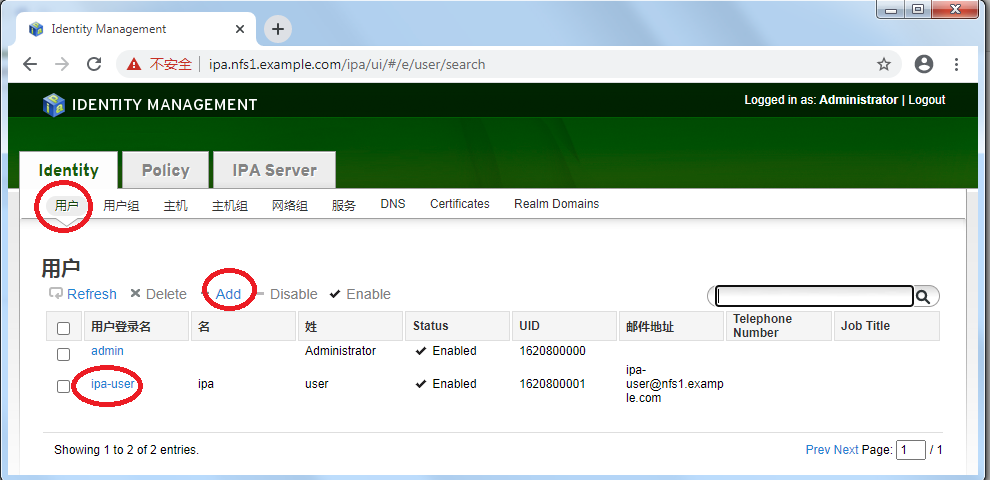
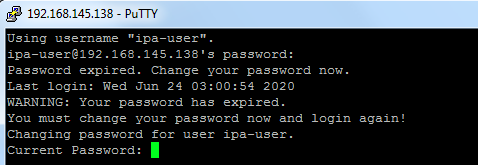
账户ipa-user可以登入nfs.example.com中所有登记的主机
(终)
Redhat FreeIPA Server 安装服务端和客户端 (实验:VMware环境下)的更多相关文章
- [企业化NET]Window Server 2008 R2[2]-SVN 服务端 和 客户端 安装
1. 服务器基本安装即问题解决记录 √ 2. SVN环境搭建和客户端使用 2.1 服务端 和 客户端 安装 √ 2.2 项目建立与基本使用 √ 2.3 基本冲突解决, ...
- (转)SVN 服务端、客户端安装及配置、导入导出项目
SVN服务器搭建和使用(一) Subversion是优秀的版本控制工具,其具体的的优点和详细介绍,这里就不再多说. 首先来下载和搭建SVN服务器. 现在Subversion已经迁移到apache网站上 ...
- SVN服务端和客户端的安装与搭建
版权声明:本文为博主原创文章,转载请注明原文出处. https://blog.csdn.net/zzfenglin/article/details/50931462 SVN简介 SVN全名Subver ...
- linux(centos 6.4)下安装php memcache服务端及其客户端(详细教程)
前言 在搭建个人博客时,由于没有使用任何框架,纯手工code前台和后台,导致遇到许多问题,其中一个问题就是mysql连接导致的页面相应速度异常低.在查询各种途径后,只能考虑使用memcache缓存.在 ...
- suse安装svn服务端和客户端的使用
suse安装svn服务端 一. 安装服务端 配置网络安装源(suse11sp1为例) 新建11.1.repo11.1为软件源名称,可自定义文件并添加如下内容后保存 linux-e0xg:/etc/zy ...
- [企业化NET]Window Server 2008 R2[3]-SVN 服务端 和 客户端 基本使用
1. 服务器基本安装即问题解决记录 √ 2. SVN环境搭建和客户端使用 2.1 服务端 和 客户端 安装 √ 2.2 项目建立与基本使用 √ 2.3 基本冲突解决, ...
- SVN1.6服务端和客户端安装配置指导
本节向大家描述SVN1.6服务端和客户端安装配置步骤,随着SVN的快速发展,版本也进行了升级更新,本节就和大家一起学习一下SVN1.6服务端和客户端安装配置步骤,欢迎大家一起来学习.下面是具体介绍.1 ...
- 安装lanproxy服务端、客户端以及小问题解决
准备 我们这里使用java客户端与服务端连接 1.一台公网服务器(运行proxy-server).2.一台内网客户端(运行proxy-client). 下载地址:https://seafile.cdj ...
- Windows10配置NFS服务端和客户端
环境:Windows10企业版x64 安装服务端 安装hane win nfs server,版本1169(官方最新版1223经试验不成功). 设置如下: 以管理员身份重启服务(注:软件界面上&quo ...
随机推荐
- Linux光盘yum源软件安装
关于Linux中的软件安装,有三种方法,个人认为比较方便的就是yum安装,有网的话比较简单,暂且不提.本文主要记录在没有外网的情况下,如何以本地光盘搭建yum源来实现yum安装. 主要包括以下几步: ...
- R 语言
ps 帮人学习R语言代码: 定义变量 alldata<-c(32.56,1.4072,28.94,0.231,11.005,2.48713,40.33,1.5334,34.79,0.288,18 ...
- Chisel3-Intellij IDEA中使用sbt构建Chisel项目
https://mp.weixin.qq.com/s/gssjiiPW6zUzKwCFZdNduw 1. 使用Intellij IDEA创建Scala项目 Chisel项目,就是构建Scala ...
- Java实现 LeetCode 154 寻找旋转排序数组中的最小值 II(二)
154. 寻找旋转排序数组中的最小值 II 假设按照升序排序的数组在预先未知的某个点上进行了旋转. ( 例如,数组 [0,1,2,4,5,6,7] 可能变为 [4,5,6,7,0,1,2] ). 请找 ...
- Java实现 LeetCode 92 反转链表 II
92. 反转链表 II 反转从位置 m 到 n 的链表.请使用一趟扫描完成反转. 说明: 1 ≤ m ≤ n ≤ 链表长度. 示例: 输入: 1->2->3->4->5-> ...
- java实现第八届蓝桥杯数位和
数位和 题目描述 数学家高斯很小的时候就天分过人.一次老师指定的算数题目是:1+2+-+100. 高斯立即做出答案:5050! 这次你的任务是类似的.但并非是把一个个的数字加起来,而是对该数字的每一个 ...
- js动态绑定class(当前父级div下的子元素有没有这个class,有的话移除,没有的话添加)
<div class="layui-inline" id=‘’ onclick="changeType(id)"> ...
- requireJS模块化
1. JavaScript里面js代码的写法:目标是解决冲突和依赖 函数式编程,全局函数和变量--很容易覆盖 对象的写法--也会从外面改变 命名空间:利用名称不同缓冲js代码的冲突---名称太长,不方 ...
- iOS-Code Data的快速体验
Code Data Core Data 是iOS SDK 里的一个很强大的框架,允许程序员以面向对象的方式储存和管理数据.使用Core Data框架,程序员可以很轻松有效地通过面向对象的接口管理数据 ...
- windows注册表删除右键菜单
1.删除空白处右键菜单 HKEY_CLASSES_ROOT\Directory\background\shell HKEY_CLASSES_ROOT\Directory\background\shel ...