
JAVA课程设计——俄罗斯方块
0.负责模块为可视化界面,技术栈为
(1)异常处理
(2)多线程
(3)文件存储
(4)Java swing
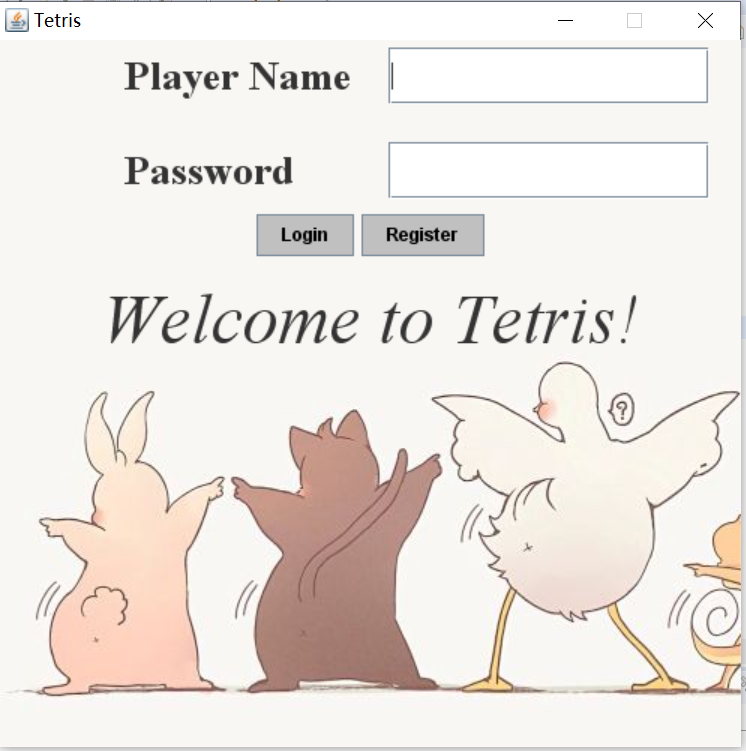
1.登陆界面
我的代码
import java.awt.Color;

	import java.awt.FlowLayout;

	import java.awt.Font;

	import java.awt.GridLayout;

	import java.awt.event.ActionEvent;

	import java.awt.event.ActionListener;

	import java.io.File;

	import java.io.IOException;

	import javax.swing.ImageIcon;

	import javax.swing.JButton;

	import javax.swing.JFrame;

	import javax.swing.JLabel;

	import javax.swing.JPanel;

	import javax.swing.JPasswordField;

	import javax.swing.JTextField;

	import tetris.control.*;

	/**

	*

	 * @author  lsm

	*

	*/

	public class Main {

		private static void login() {

			JFrame frame = new JFrame();

			frame.setResizable(false);

			ImageIcon background = new ImageIcon("beautify/login.jpg");

			JLabel backLabel = new JLabel(background);

			backLabel.setBounds(0, 0, background.getIconWidth(), background.getIconHeight());

			JPanel panel = new JPanel();

			panel = (JPanel) frame.getContentPane();

			panel.setOpaque(false);

			panel.setLayout(new FlowLayout());

			frame.getLayeredPane().add(backLabel, new Integer(Integer.MIN_VALUE));

			/*设置界面属性*/

			frame.setTitle("Tetris");

			GridLayout grid = new GridLayout(2, 2);

			grid.setHgap(25);

			grid.setVgap(25);

			JPanel panel1 = new JPanel(grid);

			panel1.setOpaque(false);

			Font f1 = new Font("Serif", Font.BOLD, 27);

			Font f2 = new Font("Serif", Font.ITALIC, 47);

			JTextField b1 = new JTextField(10);

			JPasswordField b2 = new JPasswordField(10);

			JLabel label1 = new JLabel("         Player Name");

			JLabel label2 = new JLabel("         Password");

			JLabel label3 = new JLabel("Welcome to Tetris!");

			label1.setFont(f1);

			label2.setFont(f1);

			label3.setFont(f2);

			panel1.add(label1);

			panel1.add(b1);

			panel1.add(label2);

			panel1.add(b2);

			JPanel panel2 = new JPanel();

			panel2.setOpaque(false);

			JButton button1 = new JButton("Login");

			JButton button2 = new JButton("Register");

			button1.setForeground(Color.BLACK);

			button2.setForeground(Color.BLACK);

			button1.setBackground(Color.lightGray);

			button2.setBackground(Color.lightGray);

			panel2.add(button1);

			panel2.add(button2);

			panel.add(panel1);

			panel.add(panel2);

			panel.add(label3);

			frame.setBounds(100, 100, background.getIconWidth(), background.getIconHeight());

			frame.setLocation(450, 60);

			frame.setDefaultCloseOperation(JFrame.EXIT_ON_CLOSE);

			frame.setSize(500, 500);

			frame.setVisible(true);

			button1.addActionListener(new ActionListener() {

				@SuppressWarnings("deprecation")

				@Override

				public void actionPerformed(ActionEvent arg0) {

					String playerName = b1.getText();

					String playerPassword = b2.getText();

					try {

						if (PlayerFile.matchPassword(playerName, playerPassword)) {

							frame.setVisible(false);

							new RussiaBlocksGame("Tetris");

						}

					} catch (IOException e) {

						e.printStackTrace();

					}

				}

			});

			button2.addActionListener(new ActionListener() {

				@Override

				public void actionPerformed(ActionEvent arg0) {

					String playerName = b1.getText();

					@SuppressWarnings("deprecation")

					String playerPassword = b2.getText();

					try {

						if (!PlayerFile.writeFile(playerName, playerPassword)) {

						}

					} catch (IOException e) {

						e.printStackTrace();

					}

				}

			});

		}

		public static void main(String[] args) {

			javax.swing.SwingUtilities.invokeLater(new Runnable() {

				@Override

				public void run() {

					new Music();

					login();

				}

			});

		}

	}
界面图,加入了背景音乐,引用自 https://blog.csdn.net/qq_40590018/article/details/81452392
2.游戏界面
我的代码(这里就贴主要界面代码,具体方法不展示)
    		public class RussiaBlocksGame extends JFrame {

    				private GameCanvas canvas;

				private ErsBlock block;

				private boolean playing = false;

				private ControlPanel ctrlPanel;

				private JMenuBar menuBar = new JMenuBar();

				private JMenu help = new JMenu("Help");

				private JMenu setting = new JMenu("Setting");

				private JMenuItem about = new JMenuItem("About");

				private JMenuItem setBackground = new JMenuItem("SetBackground");

				private JMenuItem setFrontground = new JMenuItem("SetFrontground");

				        private JMenuItem chart=new JMenuItem("Ranking List");

				/*

				 *  初始化菜单栏

				 */

				private void initScope() {

					setJMenuBar(menuBar);

					menuBar.add(help);

					menuBar.add(setting);

					help.add(about);

					help.add(chart);

					setting.add(setBackground);

					setting.add(setFrontground);

					/*

					 *  设置自定义颜色,引用自 https://www.jb51.net/article/142716.htm

					 */

					setFrontground.addActionListener(new ActionListener() {

						@Override

						public void actionPerformed(ActionEvent e) {

					Color newFrontColor = JColorChooser.showDialog(RussiaBlocksGame.this, "SetFrontground", canvas.getBlockColor());

							if (newFrontColor != null) {

								canvas.setBlockColor(newFrontColor);

							}

						}

					});

					setBackground.addActionListener(new ActionListener() {

						@Override

						public void actionPerformed(ActionEvent e) {

							Color newBackColor = JColorChooser.showDialog(RussiaBlocksGame.this, "SetBackground",

									canvas.getBackgroundColor());

							if (newBackColor != null) {

								canvas.setBackgroundColor(newBackColor);

							}

						}

					});

					about.addActionListener(new ActionListener() {

						@Override

						public void actionPerformed(ActionEvent e) {

							JOptionPane.showMessageDialog(null,

					"→ move right " + "← move left " + "↓ speed up " + "↑ conservasion");

						}

					});

					chart.addActionListener(new ActionListener() {

						@Override

						public void actionPerformed(ActionEvent e) {

							try {

								new RanklistDialog(PlayerFile.outputCharts());

							} catch (IOException e1) {

								e1.printStackTrace();

							}

						}

					});

				}

				public RussiaBlocksGame(String title) {

					super(title);

					setDefaultCloseOperation(JFrame.EXIT_ON_CLOSE);

					setSize(450, 570);

					setLocation(450, 60);

					setTitle("Tetris");

					initScope();

					Container container = getContentPane();

					container.setLayout(new BorderLayout(6, 0));

					canvas = new GameCanvas(ROWS, COLS);

					ctrlPanel = new ControlPanel( this );

					container.add(canvas, BorderLayout.CENTER);

					container.add(ctrlPanel, BorderLayout.EAST);

					addWindowListener(new WindowAdapter() {

						@Override

						public void windowClosing(WindowEvent we) {

							stopGame();

							System.exit(0);

						}

					});

					addComponentListener(new ComponentAdapter() {

						@Override

						public void componentResized(ComponentEvent ce) {

			 				canvas.adjust();

						}

					});

					setVisible(true);

					setResizable(false);

				}

    		}
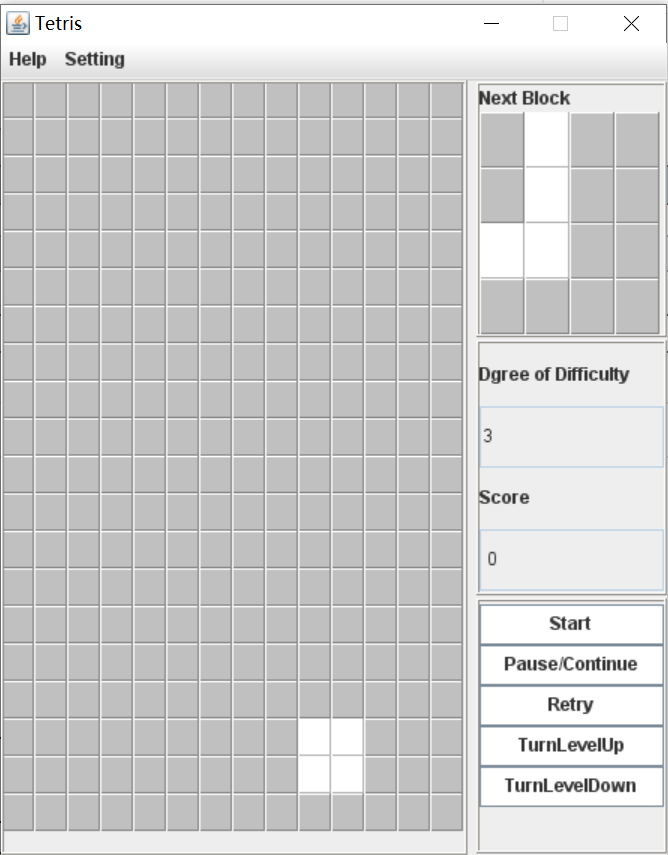
游戏界面为
3.排行榜(只取前五名)
我的代码:
            import java.awt.Color;

	import java.awt.Font;

	import java.util.HashMap;

	import java.util.Map;

	import javax.swing.ImageIcon;

	import javax.swing.JDialog;

	import javax.swing.JLabel;

	import javax.swing.JPanel;

	public class RanklistDialog extends JDialog{

		private JLabel score1,score2,score3,score4,score5;

		private JLabel name1,name2,name3,name4,name5;

		private String[][] ranking;

		public RanklistDialog(List<Entry<String, String>> list) {

			ranking = new String[5][2];

			int i=0;

			for(List.Entry<String, String> e: list.entrySet()) {

				String name=e.getKey();

				String  score=e.getValue();

				ranking[i][0]=name;

				ranking[i][1]=score;

				i++;

			}

			Font f = new Font("Serif", Font.ITALIC, 25);

			name1 = new JLabel();

			name1.setText(ranking[0][0]);

			name1.setFont(f);

			name1.setForeground(Color.yellow);

			name1.setBounds(150,270, 100, 30);

			this.add(name1);

			score1 = new JLabel();

			score1.setText(ranking[0][1]);

			score1.setFont(f);

			score1.setForeground(Color.yellow);

			score1.setBounds(280,270,100, 30);

			this.add(score1);

			name2 = new JLabel();

			name2.setText(ranking[1][0]);

			name2.setFont(f);

			name2.setForeground(Color.yellow);

			name2.setBounds(150,330,100, 30);

			this.add(name2);

			score2 = new JLabel(ranking[1][1]);

			score2.setFont(f);

			score2.setForeground(Color.yellow);

			score2.setBounds(280,330,100, 30);

			this.add(score2);

			name3 = new JLabel();

			name3.setText(ranking[2][0]);

			name3.setFont(f);

			name3.setForeground(Color.yellow);

			name3.setBounds(150, 390, 100, 30);

			this.add(name3);

			score3 = new JLabel(ranking[2][1]);

			score3.setFont(f);

			score3.setForeground(Color.yellow);

			score3.setBounds(280, 390, 100, 30);

			this.add(score3);

			name4 = new JLabel();

			name4.setText(ranking[3][0]);

			name4.setFont(f);

			name4.setForeground(Color.yellow);

			name4.setBounds(150, 450, 100, 30);

			this.add(name4);

			score4 = new JLabel(ranking[3][1]);

			score4.setFont(f);

			score4.setForeground(Color.yellow);

			score4.setBounds(280, 450, 100, 30);

			this.add(score4);

			name5 = new JLabel();

			name5.setText(ranking[4][0]);

			name5.setFont(f);

			name5.setForeground(Color.yellow);

			name5.setBounds(150, 510, 100, 30);

			this.add(name5);

			score5 = new JLabel(ranking[4][1]);

			score5.setFont(f);

			score5.setForeground(Color.yellow);

			score5.setBounds(280, 510, 100, 30);

			this.add(score5);

			ImageIcon icon = new ImageIcon("beautify/charts.jpg");

			JLabel background = new JLabel(icon);

			background.setBounds(0, 0, icon.getIconWidth(),icon.getIconHeight());

			JPanel imagePanel = (JPanel)this.getContentPane();

			imagePanel.setOpaque(false);

			imagePanel.setLayout(null);

			this.setModal(true);

			this.setTitle("Ranking List");

			this.setLayout(null);

			this.getLayeredPane().add(background, new Integer(Integer.MIN_VALUE));

			this.setResizable(false);

			this.setSize(400, 600);

			this.setLocationRelativeTo(null);

			this.setVisible(true);

			this.setDefaultCloseOperation(JDialog.DISPOSE_ON_CLOSE);

		}

	}
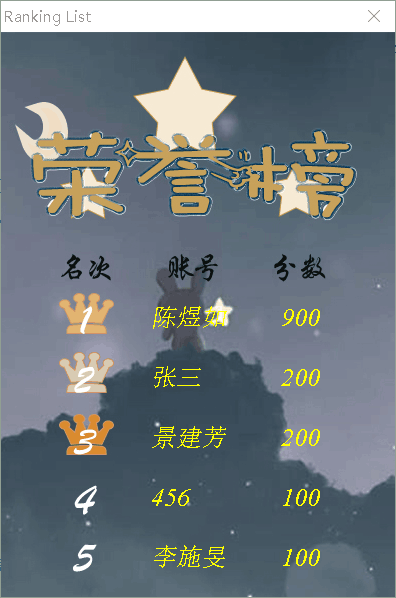
排行榜界面(好像要暴露什么)
4.我的总结
对于一个喜欢美术的人来说,界面设计真的是爽歪歪啊~,不过好像效果一般啊。。。一直对代码这块比较抵触,开发也不是以后的发展方向,
,这次课程设计这个模块就主要是整合另外两个成员写的方法,难度小,乐在其中。
JAVA课程设计——俄罗斯方块的更多相关文章
- JAVA课程设计 俄罗斯方块
俄罗斯方块 可实现功能 1.账号管理:登录.注册 2.游戏实现:移动.旋转.消除方块统计得分.暂停游戏.暂停后继续游戏.此轮游戏未结束开启新一轮游戏.游戏未结束退出游戏. 3.排行榜:按分数排名.按局 ...
- JAVA课程设计——俄罗斯方块(团队)
1.团队介绍 1.1 团名:终于可以回家了嗷嗷嗷 1.2 团员介绍 2.参考来源 https://www.jb51.net/article/142716.htm 3.项目git地址 https://g ...
- java(课程设计之记事本界面部分代码公布)
代码:涉及记事本的一些界面......!! /* *java课程设计之记事本(coder @Gxjun) * 编写一个记事本程序 * 要求: * 用图形用户界面实现. * 能实现编辑.保存.另存为.查 ...
- java课程设计(计算器)
JAVA课程 设 计 报 告 1206401-18 瞿杰 一.设计时间 2013年6月 24日-----6月28日 二.设计地点 湖南城市学院实验楼计算机506机房 三.设计目的 1.巩固学习VB ...
- Java课程设计——博客作业教学数据分析系统(201521123084 林正晟)
#课程设计--博客作业教学数据分析系统(201521123084 林正晟) 1.团队课程设计博客链接 博客作业教学数据分析系统 2.个人负责模块或任务说明 学生登陆界面的前端实现和与数据库的连接 学生 ...
- Java课程设计——博客作业教学数据分析系统(201521123082 黄华林)
Java课程设计--博客作业教学数据分析系统(201521123082 黄华林) 一.团队课程设计博客链接 博客作业教学数据分析系统(From:网络五条狗) 二.个人负责模块或任务说明 1.网络爬虫 ...
- java课程设计--We Talk(201521123061)
java课程设计--We Talk(201521123061) 团队博客链接:http://www.cnblogs.com/slickghost/ 数据库 一.通过Dao模式建立与数据库的连接 1.数 ...
- Java 课程设计 "Give it up"小游戏(团队)
JAVA课程设计 "永不言弃"小游戏(From :Niverse) 通过Swing技术创建游戏的登陆注册界面,使用mySQL数据库技术完成用户的各项信息保存和游戏完成后的成绩保存. ...
- Java课程设计----仿Windows标准型计算器
JAVA课程设计 仿Windows标准型计算器(By Yanboooooooo) 一.团队介绍: 连燕波[组长]:网络1513学生. 张文博[组员]:网络1513学生. 二.项目git地址 码云项目地 ...
随机推荐
- 12 MySQL存储过程与函数
存储过程和函数 存储过程和函数是事先经过编译并存储在数据库中的一段SQL语句的集合. 调用存储过程和函数可以简化应用开发人员的工作,减少数据在数据库和应用服务器之间的传输,提高数据处理 ...
- android 动画基础绘——帧动画(三)
前言 这篇介绍帧动画. 什么是帧动画? 帧动画,非常好理解.就是轮播,比如我们看电视,其实就是一张一张播放过去的. 正文 <?xml version="1.0" encodi ...
- Java笔记: 继承成员覆盖和隐藏
在扩展类时,既可以向类中添加新的成员,也可以重新定义现有的成员.重定义现有成员的具体效果取决于成员的类型.本文不会详细的介绍概念,只简要总结覆盖(overriding,也叫重写)和隐藏(hiding) ...
- Python 35个内置函数,你都ok吗?
Python一共有60多个内置函数,今天先梳理其中35 个 1 abs() 绝对值或复数的模 . In [1]: abs(-6)Out[1]: 6 2 all() 接受一个迭代器,如果迭代器的所有元素 ...
- 七十六、SAP中数据库的查询用法之 COUNT(总数),SUM(求和),AVG(求平均),GROUP BY(分组)
一.我们来查看一个sbook的数据库 二.查看这个表的内容如下 三.表数据如下 四.代码如下 五.结果如下 *&---------------------------------------- ...
- 091-PHP数组过滤函数array_filter,过滤非整数
<?php function not_int($x){ //定义过滤非整数的函数 if(is_int($x)) return TRUE; } $arr=array(1,2,'a',3,4,'c' ...
- Channel详解
复制自:http://www.cnblogs.com/youngKen/p/4921092.html java.nio.channels.FileChannel封装了一个文件通道和一个FileChan ...
- 打包|zip
原始:gzip zip -r ./gzip.zip ./gzip/* adding: gzip/split_10.gz (deflated 2%) adding: gzip/split_11.gz ( ...
- ES6中新增let命令使用方法
在ES6中新增了let命令,该命令的用法与var 类似,但是所声明的变量只能在let命令所在的代码块(最接近let 命令的大括号内)中有效果.但是let 又有一些不同于var 的特性. 1.let定 ...
- 使用Oracle VM VirtualBox创建虚拟机教程
使用Oracle VM VirtualBox创建虚拟机教程 ...