
ASP.NET通过更改Url进行页面传值
这里,通过假数据,手动创建的一个类,然后创建的一个集合,放入下拉框,选好值以后,点确定

会在另一个页面产生对应的id,有不懂的欢迎评论

创建一个类:
using System;

using System.Collections.Generic;

using System.Linq;

using System.Web;

namespace WebApplication1

{

    public class Dept

    {

        public int Id { get; set; }

        public string DeptName { get; set; }

    }

}
一个选择的web窗体
<%@ Page Language="C#" AutoEventWireup="true" CodeBehind="Dept.aspx.cs" Inherits="WebApplication1.Dept1" %>

<!DOCTYPE html>

<html xmlns="http://www.w3.org/1999/xhtml">

<head runat="server">

<meta http-equiv="Content-Type" content="text/html; charset=utf-8"/>

    <title></title>

</head>

<body>

    <form id="form1" runat="server">

        <div>

            <asp:DropDownList ID="DropDownList1" runat="server" AutoPostBack="true">

            </asp:DropDownList>

        </div>

        <p>><a href="dept_<%=DropDownList1.SelectedValue %>.html">查询</a></p>

    </form>

</body>

</html>
选择的web窗体的后台代码
using System;

using System.Collections.Generic;

using System.Linq;

using System.Web;

using System.Web.UI;

using System.Web.UI.WebControls;

namespace WebApplication1

{

    public partial class Dept1 : System.Web.UI.Page

    {

        protected void Page_Load(object sender, EventArgs e)

        {

            if (!IsPostBack)

            {

                LoadDeptData();

            }

        }

        private void LoadDeptData()

        {

            //手动创建数据

            List<Dept> depts = new List<Dept>

            {

                new Dept{Id=1,DeptName="小明"},

                new Dept{Id=2,DeptName="小王"},

                new Dept{Id=3,DeptName="小李"}

            };

            this.DropDownList1.DataSource = depts;

            //默认显示的值

            this.DropDownList1.DataTextField = "DeptName";

            this.DropDownList1.DataValueField = "Id";

            //保存

            this.DropDownList1.DataBind();

        }

    }

}
建一个继承Modules类
using System;

using System.Collections.Generic;

using System.Linq;

using System.Text.RegularExpressions;

using System.Web;

namespace WebApplication1.Modules

{

    public class DeptModule : IHttpModule

    {

        public void Dispose()

        {

        }

        public void Init(HttpApplication context)

        {

            context.BeginRequest += Context_BeginRequest;

        }

        private void Context_BeginRequest(object sender, EventArgs e)

        {

            //处理请求

            //获取请求url

            HttpApplication application = sender as HttpApplication;

            //相对路径

            string url = application.Request.RawUrl;

            //一个正则,用来匹配是不是相对应的页面

            Regex regex = new Regex(@"dept_(\d+).html");

            //正则的匹配后的,微软给铺好的路,正则匹配后的一个数组;

            GroupCollection groupCollection = regex.Match(url).Groups;

            //这里取得是数组的第一个值,看看是不是成功匹配了,

            if (groupCollection[0].Success)

            {

                //取到第二个值

                var id = groupCollection[1].Value.Trim('_');

                //存储id,等用到的时候直接去第二个页面去取值

                HttpContext.Current.RewritePath("~/DeptDetail.aspx","","deptid="+id);

            }

        }

    }

}
建完了类,要进入配置文件进行配置
因为我这里是放在一个文件夹下面了,所以配置文件指定type的时候,要加一个文件夹的路径
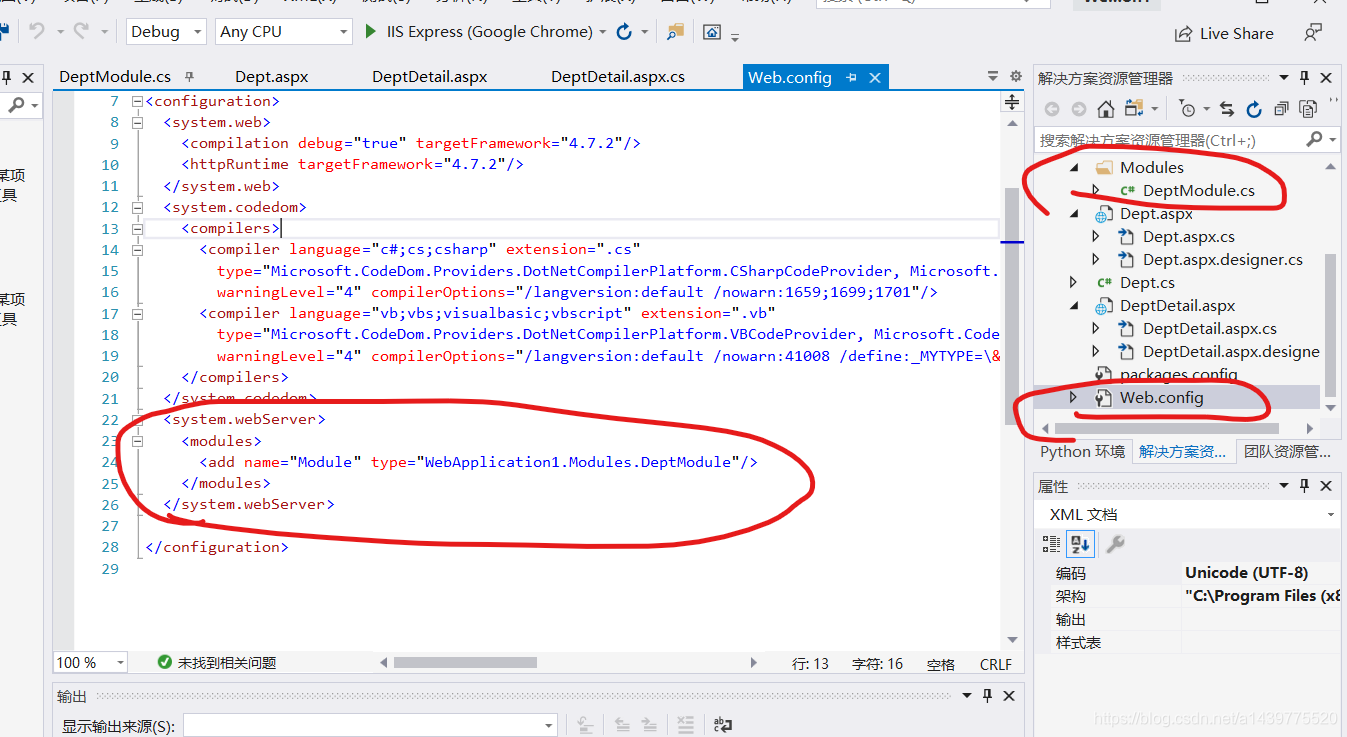
 <system.webServer>

    <modules>

      <add name="Module" type="WebApplication1.Modules.DeptModule"/>

    </modules>

  </system.webServer>
显示的web窗体
<%@ Page Language="C#" AutoEventWireup="true" CodeBehind="DeptDetail.aspx.cs" Inherits="WebApplication1.DeptDetail" %>

<!DOCTYPE html>

<html xmlns="http://www.w3.org/1999/xhtml">

<head runat="server">

<meta http-equiv="Content-Type" content="text/html; charset=utf-8"/>

    <title></title>

</head>

<body>

    <form id="form1" runat="server">

        <div>

            <asp:TextBox ID="TextBox1" runat="server"></asp:TextBox>

        </div>

    </form>

</body>

</html>
显示的web窗体的后台代码
using System;

using System.Collections.Generic;

using System.Linq;

using System.Web;

using System.Web.UI;

using System.Web.UI.WebControls;

namespace WebApplication1

{

    public partial class DeptDetail : System.Web.UI.Page

    {

        protected void Page_Load(object sender, EventArgs e)

        {

            if (!IsPostBack)

            {

                //直接通过request获取Module存入的id

                this.TextBox1.Text = $"{Request.QueryString["deptid"]}";

            }

        }

    }

}
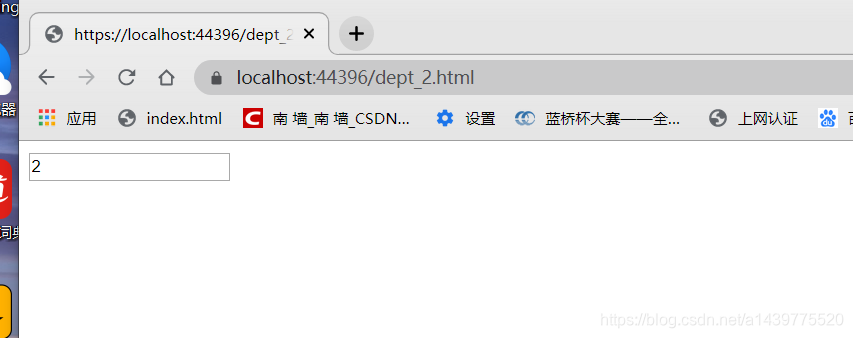
效果图
选择一个后点击查询
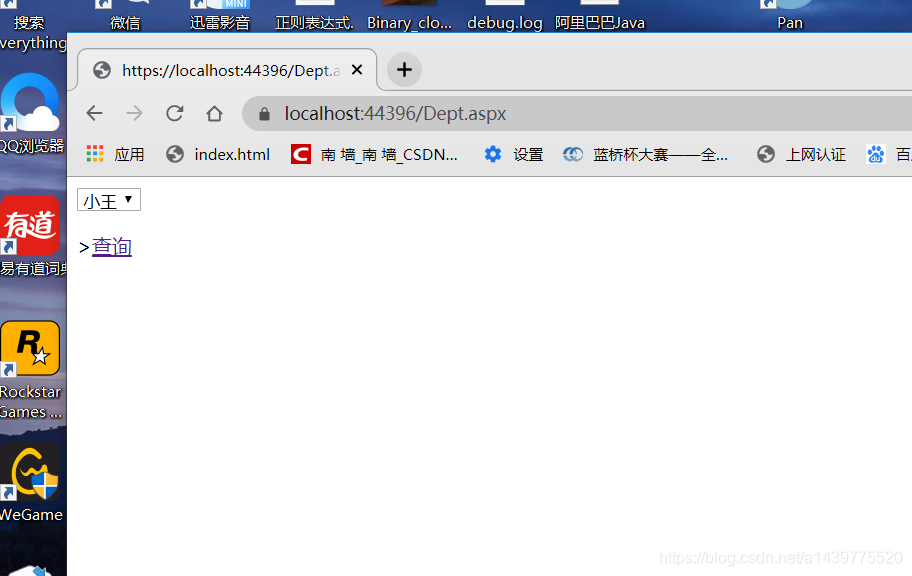
地址栏和内容都进行了更改
ASP.NET通过更改Url进行页面传值的更多相关文章
- 四、angularjs 如何在页面没有登录的情况下阻止用户通过更改url进入页面--$stateChangeStart
有时候用户没有登录或者在某些情况下你是不希望用户进入页面,但是angular的路由机制可以让用户直接通过更改Url进入页面,如何处理这一问题呢? ——监控路由转换机制 $stateChangeStar ...
- ASP.NET MVC 5 Web编程5 -- 页面传值的方式
本篇文章将讲述MVC的页面传值方式,具体包括:后端向前端传值(Controller向View传值):前端向后端传值(View向Controller传值):Action与Action之间的传值. 回顾 ...
- ASP.NET页面传值不使用QueryString
ASP.NET页面传值不使用QueryString Asp.net中的页面传值方法: 1 Url传值 特点:主要优点是实现起来非常简单,然而它的缺点是传递的值是会显示在浏览器的地址 ...
- c#ASP.NET中页面传值共有这么几种方式
一.目前在ASP.NET中页面传值共有这么几种方式: 1.Response.Redirect("http://www.hao123.com",false); 目标页面和原页面可以在 ...
- ASP.NET页面传值的几种方式
页面传值是学习asp.net初期都会面临的一个问题,总的来说有页面传值. 存储对象传值.ajax.类.model.表单等!下面欧柏泰克和大家一起来看看asp.net页面传值方式一般有哪些?常用的较简单 ...
- ASP.Net页面传值比较
ASP.Net页面传值比较 作为一个ASP.Net程序员,尤其是搞B/S开发的,对于不同页面之间变量值的传递用的非常广泛,而掌握不同方式之间的区别和特点也就很有必要.本文将针对这一知识点做一个简单 ...
- ASP.NET之页面传值
一.目前在ASP.NET中页面传值共有这么几种方式: 1.使用QueryString变量QueryString是一种非常简单的传值方式,他可以将传送的值显示在浏览器的地址栏中.如果是传递一个或多个安全 ...
- ASP.Net中页面传值的几种方式
开篇概述 对于任何一个初学者来说,页面之间传值可谓是必经之路,却又是他们的难点.其实,对大部分高手来说,未必不是难点. 回想2016年面试的将近300人中,有实习生,有应届毕业生,有1-3年经验的,有 ...
- ASP.NET页面传值与跳转
asp.net页面传值的五种方法:QueryString,Session,Application,Request.Cookies,Server.Transfer 其中Cookie和Server.Tra ...
随机推荐
- 超简单笔记本改造nas--一个萌新的摸爬滚打
最近好久没更新,你们有没有想我啊(手动滑稽)咳咳,言归正传,如同标题,最近闲来无事,打算利用家里的闲置笔记本电脑搭建一个nas.**注意:本文不涉及群晖以及相关专业NAS服务供应商!!!**nas分两 ...
- 手把手教你学Numpy,从此处理数据不再慌「一」
当当当,我又开新坑了,这次的专题是Python机器学习中一个非常重要的工具包,也就是大名鼎鼎的numpy. 所以今天的文章是Numpy专题的第一篇. 俗话说得好,机器学习要想玩的溜,你可以不会写Pyt ...
- 【SPOJ – SUBST1】New Distinct Substrings 后缀数组
New Distinct Substrings 题意 给出T个字符串,问每个字符串有多少个不同的子串. 思路 字符串所有子串,可以看做由所有后缀的前缀组成. 按照后缀排序,遍历后缀,每次新增的前缀就是 ...
- [hihoCoder1236 Scores 2015BeijingOnline]简单粗暴的分块+简单粗暴的bitset
题意:50000个5维向量,50000次询问每一维都不大于某一向量的向量个数,强制在线. 思路:做完这题才知道bitset效率这么高,自己本地测试了下1s可以操作1010个bit,orz简单粗暴 令S ...
- [hdu5379 Mahjong tree]dfs计数
题意:给n个节点的树编号1-n,一个节点唯一对应一种编号,要求编完号的树满足如下性质:所有节点的儿子的编号是连续的,对一棵子树,它包含的所有节点的编号也是连续的.连续的意思是把所有数排序后是一段连续的 ...
- [codeforces525D]BFS
题目大意: 给定一个包含'.'和'*'的地图,每次操作可以把'*'->'.',用最少的操作使得新图满足条件:所有的连通块为矩形('.'为可达点) 解法: 用bfs来模拟操作的过程,对于一个2*2 ...
- Mysql 常用函数(3)- ifnull 函数
Mysql常用函数的汇总,可看下面系列文章 https://www.cnblogs.com/poloyy/category/1765164.html ifnull 的作用 可以判断某个字段的值是否为 ...
- sqli-labs之Page-1
搭建与安装 参考:https://www.fujieace.com/penetration-test/sqli-labs-ec.html 下载:sqli-labs下载 第一关:单引号报错注入 ?id= ...
- axios请求拦截器(修改Data上的参数 ==>把data上的参数转为FormData)
let instance = axios.create({ baseURL: 'http://msmtest.ishare-go.com', //请求基地址 // timeout: 3000,//请求 ...
- chosen.jquery.min.js select2.js 弊端
chosen.jquery.min.js --将select放在页面最下方,会导致页面高度增加,最下方空白多出来 select2.js --点击select 但未选择,然后移出鼠标,发现其他文本框.关 ...