
Spring学习笔记(八)Spring Data JPA学习
jpa简单的命名规则如下,这个不多做介绍,放在这里也是给自己以后查找起来方便,这篇文章主要介绍之前一直忽略了的几个点,像@NoRepositoryBean这个注解,以及怎么自定义Repository的实现。
| 关键字 | 方法命名 | sql where字句 |
|---|---|---|
| And | findByNameAndPwd | where name= ? and pwd =? |
| Or | findByNameOrSex | where name= ? or sex=? |
| Is,Equals | findById,findByIdEquals | where id= ? |
| Between | findByIdBetween | where id between ? and ? |
| LessThan | findByIdLessThan | where id < ? |
| LessThanEquals | findByIdLessThanEquals | where id <= ? |
| GreaterThan | findByIdGreaterThan | where id > ? |
| GreaterThanEquals | findByIdGreaterThanEquals | where id > = ? |
| After | findByIdAfter | where id > ? |
| Before | findByIdBefore | where id < ? |
| IsNull | findByNameIsNull | where name is null |
| isNotNull,NotNull | findByNameNotNull | where name is not null |
| Like | findByNameLike | where name like ? |
| NotLike | findByNameNotLike | where name not like ? |
| StartingWith | findByNameStartingWith | where name like ‘?%’ |
| EndingWith | findByNameEndingWith | where name like ‘%?’ |
| Containing | findByNameContaining | where name like ‘%?%’ |
| OrderBy | findByIdOrderByXDesc | where id=? order by x desc |
| Not | findByNameNot | where name <> ? |
| In | findByIdIn(Collection<?> c) | where id in (?) |
| NotIn | findByIdNotIn(Collection<?> c) | where id not in (?) |
| True | findByAaaTrue | where aaa = true |
| False | findByAaaFalse | where aaa = false |
| IgnoreCase | findByNameIgnoreCase | where UPPER(name)=UPPER(?) |
@NoRepositoryBean
我们查看JpaRepository这个类的继承关系可以看到下面这张图
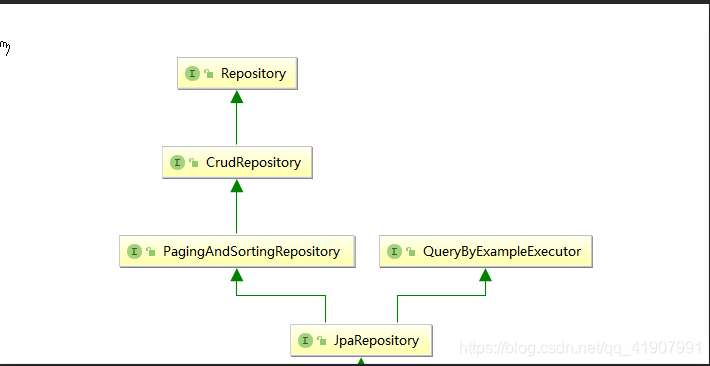
而在JpaRepository,PagingAndSortingRepository,QueryByExampleExecutor,这三个接口上我们都能发现这个注解@NoRepositoryBean,这个注解到底有上面用呢?
我们来看下官网的解释:

上面这段话大致的意思是:只要在相应的Repository接口上添加了这个注解,Spring就不会在运行时为这个接口创建对应的实例。
看到这里估计有的同学更加迷惑了,这又是什么意思呢?我们来看下面这段代码:
我定义了一个Repository接口
public interface UserRepository extends JpaRepository<User, Integer> {

    /**

     * 根据id查询

     *

     * @param part

     * @return

     */

    List<User> findFirstByUseEmailLike(String part);

}
启动类如下:
package com.study.spring.springdatajpa;

import com.study.spring.springdatajpa.config.CustomRepositoryFactoryBean;

import com.study.spring.springdatajpa.repository.UserRepository;

import org.springframework.beans.factory.annotation.Autowired;

import org.springframework.boot.ApplicationArguments;

import org.springframework.boot.ApplicationRunner;

import org.springframework.boot.SpringApplication;

import org.springframework.boot.autoconfigure.SpringBootApplication;

import org.springframework.data.jpa.repository.config.EnableJpaRepositories;

@SpringBootApplication

@EnableJpaRepositories(basePackages = {"com.study.spring.springdatajpa.repository"})

public class SpringDataJpaApplication implements ApplicationRunner {

    @Autowired

    UserRepository userRepository;

    public static void main(String[] args) {

        SpringApplication.run(SpringDataJpaApplication.class, args);

    }

    @Override

    public void run(ApplicationArguments args) throws Exception {

       userRepository.findFirstByUseEmailLike("*.com")

    }

}
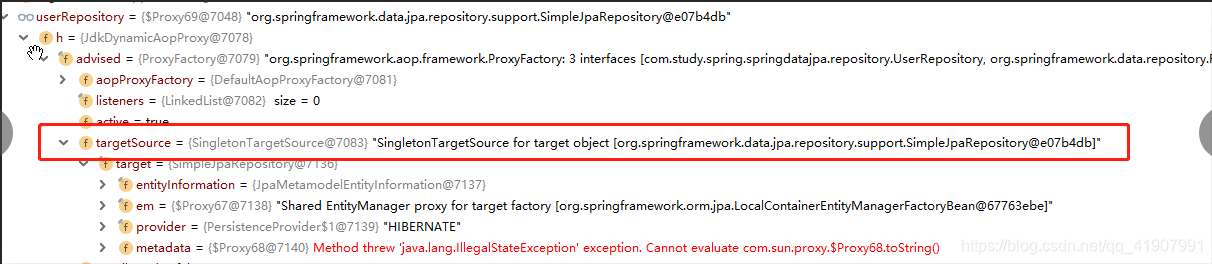
断点调试如下:

可以看到,虽然我们定义了一个userRepository接口,但是Spring为我们生成了一个代理对象,并且这个代理对象代理是org.springframework.data.jpa.repository.support.SimpleJpaRepository这个类。
我们看下SimpleJpaRepository这个类的继承关系:
可以发现,SimpleJpaRepository实现了JpaRepository这个接口。
其实在程序初始化的时候,SpringBoot会通过这个注解@EnableJpaRepositories(basePackages = {"com.study.spring.springdatajpa.repository"})将我们配置的包下的所有继承0了JpaRepository这个接口的接口,注册到spring容器中,然后以SimpleJpaRepository为目标对象创建代理对象。
我们知道对应的接口有3个,为什么它们没被创建代理对象呢?这样就要说到我们提到的注解@NoRepositoryBean了,JpaRepository,PagingAndSortingRepository,QueryByExampleExecutor这个3个接口都被这个注解标注了,所以不会被创建代理对象,这也是这个注解的作用
利用@NoRepositoryBean来自定义一个Repository的实现
我们要达到的目的就是,定义一个Repository接口(仿JpaRepository),只要有别的接口继承了这个类,就自动拥有这个接口对应的实现类(仿SimpleJpaRepository)中的方法。
代码如下:
定义接口:
package com.wisely.support;

import java.io.Serializable;

import org.springframework.data.domain.Page;

import org.springframework.data.domain.Pageable;

import org.springframework.data.jpa.repository.JpaRepository;

import org.springframework.data.jpa.repository.JpaSpecificationExecutor;

import org.springframework.data.repository.NoRepositoryBean;

@NoRepositoryBean  //指明当前这个接口不是领域类的接口

//我们自定义的CustomRepository继承了JpaRepository接口,具备JPA的能力

public interface CustomRepository<T, ID extends Serializable> extends JpaRepository<T, ID>, JpaSpecificationExecutor<T> {

    //要定义的数据操作方法在接口中定义

    void doWithId(ID id);

}
定义接口实现类
//要实现 CustomRepository接口,继承SimpleJpaRepository类让我们可以使用其提供的方法(如findAll)

public class CustomRepositoryImpl<T, ID extends Serializable>

        extends SimpleJpaRepository<T, ID> implements CustomRepository<T, ID> {

    //数据操作方法会用到entityManager,我们这里没有用到

    private final EntityManager entityManager;

    //CustomRepositoryImpl的构造函数,

    // 需当前处理的领域类和entityManager作为构造参数,在这里也给entityManager赋值了

    public CustomRepositoryImpl(Class<T> domainClass, EntityManager entityManager) {

        super(domainClass, entityManager);

        this.entityManager = entityManager;

    }

    @Override

    public void doWithId(ID id) {

        //定义数据访问操作,如调用findAll方法并构造一些查询条件

        System.out.println("拿到id干点事儿");

    }

}
自定义一个RepositoryFactoryBean
//自定义CustomRepositoryFactoryBean,继承JpaRepositoryFactoryBean

public class CustomRepositoryFactoryBean<T extends JpaRepository<S, ID>, S, ID extends Serializable>

        extends JpaRepositoryFactoryBean<T, S, ID> {

    public CustomRepositoryFactoryBean(Class<? extends T> repositoryInterface) {

        super(repositoryInterface);

    }

    @Override

    //重写createRepositoryFactory方法,用当前的CustomRepositoryFactory创建实例

    protected RepositoryFactorySupport createRepositoryFactory(EntityManager entityManager) {

        return new CustomRepositoryFactory(entityManager);  //该类见下面的定义

    }

    //定义一个私有的静态类,并继承JpaRepositoryFactory

    //复写其中两个核心方法

    private static class CustomRepositoryFactory extends JpaRepositoryFactory {

        //构造函数

        public CustomRepositoryFactory(EntityManager entityManager) {

            super(entityManager);

        }

        @Override

        protected JpaRepositoryImplementation<?, ?> getTargetRepository(RepositoryInformation information, EntityManager entityManager) {

            return new CustomRepositoryImpl<>(information.getDomainType(), entityManager);

        }

        @Override

        protected Class<?> getRepositoryBaseClass(RepositoryMetadata metadata) {// 获得当前自定义类的类型

            return CustomRepositoryImpl.class;

        }

    }

}
启动类代码,注意上面的注解
@SpringBootApplication

//@EnableJpaRepositories(basePackages = //{"com.study.spring.springdatajpa.repository"})

@EnableJpaRepositories(repositoryFactoryBeanClass = CustomRepositoryFactoryBean.class)

public class SpringDataJpaApplication implements ApplicationRunner {

    @Autowired

    UserRepository userRepository;

    public static void main(String[] args) {

        SpringApplication.run(SpringDataJpaApplication.class, args);

    }

    @Override

    public void run(ApplicationArguments args) throws Exception {

        userRepository.doWithId(11);

    }

}
运行程序打印结果如下:
拿到id干点事儿
Spring学习笔记(八)Spring Data JPA学习的更多相关文章
- Spring实战第五章学习笔记————构建Spring Web应用程序
Spring实战第五章学习笔记----构建Spring Web应用程序 Spring MVC基于模型-视图-控制器(Model-View-Controller)模式实现,它能够构建像Spring框架那 ...
- Spring实战第八章学习笔记————使用Spring Web Flow
Spring实战第八章学习笔记----使用Spring Web Flow Spring Web Flow是一个Web框架,它适用于元素按规定流程运行的程序. 其实我们可以使用任何WEB框架写流程化的应 ...
- Java架构师之路 Spring学习笔记(一) Spring介绍
前言 这是一篇原创的Spring学习笔记.主要记录我学习Spring4.0的过程.本人有四年的Java Web开发经验,最近在面试中遇到面试官总会问一些简单但我不会的Java问题,让我觉得有必要重新审 ...
- Spring 源码学习笔记10——Spring AOP
Spring 源码学习笔记10--Spring AOP 参考书籍<Spring技术内幕>Spring AOP的实现章节 书有点老,但是里面一些概念还是总结比较到位 源码基于Spring-a ...
- Spring 源码学习笔记11——Spring事务
Spring 源码学习笔记11--Spring事务 Spring事务是基于Spring Aop的扩展 AOP的知识参见<Spring 源码学习笔记10--Spring AOP> 图片参考了 ...
- go微服务框架kratos学习笔记八 (kratos的依赖注入)
目录 go微服务框架kratos学习笔记八(kratos的依赖注入) 什么是依赖注入 google wire kratos中的wire Providers injector(注入器) Binding ...
- 【opencv学习笔记八】创建TrackBar轨迹条
createTrackbar这个函数我们以后会经常用到,它创建一个可以调整数值的轨迹条,并将轨迹条附加到指定的窗口上,使用起来很方便.首先大家要记住,它往往会和一个回调函数配合起来使用.先看下他的函数 ...
- Learning ROS forRobotics Programming Second Edition学习笔记(八)indigo rviz gazebo
中文译著已经出版,详情请参考:http://blog.csdn.net/ZhangRelay/article/category/6506865 Learning ROS forRobotics Pro ...
- python3.4学习笔记(八) Python第三方库安装与使用,包管理工具解惑
python3.4学习笔记(八) Python第三方库安装与使用,包管理工具解惑 许多人在安装Python第三方库的时候, 经常会为一个问题困扰:到底应该下载什么格式的文件?当我们点开下载页时, 一般 ...
- Go语言学习笔记八: 数组
Go语言学习笔记八: 数组 数组地球人都知道.所以只说说Go语言的特殊(奇葩)写法. 我一直在想一个人参与了两种语言的设计,但是最后两种语言的语法差异这么大.这是自己否定自己么,为什么不与之前统一一下 ...
随机推荐
- svg整体缩放至指定大小
一.问题 svg画面跑在分辨率低的电脑上,导致不能完全显示. 二.要求 svg要能够根据电脑的屏幕大小自动缩放至适配电脑的尺寸. 三.实现 1.获取本机窗口高度.宽度 let clientWidth ...
- Three.js实现3D地图实例分享
本文主要给大家介绍了关于利用Three.js开发实现3D地图的实践过程,文中通过示例代码介绍的非常详细,对大家学习或者使用three.js具有一定的参考学习价值,需要的朋友们下面随着小编来一起学习学习 ...
- Spring IoC getBean 方法详解
前言 本篇文章主要介绍 Spring IoC 容器 getBean() 方法. 下图是一个大致的流程图: 正文 首先定义一个简单的 POJO,如下: public class User { priva ...
- Java数组 —— 八大排序
(请观看本人博文--<详解 普通数组 -- Arrays类 与 浅克隆>) 在本人<数据结构与算法>专栏的讲解中,本人讲解了如何去实现数组的八大排序. 但是,在讲解的过程中,我 ...
- JavaWeb后端jsp之增删改查
今日主题:JavaWeb后端jsp之增删改查 实体类: Student.java: package cn.itcast.model.entity; public class Student { pri ...
- [转+自]SSH工作原理
SSH工作原理 熟悉Linux的人肯定都知道SSH.SSH是一种用于安全访问远程服务器的网络协议.它将客户端与服务端之间的消息通过加密保护起来,这样就无法被窃取或篡改了.那么它安全性是如何实现的呢? ...
- [linux] 小问题:管道符,换行问题等;[nginx]启动,重启,关闭命令;以及升级nginx切换命令
Lniux换行问题 后面回车不会马上执行本条命令而是换行继续. : 是运行完前面就继续后面的, && 同样是前面正确就运行后面, || 是前面运行不正确就运行后面. | 管道符“|”将 ...
- vue+element-ui中引入阿里播放器
1.在public文件下的index.html文件中插入以下代码: <link rel="stylesheet" href="https://g.alicdn.co ...
- 彻底解决Python编码问题
1. 基本概念 字符集(Character set) 解释:文字和符合的总称 常见字符集: Unicode字符集 ASCII字符集(Unicode子集) GB2312字符集 编码方法(Encoding ...
- 挑战全网最幽默的Vuex系列教程:第五讲 Vuex的小帮手
先说两句 前面已经讲完了 Vuex 下的 State.Getter.Mutation 及 Action 这四驾马车,不知道大家是否已经理解.当然,要想真正熟练掌握的话,还是需要不断的练习和动手实践才行 ...