
How Many Partitions Does An RDD Have
From https://databricks.gitbooks.io/databricks-spark-knowledge-base/content/performance_optimization/how_many_partitions_does_an_rdd_have.html
For tuning and troubleshooting, it's often necessary to know how many paritions an RDD represents. There are a few ways to find this information:
View Task Execution Against Partitions Using the UI
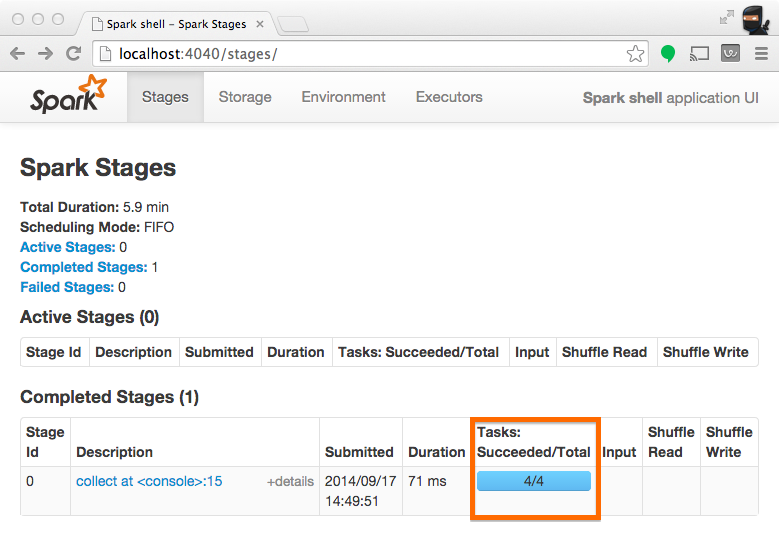
When a stage executes, you can see the number of partitions for a given stage in the Spark UI. For example, the following simple job creates an RDD of 100 elements across 4 partitions, then distributes a dummy map task before collecting the elements back to the driver program:
scala> val someRDD = sc.parallelize(1 to 100, 4)

someRDD: org.apache.spark.rdd.RDD[Int] = ParallelCollectionRDD[0] at parallelize at <console>:12

scala> someRDD.map(x => x).collect

res1: Array[Int] = Array(1, 2, 3, 4, 5, 6, 7, 8, 9, 10, 11, 12, 13, 14, 15, 16, 17, 18, 19, 20, 21, 22, 23, 24, 25, 26, 27, 28, 29, 30, 31, 32, 33, 34, 35, 36, 37, 38, 39, 40, 41, 42, 43, 44, 45, 46, 47, 48, 49, 50, 51, 52, 53, 54, 55, 56, 57, 58, 59, 60, 61, 62, 63, 64, 65, 66, 67, 68, 69, 70, 71, 72, 73, 74, 75, 76, 77, 78, 79, 80, 81, 82, 83, 84, 85, 86, 87, 88, 89, 90, 91, 92, 93, 94, 95, 96, 97, 98, 99, 100)
In Spark's application UI, you can see from the following screenshot that the "Total Tasks" represents the number of partitions:
View Partition Caching Using the UI
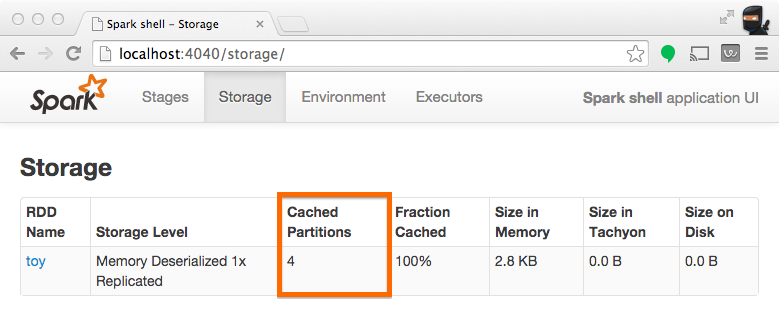
When persisting (a.k.a. caching) RDDs, it's useful to understand how many partitions have been stored. The example below is identical to the one prior, except that we'll now cache the RDD prior to processing it. After this completes, we can use the UI to understand what has been stored from this operation.
scala> someRDD.setName("toy").cache

res2: someRDD.type = toy ParallelCollectionRDD[0] at parallelize at <console>:12

scala> someRDD.map(x => x).collect

res3: Array[Int] = Array(1, 2, 3, 4, 5, 6, 7, 8, 9, 10, 11, 12, 13, 14, 15, 16, 17, 18, 19, 20, 21, 22, 23, 24, 25, 26, 27, 28, 29, 30, 31, 32, 33, 34, 35, 36, 37, 38, 39, 40, 41, 42, 43, 44, 45, 46, 47, 48, 49, 50, 51, 52, 53, 54, 55, 56, 57, 58, 59, 60, 61, 62, 63, 64, 65, 66, 67, 68, 69, 70, 71, 72, 73, 74, 75, 76, 77, 78, 79, 80, 81, 82, 83, 84, 85, 86, 87, 88, 89, 90, 91, 92, 93, 94, 95, 96, 97, 98, 99, 100)
Note from the screenshot that there are four partitions cached.
Inspect RDD Partitions Programatically
In the Scala API, an RDD holds a reference to it's Array of partitions, which you can use to find out how many partitions there are:
scala> val someRDD = sc.parallelize(1 to 100, 30)

someRDD: org.apache.spark.rdd.RDD[Int] = ParallelCollectionRDD[0] at parallelize at <console>:12

scala> someRDD.partitions.size

res0: Int = 30
In the python API, there is a method for explicitly listing the number of partitions:
In [1]: someRDD = sc.parallelize(range(101),30)

In [2]: someRDD.getNumPartitions()

Out[2]: 30
Note in the examples above, the number of partitions was intentionally set to 30 upon initialization.
How Many Partitions Does An RDD Have的更多相关文章
- Spark核心概念之RDD
RDD: Resilient Distributed Dataset RDD的特点: 1.A list of partitions 一系列的分片:比如说64M一片:类似于Hadoop中的s ...
- RDD的依赖关系
RDD的依赖关系 Rdd之间的依赖关系通过rdd中的getDependencies来进行表示, 在提交job后,会通过在DAGShuduler.submitStage-->getMissingP ...
- RDD.scala(源码)
---- map. --- flatMap.fliter.distinct.repartition.coalesce.sample.randomSplit.randomSampleWithRange. ...
- Spark函数详解系列之RDD基本转换
摘要: RDD:弹性分布式数据集,是一种特殊集合 ‚ 支持多种来源 ‚ 有容错机制 ‚ 可以被缓存 ‚ 支持并行操作,一个RDD代表一个分区里的数据集 RDD有两种操作算子: ...
- Spark编程模型及RDD操作
转载自:http://blog.csdn.net/liuwenbo0920/article/details/45243775 1. Spark中的基本概念 在Spark中,有下面的基本概念.Appli ...
- 【原创】大数据基础之Spark(4)RDD原理及代码解析
一 简介 spark核心是RDD,官方文档地址:https://spark.apache.org/docs/latest/rdd-programming-guide.html#resilient-di ...
- Spark源码系列:RDD repartition、coalesce 对比
在上一篇文章中 Spark源码系列:DataFrame repartition.coalesce 对比 对DataFrame的repartition.coalesce进行了对比,在这篇文章中,将会对R ...
- 【Spark-core学习之二】 RDD和算子
环境 虚拟机:VMware 10 Linux版本:CentOS-6.5-x86_64 客户端:Xshell4 FTP:Xftp4 jdk1.8 scala-2.10.4(依赖jdk1.8) spark ...
- spark 算子之RDD
map map(func) Return a new distributed dataset formed by passing each element of the source through ...
随机推荐
- NOIP2016 DAY2 T1 组合数问题
题目描述 组合数表示的是从n个物品中选出m个物品的方案数.举个例子,从(1,2,3) 三个物品中选择两个物品可以有(1,2),(1,3),(2,3)这三种选择方法.根据组合数的定 义,我们可以给出计算 ...
- [ZOJ]3541 Last Puzzle (区间DP)
ZOJ 3541 题目大意:有n个按钮,第i个按钮在按下ti 时间后回自动弹起,每个开关的位置是di,问什么策略按开关可以使所有的开关同时处于按下状态 Description There is one ...
- Python半双工聊天
半双工聊天 半双工聊天.创建一个简单的半双工聊天程序.指定半双工,我们的意思就是,当建立一个连接且服务开始后,只有一个人能打字,而另一个参与者在得到输入消息提示之前必须等待消息.并且,一旦发送者发送了 ...
- [剑指offer] 49. 丑数
通俗易懂的解释: 首先从丑数的定义我们知道,一个丑数的因子只有2,3,5,那么丑数p = 2 ^ x * 3 ^ y * 5 ^ z,换句话说一个丑数一定由另一个丑数乘以2或者乘以3或者乘以5得到,那 ...
- Elasticsearch Sliced Scroll分页检索案例分享
面试:你懂什么是分布式系统吗?Redis分布式锁都不会?>>> The best elasticsearch highlevel java rest api-----bboss ...
- Cannot Allocate New Log
http://www.itpub.net/thread-1842569-1-1.html http://czmmiao.iteye.com/blog/2277675
- JavaScript 获取小数任一小数点后的位数的小数
用Javascript取float型小数点后两位,例22.127456取成22.13,怎样做? 1.这样的方法最不推荐: function get(){ var s = 22.127456 + &qu ...
- U盘安装 CentOS 64bit (dell c6100, CentOS6.3, 64bit)
在淘宝买了一个server,dell c6100,64bit, 曾经系统是black apple.近期又买了一块企业级硬盘打算装CentOS. 综合各方面原因决定安装6.3版本号. 我參考了http: ...
- iOS开发之autoLayout constraint
前言 ios设备的尺寸越来越多,针对一款app可能要适配到多种设备.多种尺寸.所以.我们期望我们的app可以autoLayout.本文主要介绍在Xcode中使用constraint.未来会不定期对此文 ...
- 杂项:ExtJS
ylbtech-杂项:ExtJS extjs是一种软件.自动生成行号,支持checkbox全选,动态选择显示哪些列,支持本地以及远程分页,可以对单元格按照自己的想法进行渲染,这些也算可以想到的功能. ...