
Android第一次项目
学习了一个月的Android,接触了人生中第一个安卓项目,对于一个小白来说,总结是很重要的学习方法,以下我把学到的东西总结以下:
1. 1》okhttp3用法解析(边贴代码边熟悉)
public class OkhttpService  {

    public static final MediaType JSON = MediaType.parse("application/json; charset=utf-8"); //json请求
    public static final MediaType XML = MediaType.parse("application/xml; charset=utf-8");
    private static OkhttpService instance;
    private OkHttpClient client;

    private OkhttpService() {
        client = new OkHttpClient(); //获取OkthhpClient实例
    }
    public static OkhttpService getInstance() {
        return instance == null ? instance = new OkhttpService() : instance;
    }

    //魔盒批量封装 (post提交json数据)
    注:RequestBody body = RequestBody.create(JSON, json); //json数据为body
        Request是OkHttp中访问的请求,Builder是辅助类。Response即OkHttp中的响应。

    public String insertBoxProd(List<BoxProdInfo>  boxProd)throws IOException{
        HttpUrl route = HttpUrl.parse("http://115.29.165.110:8085/RfService.svc/V1.0/Mh/InsertBoxProd/");
        String json = new Gson().toJson(boxProd); //将boxProd序列化为json
        Request request = new Request.Builder()
                .url(route)
                .post(RequestBody.create(JSON, json)) //使用Request的post方法来提交请求体RequestBody
                .build();
        Response response = client.newCall(request).execute();
        boolean  isOk=response.isSuccessful();
        return response.body().string();  //response.body()返回ResponseBody类
}

    //网点提交盒子收货上架
    public String receiverBox(String userCode, List<BoxReceiverInfo> boxReceiverInfos)throws IOException{
        HttpUrl route=HttpUrl.parse("http://115.29.165.110:8085/RfService.svc/V1.0/Mh/ReceiveBox/")
                .newBuilder()
                .addPathSegment(userCode)
                .build();
        String json=new Gson().toJson(boxReceiverInfos);
        Request request=new Request.Builder()
                .url(route)
                .put(RequestBody.create(JSON,json))
                .build();
        Response response=client.newCall(request).execute();
        boolean  isOk=response.isSuccessful();
        return response.body().string();
    }
}
注:以上两个方法需要在前台访问。且需要返回结果提示给前台(接口中需提供 States(返回状态:成功或失败),Description(结果描述),Data(数据)等)

eg:String  result = OkhttpService.getInstance().receiverBox(userCode,boxReceiverInfos).toString();

2》官方文档总结
(1)配置
    导入Jar包
    通过构建方式导入=== meaven

(2)基本要求
  Request请求
  Response响应

(3)基本使用
 《--》Http  GET

 okHtttpClient  client=new okHtttpClient();

 String run(String  url)throws  IOException{
     Request request = new Request.Builder().url(url).build();
     Response response = client.newCall(request).execute();
    if (response.isSuccessful()) {
       return response.body().string();
    }else{
     throw new IOException("Unexpected code " + response);
    }
}
注:Request是OkHttp中访问的请求,Builder是辅助类,Response即OkHttp中的响应

《--》Http POST

》》》POST提交Json数据

public static final MediaType JSON = MediaType.parse("application/json; charset=utf-8");
OkHttpClient client = new OkHttpClient();
String post(String url, String json) throws IOException {
    RequestBody body = RequestBody.create(JSON, json);
    Request request = new Request.Builder()
    .url(url)
    .post(body)
    .build();
    Response response = client.newCall(request).execute();
    if (response.isSuccessful())
    {
        return response.body().string();
    } else
    {
        throw new IOException("Unexpected code " + response);
    }
}
注:使用Request的post方法来提交请求体RequestBody

》》》POST提交键值对
OkHttp也可以通过POST方式把键值对数据传送到服务器

OkHttpClient client = new OkHttpClient();
String post(String url, String json) throws IOException {
    RequestBody formBody = new FormEncodingBuilder()
    .add("platform", "android")
    .add("name", "bug")
    .add("subject", "XXXXXXXXXXXXXXX")
    .build();

    Request request = new Request.Builder()
    .url(url)
    .post(body)
    .build();

    Response response = client.newCall(request).execute();
    if (response.isSuccessful())
    {
        return response.body().string();
    } else {
        throw new IOException("Unexpected code " + response);
    }
}
(3)案例

布局文件:
  <LinearLayout xmlns:android="http://schemas.android.com/apk/res/android"
  android:layout_width="match_parent"
  android:layout_height="match_parent"
  android:orientation="vertical">

      <LinearLayout android:layout_width="match_parent"
       android:layout_height="wrap_content"
       android:gravity="center_horizontal"
       android:orientation="horizontal">
               <Button android:id="@+id/bt_get"
               android:layout_width="wrap_content"
               android:layout_height="wrap_content"
               android:text="乌云Get请求"/>

               <Button android:id="@+id/bt_post"
               android:layout_width="wrap_content"
               android:layout_height="wrap_content"
               android:text="乌云Post请求"/>

 LinearLayout>

     <TextView android:id="@+id/tv_show"
     android:layout_width="match_parent"
     android:layout_height="wrap_content"/>

LinearLayout>

Java代码:
由于android本身是不允许在UI线程做网络请求操作的,所以我们自己写个线程完成网络操作

import android.os.Bundle;
import android.support.v7.app.AppCompatActivity;
import android.util.Log;
import android.view.View;
import android.widget.Button;
import com.squareup.okhttp.FormEncodingBuilder;
import com.squareup.okhttp.OkHttpClient;
import com.squareup.okhttp.Request;
import com.squareup.okhttp.RequestBody;
import com.squareup.okhttp.Response;

public class MainActivity extends AppCompatActivity implements View.OnClickListener {

       private Button bt_get;
       private Button bt_post;
       final OkHttpClient client = new OkHttpClient();

       @Override
       protected void onCreate(Bundle savedInstanceState) {
       super.onCreate(savedInstanceState);
       setContentView(R.layout.activity_main2);
       bt_get=(Button)findViewById(R.id.bt_get);
       bt_post=(Button)findViewById(R.id.bt_post);
       bt_get.setOnClickListener(this);
       bt_post.setOnClickListener(this);
   }
   @Override
   public void onClick(View view) {
       switch (view.getId()){
            case R.id.bt_get:
               getRequest();
               break;

            case R.id.bt_post:
               postRequest();
               break;
       }
   }
   private void getRequest() {
        final Request request=new Request.Builder()
             .get()
             .tag(this)
             .url("http://www.wooyun.org")
             .build();
        new Thread(new Runnable() {
            @Override
            public void run() {
                 Response response = null;
                 try {
                         response = client.newCall(request).execute();
                         if (response.isSuccessful()) {
                              Log.i("WY","打印GET响应的数据:" + response.body().string());
                         } else {
                             throw new IOException("Unexpected code " + response);
                         }
                     } catch (IOException e) {
                      e.printStackTrace();
                     }
              }
        }).start();
   }

   private void postRequest() {
        RequestBody formBody = new FormEncodingBuilder()
              .add("","")
              .build();
        final Request request = new Request.Builder()
              .url("http://www.wooyun.org")
              .post(formBody)
              .build();
        new Thread(new Runnable() {
            @Override
            public void run() {
                Response response = null;
                try {
                     response = client.newCall(request).execute();
                     if (response.isSuccessful()) {
                          Log.i("WY","打印POST响应的数据:" + response.body().string());
                     } else {
                          throw new IOException("Unexpected code " + response);
                     }
                } catch (IOException e) {
                     e.printStackTrace();
                }
             }
         }).start();
   }
}

剩下的简单说明:
同步Get
下载一个文件,打印他的响应头,以string形式打印响应体。
响应体的 string() 方法对于小文档来说十分方便、高效。但是如果响应体太大(超过1MB),应避免适应 string()方法 ,因为他会将把整个文档加载到内存中。对于超过1MB的响应 body,应使用流的方式来处理body。

异步Get
在一个工作线程中下载文件,当响应可读时回调Callback接口。读取响应时会阻塞当前线程。OkHttp现阶段不提供异步api来接收响应体。
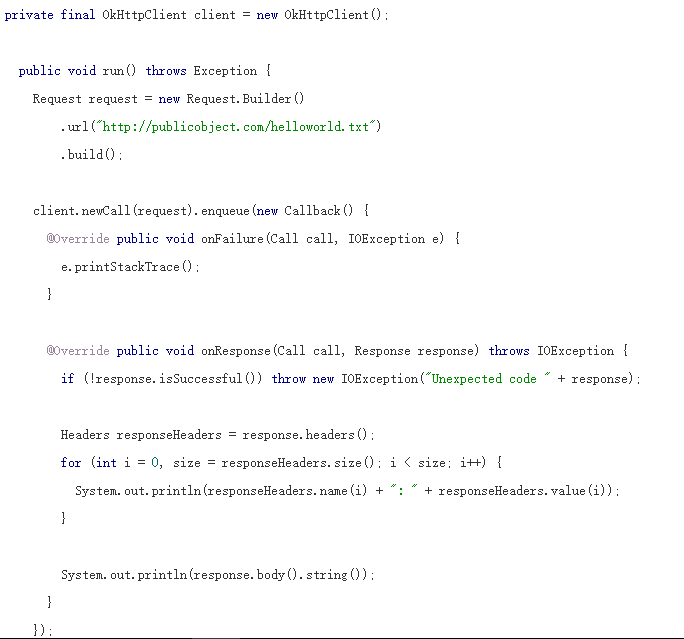
提取响应头
典型的HTTP头 像是一个 Map

Post方式提交String
使用HTTP POST提交请求到服务。这个例子提交了一个markdown文档到web服务,以HTML方式渲染markdown。因为整个请求体都在内存中,因此避免使用此api提交大文 档 (大于1MB)。
待续。。。。。。。。。
部分出自 http://m.2cto.com/net/201605/505364.html
Android第一次项目的更多相关文章
- fir.im Weekly - 从零开始创建 Android 新项目
今年的 Google I/O 大会上,人工智能和虚拟现实的产品发布让我们对未来多了几分惊喜.对于开发者部分,Google 发布了 Android N 系统,感受最深的是全新的 Android Stud ...
- 【Android 应用开发】GitHub 优秀的 Android 开源项目
原文地址为http://www.trinea.cn/android/android-open-source-projects-view/,作者Trinea 主要介绍那些不错个性化的View,包括Lis ...
- Android 开源项目及其学习
Android 系统研究:http://blog.csdn.net/luoshengyang/article/details/8923485 Android 腾讯技术人员博客 http://hukai ...
- 关于Android多项目依赖在Eclipse中无法关联源代码的问题解决
被Eclipse中Android依赖项目无法关联源代码的问题困扰了许久,网上搜索了一下,终于得到解决,大大提高了开发效率. 问题描述: 项目有A,B两个Android Project组成, B是And ...
- Android studio 使用Gradle发布Android开源项目到JCenter 总结
1.注册账号 先到https://bintray.com注册一个账号. 这个网站支持 github 账户直接登录的 2.获取 bintray.user 和 bintray.apikey ...
- [转]Android开源项目第二篇——工具库篇
本文为那些不错的Android开源项目第二篇--开发工具库篇,主要介绍常用的开发库,包括依赖注入框架.图片缓存.网络相关.数据库ORM建模.Android公共库.Android 高版本向低版本兼容.多 ...
- 2015-2016最火的Android开源项目--github开源项目集锦(不看你就out了)
标签: Android开发开源项目最火Android项目github 2015-2016最火的Android开源项目 本文整理与集结了近期github上使用最广泛最火热与最流行的开源项目,想要充电与提 ...
- Android开源项目分类汇总
目前包括: Android开源项目第一篇——个性化控件(View)篇 包括ListView.ActionBar.Menu.ViewPager.Gallery.GridView.ImageView. ...
- fir.im Weekly - 1000 个 Android 开源项目集合
冬天到了,适宜囤点代码暖暖身.本期 fir.im Weekly 收集了最近一些不错的 GitHub 源码.开发工具和技术实践教程类文章分享给大家. codeKK - 集合近 1000 Android ...
随机推荐
- 洛谷——P2657 [SCOI2009]windy数
P2657 [SCOI2009]windy数 题目大意: windy定义了一种windy数.不含前导零且相邻两个数字之差至少为2的正整数被称为windy数. windy想知道, 在A和B之间,包括A和 ...
- 使用androidstudio 分析内存泄漏
分析内存泄漏 http://www.jianshu.com/p/c49f778e7acf
- [Bzoj3940] [AC自动机,USACO 2015 February Gold] Censor [AC自动机模板题]
AC自动机模板题(膜jcvb代码) #include <iostream> #include <algorithm> #include <cstdio> #incl ...
- hdu_1020_Encoding_201310172120
Encoding Time Limit: 2000/1000 MS (Java/Others) Memory Limit: 65536/32768 K (Java/Others) Total S ...
- mysql子查询案例
源SQL如下: 创建数据表 CREATE TABLE IF NOT EXISTS tdb_goods( goods_id SMALLINT UNSIGNED PRIMARY KEY AUTO_ ...
- Javascript中数据与字符串互转(转)
数组与字符串的相互转化 <script type="text/javascript"> var obj="new1abcdefg".replace( ...
- N天学习一个linux命令之rsync
用途 主要用于本地和远程主机同步文件 特性 1 使用增量传输算法(delta-transfer algorithm) 2 支持ssh,rsync协议 3 可以用于本地同步文件 4 本地和远程主机都需要 ...
- Findbug插件静态java代码扫描工具使用
本文转自http://blog.csdn.net/gaofuqi/article/details/22679609 感谢作者 FindBugs 是由马里兰大学提供的一款开源 Java静态代码分析工具. ...
- AutoCAD 2014:安装时发生allied product not found错误
有个朋友在安装AutoCAD 2014时不慎误删了一个文件夹,结果导致安装AutoCAD时总是跳出”allied product not found”的错误. Google搜了下,解决方案如下: 1. ...
- volley基本使用方法
用volley訪问server数据,不用自己额外开线程.以下样例为訪问JSONObject类型的数据,详细使用方法看代码: 首先得有volley的jar包,假设自己没有.去github上下载,然后自己 ...