
day63-webservice 07.07.如何修改cxf配置文件路径
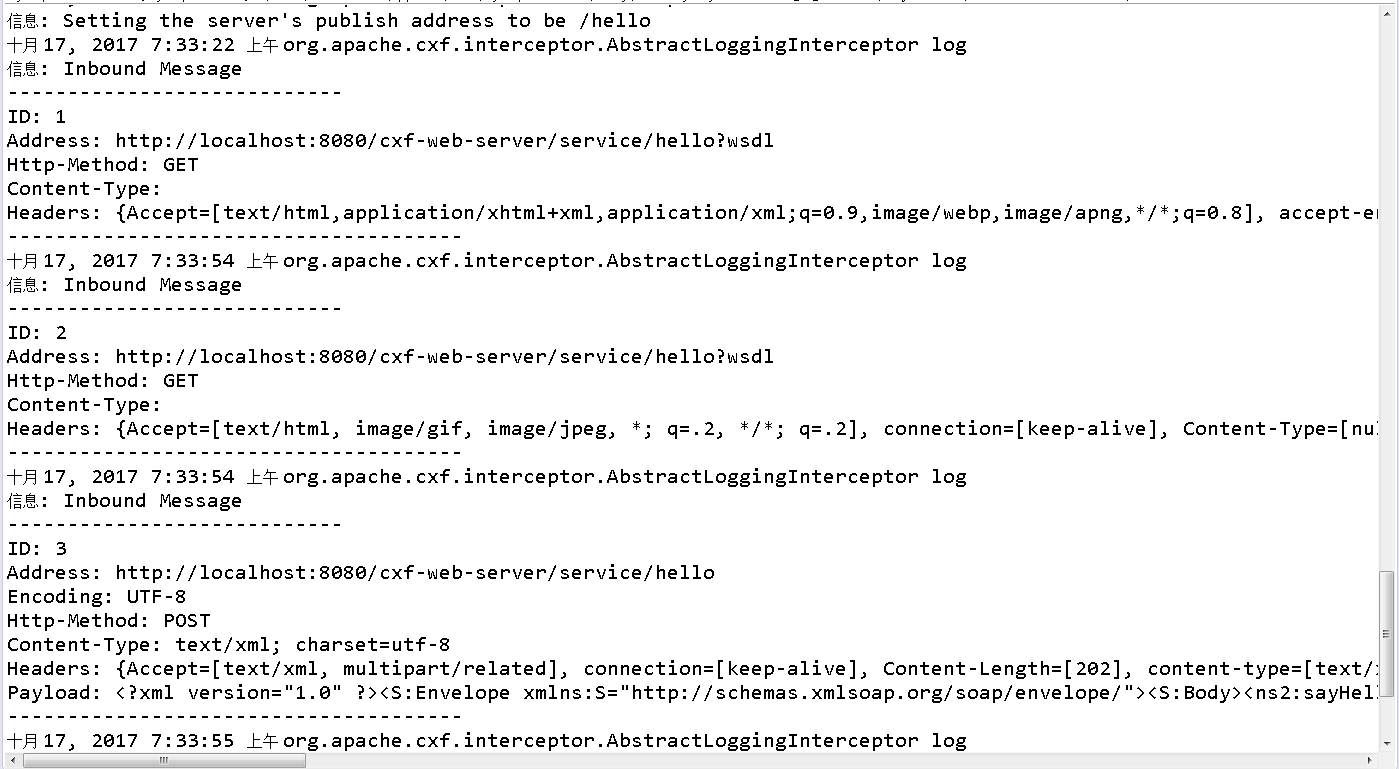
为什么第一次访问http://localhost:8080/cxf-web-server/service有点慢?证明第一次访问的时候CXFServlet被初始化了被加载了.一般是让CXFServlet随着服务器启动的时候加载,而不让它进行访问的时候加载.如果改成启动的时候加载CXFServlet就变成启动服务器的时候慢了.




<!DOCTYPE web-app PUBLIC "-//Sun Microsystems, Inc.//DTD Web Application 2.3//EN" "http://java.sun.com/dtd/web-app_2_3.dtd">

<web-app>
package com.rl.cxf.web.client;

import com.rl.web.server.HelloService;

import com.rl.web.server.HelloServiceService;

public class WebClient {

    public static void main(String[] args) {

        HelloServiceService hss = new HelloServiceService();

        HelloService hs = hss.getHelloServicePort();

        String result = hs.sayHello("李四");

        System.out.println(result);

    }

}
package com.rl.web.server;

import javax.jws.WebService;

import org.springframework.web.context.ContextLoaderListener;

@WebService //所有的webservice服务类都要加@webservice,接口的形式加在接口上

public class HelloService {

   public String sayHello(String name){

       //ContextLoaderListener

       return name + " hello";

   }

}
<?xml version="1.0" encoding="UTF-8"?>

<beans xmlns="http://www.springframework.org/schema/beans"

    xmlns:xsi="http://www.w3.org/2001/XMLSchema-instance" xmlns:jaxws="http://cxf.apache.org/jaxws"

    xmlns:jaxrs="http://cxf.apache.org/jaxrs" xmlns:cxf="http://cxf.apache.org/core"

    xsi:schemaLocation="http://www.springframework.org/schema/beans

          http://www.springframework.org/schema/beans/spring-beans.xsd

            http://cxf.apache.org/jaxrs http://cxf.apache.org/schemas/jaxrs.xsd

            http://cxf.apache.org/jaxws http://cxf.apache.org/schemas/jaxws.xsd

            http://cxf.apache.org/core http://cxf.apache.org/schemas/core.xsd">

    <!-- 引入CXF Bean定义如下,早期的版本中使用 -->

    <import resource="classpath:META-INF/cxf/cxf.xml" />

    <import resource="classpath:META-INF/cxf/cxf-extension-soap.xml" />

    <import resource="classpath:META-INF/cxf/cxf-servlet.xml" />

    <!--

       address:tomcat的host http://ip:port/projectName/service/后面的一端路径

       implementor:指定具体的服务的类

     -->

     <jaxws:endpoint id="hello" address="/hello" implementor="com.rl.web.server.HelloService">

        <!-- 输入拦截器,打印输入的消息 -->

        <jaxws:inInterceptors>

          <bean class="org.apache.cxf.interceptor.LoggingInInterceptor"></bean>

        </jaxws:inInterceptors>

        <jaxws:outInterceptors>

           <bean class="org.apache.cxf.interceptor.LoggingOutInterceptor"></bean>

        </jaxws:outInterceptors>

     </jaxws:endpoint>

</beans>
<!DOCTYPE web-app PUBLIC "-//Sun Microsystems, Inc.//DTD Web Application 2.3//EN" "http://java.sun.com/dtd/web-app_2_3.dtd">

<web-app>

   <!-- 使用Spring的监听器 -->

   <listener>

      <listener-class>org.springframework.web.context.ContextLoaderListener</listener-class><!-- 初始化Spring的容器,cxf.xml本身就是一个Spring的容器.可以把cxf.xml作为Spring的容器进行加载. -->

      <!-- 能加载Spring文件的类,这个类叫什么? -->

   </listener>

   <context-param>

      <param-name>contextConfigLocation</param-name><!-- param-name不能再指定config-location,而是要指定ContextLoaderListener里面读取Spring文件的那个Key -->

      <param-value>classpath:cxf.xml</param-value>

   </context-param>

   <servlet>

       <servlet-name>cxf</servlet-name>

       <servlet-class>org.apache.cxf.transport.servlet.CXFServlet</servlet-class>

       <!--

       <init-param>

          <param-name>config-location</param-name>

          <param-value>classpath:cxf.xml</param-value>

       </init-param>

       <load-on-startup>1</load-on-startup>

       -->

   </servlet>

   <servlet-mapping>

       <servlet-name>cxf</servlet-name>

       <url-pattern>/service/*</url-pattern>  <!-- 拦截这种请求 -->

   </servlet-mapping>

</web-app>
<?xml version="1.0" encoding="UTF-8"?>

<beans xmlns="http://www.springframework.org/schema/beans"

    xmlns:xsi="http://www.w3.org/2001/XMLSchema-instance" xmlns:jaxws="http://cxf.apache.org/jaxws"

    xmlns:jaxrs="http://cxf.apache.org/jaxrs" xmlns:cxf="http://cxf.apache.org/core"

    xsi:schemaLocation="http://www.springframework.org/schema/beans

          http://www.springframework.org/schema/beans/spring-beans.xsd

            http://cxf.apache.org/jaxrs http://cxf.apache.org/schemas/jaxrs.xsd

            http://cxf.apache.org/jaxws http://cxf.apache.org/schemas/jaxws.xsd

            http://cxf.apache.org/core http://cxf.apache.org/schemas/core.xsd">

    <!-- 引入CXF Bean定义如下,早期的版本中使用 -->

    <import resource="classpath:META-INF/cxf/cxf.xml" />

    <import resource="classpath:META-INF/cxf/cxf-extension-soap.xml" />

    <import resource="classpath:META-INF/cxf/cxf-servlet.xml" />

    <!--

       address:tomcat的host http://ip:port/projectName/service/后面的一端路径

       implementor:指定具体的服务的类

     -->

     <jaxws:endpoint id="hello" address="/hello" implementor="com.rl.web.server.HelloService">

        <!-- 输入拦截器,打印输入的消息 -->

        <jaxws:inInterceptors>

          <bean class="org.apache.cxf.interceptor.LoggingInInterceptor"></bean>

        </jaxws:inInterceptors>

        <jaxws:outInterceptors>

           <bean class="org.apache.cxf.interceptor.LoggingOutInterceptor"></bean>

        </jaxws:outInterceptors>

     </jaxws:endpoint>

</beans>
<?xml version="1.0" encoding="UTF-8"?>

   <web-app id="WebApp_ID" version="2.5"

       xmlns:xsi="http://www.w3.org/2001/XMLSchema-instance"

       xmlns="http://java.sun.com/xml/ns/javaee" xmlns:web="http://java.sun.com/xml/ns/javaee/web-app_2_5.xsd"

       xsi:schemaLocation="http://java.sun.com/xml/ns/javaee http://java.sun.com/xml/ns/javaee/web-app_2_5.xsd">

   <!-- 使用Spring的监听器 -->

   <listener>

      <listener-class>org.springframework.web.context.ContextLoaderListener</listener-class><!-- 初始化Spring的容器,cxf.xml本身就是一个Spring的容器.可以把cxf.xml作为Spring的容器进行加载. -->

      <!-- 能加载Spring文件的类,这个类叫什么? -->

   </listener>

   <context-param>

      <param-name>contextConfigLocation</param-name><!-- param-name不能再指定config-location,而是要指定ContextLoaderListener里面读取Spring文件的那个Key -->

      <param-value>classpath:cxf.xml</param-value>

   </context-param>

   <servlet>

       <servlet-name>cxf</servlet-name>

       <servlet-class>org.apache.cxf.transport.servlet.CXFServlet</servlet-class>

       <!--

       <init-param>

          <param-name>config-location</param-name>

          <param-value>classpath:cxf.xml</param-value>

       </init-param>

       <load-on-startup>1</load-on-startup>

       -->

   </servlet>

   <servlet-mapping>

       <servlet-name>cxf</servlet-name>

       <url-pattern>/service/*</url-pattern>  <!-- 拦截这种请求 -->

   </servlet-mapping>

</web-app>
day63-webservice 07.07.如何修改cxf配置文件路径的更多相关文章
- 几种流行的开源WebService框架Axis1,Axis2,Xfire,CXF,JWS比较
几种流行的开源WebService框架Axis1,Axis2,Xfire,CXF,JWS比较 来源 XFire VS Axis XFire是与Axis2 并列的新一代WebService平台.之所 ...
- 分布式架构探索 - 2. WebService RPC框架之Apache CXF
Apache CXF是一个开源的WebService RPC框架. 例子: 1. 新建一个maven web项目, 添加pom 如下: <?xml version="1.0" ...
- WebService技术(二)— CXF
前言:学习笔记,以供参考 Apache CXF 是一个开源的 Services 框架,CXF 帮助您利用 Frontend 编程 API 来构建和开发 Services .可以与Spring进行快速无 ...
- 3.SpringMVC修改配置文件路径和给界面传递数据
1.修改配置文件路径 达到 配置多文件的目的 web.xml文件中基础配置有springMVC配置的servlet路径 <servlet-name>SpringMVC</serv ...
- asp.net中为什么修改了配置文件后我们不需要重启IIS
本文转载:http://blog.itpub.net/12639172/viewspace-659819/ 大家知道,asp.net中,如果我们修改了配置文件只要把它保存之后,就会立刻反应到程序中, ...
- Spark添加/更改集群节点需要修改的配置文件
笔记:在配置好了spark后,如果需要添加/删除一个结点需要修改如下配置文件 cd $HADOOP/etc/hadoop 进入hadoop配置文件夹下 修改 slaves,将对应的节点添加/删除 修改 ...
- sublime text3修改默认配置文件是失败的解决方法
如果你修改sublime text3的默认配置文件Preferences.sublime-settings失败,现实的错误信息如下图: 其实根据提示信息就好找问题出在哪里了:权限 要想成功的修改默认配 ...
- Android Studio配置文件路径修改
用Android Studio进行Android开发已经成为趋势了,好的工具要用得称手也少不了好的调教,在Windows下更是如此.这里对Android Studio的相关配置文件的路径修改做下小结. ...
- Apache修改了配置文件中的路径后,登录该地址网页出现问题 (其中介绍了selinux的域和安全上下文)
默认的网站数据存放在: /var/www/html 首页名称: index.html Apache服务程序的主配置文件: /etc/httpd/conf/httpd.conf (若是将 119 行 ...
随机推荐
- 日期Date和String/Long之间的转换
下面是关于日期的常见的几种类型转换: import java.text.ParseException; import java.text.SimpleDateFormat; import java.u ...
- c++ 中一个类或者一个对象所占的字节数
转载博客:转载地址https://www.cnblogs.com/JingHuanXiao/p/6080726.html 一个空的class在内存中多少字节?如果加入一个成员函数后是多大?这个成员函数 ...
- 【python】数组去重
直接用set就行,比如: l = [1, 1, 2, 2, 3, 4, 5] s = set(l) c = [i for i in s] print c 结果为: [1, 2, 3, 4, 5] 其中 ...
- SAP computer之program counter
Program counter The program is stored in memory with the first instruction at binary address 0000, t ...
- 【sqli-labs】 less13 POST - Double Injection - Single quotes- String -twist (POST型单引号变形双注入)
报错 闭合掉括号 这关登录成功之后不显示登录的用户名密码了
- webapi部署到IIS 404错误
环境:win2008r2+IIS 解决方案: 添加一个映射 可执行文件地址(根据系统决定64位可32位): C:\Windows\Microsoft.NET\Framework64\v4.0.3031 ...
- How to add jdk8 in Eclipse Indigo
I just read How to have Eclipse use JDK8 to compile a project? What i added jdk8 to eclipse as, Fro ...
- drf04 drf视图类
REST framework 提供了众多的通用视图基类与扩展类,以简化视图的编写. 1.2个视图基类 1.1. APIView rest_framework.views.APIView APIView ...
- python tips:最内嵌套作用域规则,闭包与装饰器
在作用域与名字空间提到,python是静态作用域,变量定义的位置决定了变量作用的范围.变量沿着local,global,builtins的路径搜索,直觉上就是从里到外搜索变量,这称为最内嵌套作用域规则 ...
- BZOJ 3450: Tyvj1952 Easy 数学期望
Code: #include <bits/stdc++.h> #define setIO(s) freopen(s".in","r",stdin) ...