
【React Natvie】React-native-swiper的安装和配置【ES6】
react-native-swiper轮播图,是我们开发中特别常见的效果,首先感谢编写react-native-swiper的大神,让我们方便了很多。这个框架主要是用来做轮播图,焦点图等,内置了各种样式的轮播图. github地址: https://github.com/leecade/react-native-swiper
React Native官方文档:https://reactnative.cn/docs/getting-started/
react-native-swiper官方教程:https://github.com/leecade/react-native-swiper
项目地址GitHub地址:https://github.com/zhouwei1994/nativeCase.git
1、react-native-swiper如何安装?
yarn add react-native-swiper

//或者

npm install --save react-native-swiper
2、react-native-swiper导入使用?
import Swiper from 'react-native-swiper';
3、react-native-swiper如何使用?
<Swiper

                    style={styles.swiperStyle}

                    // 这个很重要,解决白屏问题

                    removeClippedSubviews={false}

                    // 切换时间,单位秒

                    autoplayTimeout={}

                    // 是否自动轮播

                    autoplay={true}

                    // 如果为true,滚动方向是横向的,如果为false,滚动方向是纵向的,

                    horizontal={true}

                    dot={<View style={[styles.dotStyle,styles.dotCommonStyle]}/>}

                    activeDot={<View style={[styles.activeDotStyle,styles.dotCommonStyle]} />}

                >

                    <Image source={{uri:'image1'}} style={styles.bannerStyle}/>

                    <Image source={{uri:'image2'}} style={styles.bannerStyle} />

                    <Image source={{uri:'image3'}} style={styles.bannerStyle} />

                    <Image source={{uri:'image4'}} style={styles.bannerStyle} />

                    <Image source={{uri:'image5'}} style={styles.bannerStyle} />

                </Swiper>
4、react-native-swiper是否可以自定义活动标识的样式?(默认是个“ . ”)
//通过设置以下两个属性,可以实现Dot的样式自定义。

dot={<View style={[styles.dotStyle,styles.dotCommonStyle]}/>}

activeDot={<View style={[styles.activeDotStyle,styles.dotCommonStyle]} />}

dotStyle:{

        width:,

        backgroundColor:'white',

    },

    activeDotStyle:{

        width:,

        backgroundColor: '#fdd000',

    },

    dotCommonStyle:{

        borderRadius: ,

        marginLeft:,

        height:,

    },
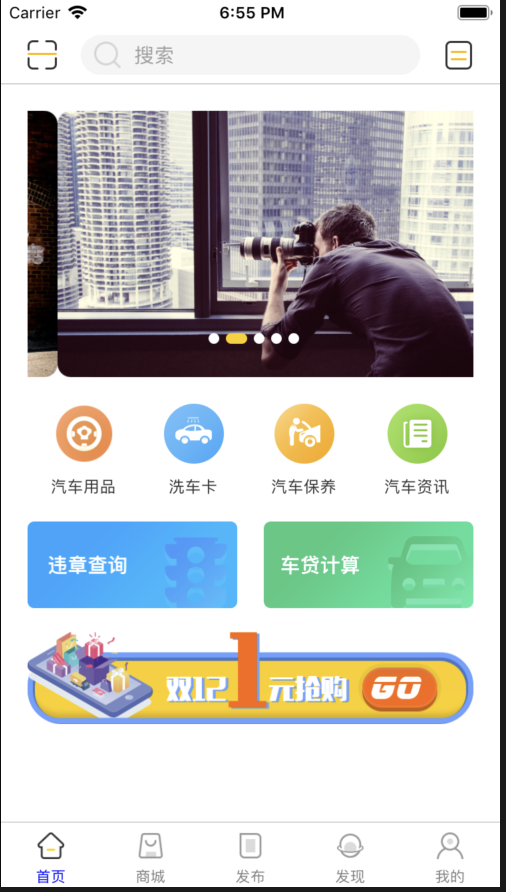
5、案例代码:
import React from 'react';

import {

    ScrollView,

    View,

    Text,

    Image,

    StyleSheet,

} from 'react-native';

let Dimensions = require('Dimensions');

let {width} = Dimensions.get('window').width;

//第三方组件

import Swiper from 'react-native-swiper';

//自定义组件

import NavigatonSearch from './NANavigationSearch';

const ruleItemW = (width - 60) / 2;

export default class NAHomeScreen extends React.Component {

    static  navigationOptions = {

        title:'首页',

        headerLeft:(

            <Image source={{uri:'ic_scan'}} style={{width:22,height:22,marginLeft: 20}}/>

        ),

        headerRight:(

            <Image source={{uri:'ic_order'}} style={{width:22,height:22,marginRight: 20}}/>

        ),

        headerTitle:<NavigatonSearch />

    }

    render() {

        return (

            <ScrollView style={styles.containerStyle}>

                <Swiper

                    style={styles.swiperStyle}

                    // 这个很重要,解决白屏问题

                    removeClippedSubviews={false}

                    // 切换时间,单位秒

                    autoplayTimeout={3}

                    // 是否自动轮播

                    autoplay={true}

                    // 如果为true,滚动方向是横向的,如果为false,滚动方向是纵向的,

                    horizontal={true}

                    dot={<View style={[styles.dotStyle,styles.dotCommonStyle]}/>}

                    activeDot={<View style={[styles.activeDotStyle,styles.dotCommonStyle]} />}

                >

                    <Image source={{uri:'image1'}} style={styles.bannerStyle}/>

                    <Image source={{uri:'image2'}} style={styles.bannerStyle} />

                    <Image source={{uri:'image3'}} style={styles.bannerStyle} />

                    <Image source={{uri:'image4'}} style={styles.bannerStyle} />

                    <Image source={{uri:'image5'}} style={styles.bannerStyle} />

                </Swiper>

                {/*汽车服务分类*/}

                <View style={styles.carServiceStyle}>

                    {this.renderAllService()}

                </View>

                {/*违章查询和车贷计算*/}

                <View style={styles.rulesView}>

                    <Image source={{uri:"bt_violation"}} style={styles.rulesItemStyle}/>

                    <Image source={{uri:"pic_home_chedai"}} style={styles.rulesItemStyle}/>

                </View>

                {/*抢购广告*/}

                <View>

                    <Image source={{uri:"banner_sale"}} style={styles.hotAdStyle}/>

                </View>

            </ScrollView>

        );

    }

    renderAllService(){

        var itemArr = [];

        let titleArr = ["汽车用品","洗车卡","汽车保养","汽车资讯"];

        let iconArr = ["ic_articles","ic_card","ic_maintain","ic_home_news"];

        for (var i = 0; i < titleArr.length ; i++) {

            itemArr.push(

                <View style={styles.serviceItemStyle}>

                    <Image source={{uri:iconArr[i]}} style={styles.serviceItemImage}/>

                    <Text style={styles.serviceItemText}>{titleArr[i]}</Text>

                </View>

            )

        }

        return itemArr;

    }

}

const styles = StyleSheet.create({

    containerStyle:{

        padding: 20,

    },

    swiperStyle:{

        height:200,

    },

    bannerStyle:{

        height:200,

        borderRadius: 10,

    },

    dotStyle:{

        width:8,

        backgroundColor:'white',

    },

    activeDotStyle:{

        width:16,

        backgroundColor: '#fdd000',

    },

    dotCommonStyle:{

        borderRadius: 8,

        marginLeft:5,

        height:8,

    },

    carServiceStyle:{

        flexDirection: 'row',

        justifyContent: 'space-around',

        marginTop: 20,

    },

    serviceItemStyle:{

        alignItems: 'center'

    },

    serviceItemImage:{

        width:45,

        height:45,

    },

    serviceItemText:{

        marginTop: 11,

        fontSize:12,

        color:'rgba(51,51,51,1.0)',

    },

    rulesView:{

        flexDirection: 'row',

        justifyContent:'space-between',

        marginTop:20,

    },

    rulesItemStyle:{

        width:ruleItemW,

        height:65,

        borderRadius:5,

    },

    hotAdStyle:{

        flex:1,

        marginTop:18,

        height:69,

    }

})
6、效果图展示:
【React Natvie】React-native-swiper的安装和配置【ES6】的更多相关文章
- React Native 开发环境安装和配置使用报错: -bash: react-native: command not found
[React Native 开发环境安装和配置:-bash: react-native: command not found 报错: 前提是安装homebrew,node.js ,npm ,watc ...
- React Native for Android on Windows 配置开发安装总结
配置开发安装总结(由于当前react-native更新较快,目前是针对2015年11月底时的reacti-native android for windows版本,有些内容可能过时) 官方的安装指导在 ...
- React 与 React Native 底层共识:React 是什么
此系列文章将整合我的 React 视频教程与 React Native 书籍中的精华部分,给大家介绍 React 与 React Native 结合学习的方法,此小节主要介绍 React 的底层原理与 ...
- 用react-service做状态管理,适用于react、react native
转载自:https://blog.csdn.net/wo_shi_ma_nong/article/details/100713151 . react-service是一个非常简单的用来在react.r ...
- 小谈React、React Native、React Web
React有三个东西,React JS 前端Web框架,React Native 移动终端Hybrid框架,React Web是一个源码转换工具(React Native 转 Web,并之所以特别提出 ...
- React的React Native
React的React Native React无疑是今年最火的前端框架,github上的star直逼30,000,基于React的React Native的star也直逼20,000.有了React ...
- React文档翻译系列(一)安装
原文地址:原文 本系列是针对React文档进行的翻译,因为自己在学习react的时候,最开始通过看博客或者论坛等中文资料,有些内容是零零散散的接收,并没有给自己带来很好的效果,所以后来决定把文档的原文 ...
- React Navigation & React Native & React Native Navigation
React Navigation & React Native & React Native Navigation React Navigation https://facebook. ...
- 一次掌握 React 与 React Native 两个框架
此系列文章将整合我的 React 视频教程与 React Native 书籍中的精华部分,给大家介绍 React 与 React Native 结合学习的方法. 1. 软件开发语言与框架的学习本质 我 ...
随机推荐
- (转)Bootstrap 之 Metronic 模板的学习之路 - (2)源码分析之 head 部分
https://segmentfault.com/a/1190000006684122 下面,我们找个目录里面想对较小的文件来分析一下源码结构,我们可以看到,page_general_help.htm ...
- es7 class的写法
再看vue-router源码的时候(代码链接)看到这样的代码片段: export default class VueRouter { app: any; apps: Array<any>; ...
- Spring+SprinMVC配置学习总结
一千个人有一千种spring的配置方式,真是这样.看了好多的配置,试验了很多.这里做一个总结. 1 原理上,spring和springmvc可以合并为一个配置文件然后在web.xml中加载,因为最终的 ...
- python tips:类的专有属性
实例通常能够调用类的属性,但是有些属性是类专有的,实例无法调用. 实例调用方法时查找属性时,首先在自己的__dict__中找,找不到去类中找,在类中能够找到的属性都位于dir(cls)中,如果类的某些 ...
- 慕课网页面app的滑动
#coding=utf-8from appium import webdriver def get_driver(): desc={ "platformName":"An ...
- 【剑指Offer】8、跳台阶
题目描述: 一只青蛙一次可以跳上1级台阶,也可以跳上2级.求该青蛙跳上一个n级的台阶总共有多少种跳法(先后次序不同算不同的结果). 解题思路: 首先考虑最简单的情况,如果只有1级台阶, ...
- PKU 1019 Number Sequence(模拟,思维)
题目 以下思路参考自discuss:http://poj.org/showmessage?message_id=176353 /*我的思路: 1.将长串数分成一个个部分,每个部分是从1到x的无重复的数 ...
- Linux思维导图之文件压缩
- svg文件报错
错误:The content of element type "font-face" is incomplete, it must match "((font-face- ...
- Codeforces 902D/901B - GCD of Polynomials
传送门:http://codeforces.com/contest/902/problem/D 本题是一个数学问题——多项式整除. 对于两个整数a.b,求最大公约数gcd(a,b)的辗转相除法的函数如 ...