
Winform 中tabcontrol 美化
需要对tabcontrol按照美工出的图进行美化
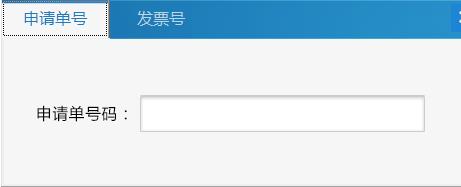
对tabpage页进行标题设置,首先对整个tabcontrol的DrawMode设置为OwnerDrawFixed,由于需要对标题宽度有要求,设置sizemode为fixed,可以对itemsize调整,设置标题的宽和高,然后进行写事件就能实现
 private void tb_DrawItem(object sender, DrawItemEventArgs e)

        {

            StringFormat sf = new StringFormat();

            #region 头背景

            sf.LineAlignment = StringAlignment.Center;

            sf.Alignment = StringAlignment.Center;

            Rectangle rec = tb.ClientRectangle;

            //获取背景图片,我的背景图片在项目资源文件中。

            Image backImage = Properties.Resources.pop_tab1_2;

            e.Graphics.DrawImage(backImage, , , tb.Width, tb.ItemSize.Height + );

            #endregion

            #region  设置选择的标签的背景

            if (e.Index == tb.SelectedIndex)

                e.Graphics.DrawImage(Properties.Resources.pop_tab1_1, e.Bounds.X, e.Bounds.Y, e.Bounds.Width, e.Bounds.Height);

            else

                e.Graphics.DrawImage(Properties.Resources.pop_tab1_2, e.Bounds.X, e.Bounds.Y, e.Bounds.Width, e.Bounds.Height);

            e.Graphics.DrawString(((TabControl)sender).TabPages[e.Index].Text,

            System.Windows.Forms.SystemInformation.MenuFont, new SolidBrush(Color.Black), e.Bounds, sf);

            #endregion

            #region 重写标签名

            ColorConverter colorConverter = new ColorConverter();

            Color cwhite = (Color)colorConverter.ConvertFromString("#2178ba");

            SolidBrush white = new SolidBrush(cwhite);

            Rectangle rect0 = tb.GetTabRect();

            StringFormat stringFormat = new StringFormat();

            stringFormat.Alignment = StringAlignment.Center;

            stringFormat.LineAlignment = StringAlignment.Center;
e.Graphics.DrawString("申请单号", new Font("微软雅黑", 12), white, rect0, stringFormat);
           #endregion

        }
Winform 中tabcontrol 美化的更多相关文章
- C# winform 中 TabControl 动态显示 TabPage
在winform应用中,tabcontrol是一个很好的控件,可以根据需求提供多个选项卡(TabPages),但是有一个问题是当某个项目需要多个选项卡,但是不同的功能要求显示不同的选项卡,其他的非该功 ...
- c# winform中TabControl中给每个选项卡添加不同的图标(图片)
在一个TabControl控件中,有几个选项卡,现在在每个选项卡上显示不同的图标. 1:你要现在form窗体中通过工具箱加入一个imagelist,名字为imagelist1,如下图: 2:然后在里面 ...
- WinForm中TabControl的使用
TabControl和TabPage之间有一个默认颜色的边框,很难去除,需要重写TabControl控件重绘区域 public class FullTabControl : TabControl { ...
- winform中tabControl的标题隐藏
方法一: Apperarance 属性:Faltbuttons SizeMode属性:Fixed 各个TabPage的Text :空 ItemSize : Width=0;Height=1; //He ...
- Winform 自定义TabControl实现浏览器标签
作者:Gavin(daisong.michelangelo@gmail.com) 时间: Nov, 2015 封面图片为Gavin原创,请勿未经允许私自引 最近因为工作需要,要做一个桌面浏览器,和大多 ...
- C# Winform中窗体的美化—— 用IrisSkin轻松实现换肤功能
今天经前辈提醒才知道winform窗体还有美化工具,呵呵,不得不说,孤陋寡闻了.下面总结一下irisskin2的使用步骤和遇到的问题及解决办法. 1.网址:http://www.pc6.com/sof ...
- 控制WinForm中Tab键的跳转
一,需求 在Winform中,默认情况下,按下Tab键,光标会按照我们设定的TabIndex值从小到大进行跳转. 但如果用户要求按下Tab键跳转到特定的控件,这种要求还是很合理的,比如用户只想输入几个 ...
- 转载:WinForm中播放声音的三种方法
转载:WinForm中播放声音的三种方法 金刚 winForm 播放声音 本文是转载的文章.原文出处:http://blog.csdn.net/jijunwu/article/details/4753 ...
- C# Winform 中如何实现音乐播放和视频播放
C# Winform 中如何实现音乐播放和视频播放 namespace WindowsFormsApplication1 { public partial class Form2 : Form { ...
随机推荐
- Java缓存组件 EhCache 入门教程
1.技术背景: 系统缓存是位于应用程序与物理数据源之间,用于临时存放复制数据的内存区域,目的是为减少应用程序对物理数据源访问的次数,从而提高应用程序的运行性能.缓存设想内存是有限的,缓存的时效性也是有 ...
- Makefile的问题
注意包含路径的变量,可能会带有空格而使得运行失败 直接定义:DEBUG = false后面引用需要使用 $(DEBUG) 或者set DEBUG $(DEBUG)之后就可以直接引用了
- Mongodb总结3-稍微封装一下
上次发表的2,纯粹是Demo,演示API的用法. 今天,稍微封装了下,看得更清楚. 考虑到不容易做得很有通用性,所以封装的一般,换种场景需要直接修改代码,但是有一部分是可以复用的. 最近项目,很可能只 ...
- 00103_死锁、Lock接口、等待唤醒机制
1.死锁 (1)同步锁使用的弊端:当线程任务中出现了多个同步(多个锁)时,如果同步中嵌套了其他的同步.这时容易引发一种现象:程序出现无限等待,这种现象我们称为死锁.这种情况能避免就避免掉: synch ...
- session的生命周期是怎样的
session的生命周期是怎样的 一.总结 一句话总结:Tomcat中Session的默认失效时间为20分钟.如果我们敲代码的时候把它设置成1个月,那么这一个月的数据会代替默认20分钟的数据,使ses ...
- amazeui学习笔记--css(HTML元素4)--图片image
amazeui学习笔记--css(HTML元素4)--图片image 一.总结 1.响应式图片:随着页面宽度而变化 .am-img-responsive class. <img src=&quo ...
- Android AutoWrapTextView 解决中英文排版问题
1.概述 最近项目有新需求,UED给了个卡券密码的UI样式,如图: 我一看很简单啊,一个TextView解决问题,然后做好以后在模拟器里一看..... 纳尼,这个时候才想起来,TextView 中英文 ...
- 2013腾讯编程马拉松初赛第〇场(HDU 4503) 湫湫系列故事——植树节
http://acm.hdu.edu.cn/showproblem.php?pid=4503 题目: 已知湫湫的班里共有n个孩子,每个孩子有Bi个朋友(i从1到n),且朋友关系是相互的,如果a小朋友和 ...
- 【2017 ACM-ICPC 亚洲区(乌鲁木齐赛区)网络赛 G】Query on a string
[链接]h在这里写链接 [题意] 让你维护字符串的一段区间内T子串的个数. [题解] 因为t不大,所以. 暴力维护一下a[i]就好. a[i]表示的是S串从i位置开始,能和T串匹配几个字符. 用树状数 ...
- SQLcl
参考博客: https://wangfanggang.com/Oracle/sqlcl/ 执行show sqlformat可以看到当前格式化样式为:default 让我们修改下显示结果的样式:set ...