
Android CursorAdapter的使用详解
一、CursorAdapter介绍
CursorAdapter这个类是继承于BaseAdapter的它是一个虚类它为Cursor和ListView连接提供了桥梁
二、CursorAdapter详解
1.CursorAdapter的继承关系图
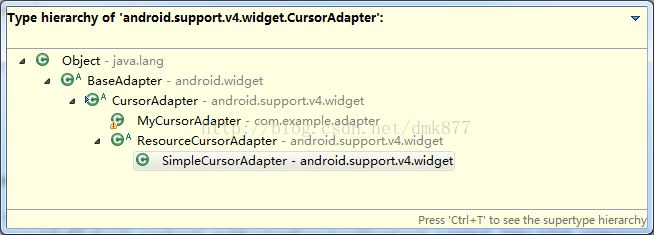
从图中可以看出CursorAdapter是继承于BaseAdapter的,它有一个直接的子类SimpleCursorAdapter
2.CursorAdapter的用法
我们首先看一下CursorAdapter的部分源码:
/**

     * @see android.widget.ListAdapter#getCount()

     */

    public int getCount() {

        if (mDataValid && mCursor != null) {

            return mCursor.getCount();

        } else {

            return ;

        }

    }

    /**

     * @see android.widget.ListAdapter#getItem(int)

     */

    public Object getItem( int position) {

        if (mDataValid && mCursor != null) {

            mCursor.moveToPosition(position);

            return mCursor;

        } else {

            return null;

        }

    }

    /**

     * @see android.widget.ListAdapter#getItemId(int)

     */

    public long getItemId( int position) {

        if (mDataValid && mCursor != null) {

            if ( mCursor.moveToPosition(position)) {

                return mCursor.getLong( mRowIDColumn);

            } else {

                return ;

            }

        } else {

            return ;

        }

    }

    /**

     * @see android.widget.ListAdapter# getView(int, View, ViewGroup)

     */

    public View getView( int position, View convertView, ViewGroup parent) {

        if (!mDataValid) {

            throw new IllegalStateException( "this should only be called when the cursor is valid");

        }

        if (!mCursor.moveToPosition(position)) {

            throw new IllegalStateException( "couldn't move cursor to position " + position);

        }

        View v;

        if (convertView == null) {

            v = newView( mContext, mCursor, parent);

        } else {

            v = convertView;

        }

        bindView(v, mContext, mCursor);

        return v;

    }

  从源码中可以看出CursorAdapter是继承了BaseAdapter后覆盖它的getView方法在getView方法中调用了newView和bindView方法,我们在写CursorAdapter时必须实现它的两个方法

 /**

     * Makes a new view to hold the data pointed to by cursor.

     * @param context Interface to application's global information

     * @param cursor The cursor from which to get the data. The cursor is already

     * moved to the correct position.

     * @param parent The parent to which the new view is attached to

     * @return the newly created view.

     */

    public abstract View newView (Context context, Cursor cursor, ViewGroup parent);

       /**

     * Bind an existing view to the data pointed to by cursor

     * @param view Existing view, returned earlier by newView

     * @param context Interface to application's global information

     * @param cursor The cursor from which to get the data. The cursor is already

     * moved to the correct position.

     */

    public abstract void bindView(View view, Context context, Cursor cursor);
/**

     * Change the underlying cursor to a new cursor. If there is an existing cursor it will be

     * closed.

     *

     * @param cursor The new cursor to be used

     */

    public void changeCursor (Cursor cursor) {

        Cursor old = swapCursor(cursor);

        if (old != null) {

            old.close();

        }

    }

 swapCursor(cusor)的源码如下:

/**

     * Swap in a new Cursor, returning the old Cursor.  Unlike

     * {@link #changeCursor(Cursor)}, the returned old Cursor is <em>not</em>

     * closed.

     *

     * @param newCursor The new cursor to be used.

     * @return Returns the previously set Cursor, or null if there wasa not one.

     * If the given new Cursor is the same instance is the previously set

     * Cursor, null is also returned.

     */

    public Cursor swapCursor (Cursor newCursor) {

        if (newCursor == mCursor) {

            return null;

        }

        Cursor oldCursor = mCursor;

        if (oldCursor != null) {

            if ( mChangeObserver != null) oldCursor.unregisterContentObserver(mChangeObserver );

            if ( mDataSetObserver != null) oldCursor.unregisterDataSetObserver(mDataSetObserver );

        }

        mCursor = newCursor;

        if (newCursor != null) {

            if ( mChangeObserver != null) newCursor.registerContentObserver(mChangeObserver );

            if ( mDataSetObserver != null) newCursor.registerDataSetObserver(mDataSetObserver );

            mRowIDColumn = newCursor.getColumnIndexOrThrow("_id" );

            mDataValid = true;

            // notify the observers about the new cursor

            notifyDataSetChanged();

        } else {

            mRowIDColumn = -;

            mDataValid = false;

            // notify the observers about the lack of a data set

            notifyDataSetInvalidated();

        }

        return oldCursor;

    }
之前我一直对cursor是怎么移动的疑惑,比方说cursor中有40条数据,那么它是怎样一行一行移动cursor把这40条数据显示出来的,看过源码后发现其实很简单,

在EditText中输入姓名和电话,点击保存后会显示在下面的listView中
@Override

     public View newView(Context context, Cursor cursor, ViewGroup parent) {

           ViewHolder viewHolder= new ViewHolder();

           LayoutInflater inflater=(LayoutInflater)context.getSystemService(Context.LAYOUT_INFLATER_SERVICE );

           View view=inflater.inflate(R.layout.item_contacts ,parent,false);

           viewHolder. tv_name=(TextView) view.findViewById(R.id.tv_showusername );

           viewHolder. tv_phonenumber=(TextView) view.findViewById(R.id.tv_showusernumber );

           view.setTag(viewHolder);

           Log. i("cursor" ,"newView=" +view);

            return view;

     }

     @Override

     public void bindView(View view, Context context, Cursor cursor) {

           Log. i("cursor" ,"bindView=" +view);

           ViewHolder viewHolder=(ViewHolder) view.getTag();

       //从数据库中查询姓名字段

           String name=cursor.getString(cursor.getColumnIndex(PersonInfo.NAME));

       //从数据库中查询电话字段

           String phoneNumber=cursor.getString(cursor.getColumnIndex(PersonInfo.PHONENUMBER));

           viewHolder. tv_name.setText(name);

           viewHolder. tv_phonenumber.setText(phoneNumber);

     }
(2)点击保存按钮执行的方法
private void setClickListener() {

            btn_save.setOnClickListener( new OnClickListener() {

                 public void onClick(View v) {

                      userName=et_name.getText().toString();

                    userPhoneNumber=et_phonenumber .getText().toString();

                    if( userName.equals( "")){

                     Toast. makeText(MainActivity.this, "用户名不能为空!",).show();

                      return;

                    }

                    if( userPhoneNumber.equals( "")){

                     Toast. makeText(MainActivity.this,"电话不能为空", ).show();

                      return;

                    }

                    ContentValues contentValues= new ContentValues();

                    contentValues.put(PersonInfo. NAME, userName);

                    contentValues.put(PersonInfo.PHONENUMBER ,userPhoneNumber );

                    //把EditText中的文本插入数据库

                    dataBase.insert(PersonInfo. PERSON_INFO_TABLE, null,contentValues);

                    //根据 _id 降序插叙数据库保证最后插入的在最上面

                    Cursor myCursor          = dataBase.query(PersonInfo. PERSON_INFO_TABLE, null, null, null, null, null, orderBy);

                    //Cursor改变调用chanageCursor()方法

                    myCursorAdapter.changeCursor(myCursor);

                }

           });

     }
Android CursorAdapter的使用详解的更多相关文章
- 《Android NFC 开发实战详解 》简介+源码+样章+勘误ING
<Android NFC 开发实战详解>简介+源码+样章+勘误ING SkySeraph Mar. 14th 2014 Email:skyseraph00@163.com 更多精彩请直接 ...
- Android开发之InstanceState详解
Android开发之InstanceState详解 本文介绍Android中关于Activity的两个神秘方法:onSaveInstanceState() 和 onRestoreInstanceS ...
- ANDROID L——Material Design详解(UI控件)
转载请注明本文出自大苞米的博客(http://blog.csdn.net/a396901990),谢谢支持! Android L: Google已经确认Android L就是Android Lolli ...
- android bundle存放数据详解
转载自:android bundle存放数据详解 正如大家所知道,Activity之间传递数据,是将数据存放在Intent或者Bundle中 例如: 将数据存放倒Intent中传递: 将数据放到Bun ...
- Cordova 打包 Android release app 过程详解
Cordova 打包 Android release app 过程详解 时间 -- :: SegmentFault 原文 https://segmentfault.com/a/119000000517 ...
- Android中Service(服务)详解
http://blog.csdn.net/ryantang03/article/details/7770939 Android中Service(服务)详解 标签: serviceandroidappl ...
- 给 Android 开发者的 RxJava 详解
我从去年开始使用 RxJava ,到现在一年多了.今年加入了 Flipboard 后,看到 Flipboard 的 Android 项目也在使用 RxJava ,并且使用的场景越来越多 .而最近这几个 ...
- Android中mesure过程详解
我们在编写layout的xml文件时会碰到layout_width和layout_height两个属性,对于这两个属性我们有三种选择:赋值成具体的数值,match_parent或者wrap_conte ...
- Android中Intent组件详解
Intent是不同组件之间相互通讯的纽带,封装了不同组件之间通讯的条件.Intent本身是定义为一个类别(Class),一个Intent对象表达一个目的(Goal)或期望(Expectation),叙 ...
随机推荐
- Linux桌面新彩虹-Fedora 14 炫酷应用新体验
Linux桌面新彩虹 --Fedora 14 炫酷应用新体验 650) this.width=650;" hspace="12" align="left&quo ...
- react+react-router+mobx+element打造管理后台系统---react-amdin-element
react-admin-element,一款基于react的后台管理系统. 那么我们和其他的后台管理系统有什么区别呢? demo地址:点我进入demo演示 github地址:点我进入github 1. ...
- ThinkPHP5.0---静态方法
ThinkPHP5大量的使用了这种可以直接使用::调用的方法,它们有一个很响亮的名字:静态方法.静态方法的引用,大幅提升了程序的运行效率,降低了资源的占用. 静态方法(ASK$ANSWER) 为什么要 ...
- java和javascript日期校验和闰年问题分析和解决方式
1.闰年的介绍 地球绕太阳执行周期为365天5小时48分46秒(合365.24219天)即一回归年.公历的平年仅仅有365日,比回归年短约0.2422 日,所余下的时间约为四年累计一天.故四年于2月加 ...
- Android时间戳与字符串相互转换
import java.text.ParseException; import java.text.SimpleDateFormat; import java.util.Date; public cl ...
- JS contcat() 连接数组 函数
语法: arrayObject.concat(arrayX,arrayX,......,arrayX) 1.把元素添加到数组中 arr.concat(a,b,c);2.把数组连起来 arr.conca ...
- (错误记录)Vue: Unknown custom element
错误: vue.js:634 [Vue warn]: Unknown custom element: <ve-pie> - did you register the component c ...
- fatfs输出目录
利用fatfs文件系统, 如何输出SD卡根目录下的各个文件夹名字呢? 程序如下: u8 Dirname_i; u8 Dirname_j; DIR dir; //读取txt里的目录用,还是要把fatfs ...
- linux 查询制定目录的制定内容
//.点为查找当前目录 下 的 所有 *.php 文件里 有 hello 的文件 find . -name "*.php" | xargs grep "hello&quo ...
- 《ECMAScript6入门》笔记——Generator函数
今天在看<ECMAScript6入门>的第17章——Generator函数的语法.理解起来还是有点费劲,几段代码看了很多遍.总算有点点理解了. 示例代码如下:(摘自阮一峰<ECMAS ...