
迷人的bug--torch.load
利用Google Colab跑了50代的EDSR超分神经网络,然后把网络模型下载到win10上做测试,结果,一直出错,卡了好久

结果百度到这一文章:Pytorch load深度模型时报错:RuntimeError: cuda runtime error (10) : invalid device ordinal
引起这种报错的原因是因为pytorch在save模型的时候会把显卡的信息也保存,当重新load的时候,发现不是同一一块显卡就报错invalid device ordinal
知道之后,我赶紧跑的colab上做测试,结果又报错
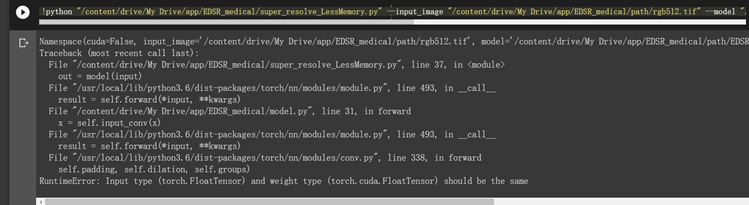
训练默认使用了GPU,而我测试任然使用的是CPU的,所以出现以上错误
下面是可以使用的GPU下的测试:
from __future__ import print_function

import argparse

import torch

import torch.backends.cudnn as cudnn

from PIL import Image

from torchvision.transforms import ToTensor

import numpy as np

# ===========================================================

# Argument settings

# ===========================================================

parser = argparse.ArgumentParser(description='PyTorch Super Res Example')

parser.add_argument('--input', type=str, required=False, default='/content/drive/My Drive/app/EDSR_medical/path/rgb512.tif', help='input image to use')

parser.add_argument('--model', type=str, default='/content/drive/My Drive/app/EDSR_medical/path/EDSR_model_50.pth', help='model file to use')

parser.add_argument('--output_filename', type=str, default='/content/drive/My Drive/app/EDSR_medical/path/out_EDSR_50.tif', help='where to save the output image')

args = parser.parse_args()

print(args)

# ===========================================================

# input image setting

# ===========================================================

GPU_IN_USE = torch.cuda.is_available()

img = Image.open(args.input)

red_c, green_c, blue_c = img.split()

red_c.save('/content/drive/My Drive/app/EDSR_medical/path/red_c.tif')

green_c.save('/content/drive/My Drive/app/EDSR_medical/path/green_c.tif')

all_black = Image.open('/content/drive/My Drive/app/EDSR_medical/path/all_black_1024.tif')

# ===========================================================

# model import & setting

# ===========================================================

device = torch.device('cuda' if GPU_IN_USE else 'cpu')

model = torch.load(args.model)#, map_location=lambda storage, loc: storage

model = model.to(device)

data = (ToTensor()(red_c)).view(, -, y.size[], y.size[])

data = data.to(device)

if GPU_IN_USE:

    cudnn.benchmark = True

# ===========================================================

# output and save image

# ===========================================================

out = model(data)

out = out.cpu()

out_img_r = out.data[].numpy()

out_img_r *= 255.0

out_img_r = out_img_r.clip(, )

out_img_r = Image.fromarray(np.uint8(out_img_r[]), mode='L')

out_img_r.save('/content/drive/My Drive/app/EDSR_medical/path/test_r_1024_edsr_50.tif')

out_img_g = all_black

out_img_b = all_black

out_img = Image.merge('RGB', [out_img_r, out_img_g, out_img_b]).convert('RGB')

#out_img = out_img_r

out_img.save(args.output_filename)

print('output image saved to ', args.output_filename)
迷人的bug--torch.load的更多相关文章
- 解决Torch.load()错误信息: UnicodeDecodeError: 'ascii' codec can't decode byte 0x8d in position 0: ordinal not in range(128)
使用PyTorch跑pretrained预训练模型的时候,发现在加载数据的时候会报错,具体错误信息如下: File "main.py", line 238, in main_wor ...
- pytorch------cpu与gpu load时相互转化 torch.load(map_location=)
将gpu改为cpu时,遇到一个报错: RuntimeError: Attempting to deserialize object on a CUDA device but torch.cuda.is ...
- golang bug Unknown load command 0x32 (50)
问题 编译文件时报错: /usr/local/go/pkg/tool/darwin_amd64/link: /usr/local/go/pkg/tool/darwin_amd64/link: comb ...
- Pytorch中torch.load()中出现AttributeError: Can't get attribute
原因:保存下来的模型和参数不能在没有类定义时直接使用. Pytorch使用Pickle来处理保存/加载模型,这个问题实际上是Pickle的问题,而不是Pytorch. 解决方法也非常简单,只需显式地导 ...
- 实践torch.fx第一篇——基于Pytorch的模型优化量化神器
第一篇--什么是torch.fx 今天聊一下比较重要的torch.fx,也趁着这次机会把之前的torch.fx笔记整理下,笔记大概拆成三份,分别对应三篇: 什么是torch.fx 基于torch.fx ...
- 深度学习框架 Torch 7 问题笔记
深度学习框架 Torch 7 问题笔记 1. 尝试第一个 CNN 的 torch版本, 代码如下: -- We now have 5 steps left to do in training our ...
- PyTorch官方中文文档:torch
torch 包 torch 包含了多维张量的数据结构以及基于其上的多种数学操作.另外,它也提供了多种工具,其中一些可以更有效地对张量和任意类型进行序列化. 它有CUDA 的对应实现,可以在NVIDIA ...
- Deep Learning with Torch
原文地址:https://github.com/soumith/cvpr2015/blob/master/Deep%20Learning%20with%20Torch.ipynb Deep Learn ...
- 学习笔记CB012: LSTM 简单实现、完整实现、torch、小说训练word2vec lstm机器人
真正掌握一种算法,最实际的方法,完全手写出来. LSTM(Long Short Tem Memory)特殊递归神经网络,神经元保存历史记忆,解决自然语言处理统计方法只能考虑最近n个词语而忽略更久前词语 ...
随机推荐
- 管理.MD
```` 对于水平低点的我一般是:讲解任务 -> 他复述任务 ->提出解决思路 -> 他复述思路 -> 认他思考一段时间,他提出他的意见和想法 -> 我再确定 -> ...
- 使用@ResponseBody输出JSON
添加jackson依赖 添加@ResponseBody 测试: 原理: 当一个处理请求的方法标记为@ResponseBody时,就说明该方法需要输出其他视图(json.xml),SpringMVC通过 ...
- O009、KVM 网络虚拟化基础
参考https://www.cnblogs.com/CloudMan6/p/5289590.html 网络虚拟化是虚拟化技术中最复杂的部分,学习难度最大. 但因为网络是虚拟化中非常重要的资源, ...
- ubuntu修改apt源
1.修改之前首先做好备份 sudo cp /etc/apt/sources.list /etc/apt/sources.list.bak 2.编辑源列表文件 sudo vim /etc/apt/sou ...
- cefsharp webBrowser Javascript 打开winForm界面
在Cef webBrowser中,如果要调用 Javascript打开 一个 winForm界面,则需要使用 ShowDialog(),而不能使用 Show(),否则界面上的鼠标会转个不停
- LLVM 安装教程(包安装)
LLVM 安装教程 环境:ubuntu16.04 llvm-4.0 clang-4.0 步骤: 1.依赖库安装 $ sudo apt-get install build-essential curl ...
- Js实现图片点击切换与轮播
Js实现图片点击切换与轮播 图片点击切换 <!DOCTYPE html> <html> <head> <meta charset="UTF-8&qu ...
- RouterOS Firewall v6 流程图
1. Firewall v5和Firewall v6对比图 2.Firewall v6的流程图
- linux下ifconfig只剩下lo的解决方法
运行以下命令,删除旧的网络配置,重新让networkmanager自动配置即可 sudo service network-manager stop sudo rm /var/lib/NetworkMa ...
- 韦东山嵌入式Linux学习笔记03--如何搭建软件环境
1. 从网上下一个虚拟机,比如vmvare station 2.下一个ubuntu镜像回来安装, 我下了14.04来安装.参考链接: https://blog.csdn.net/qq1326702 ...